

Forum Replies Created
-
AuthorPosts
-
Geoff B.
MemberGood morning again Gene,
Issues with displaying the map usually stem from either Google API key being needed: https://theeventscalendar.com/knowledgebase/setting-up-your-google-maps-api-key/
It can also happen when there is some type of Javascript based error on your site (usually coming from some type of conflict).
The next step would be to go through our testing for conflicts procedure (preferably in a staging/dev environment or local install of your WordPress website) and let us know what you find out.
Basically the goal here is to revert back to a bare WordPress installation to see if the problem persists. It also allows us to pinpoint what the cause of the issue is.
But, before you do that, there are 2 things I would advise:
- Make a backup of your database
- Consider activating a “Maintenance Page” plugin if you are doing this on your live site (to minimize impact on your visitors)
Best regards,
Geoff B.
MemberGood morning Gene,
I am stepping in for my colleague George who is out of the office today.
The good news is you are fully entitled to a refund if you want one since you are within 30 days of your purchase. To obtain the refund, you just need to follow the procedure described here.
You will not lose the ability to display the single event maps, but you are right. The map view will no longer be available.
Best regards,
Geoff B.
MemberHey Raffaello,
I’m super stoked that this worked out for you!
You are welcome back on our support forums any time 🙂
For now, I am going to close this thread.
Have a great weekend!
Geoff B.
MemberGood morning Hélène,
Awesome. I’m super stoked that this worked for you.
You are welcome back on our support forums any time 🙂
For now, I am going to close this thread.
Have a great weekend!
Geoff B.
MemberGood evening Greg,
Thank you for bringing this to our attention.
I will report and discuss this with the Dev and product director to see what is the best way to handle this.To answer your second question, we released 4.3 today (after a few delays to ensure proper QA), since you are already at 4.3rc6 , I am pretty sure that will result in you not seeing the available updates.
As such, you will probably need to manually (FTP) delete the content of the plugin folders and replace them with the actual real release.
More news tomorrow!
Have a great day!
Geoff B.
MemberThis reply is private.
MemberGood evening Sheila,
Thank you for writing back.
Full disclosure, I have not used the iMember360 plugin, so I am not fully familiar with it’s workflow.
To answer your question, we actually are not directly using get_post in our plugins.
You will however find the code you are looking for in the content.php file of each view.For example, for the list view: /wp-content/plugins/the-events-calendar/src/views/list/content.php
This calls the loop.php file in the same folder which uses while ( have_posts() )
Let me know if that helps.
Have a great day!
Geoff B.
October 13, 2016 at 9:06 pm in reply to: Responsive Breakpoint – Hitting a max issue displaying tribe-mobile-container #1176385MemberGood evening Natasha,
Wow! This is an awesome find!
I will ask if an override is possible to our Dev staff and get back to you with my findings.
Thank you for sharing!
Best regards,
Geoff B.
MemberGood evening Francescka and welcome to the Events Calendar Support forum!
Thank you for reaching out to us.
We are sorry to hear about the Eventbrite Ticket not displaying properly in IE 10 and IE 11. Yikes!
I would love to help you with this topic.Short term, since this seems to be related to the upgrade, I would recommend downgrading the Eventbrite tickets plugin: https://theeventscalendar.com/knowledgebase/downgrading-plugin-past-version/
I realize this is less than ideal, but it should buy us some time.
With that in mind, I tried to reproduce this on my end. I can see the issue on your site, but I am unable to yield the same results on my vanilla installation with a default WordPress theme.
On your site, running the IE debug console I did receive the following error “Object doesn’t support property or method ‘replaceState'” which seems to break the process.
I am thinking that there is possibly a conflict between our plugin and something on your site (plugin or theme).
Ideally, before downgrading, the next step would be to go through our testing for conflicts procedure (preferably in a staging/dev environment or local install of your WordPress website) and let us know what you find out.
Basically the goal here is to revert back to a bare WordPress installation to see if the problem persists. It also allows us to pinpoint what the cause of the issue is.
But, before you do that, there are 2 things I would advise:
- Make a backup of your database
- Consider activating a “Maintenance Page” plugin if you are doing this on your live site (to minimize impact on your visitors)
Let me know how that goes.
Best regards,
Geoff B.MemberGood evening Tom and welcome to the Events Calendar forum!
Thank you for your interest in our products.
We’ll be glad to answer your question.The short answer is yes, you can control things to your liking.
It will all come down to using the appropriate role for the right user.You can read a bit more on permissions here: https://theeventscalendar.com/knowledgebase/admin-roles-and-permissions/
Basically, you can set up the default status of your choice for new posts when using our Community Events premium add-on :
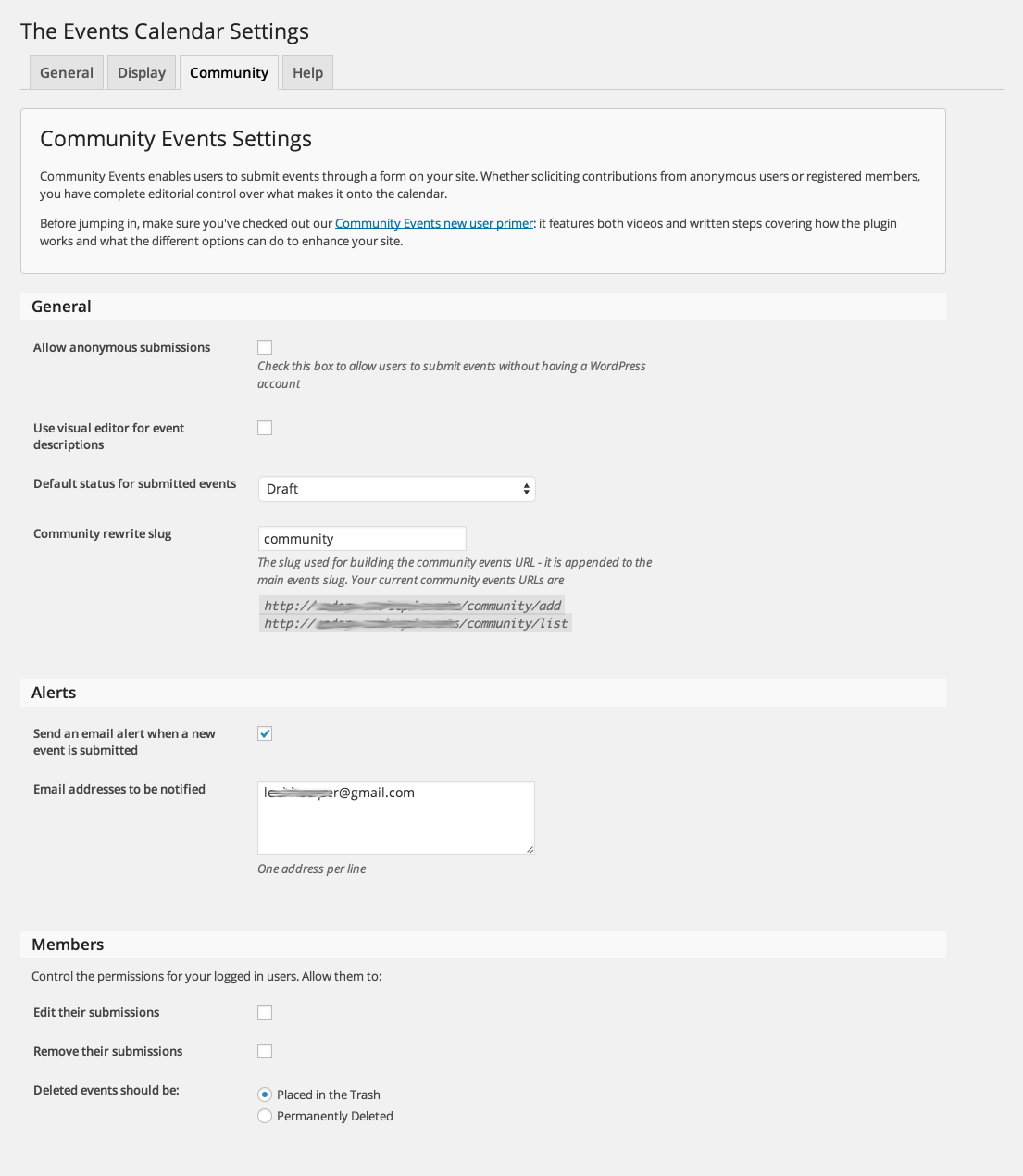
You can simply use a role similar to the built-in WordPress author role for trusted users.
Let me know if that helps.
Have a great day!
Geoff B.
October 13, 2016 at 8:22 pm in reply to: Tickets Disappear From Website a few hours before event begins #1176370MemberGood evening Doug and welcome to the Events Calendar Support forum!
Thank you for reaching out to us.
We are sorry to hear about the Eventbrite ticket disappearing on you. Yikes!
I would love to help you with this topic.Could you tell me if this happened before or after the update to version 4.3 of our plugin ?
Secondly, I will need to reproduce this on my end to be able to pinpoint what went wrong.
To achieve that, would you mind providing me with screenshots of:- The “Edit Event” screen for that event
- The Eventbrite Ticket details both in the Event page and on Eventbrite itself
I recommend using a private reply for these.
Hang in there as we figure this out.
Best regards,
Geoff B.
MemberGood evening Jacqueline and welcome to the Events Calendar Support forum!
Thank you for reaching out to us in spite of language challenges.
I would offer to continue the conversation in French, but I do not think that would help.I would love to help you with this topic.
I can see that your purchase of the 59$ the Events Calendar Pro upgrade to business was successful.
This means that you can now use the same license key you had before on 2 additional sites.
Let me know if that helps.
Have a great day!
Geoff B.
October 13, 2016 at 8:04 pm in reply to: Adding The Events Calendar Pro to a Spanish Website #1176368MemberGood evening Rob and welcome to the Events Calendar Support forum!
Thank you for reaching out to us.
I would love to help you with this topic.Normally, you should be able to display everything in Spanish, we just need to figure out why that’s not the case for you.
As a first troubleshooting step, could you please provide us with your complete system information from that site in a private reply using the instructions found in the following link?
https://theeventscalendar.com/knowledgebase/sharing-sys-info/
Secondly, could you tell me which version of Spanish you are using (from Spain? Chile ? Etc..)
Best regards,
Geoff B.
MemberGood evening Tom,
I am sorry to hear that.
This probably means that there is a conflict going on.As a first troubleshooting step, could you please provide us with your complete system information in a private reply using the instructions found in the following link?
https://theeventscalendar.com/knowledgebase/sharing-sys-info/
Secondly, could you please go through our testing for conflicts procedure (preferably in a staging/dev environment or local install of your WordPress website) and let us know what you find out.
Basically the goal here is to revert back to a bare WordPress installation to see if the problem persists. It also allows us to pinpoint what the cause of the issue is.
But, before you do that, there are 2 things I would advise:
- Make a backup of your database
- Consider activating a “Maintenance Page” plugin if you are doing this on your live site (to minimize impact on your visitors)
Let me know how that goes.
Best regards,
Geoff B.MemberGood evening Marjet and welcome back!
Thank you for reaching out to us.
I would love to help you with this topic.You are right, sometimes with themes that have their own pagination system (such as the Enfold theme), the pagination does not yield expected results.
You can get rid of this by either:
- Modifying the nav.php template using a template customization. You might want to read our Themer’s guide to get a sense of how that works.
- Use a simple CSS rule such as
#tribe-events-header .tribe-events-sub-nav .tribe-events-nav-previous {display:none}Let me know if that helps.
Have a great day!
Geoff B.
-
AuthorPosts