
Home › Forums › Calendar Products › Events Calendar PRO › I don't have a Feature Image button in Events
- This topic has 11 replies, 4 voices, and was last updated 9 years, 10 months ago by
Tom.
-
AuthorPosts
-
October 12, 2016 at 4:00 pm #1175664
Tom
ParticipantI don’t have a featured Image button anywhere on my Events screen.
I’m using Pro.October 12, 2016 at 8:31 pm #1175719Geoff B.
MemberGood evening Tom and welcome back!
Thank you for reaching out to us.
We are sorry to hear about the “featured image” option missing from your “Add event” screen.
I would love to help you with this topic.Can you tell me if the following works for you ?
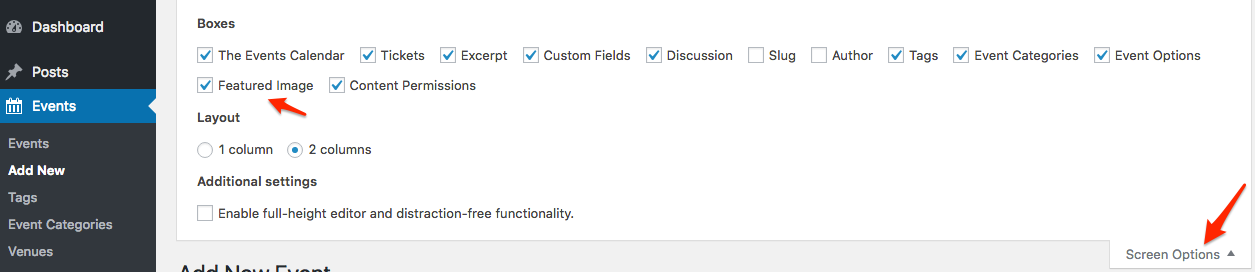
Let me know how that goes.
Best regards,
Geoff B.October 13, 2016 at 5:39 am #1175857ParticipantI do not have that button option to select
October 13, 2016 at 4:56 pm #1176337MemberGood evening Tom,
I am sorry to hear that.
This probably means that there is a conflict going on.As a first troubleshooting step, could you please provide us with your complete system information in a private reply using the instructions found in the following link?
https://theeventscalendar.com/knowledgebase/sharing-sys-info/
Secondly, could you please go through our testing for conflicts procedure (preferably in a staging/dev environment or local install of your WordPress website) and let us know what you find out.
Basically the goal here is to revert back to a bare WordPress installation to see if the problem persists. It also allows us to pinpoint what the cause of the issue is.
But, before you do that, there are 2 things I would advise:
- Make a backup of your database
- Consider activating a “Maintenance Page” plugin if you are doing this on your live site (to minimize impact on your visitors)
Let me know how that goes.
Best regards,
Geoff B.October 17, 2016 at 10:22 am #1177762Participanthi Geoff,
None of those step by step directions work. There is no support screen under lic.
I’m using 4.6.1October 18, 2016 at 11:57 am #1178581MemberGood afternoon Tom,
I am sorry that the testing for conflicts did not yield any results.
Did you also temporarily revert back to a default WordPress theme ?
As for the “Help” menu that enables you to share your system information, depending on which version of our plugin you are using, this can vary.
It can either be found under Events -> Settings -> Help or Events -> Help
That information will really help us help you out.
Hang in there!
Geoff B.
October 18, 2016 at 12:05 pm #1178583ParticipantFor a Paid plug in this is really the worst and time delayed support I have ever got.
For 89.00 I feel like there should be a bit more.I gave up since its been a week with very little help.
October 19, 2016 at 10:56 am #1179271MemberHey Tom,
Thank you for writing back.
I am sorry you feel this way about the support we provide.I absolutely understand that it can be frustrating to not be able to solve issues quickly.
Perhaps this will come as a surprise to you, but we actually have the same goal as you: solve each and every issue as fast as possible.
That being said, as you can read in the following post, our turnaround time between answers is typically 24 to 48 hours (except on weekends where we are closed).
In order to be able to take this one step closer towards resolution, we would absolutely need at least one of the following:
- Your latest system information
- To know if the featured image option is available if you temporarily revert back to a default WordPress theme (because there is a high chance this is a theme-based conflict)
Best regards,
Geoff B.
October 19, 2016 at 1:00 pm #1179400ParticipantI’m using 4.6.1 of WordPress
Windows 10
Google ChromeOctober 19, 2016 at 6:15 pm #1179590MemberGood evening Tom,
Thank you for writing back.
Unfortunately, in order to help you out further, we would need your complete system information.
Without it, I am unable to replicate the issue and thus unable to help you resolve it.
You can do this (using a private reply) by following the instructions found in the following linkhttps://theeventscalendar.com/knowledgebase/sharing-sys-info/
If not, could you please answer my previous question ?
Is the featured image option is available if you temporarily revert back to a default WordPress theme such as twenty-fifteen ?
I realize this is not the most fun test to run, but in my experience, issues like the one you are dealing with tend to come from the WordPress theme or a plugin conflict.
Thank your patience as we are continuing this collaborative effort to solve your issue.
Best regards,
Geoff B.
November 10, 2016 at 8:35 am #1190402Support Droid
KeymasterHey there! This thread has been pretty quiet for the last three weeks, so we’re going to go ahead and close it to avoid confusion with other topics. If you’re still looking for help with this, please do open a new thread, reference this one and we’d be more than happy to continue the conversation over there.
Thanks so much!
The Events Calendar Support Team -
AuthorPosts
- The topic ‘I don't have a Feature Image button in Events’ is closed to new replies.