

Forum Replies Created
-
AuthorPosts
-
Geoff B.
MemberHey James,
I’m super stoked that my colleague Josh’s solution worked out for you.
You are welcome back on our support forums any time 🙂
For now, I am going to close this thread.
Have a great week!
Geoff B.
MemberGood evening Jeremy and welcome to the Events Calendar Support forum!
Thank you for reaching out to us.
We are sorry to hear about the titles overlapping the thumbnails.
I would love to help you with this topic.This seems to be specific to your WordPress theme.
With that in mind, here are a few CSS rules that should help..tribe-events-list-widget ol li {
padding-left: 0px;
}.tribe-events-list-widget-events .tribe-events-event-image {
float: left;
display: inline-block;
max-width: 32%;
}.tribe-event-title, .tribe-event-duration { display: inline-block;
float: left;
width: 51%;
margin-left: 8%;
}Let me know if that helps.
Have a great day!
Geoff B.
MemberGood afternoon Jeremy and welcome to the Events Calendar Support forum!
Thank you for reaching out to us.
We are sorry to hear about your events not showing up as you would expect them.
I would love to help you with this topic.I just took a look at your website and I know what is going on.
The issue is with the single-event slug. This slug absolutely needs to be different than the calendar slug (see attached screenshot)You can find this under Events -> Settings -> General
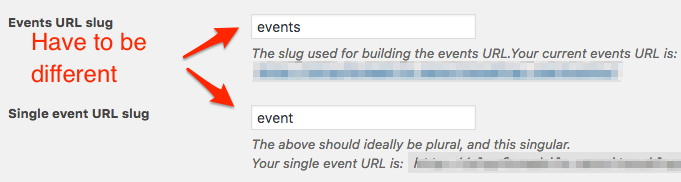
Let me know how that goes.
Best regards,
Geoff B.MemberGood afternoon Frances and welcome to the Events Calendar Support forum!
Thank you for reaching out to us and bringing this to our attention.
I would love to help you with this topic.I have looked up your account and you are 100% right, you do not need to renew your license before 2017.
We apologize for the inconvenience this might have caused. You can simply ignore this email.
Best regards,
Geoff B.
MemberGood afternoon Gabriel and welcome back!
Yes, as of today, we provide support for recurring events with WPML!
You are welcome to check out our KB articles about this:
- https://theeventscalendar.com/knowledgebase/setting-up-the-events-calendar-with-wpml/
- https://theeventscalendar.com/knowledgebase/creating-translations-for-events-using-wpml/
Let me know if that helps.
Have a great day!
Geoff B.
MemberGood afternoon Hélène and welcome back!
Thank you for reaching out to us.
I would love to help you with this topic.As a first troubleshooting step, could you please provide us with your complete system information in a private reply using the instructions found in the following link?
https://theeventscalendar.com/knowledgebase/sharing-sys-info/
With that in mind, I would recommend going to your WordPress backend Settings > General and perhaps taking a look at the hour format available on your installation.
If that does not work, there is a good chance that the time format is embedded in your WordPress theme.
Let me know how that goes.
Best regards,
Geoff B.MemberGood evening Paul and welcome to the Events Calendar Support forum!
Thank you for reaching out to us.
I would love to help you with this topic.As a first troubleshooting step, could you please provide us with your complete system information in a private reply using the instructions found in the following link?
https://theeventscalendar.com/knowledgebase/sharing-sys-info/
Secondly, to make sure we are indeed talking about the same thing, could you send me a screenshot of where you have the “allow user reactions” option ?
I just want to confirm if that is the “allow comments” option or a different one.
If it is indeed the “allow comments” option, you are right, that option is not available for front-end users. However, you can set it to default to “allow” under Settings > Discussion in the back-end of WordPress.
Let me know if that helps.
Have a great day!
Geoff B.
MemberGood afternoon Mikko and welcome back!
Thank you for reaching out to us.
We are sorry to hear about the challenges you have been facing while trying to translate our plugins. I would love to help you with this topic.
There are a couple of things that might be at play here.
Where these months’ names and weekdays are coming?
These usually come either from the WordPress language files (not our plugin’s) or your WordPress theme’s language files (Eventica in this case).
As it turns out, the good folks at Eventica have decided to use their own built-in translation domain for strings related to our plugin 🙁
You can see that in many files found under the theme’s /tribe-events/ folder. For example /wp-content/themes/eventica-wp/tribe-events/modules/meta/details.php around line 12
_e( 'Details', 'tokopress' )The translation domain ‘tokokpress’ should be ‘the-events-calendar’ if you want the po/mo files you are working on to kick-in.
To make a long story short, this has nothing to do with us, but this is rather a choice this theme developer made.
The workaround is to replace tokopress by ‘the-events-calendar’ not everywhere in the /tribe-events/ folder (as the term tokopress is also used in functions).
That also leads me to a second reason why some translations might not be kicking-in.
It is very possible that the po file for your language needs updating from the pot file.I can help with that if you want.
Finally, please know that all the latest language files live here: http://translations.theeventscalendar.com/projects you can also contribute there 🙂
Let me know if that helps.
Have a great day!
Geoff B.
MemberGood morning Raffaello,
At your request, I just changed the previous answer to “private”.
I do believe I know what is going on. When you switch to Italian, the “add” slug gets translated too (hence the 404). It is probably something like http://www.associazioneitalianialisbona.pt/eventi/community/aggiungi
You can find the exact URL if you go to Events -> Settings -> Community after changing language.
Let me know how that goes.
Best regards,
Geoff B.MemberGood morning Luca,
Awesome!
That being said, the Modern Tribe agency typically only tackles projects that are 35K and above.But, the good news is that you can hire one of our recommended customizers to do the customization for you..
Best of luck with that project.
Cheers,
Geoff B.MemberGood evening Sheila and welcome to the Events Calendar Support forum!o
Thank you for reaching out to us.
I would love to help you with this topic.The first thing I would recommend (if you have not done so already), would be to read the following post: https://theeventscalendar.com/knowledgebase/admin-roles-and-permissions/
Secondly, to achieve what you are trying to do, you will need to add conditionals to the views you are using on your website. Something like “IF member of that group THEN execute normal loop, ELSE, return message”.
You might want to read our Themer’s guide to get a sense of how that works.
Let me know if that helps.
Have a great day!
Geoff B.
October 13, 2016 at 7:12 am in reply to: Tickets Area – Ticket name, available tickets, ticket price, ticket overlapping #1175892MemberGood morning Victor,
I am glad those CSS rules helped out.
If you want to have the number of available tickets to go under the quantity button, you should try the following CSS
.tribe-tickets-remaining {

clear: both;

float: left;

display: block;

width: 100%;

}
Let me know how that goes.
Best regards,
Geoff B.MemberGood evening Christine,
That’s a great question. If you want to modify the list view for example, you will need to edit the file found under wp-content/themes/language-school/tribe-events/list/content.php to add the navigation.
Here’s a really quick version of that: content (you will need to edit and perhaps review the CSS)
The code come from /wp-content/plugins/the-events-calendar/src/views/list/nav.php
Of course you can do the same with any other view.
Let me know if that helps.
Have a great day!
Geoff B.
MemberGood evening Michael,
Thank you for writing back, for the files and for opening a ticket with the good folks from Jupiter.
I took a look at the suggested page and I can’t seem to see the table from your previous screenshot (after you added the snippet). Did you change anything since we last spoke ?
Best regards,
Geoff B.
MemberGood evening Ryan and welcome to the Events Calendar Support forum!
Thank you for reaching out to us.
I would love to help you with this topic.Is there a way to add a button to an event page that will take them back to the month that they were viewing?
The short answer is yes. In fact you can customize pretty much any view to your liking (adding buttons, moving stuff around, etc..).
You might want to read our Themer’s guide to get a sense of how that works.
Let me know if that helps.
Have a great day!
Geoff B.
-
AuthorPosts