
Home › Forums › Calendar Products › Events Calendar PRO › Fields' origins when translating
- This topic has 6 replies, 3 voices, and was last updated 9 years, 11 months ago by
Mikko.
-
AuthorPosts
-
October 13, 2016 at 5:26 am #1175852
Mikko
ParticipantI’m using the Event Calendar PRO, and I’m trying to translate it to different languages. Now I’m facing some issues where it seems that the fields are populated with translated strings somewhere else than the provided .po&.mo files.
Where these months’ names and weekdays are coming? The file: tribe-events-calendar-pro-ru_RU.po it is not, since the months are there translated, but they are not taken into account , so to say. Also if I change the language to eg. Finnish, it shows the months and weekdays correctly. And when making changes to the correspondent po file of the FInnish events calendar pro, the month’s name in the calendar is not changed.
Then for example when using Arabic langauge for the calendar, it shows months in Arabic.
I know managing translations is challenging, but now this is not making any sense. OR it is, if some fields are actually translated bypassing the po-files. But that would not make any sense 🙂
Cheers,
MikkoOctober 13, 2016 at 11:04 am #1176113Geoff B.
MemberGood afternoon Mikko and welcome back!
Thank you for reaching out to us.
We are sorry to hear about the challenges you have been facing while trying to translate our plugins. I would love to help you with this topic.
There are a couple of things that might be at play here.
Where these months’ names and weekdays are coming?
These usually come either from the WordPress language files (not our plugin’s) or your WordPress theme’s language files (Eventica in this case).
As it turns out, the good folks at Eventica have decided to use their own built-in translation domain for strings related to our plugin 🙁
You can see that in many files found under the theme’s /tribe-events/ folder. For example /wp-content/themes/eventica-wp/tribe-events/modules/meta/details.php around line 12
_e( 'Details', 'tokopress' )The translation domain ‘tokokpress’ should be ‘the-events-calendar’ if you want the po/mo files you are working on to kick-in.
To make a long story short, this has nothing to do with us, but this is rather a choice this theme developer made.
The workaround is to replace tokopress by ‘the-events-calendar’ not everywhere in the /tribe-events/ folder (as the term tokopress is also used in functions).
That also leads me to a second reason why some translations might not be kicking-in.
It is very possible that the po file for your language needs updating from the pot file.I can help with that if you want.
Finally, please know that all the latest language files live here: http://translations.theeventscalendar.com/projects you can also contribute there 🙂
Let me know if that helps.
Have a great day!
Geoff B.
October 19, 2016 at 7:27 am #1179047ParticipantHello!
And thanks for the prompt reply. I somehow was afraid that these plugins and themes will somehow mix with eachother. But I can’t see that happening in this case. For these reasons:
1) The Arabic version has weekdays and months translated. So does the Swedish and Finnish. They just came from somewhere.
2) I browsed through the Tokopress’s mo/po files, no signs of relevant fields, which could lead me into weekdays or month’s name. Therefore I cannot compare the things in the first point. Look for something that is in arabic transaltion and which are in russian translation.
3) I searched all the files of the site for a Finnish word Tiistai (tuesday) and changed that everywhere into tiistaj. The calendar always showed tiistai.
4) I disabled the Eventica theme, and that did not make any difference.
EDIT: OK, they appear to come from the WordPress mo&po. AND NOTE TO SELF: DONT EDIT JUST THE .PO FILE STRAIGHT FROM FILEZILLA, BUT DOWNLOAD, OPEN IN POEDIT, SAVE, UPLOAD. Anyone knows a good tattoo studio with good font selection? I need the above in my palm. In Comic Sans. 🙂
I’ll change the status in to resolved as soon as I’ve really resolved this.
Cheers,
Mikko-
This reply was modified 9 years, 11 months ago by
October 19, 2016 at 8:42 pm #1179648MemberGood evening Mikko,
Thank you for writing back.
Just to avoid confusion, as stated before, the day themselves come from WordPress’s language packs, not from the Events Calendar language files or from Eventica’s theme.
I just ran a quick test on my end switching to Russian and it works (see screenshot)
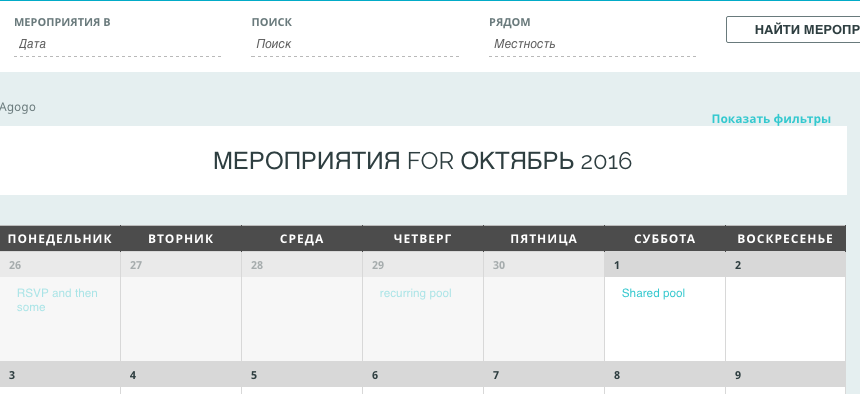
This does confirm your findings, so let me know when you have finally tackled that beast.
As per the tattoo, it’s a great idea, but you might not find Comic Sans funny when you get older 😉
Let me know how that goes.
Best regards,
Geoff B.October 20, 2016 at 1:21 am #1179686ParticipantProblem solved. Thing was that the wordpress mo&po had to be ru_RU.mp/po not just ru.mo/po. However for Arabic, just ar.mo/po works fine. Another tattoo idea.
Cheers!
MikkoOctober 20, 2016 at 9:36 am #1179924MemberWow Mikko!
I am super stoked and impressed. Awesome job!
You are right, sometimes language file naming conventions are a bit on the odd side.
Thank you for sharing your tip!Maybe you should just go for a tattoo that says #PolyGlot
You are welcome back on our support forums any time 🙂
For now, I am going to close this thread.
Have a great week!
Geoff B.
-
This reply was modified 9 years, 11 months ago by
-
AuthorPosts
- The topic ‘Fields' origins when translating’ is closed to new replies.