

Forum Replies Created
-
AuthorPosts
-
October 12, 2016 at 8:41 pm in reply to: Cancel and refund my order for Events Calendar Pro #1175731
Geoff B.
MemberGood evening Claudia and welcome to the Events Calendar Support forum!
Thank you for reaching out to us.
We are sorry to hear that our plugin did not meet your needs.
I would like to offer to help, should you want to, to solve any issue that might be causing your refund request.
That being said, the good news is you are fully entitled to a refund if you want one since you are within 30 days of your purchase. To obtain the refund, you just need to follow the procedure described here.
Best regards,
Geoff B.
MemberGood evening Michael and welcome to the Events Calendar forum!
Thank you for your interest in our products.
We’ll be glad to answer your questions.Can I add events in this same way? Is there an API that would allow me to add, edit and delete events?
Based on this specific set of needs, I believe your best bet is to use a third-party plugin such as wp all import (perhaps the Pro version depending on your needs): https://wordpress.org/plugins/wp-all-import/
I have personally used it on a few projects to create/update events.
Let me know if that helps.
Have a great day!
Geoff B.
MemberGood evening Brock and welcome to the Events Calendar Support forum!
Thank you for reaching out to us.
I would love to help you with this topic.I believe that the simplest solution for now would be to use one of our shortcodes: https://theeventscalendar.com/knowledgebase/pro-widget-shortcodes/
If the “This week” widget is not what you are looking for, I have some pretty good news for you.
We will release Pro version 4.3 tomorrow which includes the ability to have shortcodes for the full calendar (which should cover every possible scenario).Let me know if that helps.
Have a great day!
Geoff B.
MemberGood evening Tom and welcome back!
Thank you for reaching out to us.
We are sorry to hear about the “featured image” option missing from your “Add event” screen.
I would love to help you with this topic.Can you tell me if the following works for you ?
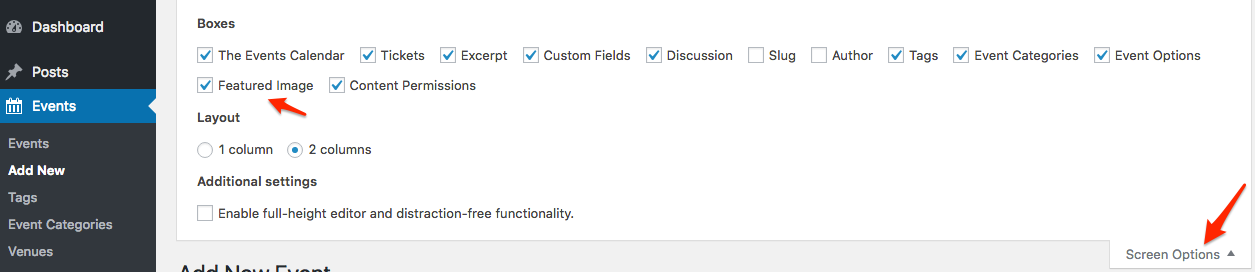
Let me know how that goes.
Best regards,
Geoff B.October 12, 2016 at 8:30 pm in reply to: Responsive Breakpoint – Hitting a max issue displaying tribe-mobile-container #1175714MemberGood evening Natasha and welcome back!
Thank you for writing back.
That is indeed interesting and I do not have a logical explanation for this failed customization.
With that in mind, forcing true mobile view everywhere would be a really nice feature.In fact, you can suggest it or cast your vote on other features in our User Voice forum.
I wish I had a better answer for you, but for now it’s the best one I have.
Have a great day!
Geoff B.
MemberGood evening Tom and welcome back!
Thank you for reaching out to us.
I would love to help you with these questions.As a first troubleshooting step, could you please provide us with your complete system information in a private reply using the instructions found in the following link?
https://theeventscalendar.com/knowledgebase/sharing-sys-info/
1) How do I change the Color of the text of the header?
Without knowing much about your site, it’s a bit hard to answer.
However, chances are that if you go to Appearance > Customize , you will find a ” the Events Calendar” section that contains many color customization options.2) how do I add a photo to the Photo View of the calendar
Normally, all you need to do is to use the built-in WordPress “Featured image” option.
If you do not see that option on your “Add event” page, you can add it using the following instructions3) How do I make it so, it is ONLY the header or event on the Calendar and not the whole description.
Could you give me the URL or at least the view in which you are interested in doing this.
Best regards,
Geoff B.
MemberThis reply is private.
October 12, 2016 at 7:58 pm in reply to: Is there a way to automatically delete old events? #1175701MemberGood evening Jennifer and welcome back!
Thank you for reaching out to us.
I would love to help you with this topic.The first thing you could do is increase the number of events visible on the page
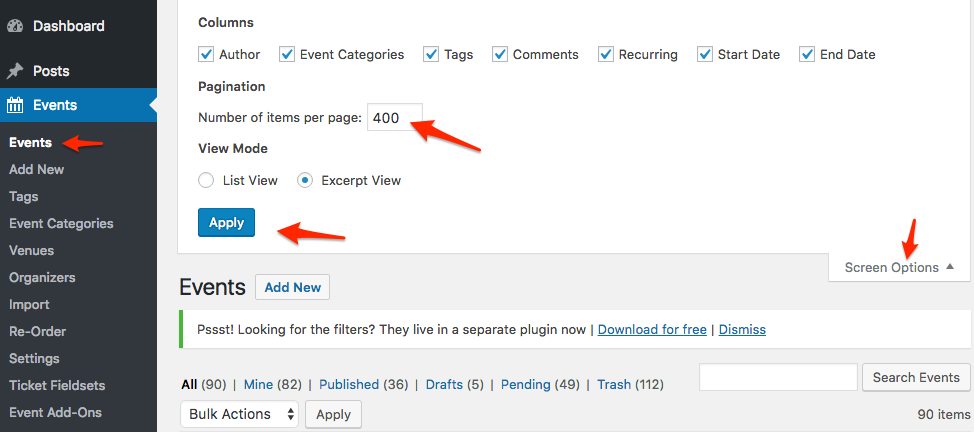
Secondly, you could try a third-party bulk edit plugin.
Is there a way to set up automatic deletion without losing other data like address?
Deleting events will not impact Venues and Organizers. In other words, you will not loose the address for example.
Deleting events will however result in loss of things such as: event date, event description, event website, event cost and any additional field (from Pro) info.
You could automate this via a CRON job. There would need to be a few conditionals, such as:
- Delete tribe_events post type IF publish date is more than 1 year from current date
Let me know if that helps.
Have a great day!
Geoff B.
MemberGood evening Raffaello and welcome to the Events Calendar Support forum!
Thank you for reaching out to us.
We are sorry to hear about the 404 message you are getting. Yikes!
I would love to help you with this topic.As a first troubleshooting step, could you please provide us with your complete system information in a private reply using the instructions found in the following link?
https://theeventscalendar.com/knowledgebase/sharing-sys-info/
Secondly, I would highly recommend re-saving your permalinks.
Finally, could you tell me what URL generates that message ?
Best regards,
Geoff B.
MemberGood evening Luca and welcome to the Events Calendar forum!
Thank you for your interest in our products.
We’ll be glad to answer your questions.I’m wondering if the Event Ticket Plus plugin does allow to have conditional dropdown list fields. I mean, we need to display a certain list of contents depending on the previous dropdown field option selected.
Event Tickets Plus does allow additional registration fields both for the e-commerce tickets and the RSVP tickets.
However, as it stands, there is no conditional logic support built-in. But that would be a really cool feature to have!
In fact, you can suggest it or cast your vote on other features in our User Voice forum.
In the meantime, the only way that could be accomplished is via some template customization.
You might want to read our Themer’s guide to get a sense of how that works.Some of our customers have even integrated the ticketing process with form plugins (e.g.: formidable form) to handle such conditional logic.
I wish I had a better answer for you, but for now it’s the best one I have.
Have a great day!
Geoff B.
MemberGood evening Falayn and welcome to the Events Calendar Support forum!
Thank you for reaching out to us.
We are sorry to hear about the fatal error message you have been getting. Yikes!
I would love to help you with this topic.As it turns out, this is a legitimate bug for some of our users. We apologize for the inconvenience this is causing.
A fix is underway. Unfortunately, I cannot commit to a release date at this point. But stay tuned, you will be contacted when the fix is released.
In the meantime, we have a workaround available.
Try the following: https://theeventscalendar.com/support/forums/topic/http-error-500-when-trying-to-save-attendee-info/#post-1163856
Let me know how that goes.
Best regards,
Geoff B.MemberGood evening Michael and welcome back!
Thank you for reaching out to us.
I would love to help you with this topic.From the looks of it, your “Upcoming events” / Advanced list event widget already has some customization (since it normally does not display the event’s content.
Could you please send me a copy of your WordPress theme / child theme in a .zip file link (via Dropbox or Google Drive) so that I can run some tests on my end ? In a private reply ideally.
Please ensure you are using the latest files as found on your actual website.
This way I will get access to any updates you might have made.Basically, the best solution would be to grab the_excerpt and not the actual content of an event.
Best regards,
Geoff B.
MemberGood evening Erin and welcome to the Events Calendar Support forum!
Thank you for reaching out to us.
I would love to help you with this topic.First, if you do not mind, I would love to offer to answer any question you might have regarding what you are trying to accomplish versus what our plugin can do.
The good news is you are fully entitled to a refund if you want one since you are within 30 days of your purchase. To obtain the refund, you just need to follow the procedure described here.
Best regards,
Geoff B.
October 12, 2016 at 7:06 pm in reply to: Tickets Area – Ticket name, available tickets, ticket price, ticket overlapping #1175689MemberGood evening Victor,
Thank you for writing back.
To fix the layout, I recommend the following CSS rule
.single-tribe_events .sidebar .tribe-events-tickets td {

width: 100%;

DISPLAY: inline-block;

FLOAT: left;

clear: both;

min-width: 280px;

}
Let me know if that helps.
Have a great day!
Geoff B.
October 12, 2016 at 2:43 pm in reply to: How do you get to the Edit Fieldset screen if you’re only using Event Tickets? #1175635MemberGood evening Abby,
The fix is being worked on as we speak.
In the meantime, I do have another workaround for you.You can actually use the direct URL
/wp-admin/edit.php?post_type=ticket-meta-fieldsetHang in there!
Best regards,
Geoff B.
-
AuthorPosts