

Forum Replies Created
-
AuthorPosts
-
September 26, 2017 at 6:11 pm in reply to: Register, pay, check-in, and scan for specific sessions? #1355298
Caroline
MemberHi Katie,
Thanks for reaching out! While our Event Tickets Plus plugin does include QR code functionality for checking in attendees via a simple ticket scan, unfortunately, these QR codes can only be scanned one time per ticket. If you’d like to enable QR-based check-ins for multiple sessions, the only way to accomplish this for now would be to create separate events for each session and request that users register in advance for each session they’d like to attend.
I’m sorry to be the bearer of bad news here! Let us know if you should have any other questions about your intended setup and how it might work with our plugins–we can certainly do our best to assist. 🙂 Cheers, and thanks again!
MemberHi Kerry,
Thanks for reaching out! When viewing your WordPress site’s admin, you’ll find the Event Categories section located underneath Events in your WordPress sidebar:
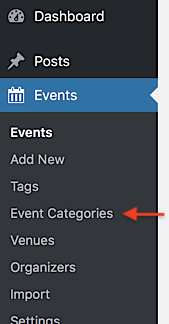
Simply click this link, and you’ll be brought to the Event Categories section, where you can view and edit existing categories or add new categories as desired. 🙂
I hope that helps! Thanks again, and let us know if you should have any other questions!
MemberHi Phil,
Thanks so much for your interest in our Event Aggregator plugin! I’d be more than glad to take on these questions for you! 🙂
- Yes–with Event Aggregator, you may import events from as many unique Facebook pages and groups as you’d like! Daily import tasks are limited depending on your selected license tier, but this count only refers to the number of tasks that can be completed in a given day. There are no restrictions on how many sources can be used or how many events you may import in a single task.
- Great question! Event Aggregator is able to import any events that are published to a public Facebook page or group, as well as public events hosted by an individual Facebook user. Imports from closed or restricted groups are not supported at this time.
- As long as your Facebook source meets the above criteria, you should have no problems importing events from it. Administrator access is not required to import events using Event Aggregator.
I hope that helps! Thanks again, and let us know if you should have any other questions!
September 26, 2017 at 1:01 pm in reply to: Series of event, not recurring, one offline ticket #1355178MemberHi Klaus,
Thanks so much for stopping by and checking out our plugins! 🙂 It looks like our Events Calendar PRO and Event Tickets Plus products should cover most of your stated needs here, including event series, customizable booking forms (through our attendee information fields), support for non-English languages, and compatibility with Avada. Offline payment options are also available, to the extent that they are supported by your e-commerce platform of choice. We typically recommend using WooCommerce and its “Cash on Delivery” option for these use cases:
https://docs.woocommerce.com/document/cash-on-delivery/
It’s worth noting, however, that full support for ticketing on recurring events and event series is not available at this time. At present, tickets that are created for an event series will be applied to all events within that series, with no distinctions made between several instances of events. Related to this, tickets purchased for an event series can only be checked in once per ticket, regardless of the number of days in the series. You may be able to work within these parameters, depending upon your needs–it’s worth testing this combination of plugins with your intended setup before investing in any significant development. If you should find that these restrictions aren’t suitable for your needs, we’ll be glad to process a refund for your order within 30 days of your original purchase:
https://theeventscalendar.com/knowledgebase/refund-policy/
I hope that helps to get you started here! Thanks again for reaching out, and let us know if you should have any other questions!
MemberHi Alexander,
Thanks for taking the time to reach out to us here! I’m afraid that at this time, there is no built-in support for image uploads on ticketing forms. I’m sorry to disappoint. 🙁 If you’re interested in incorporating this functionality into your site, I’d suggest one or more of the following options:
- If you’re comfortable with WordPress development, our Themer’s Guide provides plenty of resources for custom development using our plugin templates. You may be able to craft some custom code to display on ticket forms that would enable this feature! https://theeventscalendar.com/knowledgebase/themers-guide/
- If you’d prefer to bring on another set of hands for this task, we do maintain a list of third-party developers who work with our plugins on custom projects. You might consider reaching out to one of them for a quote! https://theeventscalendar.com/knowledgebase/find-a-customizer/
- We welcome all users to submit feature requests on our UserVoice forum–by doing this, you’ll give other users the chance to vote and comment on your idea. Our team regularly monitors this forum for feature suggestions, so it’s a great way to get your ideas on our radar! https://tribe.uservoice.com/forums/195723-feature-ideas
I hope that helps to get you started here! 🙂 Thanks again, and let us know if you should have any other questions!
MemberHi George,
Thanks for reaching out! At the moment, we aren’t able to fulfill requests for adding custom numbers of activation slots to a single license key. I’m sorry to disappoint! If you only wish to add ten Events Calendar PRO activation slots to your account, rather than upgrading to our Unlimited tier, I’d suggest purchasing a new Events Calendar PRO license key at the Agency level. You may then distribute your two license keys across your network of sites in any way you’d like–and, of course, you’ll still have the option of moving to Unlimited later, should you change your mind. 🙂
I hope that helps! Thanks again, and let us know if you should have any other questions!
MemberHi Line,
Thanks for taking the time to reach out to us here. I’m sorry to hear that you’re considering a refund for Event Aggregator at this time. All of our product licenses include a full 30-day return period, giving you plenty of time to decide if our plugins are right for you. Should you find that our plugins aren’t an ideal fit, obtaining a refund is as simple as filling out our refund request form:
https://theeventscalendar.com/knowledgebase/refund-policy/
Once we’ve received your request, one of our team members will follow up to confirm, and you should see your refund returning to your bank account shortly.
Thanks again, and please don’t hesitate to let us know if there’s anything else we can do to assist!
MemberHi Daniele,
Thanks for following up! If you want your users to be able to purchase event tickets on your site, you’ll need to add the free version of Event Tickets and our premium add-on Event Tickets Plus to your existing setup. Event Tickets Plus can then be paired with an e-commerce platform of your choice (either WooCommerce or Easy Digital Downloads) to handle payment processing and management of ticket orders. For more information on Event Tickets Plus, including features and pricing, you can refer to the Event Tickets Plus product page:
https://theeventscalendar.com/product/wordpress-event-tickets-plus/
Event Tickets Plus also includes support for attendee information fields, allowing you to create form fields and collect additional details from your event participants. This Knowledgebase article sheds a bit more light on this feature and how it works:
https://theeventscalendar.com/knowledgebase/collecting-attendee-information/
I hope that helps to get you on your way here! 🙂 Thanks again, and let us know if you should have any other questions!
MemberHi Karen,
Thanks for reaching out, and I’m so sorry for the trouble! We’d be more than glad to take a closer look to see what might be happening here. Would you mind dropping us a quick email with the order number for your recent purchase (and your original license key, if this purchase was a renewal)? One of our team members will follow up to continue the conversation as soon as possible!
https://theeventscalendar.com/contact/
Please select the option “Help accessing my account” from the drop-down menu to display the full email form.
Thanks so much, and we’ll see you there! 🙂
MemberHi Greig,
Thanks for taking the time to reach out to us here! I’m so sorry to hear that you’ve encountered some issues in working with The Events Calendar on your client’s site. That’s certainly not the experience that we’d like for our users to have, and our team would love the opportunity to assist! 🙂
We do our best to provide support services for all users of our plugins on both WordPress.org and our premium support forums. However, during periods of high request volume, our primary efforts will always be focused on delivering support to our paid customers. Unfortunately, at certain times, it may be a week (or longer) before new threads on our free support forums receive a reply. Our premium support forums are subject to more frequent passes, and threads posted to these forums generally receive a reply within 1 business day.
If you’re interested in obtaining the added features of Events Calendar PRO, including premium support access for any questions or concerns you may have, there’s no risk involved in taking the plunge. Should you decide it’s not the right fit for you for any reason, simply complete our refund request form within 30 days of purchase, and we’ll gladly refund your entire purchase price.
https://theeventscalendar.com/knowledgebase/refund-policy/
Again, I truly apologize for the difficulties that you’ve encountered here–whether it’s here or on our WordPress.org forums, we hope that we might have the chance to turn things around for you here! Thanks again for paying us a visit, and please don’t hesitate to let us know if there’s anything else that we can do for you!
MemberHi Will,
Thanks for taking the time to reach out, and I’m so sorry for the trouble here! If you’re having trouble completing a purchase with us, we’d be more than glad to try and assist over in email. Would you mind dropping us a quick message with some more details, including your operating system and the web browser that you’re using to place your order? One of our team members will follow up to continue the conversation as soon as possible!
https://theeventscalendar.com/contact/
Please select the option “Help accessing my account” from the drop-down menu to display the full email form.
Thanks so much, and we’ll see you there! 🙂
MemberHi Colin,
Thanks for reaching out! Our Event Tickets Plus plugin relies exclusively on third-party e-commerce plugins for payment processing and order management–any payment gateways that are supported by your e-commerce platform of choice should work just fine with Event Tickets Plus. You can find more information on the Moneris gateway for WooCommerce at the following link:
https://woocommerce.com/products/moneris-gateway/
I hope that helps! 🙂 Thanks again, and let us know if you should have any other questions or concerns here!
MemberHi Kirsch,
Thanks for reaching out, and I’m so sorry for the trouble here! Unfortunately, we’re not equipped to provide technical support for current plugin users here in our pre-sales forum. Would you mind taking a moment to submit your inquiry on our WordPress.org support forum for The Events Calendar? One of our team members will be on hand to provide further assistance as soon as possible!
If you can, please take the time to confirm in your post that you’ve run through our conflict testing steps prior to contacting us–this will save us a step and help us to get your issue resolved that much quicker! 🙂
Thanks again, and we’ll see you in the forums!
MemberHi Carson,
Thanks for getting in touch, and I’m so sorry for the trouble here! This type of renewal issue is usually known to occur when a license key is renewed from an account not originally associated with that key. However, there may be other causes for failed renewals in rare cases. Whatever the circumstances, we’d be glad to sort this out for you and your client over in email! Would you mind taking a moment to reach out to us there? Please include your order number and the license key in your message, and one of our team members will follow up as soon as possible!
https://theeventscalendar.com/contact/
Please select the option “Help accessing my account” from the drop-down menu to display the full email form.
Thanks again, and we’ll see you there!
MemberHi Michael,
Thanks for stopping by–great to see you again here on the forums! 🙂 If you’re looking to maintain a calendar with several recurring events and other scattered events pulled from a single Facebook page, it sounds like a combo of Events Calendar PRO and Event Aggregator might be a great fit! You’ll find the recurring event functionality that you need in PRO, and Event Aggregator supports scheduled imports from sources such as Facebook, making it easy to keep your calendar updated with external events.
It looks like you’ve worked with these two products before, but I’ll go ahead and leave their product pages linked here, just in case!
https://theeventscalendar.com/product/wordpress-events-calendar-pro/
https://theeventscalendar.com/product/event-aggregator/Let me know if you should have any specific questions about either of those or how they might work for your intended setup! 🙂 Cheers, and thanks again for reaching out!
-
AuthorPosts