
Home › Forums › Welcome! › Pre-Sales Questions › Adding a category for an event
- This topic has 6 replies, 2 voices, and was last updated 8 years, 12 months ago by
Support Droid.
-
AuthorPosts
-
September 26, 2017 at 1:39 pm #1355197
Kerry
GuestWe are a school of yoga and our website developer used Events to create a section for our teachers directory. They built Level I and Level II categories so that users can search for just Level I’s or II’s if they want to. We have just created a Level III certification for our teachers and I need to add a “category.” I have searched the dashboard high and low and can’t find where to do make this change. Any help is appreciated!
September 26, 2017 at 5:59 pm #1355296Caroline
MemberHi Kerry,
Thanks for reaching out! When viewing your WordPress site’s admin, you’ll find the Event Categories section located underneath Events in your WordPress sidebar:
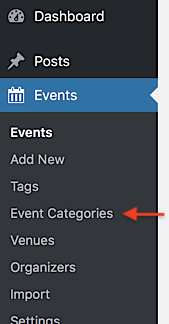
Simply click this link, and you’ll be brought to the Event Categories section, where you can view and edit existing categories or add new categories as desired. 🙂
I hope that helps! Thanks again, and let us know if you should have any other questions!
September 27, 2017 at 6:42 am #1355503Guesto forums
Thanks for getting back to me! Yes, I’ve checked that out. Our categories are good to go. What I’m referring to I guess are subcategories for a category. Those are what I can’t find to edit. Any suggestions?September 28, 2017 at 10:00 am #1356269MemberHi Kerry,
Thanks for following up to clarify–so sorry for my misunderstanding here! When creating a new category from the Event Categories section, you can select a Parent Event Category from the drop-down menu to designate a parent for the category you’re creating. This will register your new category as a subcategory of the specified parent. Existing categories can also be converted into subcategories in a similar fashion. Simply hover over any category in the provided list, click the Edit link that appears beneath the category title, and select the new parent for your event before saving your changes.
Does that help to answer your question here? Let me know! 🙂 Thanks again!
September 28, 2017 at 10:10 am #1356281GuestHmmmm…I’ve tried that as well. I’m looking for where the sub categories within a category already exist so that I can then create a new one.
October 2, 2017 at 8:33 am #1357767MemberHi Kerry,
I’m sorry to hear that you’re still having trouble here! At the moment, designating a category as a child of another parent category is the only way to create a subcategory. Our event categories are defined by the same processes as standard WordPress post categories–you can read more about these on the WordPress Codex.
https://codex.wordpress.org/Posts_Categories_SubPanel
Once you’ve specified a parent category for a new or existing category, that subcategory will be moved beneath its parent and will be indented by a horizontal line, as seen here:

When creating a new subcategory using the form on the Event Categories page, does the subcategory not appear as shown above? Any details you can provide on the steps you’ve followed would be a huge help! 🙂
Thank you!
October 24, 2017 at 9:35 am #1368142KeymasterHey there! This thread has been pretty quiet for the last three weeks, so we’re going to go ahead and close it to avoid confusion with other topics. If you’re still looking for help with this, please do open a new thread, reference this one and we’d be more than happy to continue the conversation over there.
Thanks so much!
The Events Calendar Support Team -
AuthorPosts
- The topic ‘Adding a category for an event’ is closed to new replies.