Forum Replies Created
-
AuthorPosts
-
October 24, 2017 at 10:06 am in reply to: Ticket sale with add to card is not showing for front end user #1368213
Jennifer
KeymasterHi Pim,
I’m sorry to hear you’re tickets aren’t showing up, but I’ll be happy to help you figure out what’s going on!
Could you please send me a screenshot of the ticket details section on the event edit screen? Also, have you tried testing for conflicts with both your theme and other plugins? If you need a testing environment, the free WP Staging plugin will let you create a quick copy of your live site that you can use for testing.
Thanks,
Jennifer
KeymasterHi Joan,
Thanks for reaching out!
Events should still show up by default until the event’s end time…can you verify that your site’s time zone is correct under Settings > General? This is usually the source of the issue when events are disappearing too early.
Let me know if that works!
Thanks,
Jennifer
KeymasterHi Henrik,
Thanks for checking out our plugins!
I’ll address each of the features you’re looking for one by one:
- Easy to navigate and see all specific events/dates for a specific city. With Filter Bar, users can filter events based on the city. You can use the shortcodes that come with Events Calendar Pro to display events by category/tag (currently there is not an option to display events by city, but the categories/tags could be used to do this).
- Customers who have bought a ticket needs to be able cancel or rebook the ticket for a future event. You can cancel tickets and refund tickets from the backend (this guide has some more information on how that works). If you require users to be logged in to buy tickets (an option in the settings), then they can come back and view their tickets from their account, but they don’t have the option to change or cancel the ticket. However, you could issue a coupon (through WooCommerce) for them to use on a later ticket purchase.
- If you buy tickets for >4 people, there should be 20% discount. Tickets are essentially WooCommerce simple products, so you can use some of their add-ons like this one or third-party plugins like this one to offer discounts for buying in bulk.
- If possible, gift vouchers should be an option to buy and give to someone to use for buying tickets. Again, WooCommerce solutions for gift certificates should also work for tickets. I did a quick search, and it looks like this plugin should help you out here.
- The list of customers who have bought tickets for a specific event should be easy to print for admin. While this is not out of the box functionality, we do have a free extension that will let you do this.
- It should be easy at any point to stop people from buying tickets for a specific event. You can always go into the event and either change the date for the ticket sale to end (you can do this on a per-ticket basis for each event) or set the available stock to 0, which will prevent users from buying any more of those tickets.
- An easy way to email all customers for a specific event. When a user completes an order that includes tickets, two emails go out: the WooCommerce order confirmation email and a separate email (from our plugin) with the tickets. However, there is not currently any functionality that allows you to go back later and send new emails to the attendees list, but you can export the list and use another mailing service to send out the emails.
- Option to check if the customer wants to receive newsletter from Mailchimp You can use the additional fields that come with Event Tickets Plus to create a checkbox, but you would then need to add those email addresses into MailChimp, or you could also use a plugin like this one to allow users to subscribe during the checkout process.
- An extra field where the customer can write whatever they want, specific requests or important info like allergy or anything else the admin needs to know. The additional fields feature will take care of this for you!
And finally, yes we do offer full refunds within 30 days of purchase if you’re not satisfied with our products. I’d recommend doing a test run with our free plugins, The Events Calendar and Event Tickets to see how they work with your theme, since our premium add-ons are extensions of these plugins. If you have any questions, please let me know!
Thanks,
Jennifer
KeymasterHi Henrik,
Thanks for checking out our plugins!
I’ll address each of the features you’re looking for one by one:
- Easy to navigate and see all specific events/dates for a specific city. With Filter Bar, users can filter events based on the city. You can use the shortcodes that come with Events Calendar Pro to display events by category/tag (currently there is not an option to display events by city, but the categories/tags could be used to do this).
- Customers who have bought a ticket needs to be able cancel or rebook the ticket for a future event. You can cancel tickets and refund tickets from the backend (this guide has some more information on how that works). If you require users to be logged in to buy tickets (an option in the settings), then they can come back and view their tickets from their account, but they don’t have the option to change or cancel the ticket. However, you could issue a coupon (through WooCommerce) for them to use on a later ticket purchase.
- If you buy tickets for >4 people, there should be 20% discount. Tickets are essentially WooCommerce simple products, so you can use some of their add-ons like this one or third-party plugins like this one to offer discounts for buying in bulk.
- If possible, gift vouchers should be an option to buy and give to someone to use for buying tickets. Again, WooCommerce solutions for gift certificates should also work for tickets. I did a quick search, and it looks like this plugin should help you out here.
- The list of customers who have bought tickets for a specific event should be easy to print for admin. While this is not out of the box functionality, we do have a free extension that will let you do this.
- It should be easy at any point to stop people from buying tickets for a specific event. You can always go into the event and either change the date for the ticket sale to end (you can do this on a per-ticket basis for each event) or set the available stock to 0, which will prevent users from buying any more of those tickets.
- An easy way to email all customers for a specific event. When a user completes an order that includes tickets, two emails go out: the WooCommerce order confirmation email and a separate email (from our plugin) with the tickets. However, there is not currently any functionality that allows you to go back later and send new emails to the attendees list, but you can export the list and use another mailing service to send out the emails.
- Option to check if the customer wants to receive newsletter from Mailchimp You can use the additional fields that come with Event Tickets Plus to create a checkbox, but you would then need to add those email addresses into MailChimp, or you could also use a plugin like this one to allow users to subscribe during the checkout process.
- An extra field where the customer can write whatever they want, specific requests or important info like allergy or anything else the admin needs to know. The additional fields feature will take care of this for you!
And finally, yes we do offer full refunds within 30 days of purchase if you’re not satisfied with our products. I’d recommend doing a test run with our free plugins, The Events Calendar and Event Tickets to see how they work with your theme, since our premium add-ons are extensions of these plugins. If you have any questions, please let me know!
Thanks,
Jennifer
October 24, 2017 at 2:34 am in reply to: Limit available tags on Community Even Submission page #1367933KeymasterHi Ian,
I tested this out, and it does seem like that should be working. I’m going to check in with one of our developers for a second opinion on this one, and I’ll get back to you as soon as I hear back.
Thanks,
Jennifer
KeymasterHi Ginnie,
I’m sorry about the delayed response here, but it sounds like you were able to get individual events displaying properly with a default theme enabled? If this is the case, then it sounds like there is something in your theme conflicting with Events Calendar Pro. While we are limited in the amount of support we can provide for theme conflicts, I’ll be happy to take a look if you could send me a link that I can view from the front end (we are currently not able to login to user sites)!
I noticed that you are using a child theme…you may try switching back to the parent theme (Veda) and see if you are still running into the same thing…If not, then there may be a customization in your child theme that is actually causing the conflict. When doing testing like this, it is always a good idea to use a testing environment (WP Staging provides a quick way to make a copy of your site that you can use for testing).
Thanks,
Jennifer
KeymasterNo problem Darius, just let us know if there’s anything else we can help with!
October 23, 2017 at 5:53 am in reply to: How do the old HIDE and IGNORE events get deleted? #1367517KeymasterHi Karen,
I’m sorry about the delayed response, it looks like my previous reply did not save – sorry about that!
I was actually asking about your current scheduled cleanup (I know my question wasn’t very clear, that was my fault!)…whether or not ignored events are included depends on how you are scheduling events to be deleted, but we do not currently have any scheduled cleanups built into our plugins that would automatically delete ignored events. However, if you are using another plugin to automatically delete past events, you may be able to get the ignored events in there as well. The only scheduled cleanup we have at the moment is for recurring events.
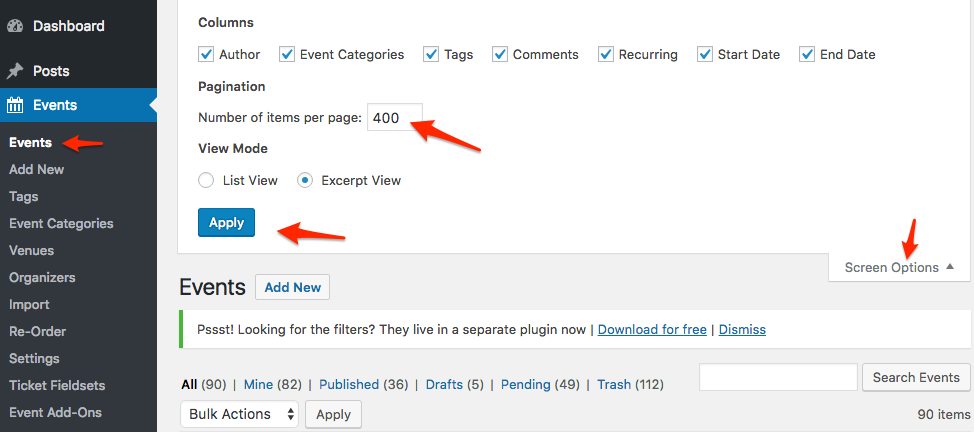
You can delete ignored events manually by going to the Events page in the admin section and clicking the “Ignored” link, then bulk-selecting the events and selecting “Delete Permanently”. If you have lots of ignored events, you can speed this up by increasing the number of posts on the page (see screenshot) to get them all at once, or you could also try using a plugin like Bulk Delete. If you’re comfortable with SQL, we also have a query which deletes ignored events. Be sure to make a full backup before running this! I would recommend taking a look at this article as well, which has some more information on ignored events.
If an auto-cleanup feature is something you would like to see implemented in the future, please let us know over in our Feature Ideas Forum. This is what we use to gauge user interest in new features and help guide future development efforts.
Please let me know if you have any other questions!
Thanks,
Jennifer
KeymasterHello,
Thanks for reaching out! Events Calendar Pro includes great features like additional views (map, photo, and week), shortcodes, custom fields, and recurring events, but it sounds like what you’re looking for is actually the default behavior of the calendar in mobile view (for both The Events Calendar and Events Calendar Pro).
If this is no longer working for you, could you please send me a link to the calendar page so that I can do some testing on my end? Also, please try testing for conflicts with your theme and other plugins if you haven’t done so already. Since this was working before but is not working now, it could be that an update resulted in the current versions of our plugins not being compatible with something else on your site. If you need a testing environment to do this in, the free WP Staging plugin will let you create a quick copy of your live site that you can use for testing.
Let me know what you find!
Thanks,
Jennifer
KeymasterHi Miguel,
Thanks for checking out our plugins!
No, you do not need Events Calendar Pro to use Event Tickets Plus. You do need the free Event Tickets plugin to run Event Tickets Plus however.
If you’d like to take Event Tickets Plus (or Events Calendar Pro) for a test run, we offer full refunds within 30 days of purchase, so feel free to do so! If you have any other questions, please let me know.
Thanks,
Jennifer
KeymasterHello,
It looks like you have another thread open for this topic, so I’ll go ahead and close this one out. I’ll see you over in the other thread!
KeymasterHi Mirian,
Thanks for checking out our plugins!
Event Aggregator is $89 for a 1 year license, and the other plugins will depend on if you go with the free versions or the pro versions.
The Events Calendar is our free events plugin, and it is needed to use Event Aggregator as well as Events Calendar Pro ($89 for a 1 year license), which offers some great features like additional fields, recurring events, and additional calendar views (photo, map, and week).
For ticketing, Event Tickets (free) will let you create free RSVP-style tickets on events (or other post types as well), and Event Tickets Plus ($89 for a 1 year license) will let you sell tickets for your events. It actually uses either WooCommerce or Easy Digital Downloads to handle the checkout and payment processing, both of which are free and include support for PayPal.
We do offer full refunds within 30 days of purchase, so feel free to take any of our premium extensions for a test run! We do also have some bundles that will help you save if you’re interested in purchasing more than one of these add-ons. If you have any other questions, please let me know.
Thanks,
Jennifer
October 20, 2017 at 11:20 pm in reply to: I purchased a license, but no download is available. #1366985KeymasterHi Rod,
I’m sorry to hear you’re not able to download Event Tickets Plus! You should have gotten an email when you purchased the license with a link to download. Is that link not working for you? You can also install the plugin manually by following these instructions, but you will need to make sure you are logged in with the same account that you used to purchase the license.
Let me know if you are able to download it that way!
Thanks,
Jennifer
KeymasterHi Lluís,
I’m sorry to hear you’re having such a hard time with the updates! Can you try updating manually by following these instructions? If that doesn’t work, can you please share your system information with me?
Thanks,
Jennifer
KeymasterHi Christine!
Occasionally the automatic download does not work for some users, but you can download the plugin manually by following these instructions.
Let me know if that works for you!
Thanks,
Jennifer
-
AuthorPosts