

Forum Replies Created
-
AuthorPosts
-
March 24, 2017 at 12:28 pm in reply to: Apparent issue with Yoast SEO-calendar not showing on url #1259767
Hunter
ModeratorThe conflict you’re experiencing is most likely due to either a theme and/or plugin conflict. You can confirm this by reviewing the Testing for conflicts guide. Our New User Primer: The Events Calendar and Events Calendar PRO is also worth a read.
Using any of the shortcodes available for PRO would most likely display properly, but you’ll still want to address the issue at hand. Feel free to open a thread over at our TEC WordPress.org support page for more assistance. We offer a 30-day money back Refund policy which gives you plenty of time to test things out. Let me know if this helps and have a great weekend ahead!
ModeratorThank you for letting me know you’ve got things figured out and also for sharing your solution for others to learn from. Feel free to create a new thread if you have any more questions or comments and have a pleasant weekend ahead. Cheers!
ModeratorHey Matt,
Yes, you should definitely be able to access past events as well as current events from the front end. When you visit the front end “My Events” page, you should see a “View past events” link in the upper right-hand section of your screen:
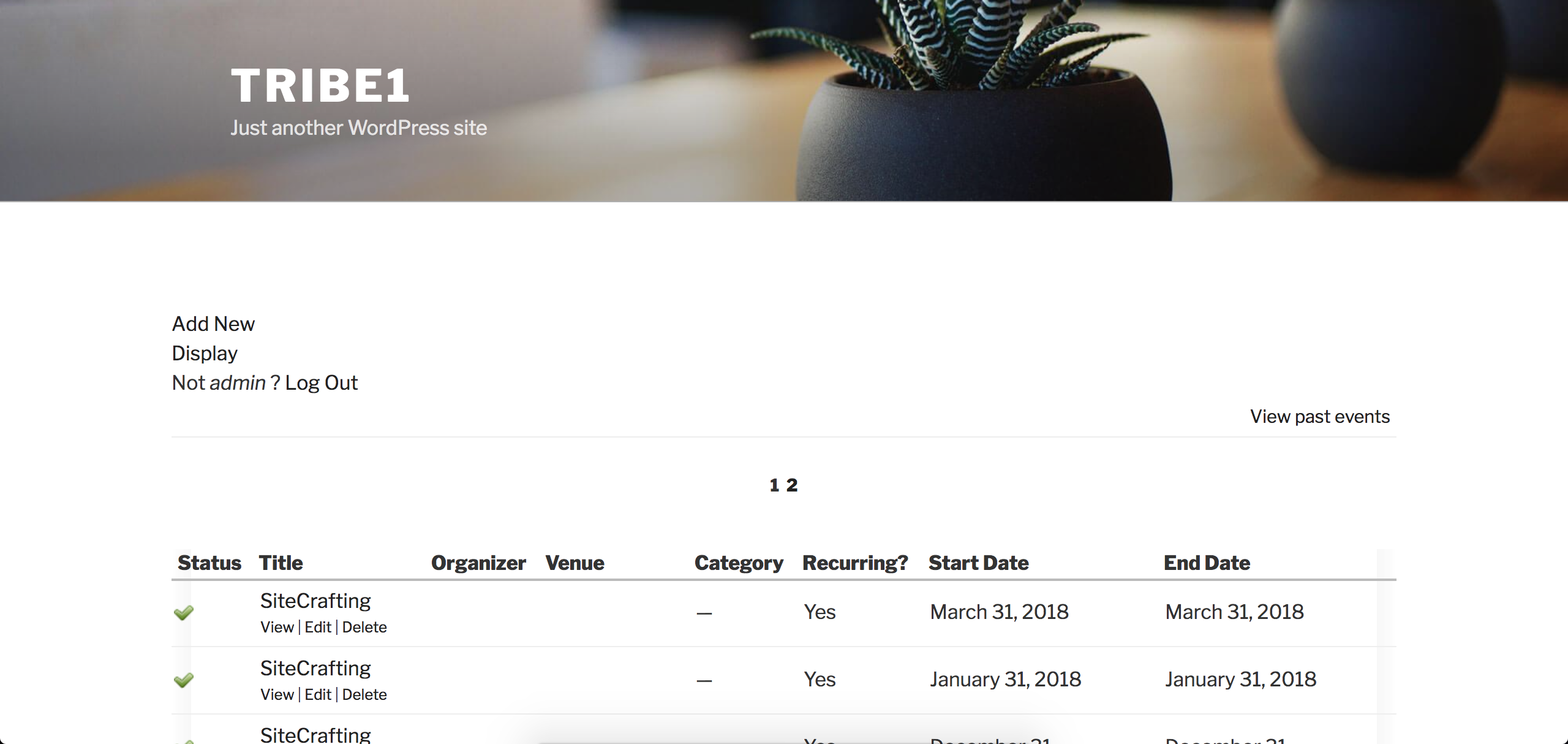
Once you click that link, you’re taken to a page displaying all your past events which have an “Edit” link. As you can see, these events occurred yesterday:

I hope this helps clarify how the plugin works and have an excellent weekend ahead 🙂
ModeratorHey John!
First off, thank you for your purchase and welcome to our premium plugin support forums! What you’re requesting would require custom code which we’re unable to provide, but have a look at our Using tribe_get_events tutorial as a starting point. You also might want to search our forums in addition to general web searches for examples.
Sorry I can’t do more in this instance. Please review our What support is provided for license holders? Knowledgebase article for more information. If you have any suggestions, you can submit them to our UserVoice Feature Ideas page. Let me know how it goes and have a pleasant rest of your day. Cheers!
ModeratorHello,
Welcome to our Pre-Sales Questions channel. We truly appreciate you considering our plugins for your site. I would be happy to help answer your questions:
I would like to know if the event aggregator plugin can export my events to Facebook?
At this time, it is not possible to post events to Facebook from your WP site using Event Aggregator. We have a feature report logged to include this feature in an upcoming release, but I can’t provide any sort of timeline when you can expect it. I’ve added this thread to the report which helps increase attention on the matter.
Also once I import events and make changes will they be updated to Facebook?
No, changes made on your WP site will not be “pushed” to Facebook. I recommend review our New User Primer: Event Aggregator as it goes over the basic process of installing the plugin and getting started. It links to other helpful articles which explain the process of creating an import and so forth.
We have a 30-day money back Refund policy, so that gives you plenty of time to test things out and make sure everything works as you need.
Please let me know if you have any additional questions and have a pleasant rest of your day. Cheers!
ModeratorHi Tom,
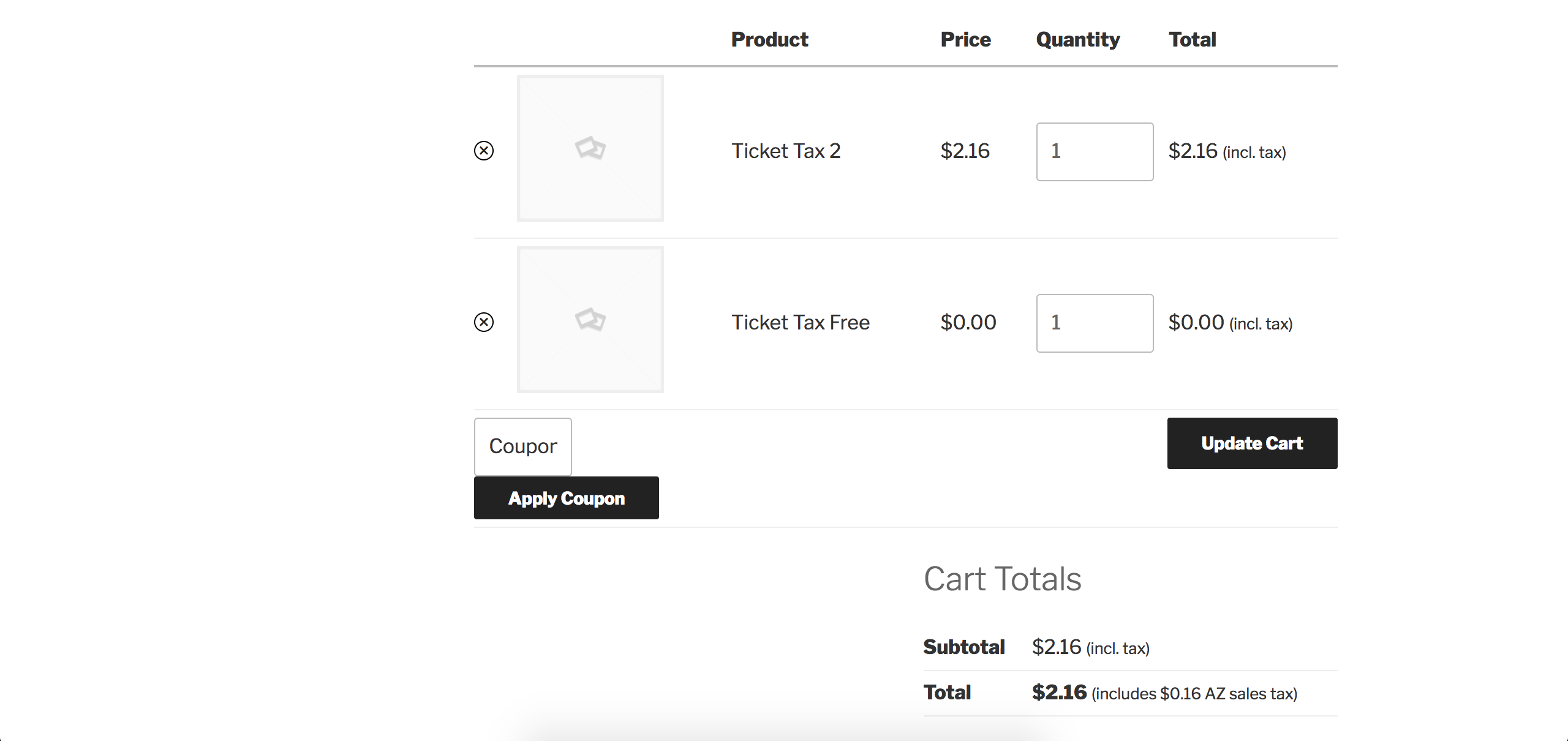
Thank you for considering our plugins for your project! To answer simply, yes. Let’s say you’re using WooCommerce as your ecommerce provider. If you have taxes set up, they will be added to the ticket as they would a physical product. No tax will be added to free tickets. I quickly created a test event with a free and paid ticket and have added both tickets to my cart. See the screenshot below for a visual example:
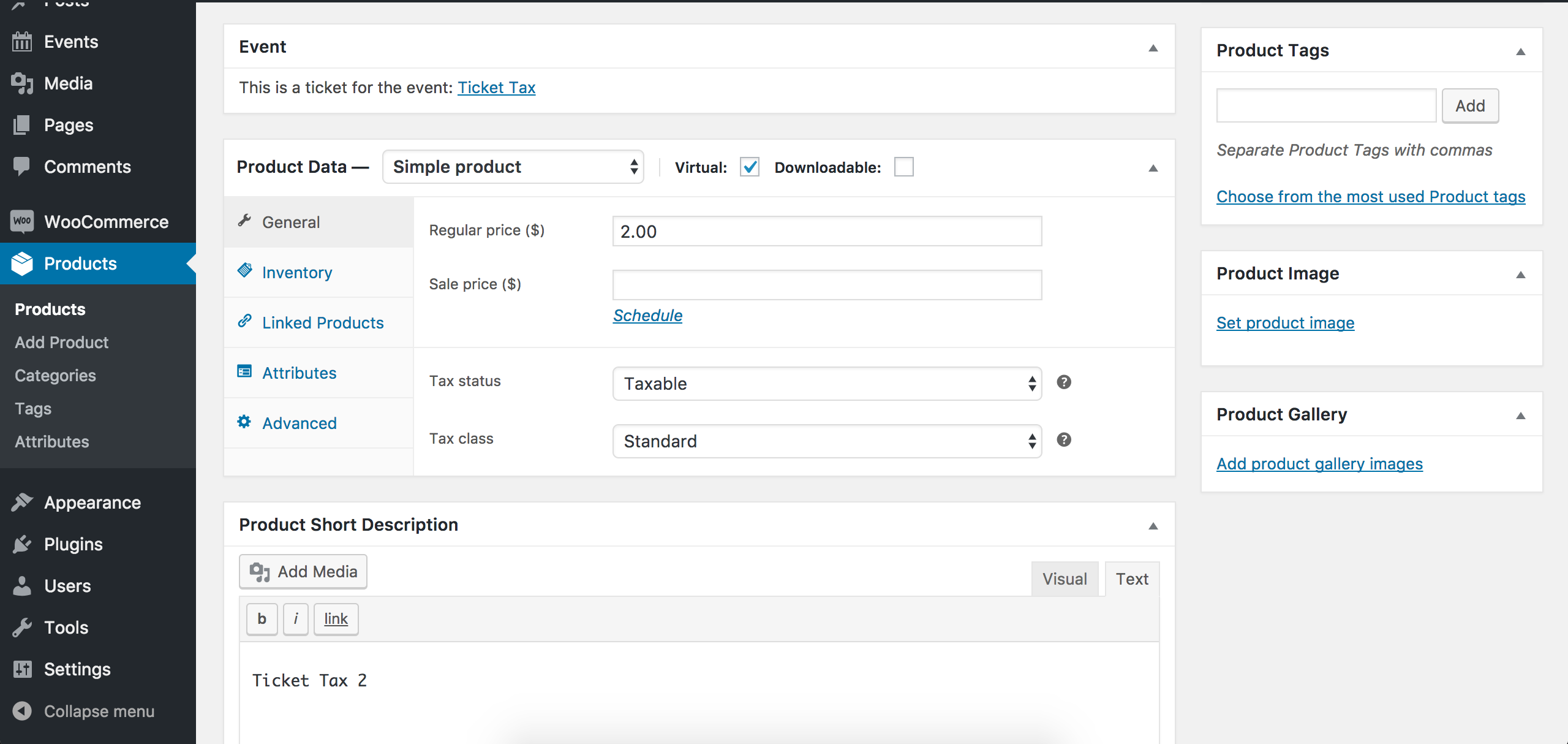
You can also edit the ticket via WooCommerce (just as you would edit a product page) and it’s tax-related options:
Please let me know if this helps answer your question and feel free to reply back with any additional questions you have. I also recommend reading over the New User Primer: Event Tickets & Event Tickets Plus tutorial to get an idea on the process of installing the plugin, making tickets, managing your orders and attendees, etc.
We offer a 30-day money back guarantee allowing ample time to test the plugins out to ensure they meet your needs. Thanks again and enjoy the rest of your day. Cheers!
ModeratorHello,
We are unfortunately unable to provide support through our Pre-Sales forum channel, but you can head over to The Events Calendar WordPress.org support forums for assistance and answers.
If you have a PRO license, you can log into your account and get assistance through the PRO forums.
Thanks for understanding and good luck resolving your issue. Have a good day!
March 23, 2017 at 2:21 pm in reply to: Apparent issue with Yoast SEO-calendar not showing on url #1259083ModeratorHello,
We are unfortunately unable to provide support through our Pre-Sales forum channel, but you can head over to The Events Calendar WordPress.org support forums for assistance and answers.
If you have a valid license, you can log into your account and get assistance through the PRO forums.
Thanks for understanding and good luck resolving your issue. Have a good day!
March 23, 2017 at 2:18 pm in reply to: Allowing users to sell tickets, but with restrictions #1259077ModeratorHi and welcome 🙂
Thank you for the kind words and I’m happy to hear our plugins have served you well thus far!
* Users cannot create new events, i.e. users can only sell tickets to events previously created by the admin
This would require some tinkering on your end, but our Admin roles and permissions tutorial is a good starting point. You also might try searching our forums in addition to general web searches to see if you can find any working examples. Unfortunately, we’re unable to provide customizations such as this, but visit our UserVoice Feature Ideas to suggest any features you’d like to see built into an upcoming release.
* Admin sets a limit of tickets each user can sell per event
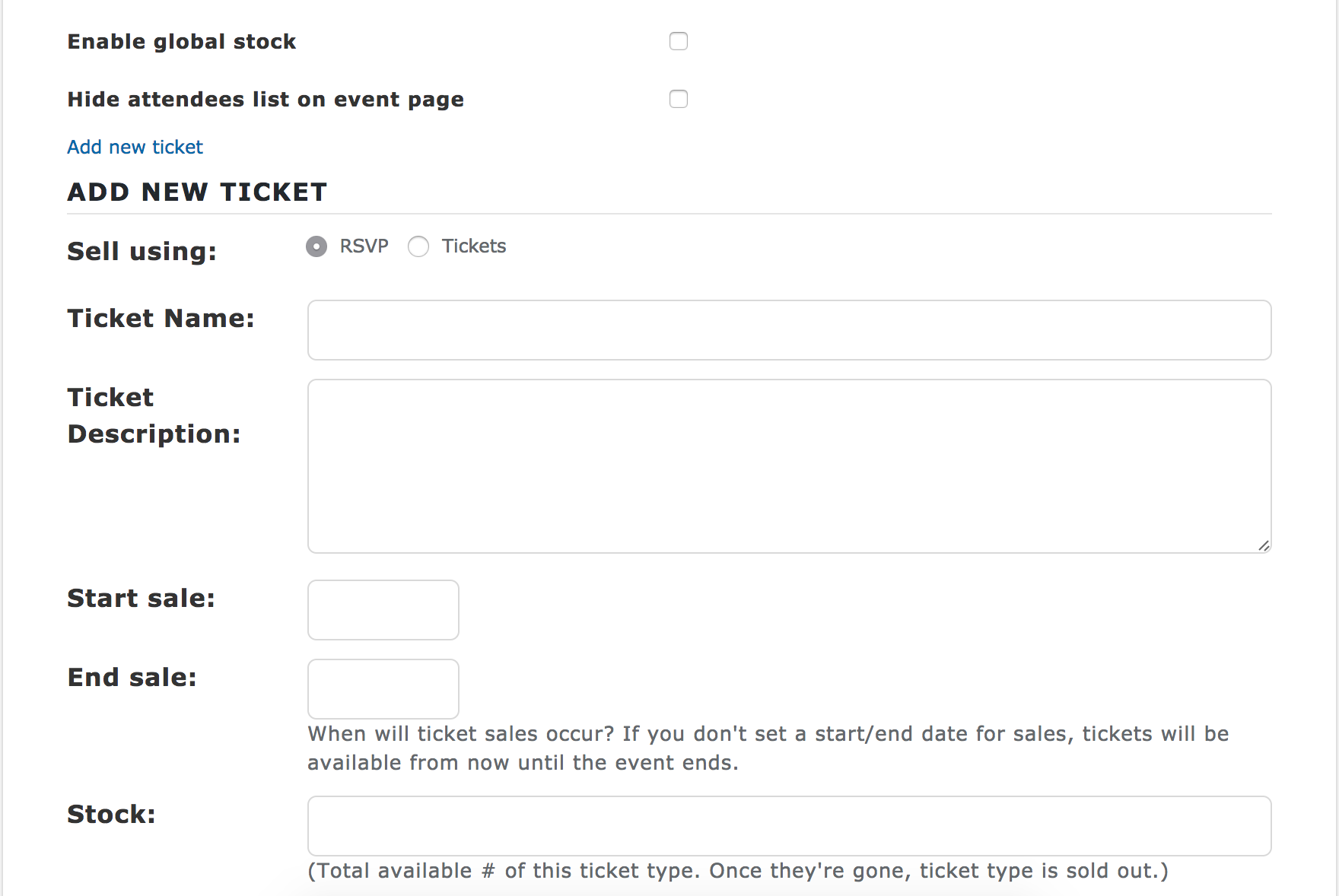
Just as Event Tickets/Event Tickets Plus allows you to set a ticket stock limit, the Add event page for Community EventsCommunity Tickets is essentially the same as what you would see on the backend of your site. Below is a screenshot of the front-end of my Add event page’s Tickets section:
As stated in our New User Primer: Community Tickets tutorial, you would need the following:
Community Tickets requires The Events Calendar to be installed on your site. Additionally, Community Tickets requires you to have Community Events with Event Tickets, Event Tickets Plus, and WooCommerce installed and active on your site…
Another article worth reviewing is our Configuring Community Tickets tutorial.
* Admin has to approve the sale of community tickets before it goes live
Yes! We’ve included a setting allowing you to set the default status of events submitted by users:

Lastly, be sure to check out the Bundles page to possible save some money when purchasing multiple plugins.
For future reference, whenever you have a question about a product(s) you’re considering purchase, we ask you post in our Pre-Sales Questions channel. Thanks and let me know if you have any additional questions. Cheers!
ModeratorHello!
First off, thank you for your purchase and welcome to our premium plugin support forums! I reviewed your System Information which includes details about your site, including the list of plugins you have installed. I don’t see any E-commerce plugin such as WooCommerce, for example.
Can you confirm whether or not you have an E-commerce plugin installed and activated on your site? If you do not, it might be a good idea to review our Event Tickets Plus: which ecommerce solution is right for you? tutorial. It might also be wise to review our New User Primer: The Events Calendar and Events Calendar PRO and New User Primer: Event Tickets and Event Tickets Plus tutorials if you have not already.
Please let me know and we’ll continue investigating. Thanks again and enjoy the rest of your day. Cheers!
March 23, 2017 at 1:49 pm in reply to: Event aggregator source back link and event aggregator license questions #1259041ModeratorHi Eva 🙂
Thank you for the kind words and we’re happy our calendar has served you well thus far! We appreciate you considering our premium plugins for your site. The answer to question #1 is yes, the source’s Facebook URL appears in the Website field for each event imported via Event Aggregator from Facebook. If you review our Add the Source Link of an Event Imported from Facebook Extension page, at the top it states:
Please note: This tutorial only pertains to our legacy plugin, Facebook Events. If you are importing with our new Event Aggregator tool, the website field will automatically be populated with the original event’s url.
Before Event Aggregator, we had a plugin named Facebook Events which imported events from Facebook. It was retired and it’s features incorporated into Event Aggregator. This Extension did exactly what you’ve requested, but is now a feature “baked into” Event Aggregator.
Should you need to upgrade to a different license, the process is very simple and outlined in our Upgrading a license tutorial.
Please let me know if you’ve got any additional questions and enjoy the rest of your day. Cheers!
March 23, 2017 at 1:46 pm in reply to: RSVP event – removing "Cost" in secondary details box #1259038ModeratorHey Mike,
Welcome back. What I’d do in this instance is a template override for /the-events-calendar/src/views/modules/meta/details.php. Remove/comment out line 123:
<dt> <?php esc_html_e( 'Cost:', 'the-events-calendar' ) ?> </dt>Save as [your-theme]/tribe-events/modules/meta/details.php to ensure your changes take precedence and to avoid losing them when updating The Events Calendar. Refer to our Themer’s Guide for complete details.
Have a good afternoon 🙂
ModeratorHi Dora 🙂
Happy Thursday! You have posted a request for technical support in our Pre-Sales Questions channel which we’re unfortunately unable to accommodate. In this instance, I can quickly point you to our Changing the word ‘events’ to something else tutorial.
Should you need any additional assistance, you can head over to The Events Calendar WordPress.org support forums for assistance and answers. If you have a PRO license, you can log into your account and get assistance through the PRO forums.
Thanks for understanding and good luck resolving your issue. Have a good day!
ModeratorHi and welcome,
Sorry to see you’ve run into issues with scheduled imports. There are a variety of reasons scheduled imports fail, but Event Aggregator is designed to reattempt a failed import – and most of the time does so successfully. We are nearing the release a new version which will provide more information as to why an import failed to run so you have a better understanding of the situation.
Try adjusting your scheduled imports to run less frequently (hourly to daily, for instance) and see if that has any effect on the scheduled imports which are currently failing. I’ll add this thread to the report for the developers to review. We’ll update you here once the release is available as well as include info in the plugin changelogs and Release Notes.
We get an error msg for the most of the events.
Can you provide the specific error(s) you’re getting? Thanks for your patience while we work to improve Event Aggregator and let me know if you have any questions or comments in the mean time. Cheers!
ModeratorHello again,
You can use the [tribe_events] shortcode to display Featured Events. For example:
[tribe_events view="list" tribe-bar="false" featured=true]More info on the [tribe_events] shortcode can be found in our Embedding Calendar Views with the [tribe_events] Shortcode tutorial.
I have to manually update the upcoming events bar content.
How are you currently pulling in Featured Events into your home page? Let me know if this helps and take care.
-
AuthorPosts