

Forum Replies Created
-
AuthorPosts
-
Hunter
ModeratorHi Hans-Gerd,
I’m happy to hear the code is working on your site! Let’s hope Colm (the original poster) has the same luck. Thank you for the update and have a great weekend ahead!
ModeratorI followed the link provided but am getting a 404 page on FLICKR. You might want to review the Testing for conflicts guide to see if there is a theme and/or plugin conflict causing the issue.
Any files residing in [your-theme]/tribe-events/ will take precedence over our plugin files, so outdated templates could be the cause of conflict. When users have custom templates, they are responsible for updating them to match changes made in new releases. We try to minimize disruption as far as possible. Also, we provide useful data in Events > Help > Recent Template Changes. If you navigate there, you should see a list of recently updated templates (which changes each release).
Please let me know what you learn and take care.
ModeratorAwesome! I appreciate the update and I’m glad to hear the issue has been resolved. Please open a new thread if you have any more questions. Cheers!
March 23, 2017 at 12:11 am in reply to: "No editor could be selected" on front-end submission form #1258501ModeratorHello,
Unfortunately, there is not much I don’t in regards to support seeing it relates to your entire site and not just content related to our plugins. You might want to try contacting your hosting provider to see if they can help ensure your records are set up so emails work properly. I’d also try searching Google/Bing and our forums to see if you can find any answers.
Once you have your site email situation squared away, then would be a good idea for using Easy WP SMTP.
ModeratorI’m not seeing any errors relating to the ones you’ve shared with me, but I quickly skimmed over them so there’s the chance one might be related. Regardless, I’m happy to hear things have worked themselves out for the mean time.
There is always the chance the issue is coming from PayPal itself. They’ve been known to have outages, so try contacting them next time for any insight. If it’s been awhile since you went through your WooCommerce settings, mainly those related to PayPal, it might be best doing so.
When users have custom templates, they are responsible for updating them to match changes made in new releases. Of course, we try to minimize disruption as far as possible. Also, we try to clue you in to things you should look for by providing useful data in Events > Help > Recent Template Changes. If you navigate there, you should see a list of recently updated templates (which changes each release). This is useful to ensure you’re using the latest code.
I’d also like to reiterate my recommendation to get a test site up integrated with your PayPal developer account. You can test the entire process to ensure things work exactly how you need. Keep me posted! Cheers 🙂
ModeratorThank you for letting me know the issue has been resolved and please feel free to create a new thread if you have any more questions or comments. Take care!
ModeratorI’m happy to hear things have been resolved for the most part!
I used Tribe’s shortcode to insert the calendar on the home page via html
module. It worked, however, the Map jumps to the top of the page instead of
staying in the module.I checked our logged bug reports and am not finding anything relating to what you’ve shared with me nor am I able to reproduce it on my test site. Does the behavior occur when you revert back to the default WP theme and deactivate all plugins other than ours? Let me know what you learn and please refer to the Testing for conflicts guide once again to ensure you test to fully eliminate theme and/or plugin conflicts.
Take care! Cheers 🙂
ModeratorHey Jason,
Ever since we released Event Aggregator, there have been a plethora of threads relating to scheduled imports failing for one reason or another. I could go into the specifics how Event Aggregator manages the scheduled imports, but the short and sweet version is: scheduled imports may appear as “failed”, but they were merely rescheduled and ran at a later time.
There have of course been instances when scheduled imports truly were failing, but that issue has since been patched. We have done extensive testing, research, more testing, debugging, and are nearing the point of releasing a patch which will enhance the entire Events > Imports section. There will also be more settings related to imports allowing for greater control.
I’ve included this thread to the report for them to review while making coding improvements. Should I learn anything before we get the release out, I’d be happy to update you. Either way, we’ll let you know when the fix is available here, in the plugin changelogs, and Release Notes.
Try setting up a scheduled import to run less frequently than you’re currently doing and run imports manually until we get this fix out. Hang tight… it’s almost here! Let me know if you have any questions or comments for me. Take care 🙂
ModeratorHey Colm,
Thank you for the response. I see in your System Information you have Community Events installed. We are aware of the issue you’re experiencing. I’ve added this forum thread to the ticket which helps expedite the process of getting a fix included in an upcoming release. I don’t have a precise date when it will be available, but please stay tuned to our Release Notes and the plugin changelogs for more information.
I am seeing a workaround though I’m unsure whether it works or not. Try adding it to the bottom of your theme’s functions.php file and see if it resolves the issue:
/*

 * Changes the formatting of the timepicker in The Events Calendar: Community Events submission form

 * Change format in line 17 based on https://codex.wordpress.org/Formatting_Date_and_Time

 *

 * Author: Barry Hughes

 */

function ce_timepicker_24hr_fix() {

    echo "

        <script type='text/javascript'>

            document.addEventListener( 'DOMContentLoaded', function() {

                if ( 'function' !== typeof jQuery ) {

                    return;

                }
setTimeout( function() {
jQuery( '.tribe-timepicker' ).timepicker( { 'timeFormat': 'H:i' } );
}, 500 );
}, false );
</script>
";
}add_action( 'tribe_events_community_form_after_template', 'ce_timepicker_24hr_fix' );
Your other option in this instance is to downgrade to the version that best works for you.
Thanks again (to you too, Hans-Gerd) and let me know if you’ve got any additional questions or comments. Cheers!
ModeratorGlad to see you got things squared away. I’ll close this thread out but feel free to open a new one should the need arise. Have a great rest of your week!
ModeratorHi and welcome 🙂
Thank you for posting to our premium plugin forums and sorry to see you’re having inconsistent results with your events displaying. The first thing I’d do is visit Events > Settings > General and see what your End of day cutoff setting is. See screenshot below for example:

When I log onto my admin at (say) 6a, the calendar widget and Upcoming Events on my menu bar still show the *previous* day.
This sounds like a caching issue to me. I see you’re using WP Super Cache. Can you walk me through the steps you do to clear your cache? If you open an incognito window, does the event-related content as you hover over “Events” in your menu display the correct time? Have you tried multiple browsers? If so, do the results differ?
The best way to identify the exact source of conflict is to review our Testing for conflicts guide. When testing, please make sure WP_DEBUG and WP_DEBUG_LOG are enabled on your site’s wp-config.php file. Any errors will display at the top of your page and in your error logas you try to reproduce the conflict. I also recommend right-clicking your mouse and opening the ‘Inspect’ tool to see if any errors display in the console. Note what you find and please include it in your reply.
Let me know what you learn and have a pleasant rest of your day. Cheers!
ModeratorHello again,
Welcome back and thank you for your continued business!
Is there a setting that I need to change?
Yes. If you visit Events > Settings > Community and scroll down to the Members section, you want to ensure the Edit their submissions option is checked. See screenshot below for example:

Please let me know if you’re able to get things squared away and have a good evening.
ModeratorGlad to see you’re on the right track!
I want to know if there is the possibility to translate the Title “Events” or if it can be removed.
Check out our Altering or removing titles on calendar views tutorial and let me know if it helps accomplish your request.
Also i want to translate “find” and remove the word “for” (or traduce in “a”)
I provided all translation-related material we have in my previous response, so please review that info for instructions on translation the “Find” text. I looked around our forums before digging too deep and came up with this thread which has a solution, though I did not test to confirm if it is in working order:
• https://theeventscalendar.com/support/forums/topic/how-to-customize-the-find-events-button/
You could also create a template override for /the-events-calendar/src/views/modules/bar.php and save as [your-theme]/tribe-events/modules/bar.php to avoid losing customizations. The “Find” text appears on line 34:
<?php printf( esc_html__( 'Find %s', 'the-events-calendar' ), tribe_get_event_label_plural() ); ?><span class="tribe-bar-toggle-arrow"></span>Refer to our Themer’s Guide for complete details on creating and saving customizations. Please note we’re not able to help come up with custom solutions, but I’m happy to help inform you of any necessary documentation that can help where possible.
Review our What support is provided for license holders? Knowledgebase article. Best of luck and have a good evening.
ModeratorWelcome back,
Let me fill you in on the details we know thus far about this particular issue. The only time (as far as we know) this issue occurs is when:
• You have the Events > Settings > Display > Disable the Event Search Bar option checked (see screenshot below):

• You have Events > Settings > Filters > Filters Layout to “Horizontal” (see screenshot below):

The results of having those settings creates a bug which results in the “Show/Filters” or “Visa filter” in Swedish button/text disappearing if the user’s screen width is less than ~768px.
With that said, I’m admittedly a little unclear based on your last response:
Thanks! But it doesn’t work.
The button does display.When you say “it doesn’t work”, what exactly doesn’t work? Are you’re referring to the fact that when the screen width is less than 768px, the “Show Filters/Visa filter” text/button appears above the datepicker/view option selector rather than “Show Filters/Visa Filter” text/button appearing below the datepicker/view option selector?
• “Show Filters/Visa filter” text/button above datepicker/view option selector
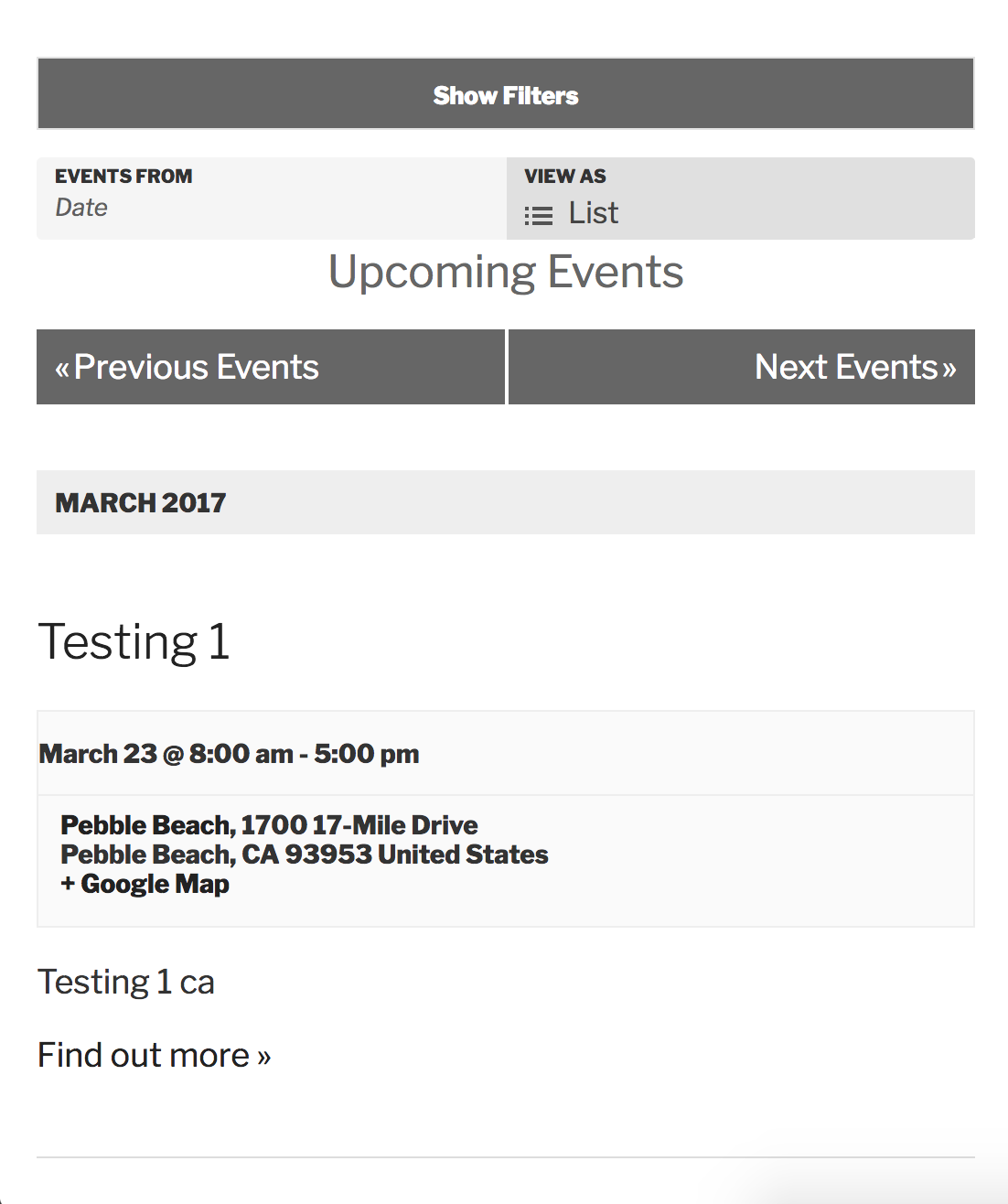
• “Show Filters/Visa filter” text/button below datepicker/view option selector
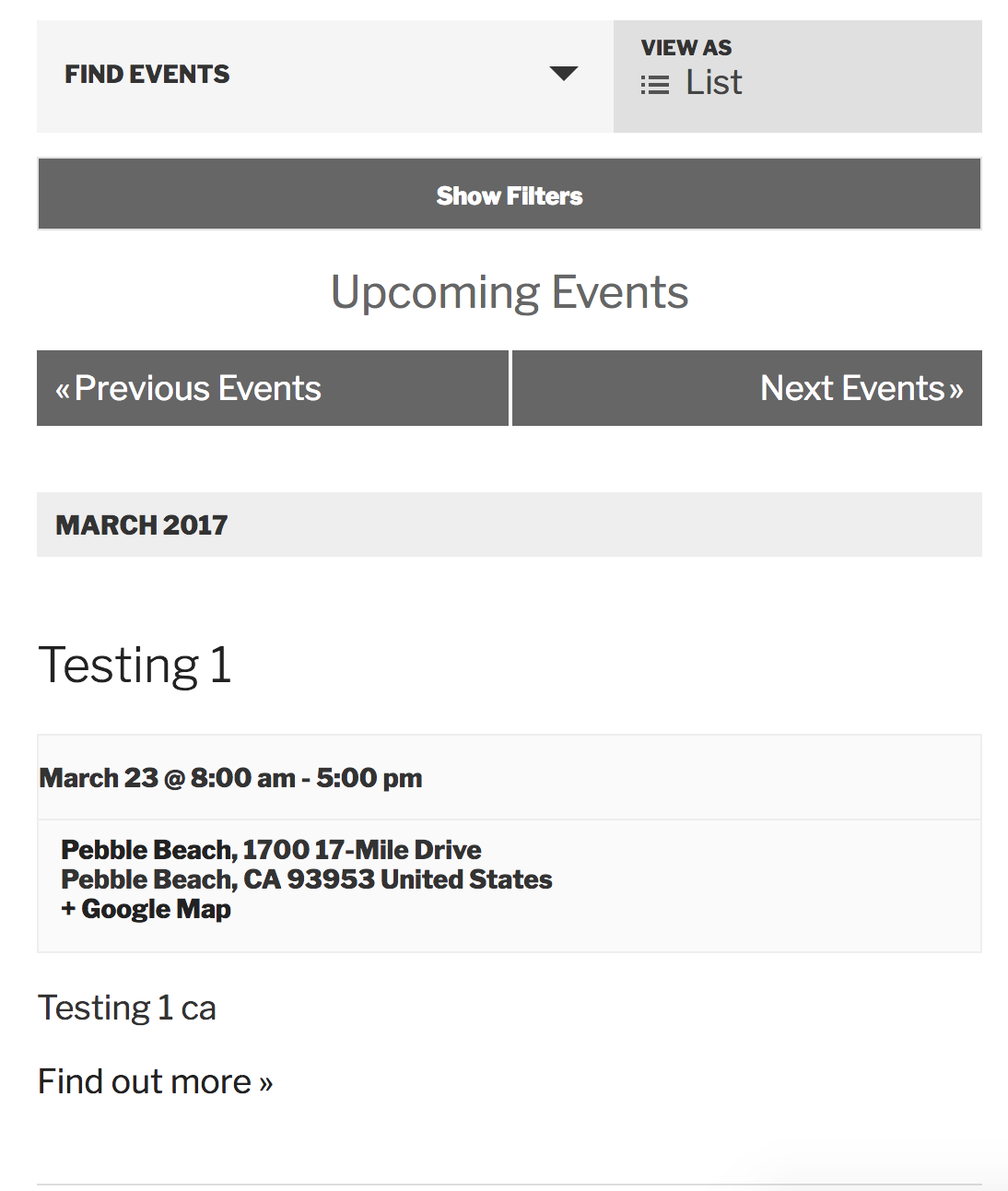
If this is the case, I’m honestly not certain whether it’s by design or a bug. I’ve reached out to the dev team in hopes of learning more information. Once I hear back I’d be happy to update you here in this thread.
If it’s something you need changed immediately, you might want to look into either altering a setting related to the bug, such as changing Events > Settings > Filters > Filters Layout from “Horizontal” to “Vertical” or unchecking the Events > Settings > Display > Disable the Event Search Bar box.
Another option is to downgrade to the version that best works for you. You can refer to the plugin changelogs and Release Notes for more info.
Last would be to do a template override as explained in our Themer’s Guide. You’ll basically be manipulating the content as you see fit and it’s usually just a matter of copying and pasting. A great visual example can be found by watching this Customizing WordPress #1 – How To Create A Child Theme by LevelUpTuts YouTube video.
Hopefully this helps and thanks for hanging tight while we get this bug addressed. Have a great afternoon 🙂
ModeratorWelcome back,
I get an error message that says
” Oops! Something went wrong.This page didn’t load Google Maps correctly. See the JavaScript console for technical details.”Please review our Setting Up Your Google Maps API Key tutorial to ensure your Google Maps API key is set up properly. If you’re still seeing errors/warnings in your browser console, you may want to see if your theme and any other plugins which rely on Google Maps are the cause of conflict.
I went ahead and created a short screencast going over the Tribe Events Bar in detail, so please take a moment to review my explanation on how the feature works, current known issues, etc. We have multiple bug and feature reports related to the Tribe Events Bar which I’ve linked to this forum thread. Our devs review each before beginning work on fixing faulty code, so your input is appreciated.
I don’t have any timeline when these fixes/features will be available, but we’ll update you here in this thread in addition to the plugin changelogs and Release Notes.
<-Does the zip code feature work?
Yep! I have a venue who’s zip code is 93953. I entered it into the “Near” field and the plugin displayed all events held in/near the 93953 zip code:
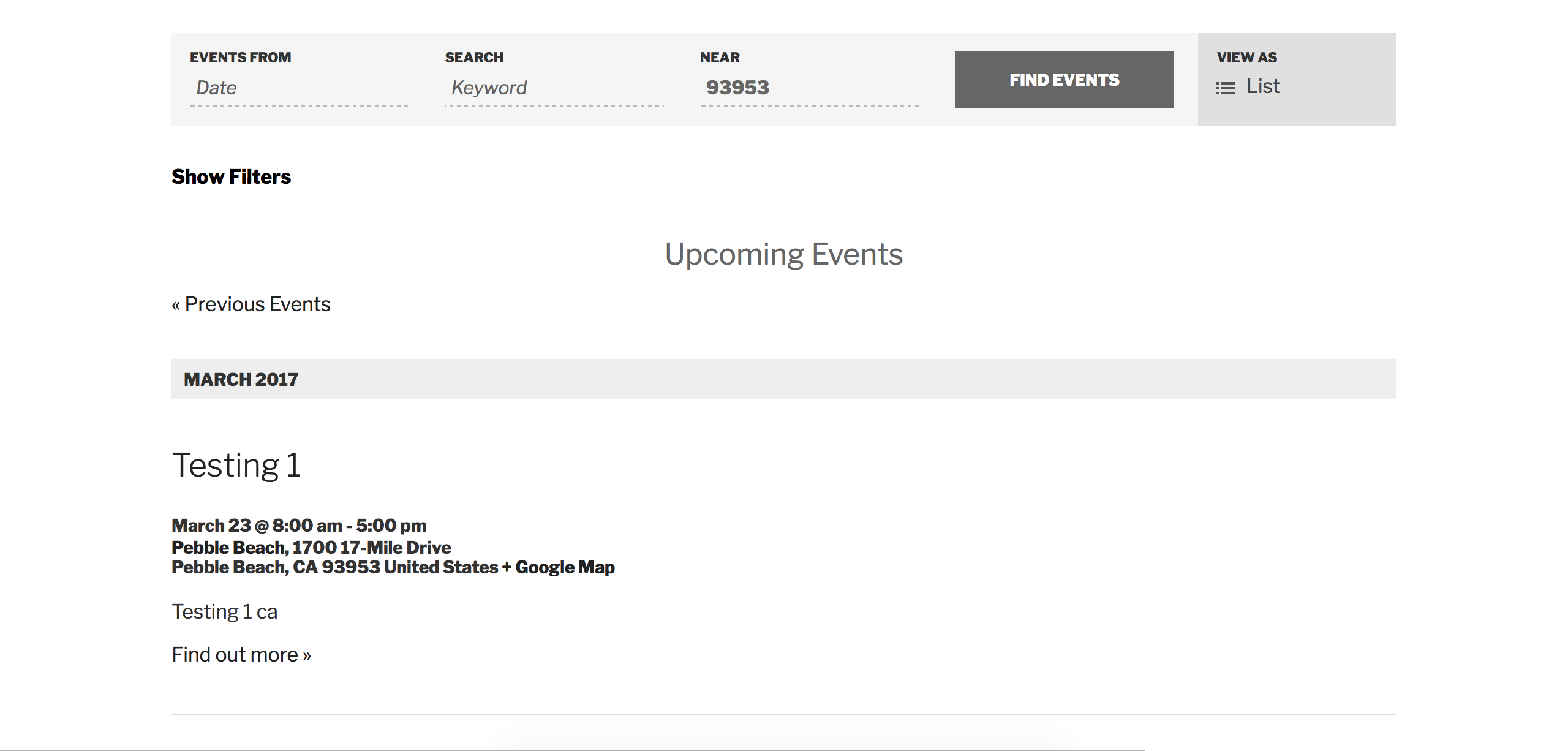
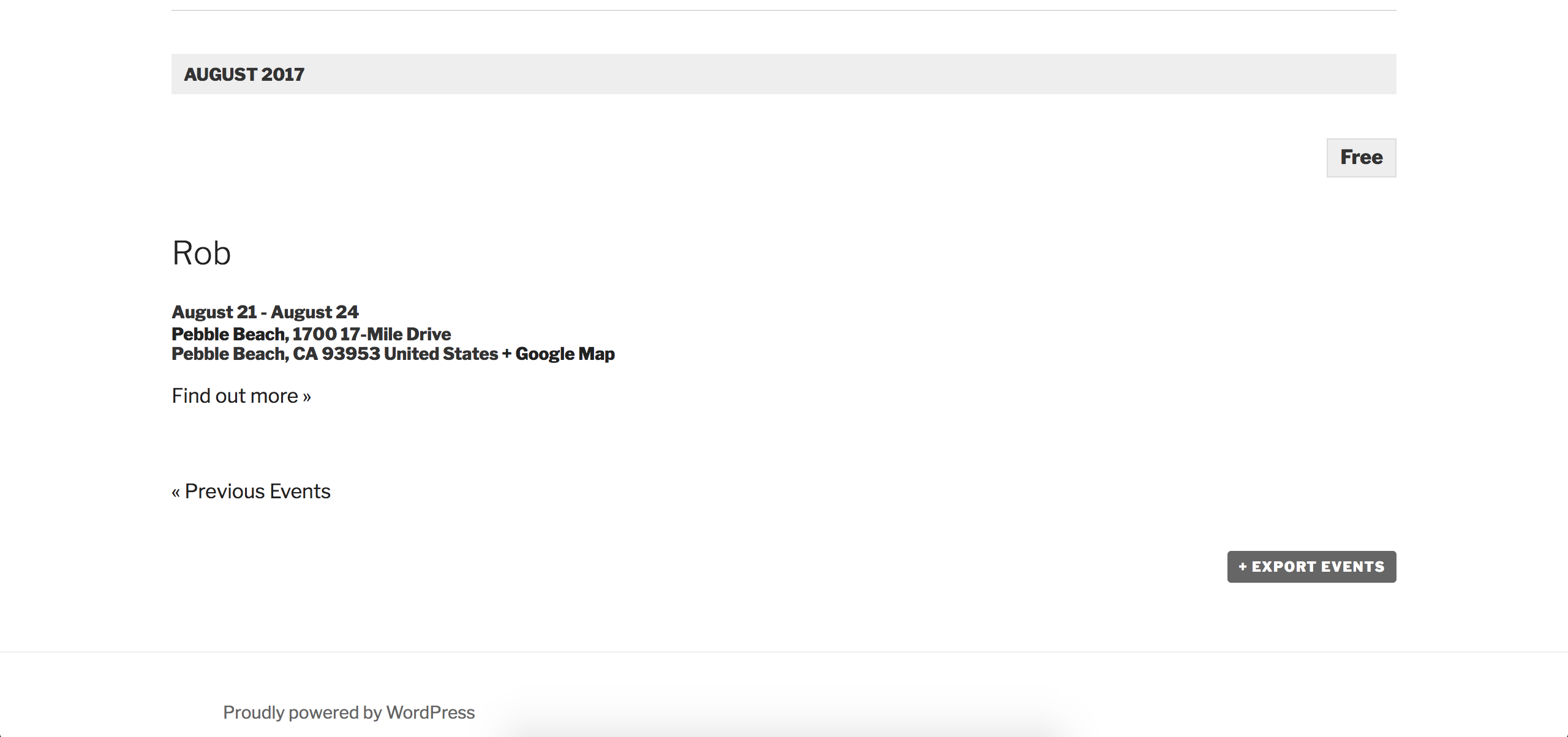
Check out our UserVoice Feature Ideas should you want/need to submit any feature requests. We’re not able to assist with customizations beyond what is already included in the plugins. Please review our What support is provided for license holders? Knowledgebase article for more information. Thanks again for working with me on the issue and let me know if you get the Google Maps issue squared away.
Cheers!
-
AuthorPosts