

Forum Replies Created
-
AuthorPosts
-
January 12, 2017 at 4:12 pm in reply to: Recurring Event Instances Not Being Created Consistently #1217762
Hunter
ModeratorHey Matthew,
Thank you for the update. I can confirm the plugin is not creating the second event in a series when attempting to create a series of two events on the same date at different times. I’ve updated the existing ticket with this information and once I hear back, I’ll update this thread with what I learn.
Sorry things still aren’t working properly and thanks for hanging in there while we get everything squared away. Cheers 🙂
ModeratorHey Dan,
Sorry to see you’re experiencing issues. Please create a separate thread and we’d be happy to help further investigate. Please review the Testing for conflicts guide prior to opening the new thread.
Thanks and have a good afternoon 🙂
ModeratorHi and welcome 🙂
I went ahead and tested the behavior and can confirm the behavior you’ve described occurs, but I’ve narrowed down the source of conflict to the Filter Bar plugin. Before we can confirm you are experiencing the same bug, you’ll need to a) update to the latest versions of our plugins and b) review our Testing for conflicts guide and reply back with what you learn.
I’ve created a bug report and added this forum thread to the ticket which helps expedite the process of getting a fix included in an upcoming release. I don’t have a precise date when it will be available, but please stay tuned to our Release Notes and the plugin changelogs for more information. Thanks again and let me know if you’ve got any additional questions or comments. Cheers!
ModeratorHi and welcome 🙂
Thank you for your purchase! Please review our Using Recurring Events in Events Calendar PRO Knowledgebase article and if you still have questions or need further clarification, let me know and I’d be happy to help further assist.
Thanks again and have a great afternoon. Cheers!
January 12, 2017 at 11:20 am in reply to: Events calendar is conflicting with my disqus plug in #1217579ModeratorHi and welcome,
Sorry to see you’re having troubles and thank you for your purchase. Before we begin, can you please send over the System Information as a private reply for each site you’re experiencing the conflict on. I’ll also need you to confirm you’ve reviewed our Testing for conflicts guide to see if the issue is reproducible. Please do this for both site.
Please make sure WP_DEBUG and WP_DEBUG_LOG are enabled on your site’s wp-config.php file. Any errors will display at the top of your page as you try to reproduce the conflict. I’d also use your browser’s ‘Inspect’ tool to see if any errors display in the console. Note what you find and please include it in your reply.
We have a known bug which results in the WordPress comments disappearing when Community Events 4.4 is active, so let me know if this is what you find during your testing. The good news is, the bug is marked at Priority level 1 and a fix should be included in the next maintenance release. I don’t have a concrete date when that will be, but keep your eyes on the plugin changelogs and our Release Notes.
I do want to point out that we don’t support conflicts with themes or plugins by other authors. For more information, please review our What support is provided for license holders? Knowledgebase article.
Keep me updated with what you find out and have a great rest of your day. Cheers!
ModeratorThank you for the update and sharing the System Information with me. What do you have the ‘Status‘ set to when importing via the Events > Import screen? See screenshot below for reference.
 Moderator
Hey @Jim,
Sorry to hear you’re experiencing similar behaviors. Please create a separate thread and we’d be happy to help further investigate. Thanks and have a great evening 🙂
ModeratorPlease set up an import the way you’ve been doing thus far and provide a screenshot of the Events > Import screen. See screenshot below for example. I’ll also need the links you’re attempting to import events from and a screenshot of your Events > Settings > Imports screen. Once I have this information, I can test to see if I experience the same results.
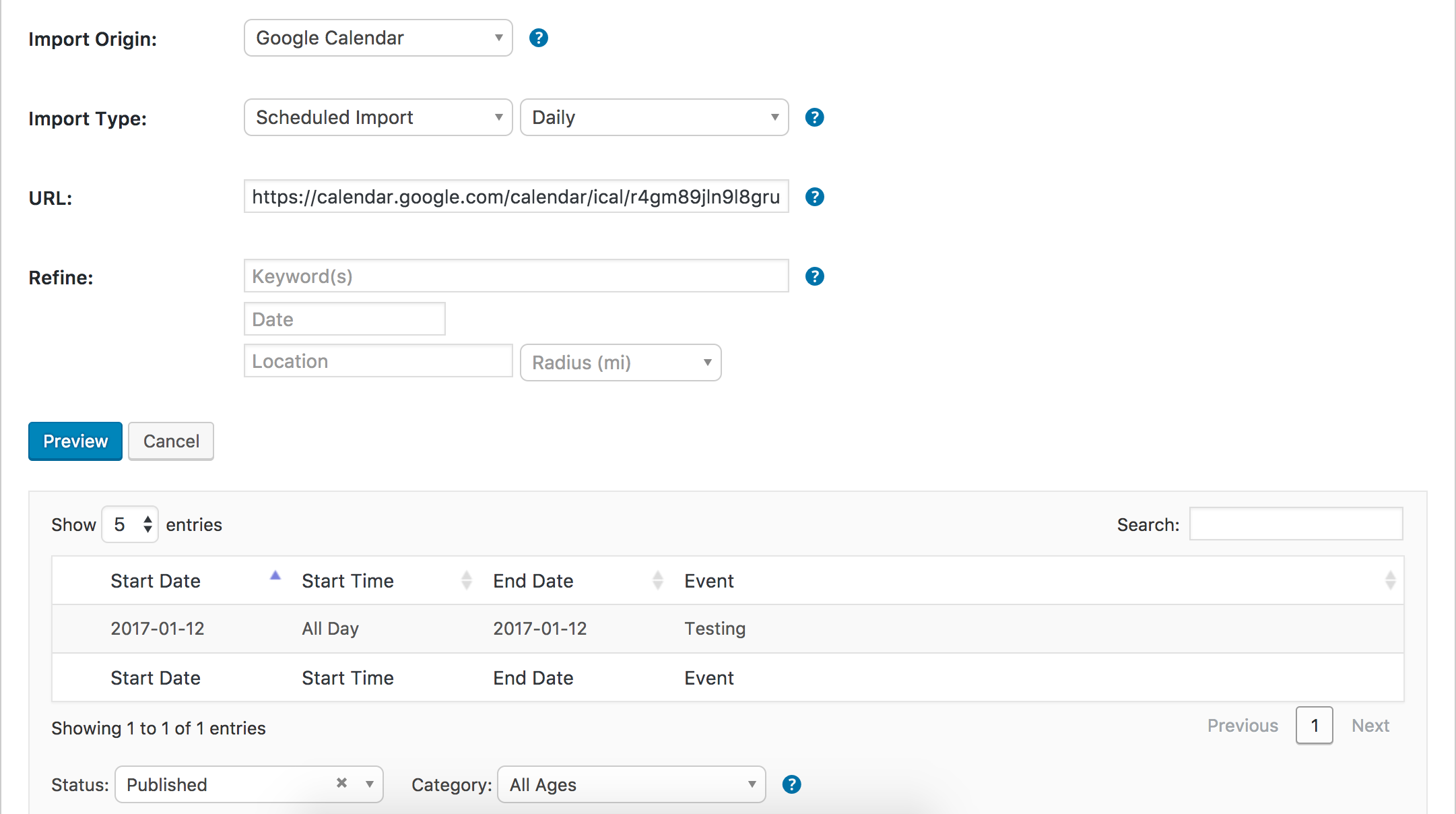
Thanks and have a good evening 🙂
ModeratorHello,
Can you share the System Information as a private reply for your dev site? I just set up a test event with a ticket and a text attendee ticket fieldset. After completing the checkout process (I use WooCommerce for my E-commerce platform), I am able to see the attendee meta in the attendee report page.
Thanks and take care 🙂
ModeratorThank you for understanding and being so patient while we worked to identify the conflict and get it logged! I’ll mark this thread as ‘Pending Fix‘ for the time being. We typically come back to these threads and update users when issues have been resolved, but a sure-fire way to know for certain is by checking our Release Notes and the plugin changelogs regularly. Thanks again and have a great rest of your week. Cheers!
ModeratorHey Bill,
Thank you for sharing the photo with me! Looks like a great time and whoever was in charge did an amazing job! I’ve attached a revised copy of the functions.php file you shared with me. At the bottom, it includes the code which should hide recurring events in photo view. Please give it a shot and let me know if it works out.
Click HERE to download file
Cheers!
January 11, 2017 at 4:19 pm in reply to: Events not showing after upgrade from 2.0.11 to 4.3.5 #1217053ModeratorWelcome back,
Thank you for the update and I’m sorry to hear things didn’t go well. Your best route is to search our forums for any examples of this happening and hopefully you’re able to find a solution. It’s not uncommon for this kind of behavior to occur after so much time between plugin updates. I really wish I could dedicate more time on the matter. Please review our What support is provided for license holders? Knowledgebase article for more information.
When testing, make sure WP_DEBUG and WP_DEBUG_LOG are enabled on your site’s wp-config.php file. Any errors will display at the top of your page as you try to reproduce the conflict. Your browser’s ‘Inspect’ tool will also display any errors in the console.
It might be best you set up a fresh WordPress installation where you can fully troubleshoot the issue. Make sure you have only the default WordPress theme, The Events Calendar, and PRO installed and activated on the test site. Please review our Using One License for Live and Dev Sites for more information.
Lastly, refer to Our Favorite Developer Plugins to see which plugins we recommend to help troubleshooting. Good luck and hopefully you can get things squared away quickly. Cheers!
ModeratorHello,
That appears to be a product page rather than an event page. Have you added an event with tickets? Again, please review our Making Tickets and New User Primer: Event Tickets & Event Tickets Plus Knowledgebase articles and let me know if you’re able to successfully bring up an event with tickets.
These might also come in handy:
https://theeventscalendar.com/knowledgebase/plugin/event-tickets/
https://theeventscalendar.com/knowledgebase/plugin/event-tickets-plus/Cheers!
ModeratorWelcome back,
I assure you I downgraded your Multisite license to a Personal license shortly before I responded on January 9, 2017. You should have seen the option to renew your Personal license for PRO in your License Keys page.
If you would like, you can get a Refund for the purchase you made on January 11, 2017 and renew your existing license at a discount. If this is what you would like to do, please visit the Refunds page and complete the form. Once you’ve done that, visit your License Keys page and select the ‘RENEW PERSONAL LICENSE‘ button. (see screenshot below)

There is a possibility you’re experiencing a theme and/or plugin conflict. Please review our Testing for conflicts guide to see if you are able to update.
Please review the Knowledgebase articles below for more information:
- https://theeventscalendar.com/knowledgebase/finding-and-inputting-your-license-key/
- https://theeventscalendar.com/knowledgebase/moving-your-license-keys/
It might be best you open a thread in the Events Calendar PRO support forums so we have the option to reply privately. For example, I need your System Information sent in a private reply, but the Pre-Sales Questions forums doesn’t allow for private replies.
If you are still having troubles after reviewing the articles linked to above, please create a new thread in the PRO support forums. Please make sure you’ve reviewed our Testing for conflicts guide before replying to this post or creating a new one.
Lastly, until we get this issue resolved, you can always download the latest version of PRO from your Downloads page and update the plugin manually.
Thank you and please keep me updated. Cheers!
January 11, 2017 at 3:43 pm in reply to: Theme conflict – Perth Pro vs Events Calendar Pro's latest update #1217025ModeratorThank you for letting me know the issue has been resolved and also for the kind words! Please feel free to create a new thread if you have any more questions or comments. Take care!
-
AuthorPosts