

Forum Replies Created
-
AuthorPosts
-
Hunter
ModeratorAny features/functionalities not included with the plugins will require either the use of additional plugins and/or custom code, which we’re unable to provide. Additionally, seeing this relates to a theme customization, there’s very little support I’m able to provide.
Your best bet is to explore the Themer’s Guide to familiarize yourself with creating/saving customizations. I’d also explore the following resources pertaining to styling/customizing event-related content:
- https://theeventscalendar.com/knowledgebase/pro-color-customizer
- https://theeventscalendar.com/knowledgebase/themers-guide
- https://theeventscalendar.com/knowledgebase/stylesheets-and-page-templates
- https://theeventscalendar.com/knowledgebase/wp-admin-settings-overview
- https://theeventscalendar.com/knowledgebase/changing-fonts-and-colours
- https://css-tricks.com/methods-overriding-styles-wordpress
One last idea is to submit features you’d like seen incorporated into future releases. Check out our UserVoice Feature Ideas for complete details.
Good luck and have a great week 🙂
ModeratorHi Cappy,
Thank you for sending the link over. As George mentioned in his response, you’d need to either build the customizations yourself or hire someone to help out. I’d also like to reiterate the option to add your suggestion to our UserVoice Feature Ideas.
If I have say 100 meetup groups I’d like to setup to import events from, is there a quicker way to set those up? To the database perhaps? Or do they have to be inputed one by one?
At this time, you’ll need to create a new import for each group you want events imported from. This is yet another case where a) you can either build customizations/hire a developer and/or b) submit a detailed writeup of what features you envision in a future release to the UserVoice Feature Ideas page.
Please let me know if I’ve answered your questions and thanks for choosing us for your events calendar needs. Until next time 🙂
ModeratorHey Ben,
I took a look at your site and notice the issue you’re concerned about. The behavior may be the result of the bug which we’re aware of, but you might also need to apply some custom CSS to get things looking/feeling how you prefer.
Our What support is provided for license holders? Knowledgebase article states we’re unable to assist with theme conflicts/customizations, so you’ll need to handle the heavy lifting yourself. Our demo site doesn’t appear to have the same issues as your site.
Check out the helpful resources related to CSS:
• Using Google Chrome Developer Tools
• Customizing WordPress #2 – Using Chrome Developers Tools
• Our Favorite Developer Plugins
• Handy WordPress Web Developer Extensions & ToolsPlease continue to hang tight while we tidy up the faulty code related to the bug and best of luck with the style customizations. Cheers!
ModeratorGlad I could help out and hopefully I’ll see you around the premium plugin forums. Take care!
ModeratorHi Diego,
This thread was automatically closed, but I wanted to touch base with you on your initial issue/inquiry about using shortcodes on the back-end of your site.
Using the shortcode from within the admin environment certainly counts as atypical usage of this feature. Numerous things our views look for and depend upon – body classes, hooks for various assets etc – are likely to be absent in this environment. After further review we feel this is best treated as a custom development task that we regrettably cannot provide further assistance with at this time.
What I would do in this situation is visit our UserVoice Feature Ideas and submit your request. We regularly incorporate user ideas into releases, so yours could be next!
I hope this clears up any confusion on the matter and if you’re still experiencing any issues, please create a separate thread and we’d be happy to further assist. Enjoy what’s left of your weekend! Cheers 🙂
ModeratorHello again ?
This thread had been automatically closed, but I’ve reopened it due to new findings. My apologies, but it seems the bug I had linked your thread to apparently was related to our iCal Importer plugin which was retired and it’s features incorporated into Event Aggregator.
Can you update to the latest version of TEC (check your Downloads page) and let me know if you’re still getting duplicate events? Be sure to revert back to the default WP theme and have TEC the only active plugin while testing.
Please make sure WP_DEBUG and WP_DEBUG_LOG are enabled on your site’s wp-config.php file. Any errors will display at the top of your page and in your error log as you try to reproduce the conflict. I also recommend right-clicking your mouse and opening the ‘Inspect’ tool to see if any errors display in the console. Note what you find and please include it in your reply.
Sorry I was originally mistaken and please keep me updated. Take care ?
ModeratorHello again, Joelle 🙂
My apologies, but it seems the bug I had linked your thread to apparently was related to our iCal Importer plugin which was retired and it’s features incorporated into Event Aggregator.
Can you update to the latest version of TEC (check your Downloads page) and let me know if you’re still getting duplicate events? Be sure to revert back to the default WP theme and have just TEC active while testing.
When testing, please make sure WP_DEBUG and WP_DEBUG_LOG are enabled on your site’s wp-config.php file. Any errors will display at the top of your page and in your error log as you try to reproduce the conflict. I also recommend right-clicking your mouse and opening the ‘Inspect’ tool to see if any errors display in the console. Note what you find and please include it in your reply.
Sorry I was originally mistaken and please keep me updated. Take care 🙂
March 25, 2017 at 9:57 pm in reply to: Upconing Events not displaying below Events Calendar Widget #1260156ModeratorHello,
I took a look and got a plethora of issues when attempting to select an event on your mini cal widget. The best way to identify where the conflict is coming from is to review the Testing for conflicts guide.
Please make sure WP_DEBUG and WP_DEBUG_LOG are enabled on your site’s wp-config.php file. Any errors will display at the top of your page and your error log as you try to reproduce the conflict. I also recommend right-clicking your mouse and opening the ‘Inspect’ tool to see if any errors display in the console. Note what you find and please include it in your reply.
I also noticed a error/warning relating to missing Google Maps API keys. Review our Setting Up Your Google Maps API Key tutorial to ensure everything is set up properly.
Thanks and have a pleasant rest of your evening. Cheers!
ModeratorMind sending me a screenshot of the ‘TIME & DATE‘ section for the add/edit event screen you’re referring to? Please include a screenshot of your Events > Settings > Display > Date Format Settings screen too.
Have you checked to see the problem is 100% fault of our plugin(s)? The best way to identify the specific source of conflict is to review the Testing for conflicts guide. Let me know if that’s a possibility and what the results are.
Please make sure WP_DEBUG and WP_DEBUG_LOG are enabled on your site’s wp-config.php file. Any errors will display at the top of your page and in your error log as you try to reproduce the conflict. I also recommend right-clicking your mouse and opening the ‘Inspect’ tool to see if any errors display in the console. Note any errors experienced during your testing in your reply.
Once I’ve got that information I’ll have a better idea on how to proceed. Enjoy the rest of your weekend! Cheers 🙂
ModeratorHello,
I you visit our demo site and select the “Show Filters“, it will bring up the Filter Bar to allow users to further filter events. The list of organizers is in alphabetical order:
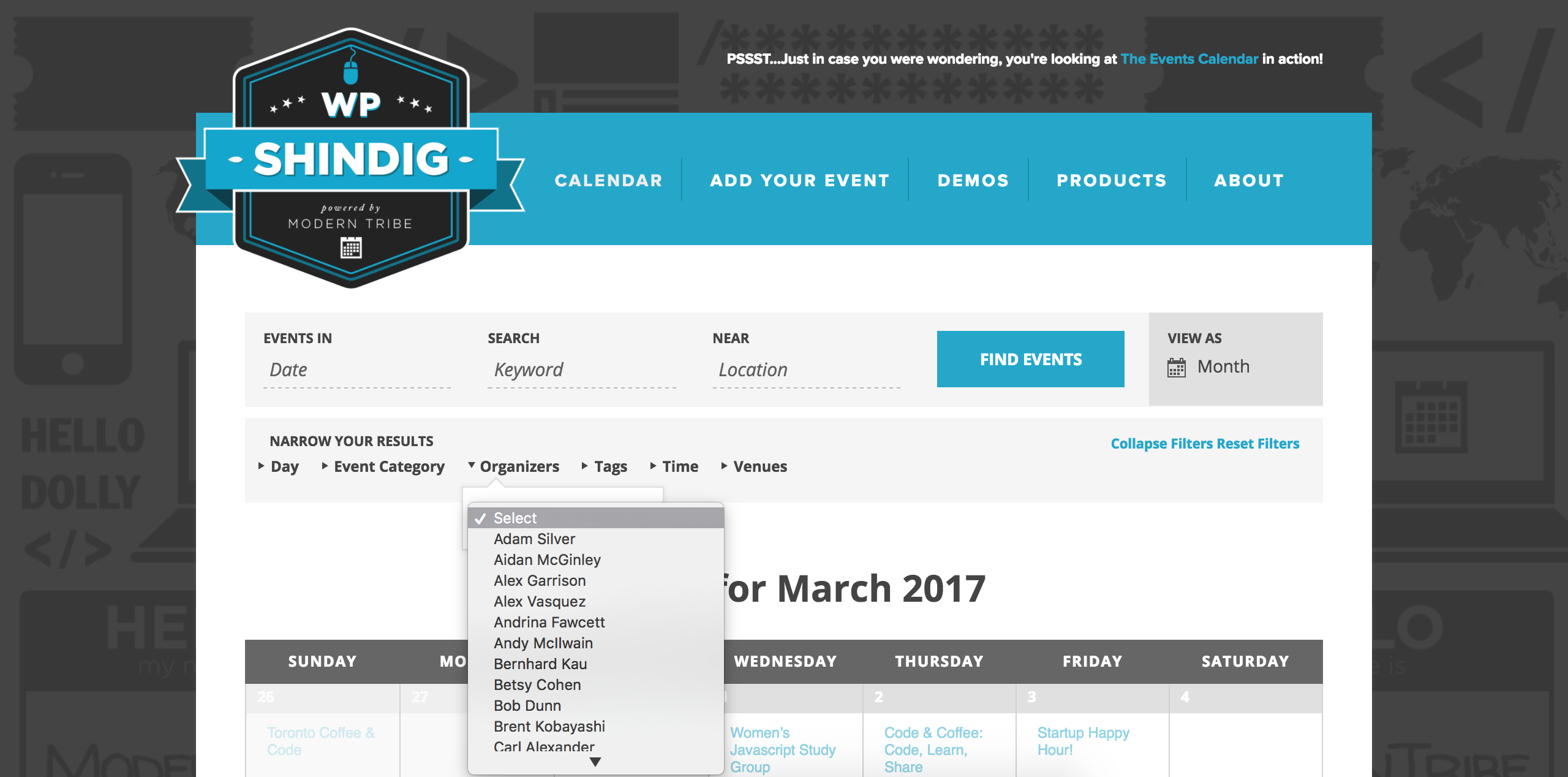
I took a quick look at the site you linked to and it doesn’t appear to be using our plugins. While we include many different options (example 1, 2) aimed to make the plugins “fit in” with your theme, there might be some instances where you need to create customizations as outlined in our Themer’s Guide and hopefully you’re a little familiar with CSS.
The closest I could find that resembled the site you displayed is our demo site’s Photo view. With the use of our shortcodes, you could probably come up with a way list organizers (Speakers, in your case) in alphabetical order and mimic the look/feel of the site you shared with me. Here is all of our shortcode-related documentation which is only available with a PRO license:
- PRO Widget Shortcodes
- Embedding Calendar Views with the [tribe_events] Shortcode
- Inserting Calendar Content into Posts or Pages
- Embedding Single Events with the [tribe_event_inline] Shortcode
Let me know if this helps and have a great weekend. Cheers!
ModeratorHello,
We are unfortunately unable to provide support through our Pre-Sales forum channel, but you can head over to The Events Calendar WordPress.org support forums for assistance and answers.
If you have a PRO license, you can log into your account and get assistance through the PRO forums.
Thanks for understanding and good luck resolving your issue. Have a good day!
March 25, 2017 at 9:41 pm in reply to: Roll-Over Popup on Calendar no longer clicks through to event #1260150ModeratorHello,
There might be the possibility you need to update any custom templates you have residing in [your-themes]tribe-events/ folder if you’ve got one. I see you checked ‘Yes’ to reverting back to the default WordPress theme and deactivating all plugins other than ours as instructed in the Testing for conflicts guide, but can you please confirm this? It would also help if you could include your System Information as a private reply.
When users have custom templates they are responsible for updating them to match changes made in new releases – of course, we try to minimize disruption as far as possible. Also, we try to clue them in to things they should look for in our Release Notes, and the plugin changelogs, by providing useful data in Events > Help > Recent Template Changes. If you navigate there, you should see a list of recently updated templates (which changes each release).
Try creating a custom template override as explained in our Themer’s Guide. Copy the contents of /the-events-calendar/src/views/month/tooltip.php and replace with the code from this snippet. Save as [your-theme]/tribe-events/month/tooltip.php.
I can’t do more than what I’ve posted above, so best of luck and if you need a visual example of the process, check out this Customizing WordPress #1 – How To Create A Child Theme by LevelUpTutse YouTube video.
Cheers!
ModeratorWelcome back,
I hope your weekend is going well thus far. Can you visit Events > Settings > APIs and hit the “Remove Authorization” button:
Once the pages refreshes, you should see a, “Success! You have deauthorized your Eventbrite Application Key.” notice at the top of your page. Navigate back down to the bottom of that page and hit the “Get Authorization” button:
You’ll be brought to a page on Eventbrite with text resembling:
“Allow Your Site by Your Name/Entity to access your Eventbrite account?
Eventbrite takes privacy very seriously. Before allowing access to your account, please ensure that you trust Your Name with your data and that you initiated this request.
If you have questions or comments, please contact us.
By proceeding, you agree to the Eventbrite Terms of Service and Privacy Policy.Hit the “Allow” button:

Our New User Primer: Eventbrite Tickets and Configuring Eventbrite Tickets tutorials are the most helpful resources we have on the matter, so please review them in-depth to ensure things are set up properly. If you run into any issues, review the Testing for conflicts guide.
Please make sure WP_DEBUG and WP_DEBUG_LOG are enabled on your site’s wp-config.php file. Any errors will display at the top of your page as you try to reproduce the conflict. I also recommend right-clicking your mouse and opening the ‘Inspect’ tool to see if any errors display in the console. Note what you find and please include it in your reply.
Cheers!
ModeratorHi and welcome,
Sorry to see you’re having troubles. I’d be happy to help. To clarify, you’re referring to importing events from Meetup.com using Event Aggregator, correct?
I have read through the forum and I see people are having the same issue I am having in regards to private meet up events and lack of detail including location.
Can you share links to threads of users experiencing the same issues?
It would be great to assign to default location to imports from certain meet up groups. For example, if I create LA bicycle meet up import in the backend, and it can’t find any location information for an event, it simply applies a default location I specify which would be Los Angeles in this case. That way the events still show up when doing an area search.
We appreciate all types of constructive criticism. The best venue to submit requests is our UserVoice Feature Ideas, so please take a moment and add your recommendations there.
PS, is it possible to do a bulk import of meet up groups? Maybe directly to the db?
Other than running a scheduled import, there is no way to add a list of events you’d like imported from Meetup.com at this time. For example, if I enter https://www.meetup.com/ChandlerPublicLibrary/ into the Events > Imports > New Imports > URL field (screenshot below), I’m able to set up an import to regularly import events Chandler City Public library has published to Meetup.com.
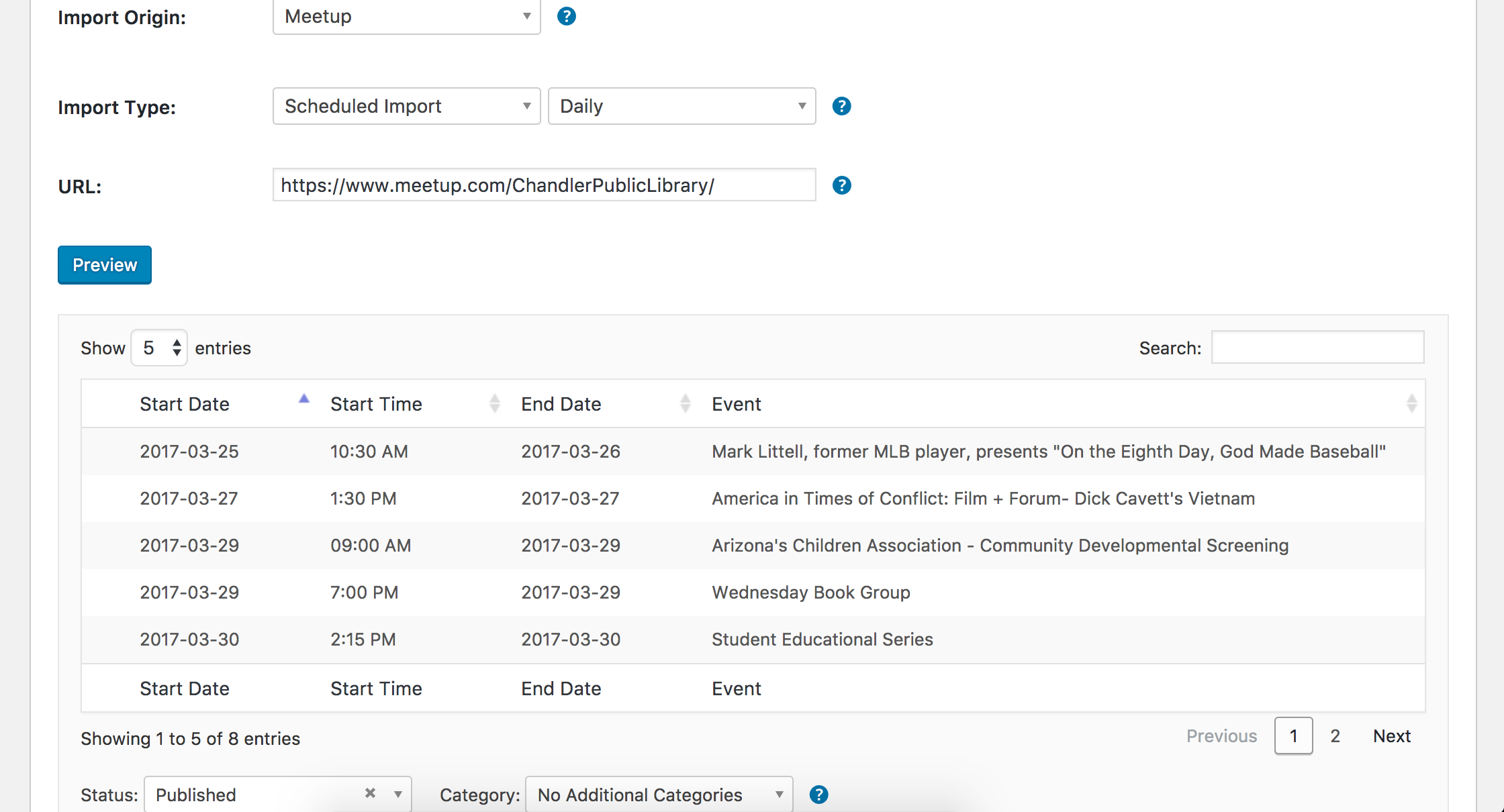
The ability to add a list of events you’d like imported from Meetup is a feature I see worth adding to our UserVoice Feature Ideas.
Let me know if this helps clarify the current features and limits of Event Aggregator and have a pleasant rest of your day. Cheers!
ModeratorHello and welcome,
I hope you’re having a great weekend thus far. At this time, it is not possible to import events based on Facebook categories. Please review our Importing events from Facebook and Event Aggregator: Importing Events from a Feed or URL, and Event Aggregator Import Settings tutorials for more information. We welcome requests via our UserVoice Feature Ideas page.
I hope this helps answer your question and let me know if you have any additional questions or comments. Have a great rest of your weekend. Cheers!
-
AuthorPosts