

Forum Replies Created
-
AuthorPosts
-
Hunter
ModeratorMy apologies for the misunderstanding. Are you familiar with our PRO Recurring Events Knowledgebase article? It goes over the options available for creating multiple dates/events for each trip.
If you do run into any issues/conflicts, reply back with as much information as possible and I’d be happy to further investigate. Hopefully we’re on the same page now and let me know if this response helps 🙂
ModeratorHey Jeff,
Thanks for providing further clarification. I see you checked ‘Yes’ to reverting back to the default WordPress theme and deactivating all plugins other than ours as instructed in the Testing for conflicts guide, but can you please confirm this?
We have a logged bug which might be the contributing factor to the issue. Is there any way you can downgrade to the version 4.4.3 and possibly 4.4.2. Visit Downloads page to access prior versions.
Last idea I’d lik to bring up: if you have custom templates (saved in [your-theme]/tribe-events), you are responsible for updating them to match changes made in new releases. Visit Events > Help > Recent Template Changes for a list of recently updated templates.
Keep me posted with what you find out and have a good rest of your day. cheers!
ModeratorVanina ,
Thanks for the clarification, I now understand what you’re wanting to do, but it is not possible to do so how you’ve described. You would need to create individual events for compatible but I each event and add the ticket types, stock, pries etc.
I know this is not the ideal workflow and we have plans to incorporate RSVP/ticketed events for recurring events, I’ve added this forum thread to the ticket which helps expedite the process of getting a fix included in an upcoming release. We also have a popular UserVoice submission relating to your request, so please take a moment and “upvote” it: http://tribe.uservoice.com/forums/195723-feature-ideas/suggestions/3685663-recurring-event-support-for-wootickets You could also proactively create any tickets you’ll need under the Events > Ticket Fieldsets tab.
I don’t have a precise date when it will be available, but please stay tuned to our Release Notes and the plugin changelogs for more information. Thanks again and let me know if you’ve got any additional questions or comments. Cheers!
ModeratorThank you for the update. I’ll provide all content relative to translating our plugins:
• https://theeventscalendar.com/support/forums/forum/events/translation/
• https://theeventscalendar.com/knowledgebase/translating-the-events-calendar/
• https://theeventscalendar.com/knowledgebase/changing-the-language-on-your-calendar/
• https://theeventscalendar.com/knowledgebase/adding-or-updating-a-translation/
• https://theeventscalendar.com/knowledgebase/change-the-wording-of-any-bit-of-text-or-string/I’ve asked numerous times, so please review our tutorial on how to access your System Information and send it as a private reply.
When trying different options under the Events > Settings > Display tab, have you noticed any change in the behavior? IF you have created a page (WordPress > Pages > Add New) which has the same slug as what you’ve entered in the Events > Settings > General > Events URL slug field, you’ll need to delete the page,
I’d like to reiterate we’re limited on the level of support we can provide with theme conflicts. Hopefully my answer points to anything which might lead us in the right direction and we’ll go from there. Take care!
ModeratorHello,
Event Tickets/Event Tickets Plus and the PRO Recurring Events feature are not 100% compatible, therefore we are not able to support issues related to combining the features.
If I’ve misunderstood you, please provide more information and include exact step-by-step instructions on how to reproduce the behavior. It would also be helpful if you could review the Testing for conflicts guide so we can eliminate the potential of a theme and/or plugin conflict.
Finally, please include your System Information as a private reply. I look forward to getting this issue resolved and thanks for working with me on the matter. Cheers!
ModeratorHey Phil,
Sorry to see you’re having issues with tickets not being delivered properly. Just to make sure all your bases are covered, have you:
• Reviewed your WooCommerce email settings
• WooCommerce-Specific Ticket Settings
• Install/activate Easy WP SMTP to gain more power over emails sent from your WP siteIt might be best you set up a fresh WordPress installation where you can fully troubleshoot the issue. Make sure you have only the default WordPress theme and Modern Tribe plugins installed and activated on the test site. Please review our Using One License for Live and Dev Sites and Moving Your License Keys tutorials for more information.
When testing, please make sure WP_DEBUG and WP_DEBUG_LOG are enabled on your site’s wp-config.php file. Any errors will display at the top of your page and in your error log as you try to reproduce the conflict. I also recommend right-clicking your mouse and opening the ‘Inspect’ tool to see if any errors display in the console. Note what you find and please include it in your reply.
I checked our logged bug reports and am not seeing anything resembling what you’ve described, so as of now it appears to be an isolated incident. The extensive testing should lead to information which might help us solve the issue.
Keep me posted! Cheers 🙂
ModeratorHey Tom,
Thank you for reaching out and sorry to see you here under the circumstances. I compared what you’ve described and the links you shared with me to our bug reports and located one I believe is relevant to your situation. The bug description is as follows:
When a user adds a ticket with attendee information to the cart, then either switches to another PC or loses session information, then the ticket stays in the cart, but the attendee information is lost.
I searched each thread for “PayPal” and “Stripe” and this thread is the only one that mentions either. The user states the issue occurred with Stripe as well – so it may not be limited to PayPal.
I’ve added this forum thread to the ticket which helps expedite the process of getting a fix included in an upcoming release. I don’t have a precise date when it will be available, but please stay tuned to our Release Notes and the plugin changelogs for more information.
I’m unfortunately not seeing any temporary workarounds in the bug report notes. You could always downgrade to the version(s) that best work for your site until our devs can get the faulty code addressed. Unfortunately, the report doesn’t mention which version(s) this issue was introduced in.
I’ll mark this thread as ‘Pending Fix‘ in the mean time and update you with any information I learn relating to this issue. Thanks again and let me know if you’ve got any additional questions or comments. Cheers!
ModeratorHi and welcome 🙂
CSS is usually the way to go in this instance, but I wasn’t able to come up with a working solution in a timely manner, so what I’d do is copy the contents of /events-calendar-pro/src/views/modules/meta/additional-fields.php and paste them into a blank file. You can simply delete the “Other” text on line 18 which will yield the results you’re looking for.
<?php esc_html_e( 'Other', 'tribe-events-calendar-pro' ) ?>
Make sure and save this newly created file as [your-theme]/tribe-events/pro/modules/meta/additional-fields.php to avoid losing customizations. Refer to our Themer’s Guide for complete details. Due to your request relating to a theme customization, I’m not able to provide any assistance beyond this, so best of luck and thanks for choosing us for your events calendar needs. Cheers!
March 27, 2017 at 8:20 pm in reply to: Ticket start time not working with event specific timezone #1260626ModeratorHey Bradley,
Welcome to the premium plugin support forums. I imagine you’re already aware of it’s existence, but please bookmark our Working with timezones tutorial.
Can you send me a screenshot of your WordPress Settings > General > Timezone, Date Format, and Time Format screen? I’ll also need one of your Events > Settings > Display > Date Format Settings screen?
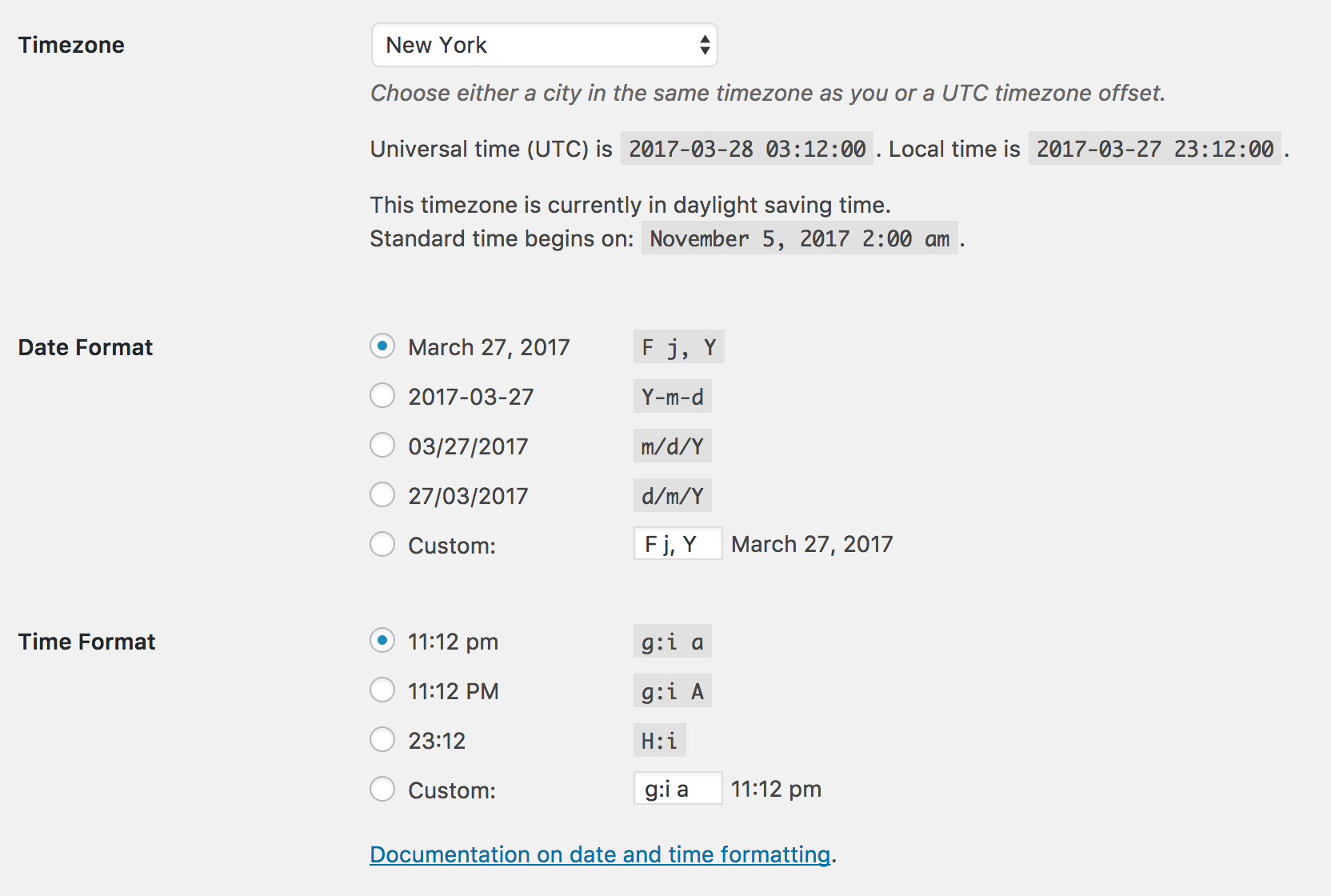
Do you see a section at the bottom of your Events > Settings > General screen similar to this?

One last request: please take a screenshot of the TIME & DATE and ticket section on the add/edit screen of an event showing this incorrect behavior. My goal here is to have my site and ticket settings exactly as you have them in hopes of recreating the issue.
Thanks and have a great rest of your day. Cheers!
ModeratorYippee! I’m more than pleased to hear things are working and should that situation change, feel free to create a new thread. Take care!
ModeratorThank you for the in-depth testing and response. I would be more than happy to go through the process from A to Z and can record my activity, including a link to a screencast, but until I’ve got the results from the Testing for conflicts guide, I’m not permitted to spend that time yet.
(as long as I remember to recheck “Leave this event associated with EVentbrite.com,” which gets unselected by default with every update)
Can you clarify which plugin(s) you’re referring to when you say, “this setting gets unselected by default with every update.”
Lastly, I just wanted to make sure you have entered your Eventbrite license key field in Events > Settings > Licenses. Thanks again and keep me posted with what you find out.
March 27, 2017 at 7:37 pm in reply to: "No editor could be selected" on front-end submission form #1260614ModeratorI also notice in your System Information you have both the Facebook Events and iCal Importer plugins installed on your site. If you’re not aware, we are in the process of retiring both of these plugins and replacing them with our newest plugin, Event Aggregator.
You have been granted a license for Event Aggregator and it is set to expire on the same date your Facebook Events/iCal Importer licenses expire. For information, please review our Moving to Event Aggregator Knowledgebase article and if you run into any issues along the way, please create a separate thread.
Thanks!
ModeratorThank you for providing the link. I’ve familiarized myself with the situation and it appears Brook never ended up logging any sort of report aimed to include the provided snippet into an upcoming version. I’ve since contacted him in hopes of learning more information, but many team members (including Brook) are on a team retreat, so it may be a little while until I hear back.
If you don’t hear from me within 7 days, feel free to reply back here on this thread and I should have more information for you. Until then, you’ll need to stick to manually updating that line of code each release.
Thanks again and enjoy what’s left of your day 🙂
March 27, 2017 at 7:26 pm in reply to: "No editor could be selected" on front-end submission form #1260611ModeratorWelcome back!
As I recently changed servers, I suspect this is the culprit. Will know shortly.
Please do keep me updated with what you learn. As aforementioned, you might want to check out Easy WP SMTP as it helps ensure emails get delivered properly. I use it on all my sites and it is super simple to set up and requires little to no maintenance. I imagine you’re already aware, but there are also records (MX) related to your hosting provider you need to ensure are correct.
We’d be happy to add the issue to our Known Issues page, but I would need to be able to reproduce the behavior on my test installation and file a bug report before doing so. Please send over exact step-by-step instructions on how to reproduce the conflict and I’d be happy to test things out.
If you are not running the latest versions of our plugins, can you please update them? Once you’ve done that, please retest as explained in the Testing for conflicts guide.
Please make sure WP_DEBUG and WP_DEBUG_LOG are enabled on your site’s wp-config.php file. Any errors will display at the top of your page and in your error log as you try to reproduce the conflict. I also recommend right-clicking your mouse and opening the ‘Inspect’ tool to see if any errors display in the console. Note what you find and please include it in your reply.
Once you’ve done all that, can you please send over your System Information as a private reply?
ModeratorI quickly skimmed over the site, hence the reason I said, “it doesn’t appear…” My apologies for making assumptions. I’m unsure of the licenses you currently own, but you’ll need to purchase the Filter Bar in order to gain the “Organizers” filter.
Sorry again if I caused any confusion and please let me know if this clears things up. Enjoy the evening 🙂
-
AuthorPosts