

Forum Replies Created
-
AuthorPosts
-
Hunter
ModeratorHi and welcome back,
Sorry to see you’ve run into troubles. Just so I understand the issue, you’re taken to a 503 Service Unavailable page when attempting to access your Community Events Add Events form – is this correct?
I see you’ve been a user for a little while now. Did this issue just start? Do you remember making any changes on your site prior to noticing the 503 issue? Have you recently updated Community Events?
It appears your System Information did not come through. Are you running the latest versions of our plugins? If not, can you please update to the most recent versions? Once you’ve done that, can you please review our Testing for conflicts guide and reply back with your findings?
Please make sure WP_DEBUG and WP_DEBUG_LOG are enabled on your site’s wp-config.php file. Any errors will display at the top of your page and in your error log as you try to reproduce the conflict. I also recommend right-clicking your mouse and opening the ‘Inspect’ tool to see if any errors display in the console. Note what you find and please include it in your reply.
I skimmed our logged bug reports but am not seeing anything relative to your issue, so please keep me posted and have a pleasant rest of your day. Cheers!
ModeratorHi and welcome back,
We have a bug logged and the notes match up to basically exactly what you’ve described, so I’ve added this forum thread to the ticket which helps expedite the process of getting a fix included in an upcoming release. I don’t have a precise date when it will be available, but please stay tuned to our Release Notes and the plugin changelogs for more information. Thanks again and let me know if you’ve got any additional questions or comments. Cheers!
ModeratorTry installing Easy WP SMTP as it helps ensure emails get delivered properly. I use it on all my test/live sites and it works wonders! Let me know how it goes.
ModeratorThank you for sending over the System Information. When you did the transition, in what order did you import the event-related content? E.g. events, venues, then organizers last. I’m not seeing any bug reports relating to 404 errors.
March 29, 2017 at 9:01 pm in reply to: "No editor could be selected" on front-end submission form #1261839ModeratorWelcome back,
I understand you’re aware of Event Aggregator’s existence, I just wanted to ensure you were aware they were unnecessary and need to be installed/removed and replaced with Event Aggregator.
Based on your last response, please review our What are the system requirements for your plugins? tutorial to ensure you’re using compatible versions of WP, PHP, etc in order for things to work properly.
In your site info, it appears you’re running WordPress version: 4.1.0. which looks like it was released in December 2014. If that’s the case, it might be best you update not only WordPress, but any plugins you’re using to lessen the chance for conflict and maximize the potential for each software. I also see Community Events version 4.4.2 while the latest version is 4.4.3. It looks like PRO is also running an outdated version, so double-check all plugins are running their latest versions.
Are you familiar with setting up a local environment such as MAMP or XAMPP where you can spin up a fresh WP install to test things out before deploying them to live environments? I recommend doing so so you can isolate if both the Event Aggregator-related and Community Events-related are server-related issues. If you don’t mind me asking, what server/hosting company were you on and which one are you switching to?
If you decide to set up a test site,
please make sure WP_DEBUG and WP_DEBUG_LOG are enabled on your site’s wp-config.php file. Any errors will display at the top of your page and in your error log as you try to reproduce the conflict. I also recommend right-clicking your mouse and opening the ‘Inspect’ tool to see if any errors display in the console. Note what you find and please include it in your reply.While Event Aggregator has had it’s issues, none have been so detrimental that we’ve had to scrap the project or anything of that nature. The majority of failed imports you’ve read about on the forums are merely a case of imports that didn’t run initially but did so at a later time. EA uses wp_cron to “fire” the scheduled imports, so if there aren’t any visits to your site when an import is scheduled to run, it will not run.
As of right now, I’m not able to reproduce any behaviors you’ve shared with me nor locate any bugs I feel are relevant to your situation. I see you’re using Autoptimize. While it’s a great plugin, it could be the cause of conflict. Try excluding the “Add event” page:
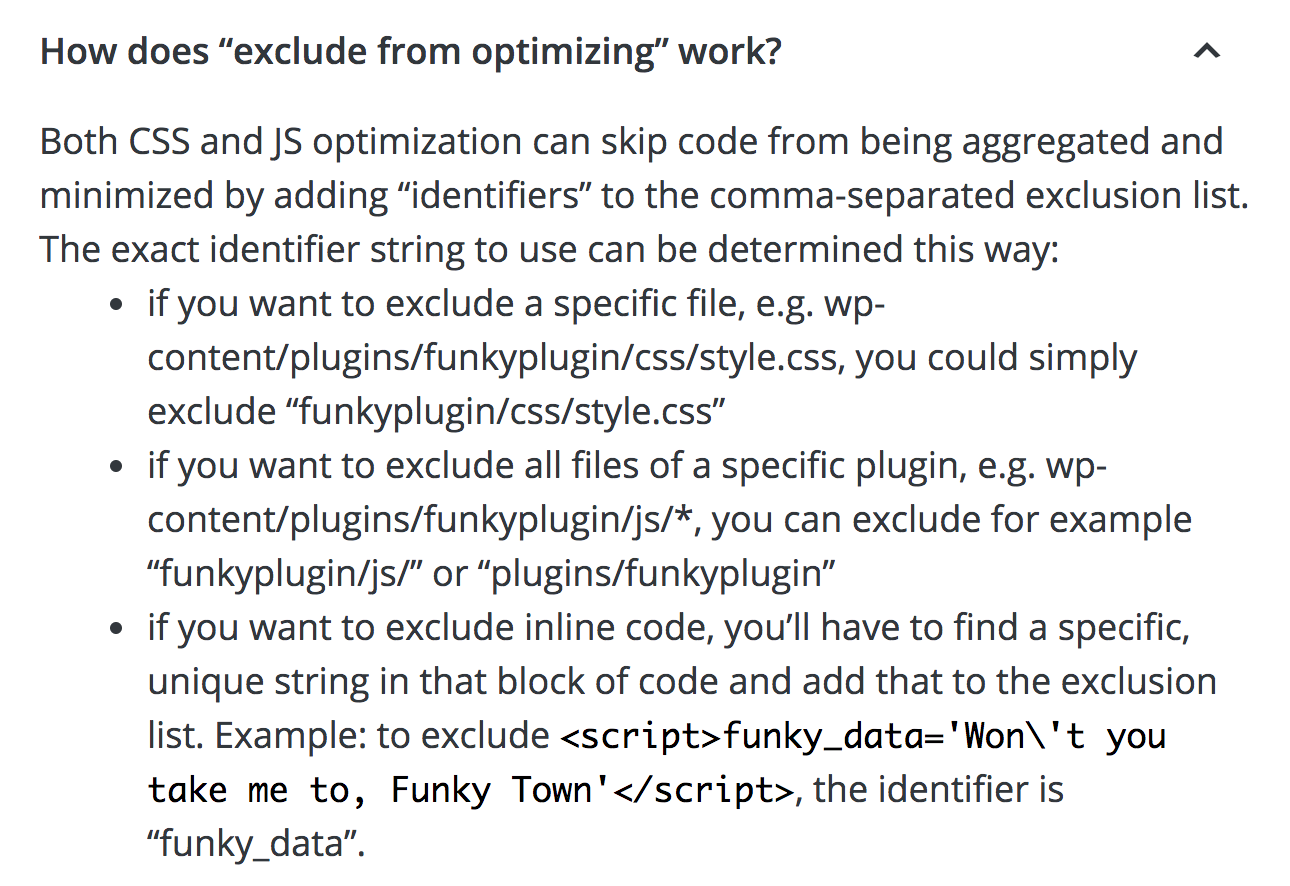
Source: https://wordpress.org/plugins/autoptimize/#faq
Cheers!
ModeratorThank you for the update. I went ahead and created a detailed screencast documenting my experience based on the details you’ve shared with me thus far. In a nutshell, I’m logging a bug because the “Leave this event associated with eventbrite.com?” option doesn’t stay set to “Yes” as it should.
I tested both TEC versions 4.4.4 and 4.4.5 – it appears as long as I’m running version 4.4.5, changes made on your WP site (such as updating the event description) will update to the event on Eventbrite.
Let me know if this helps clear up where things lie. One last option would be to downgrade to the version(s) that allow for the “Leave this event associated with eventbrite.com?” setting to stay selected. If you go that route, feel free to reply back which version the issue appears in.
Thanks and hang tight while our devs get this bug patched. I don’t have any timeline when that’ll be, but we’ll update you here. Take care!
March 29, 2017 at 4:53 pm in reply to: Multi-day event only showing first day on ticket email #1261808ModeratorHey Paul,
The date information displaying in the ticket email is due to the fact that ET/ET+ and PRO Recurring Events are not 100% compatible. We’re aware this needs addressed and have similar notes logged in the feature report.
I’ll close this thread out but feel free to open a new one should the need arise. Cheers!
ModeratorHi and welcome to our Pre-Sales Questions Channel! Thank you for considering our plugins for your project! My apologies for the delayed response, this thread must’ve gotten lost in the mix. I’d be happy to help answer your questions.
Community Events provides a log in form, but you can guide users to use the WooCommerce log in form you’re currently using. Once a user is logged in, they’ll be able to access their WooCommerce account dashboard, have access to the Add events form, and so forth. A plugin which might come in handy is Theme My Login as it can “combine” all your login forms, giving greater power and control over the login process and user experience.
I hope this helps clarify how things work and don’t forget… we have a 30-day money back Refunds policy, so that should allow enough time to test things out and ensure they meet your criteria.
Thanks again for your patience and let me know if you’ve got any additional questions or comments. Cheers!
March 29, 2017 at 12:38 am in reply to: Multi-day event only showing first day on ticket email #1261282ModeratorHi and welcome,
All the points you’ve made are valid, so thanks for sharing them with us. We have a few Extensions which might help bridge the gap, so check the out to see if any fit your needs:
• Add Event and Attendee Information to WooCommerce Order Details
• Include Attendee Phone Number in the Event Attendee ReportIf you’re attempting to use PRO Recurring Events Knowledgebase article with ET/ET+, they are not fully compatible just yet. This also means we’re unable to support requests from users asking for custom work.
With that said, try searching our forums in addition to general web searches in hopes o findingg a temporary solution. Once recurring events and ET/ET+ are fully supported, well update you here in addition to the plugin changelogs and Release Notes. Cheers!
ModeratorYou could locate the image link and hardcode it where you see fit. Review our Themer’s Guide on more information.
For example:
Let me know now it goes!
ModeratorHi Damian,
I’d be happy to look into this issue for you. Before I’m able to do much, I’ll need you to review the Testing for conflicts guide, take notes on what you find, and them along with your System Information as a private reply.
Sorry to see you here under the circumstances. I was recently testing the process similar to what you described for another user and also could not figure out a way to have the orders marked as “Complete” when purchasing test tickets in my PayPal Sandbox Dev account. I’m still awaiting a response from our dev team in hopes of learning more. I’m not even sure a bug is present, it could be a simple setting. Please review the following resources just to make sure you have things set to your liking:
• https://theeventscalendar.com/knowledgebase/woocommerce-specific-ticket-settings/
• https://theeventscalendar.com/knowledgebase/woocommerce-specific-ticket-settings/
• https://docs.woocommerce.com/document/automatically-complete-orders/
• https://wordpress.org/plugins/woocommerce-autocomplete-order/Should you decide to test more and come up with a solution, it would be sincerely appreciated if you could what you come up with in this thread. The majority of our team is on a team retreat, so the turnaround time may be a slower than our typical 24 hour response time, but hang tight and I’ll update you once I learn more information. If it’s been longer than a few days, feel free to ping me here and I’ll see what I’ve got for you.
I have just discovered an even bigger problem…… when a ticket is sold the community organiser does not get any notification. The site owner gets a notification but not the event organiser!
Download and install this extension as you would a normal plugin: https://theeventscalendar.com/content/uploads/2016/10/tribe-ext-tickets-email-options-0-4-1.zip
Whatever email address entered into the ‘Organizer’ field should receive an eamil notifying an order was placed
 Moderator
Hi and welcome 🙂
To adjust the map position, review our Themer’s Guide as it goes over the basic process you’ll need to follow. Unfortunately, this type of support extends beyond what can support on the forums, so please refe our What support is provided for license holders? Knowledgebase article for more info.
If I’ve mistaken you and you are concerned a bug may be preesent, please include detailed step-by-step instructions on how to reproduce the behavior and I’d be happy to help further investigate. Thank you!
ModeratorHi and welcome,
Sorry to see you here under the circumstances. I was recently testing the process similar to what you described for another user and also could not figure out a way to have the orders marked as “Complete” when purchasing test tickets in my PayPal Sandbox Dev account. I’m still awaiting a response from our dev team in hopes of learning more. I’m not even sure a bug is present, it could be a simple setting. Please review the following resources just to make sure you have things set to your liking:
• https://theeventscalendar.com/knowledgebase/woocommerce-specific-ticket-settings/
• https://theeventscalendar.com/knowledgebase/woocommerce-specific-ticket-settings/
• https://docs.woocommerce.com/document/automatically-complete-orders/
• https://wordpress.org/plugins/woocommerce-autocomplete-order/Should you decide to test more and come up with a solution, it would be sincerely appreciated if you could what you come up with in this thread. The majority of our team is on a team retreat, so the turnaround time may be a slower than our typical 24 hour response time, but hang tight and I’ll update you once I learn more information. If it’s been longer than a few days, feel free to ping me here and I’ll see what I’ve got for you.
I have just discovered an even bigger problem…… when a ticket is sold the community organiser does not get any notification. The site owner gets a notification but not the event organiser!
Download and install this extension as you would a normal plugin: https://theeventscalendar.com/content/uploads/2016/10/tribe-ext-tickets-email-options-0-4-1.zip
Whatever email address entered into the ‘Organizer’ field should receive an eamil notifying an order was placed
ModeratorMy pleasure! I’ll close this thread out but feel free to create a new one if you have any more questions or concerns. Enjoy the rest of your day!
March 28, 2017 at 10:02 pm in reply to: Possible bug with recurrence series using last day of the month #1261247ModeratorI checked the status of the report, but unfortunately not much has changed. The majority of our team (including the dev team) are on a retreat, so they weren’t able to review it before tying up any loose ends prior to leaving for the trip.
I’ll be sure to update you here once I see any new activity on the report. Thanks again for your continued patience and have a good evening.
-
AuthorPosts