

Forum Replies Created
-
AuthorPosts
-
March 31, 2017 at 12:32 pm in reply to: Setting up recurring event over several days (Part II) #1262793
Hunter
ModeratorHi and welcome back,
My Mother just returned from a trip backpacking across Europe and brought me nothing from her travels, so my expectations are low at this point… but it only incentivizes me to set in motion my own plans to explore the many great lands Mother Earth has to offer! Stay in touch and I’ll remember to get you a trinket from my travels 😉
Thank you for the information provided – it helped lead me to a bug report which I believe to be the cause of conflict for your particular issue. The bug report is titled, “Recurring event fail with multi-day events that are all day events” – and the notes further reflect the behavior you’ve shared with me.
It’s marked as Priority Level 1 which means it’s being expedited and should make it into the next Maintenance Release (or two). I’ve included this forum thread so you’ll get an update here notifying the bug has been patched up.
Other than downgrading to the version(s) that best work for you, there isn’t much of a temporary workaround mentioned in the notes. I hope this provides clarification on the matter and gives you an idea on how things will progress from here.
Thanks again for your patience and willingness to fully troubleshoot the issue – often times it takes a little back-and-forth to fully comprehend the issue and possible solutions. Have a great weekend ahead and feel free to reply back with any questions or comments you have on the matter. Cheers!
March 31, 2017 at 12:22 pm in reply to: Only previews display correctly; existing event is missing RSVP fields #1262788ModeratorHello,
I understand the Testing for conflicts guide is laborious but is a necessary step in order to continue receiving troubleshooting support. Running through this test may help realize the conflict is coming from your custom theme or potentially another plugin, so without knowing the precise source of conflict may be lost time spent on the actual source of conflict.
You could at the least set WP_DEBUG and WP_DEBUG_LOG are set to “true” on your site’s wp-config.php file. Any errors will display at the top of your page and in your error log as you try to reproduce the conflict. Note what you find and please include it in your reply.
I appreciate you sending the errors you’re seeing in the browser error console – unfortunately they’re not leading me towards any known issues at this time. Does this issue seem to occur with RSVPs only or does it also seem to affect WooCommerce tickets?
Lastly, can you provide a link to an event displaying the issues and I’d be happy to take a look to see if I can gain any insight on the matter? Thanks and have a good weekend ahead 🙂
ModeratorCan you try enabling Map view under Events > Settings > Display > Enable event views (if you have not already) and let me know if you experience the same behavior?
You also mention Photos went away in your previous response. What happens when you add a new event with a featured image? Does it show in Photo view?
Our WPML-master is away at the retreat, so once he’s back I’ll loop him into this conversation to see if he has any further insight on the matter. Let me know the answers to the questions I’ve posed above and we’ll continue investigating. Thanks for your patience and have a great weekend ahead!
ModeratorHi and welcome,
The best route at this time would most likely be to do a template override as explained in our Themer’s Guide. Let me know how it works out or if you choose another route, feel free to share your solution. Thanks and take care!
March 30, 2017 at 1:53 pm in reply to: Showing a little description of the event in the List event widget? #1262272ModeratorHi and welcome 🙂
I did a little testing and also looked over our feature/bug reports. It appears pulling in the event excerpt is not currently an available shortcode attribute. I’ve logged a report for our developers to review aimed to include this attribute in the shortcodes in a future release, but do not have a temporary workaround for you nor concrete date when this feature will be available.
I did find a possible solution provided by my awesome fellow support team member George: https://theeventscalendar.com/support/forums/topic/is-there-a-way-to-add-a-shortcode-to-the-excerpt-section/#post-1224068
Give it a shot and let me know if it works for you. Sorry I don’t have a better answer for you at this time and let me know if you have any questions or comments on the matter. Take care!
March 30, 2017 at 1:41 pm in reply to: Error 500 when uploading events in Events Calendar Pro #1262266ModeratorHi and welcome,
Sorry to see you here under the circumstances. So the issue does not occur when PRO is deactivated. What happens when you have both TEC and PRO active, but temporarily revert back to the default WP theme and deactivate all plugins besides TEC and PRO? What happens if you then deactivate PRO too, leaving only TEC and the default WP theme active?
Refer to our Themer’s Guide so we can identify the exact source of conflict. I checked our logged bugs and am not finding anything relating to your issue nor am I able to reproduce it on my test site.
Keep me posted and have a good evening! Cheers 🙂
March 30, 2017 at 1:37 pm in reply to: Reduced recurring events pregeneration, events past this date not deleted #1262264ModeratorHi Ellie 🙂
Welcome back!
If you visit Events > Settings > General, turn your attention to the Clean up recurring events after option. The lower the number entered, the less time past recurring events will remain listed on your site.
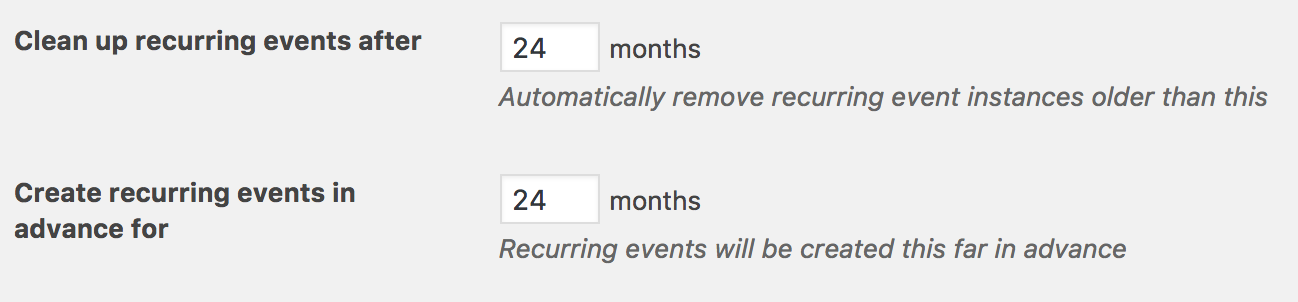
Let me know if this answers your question. I’ll also provide all resources I have relative to performance below:
- https://codex.wordpress.org/High_Traffic_Tips_For_WordPress
- https://codex.wordpress.org/WordPress_Optimization
- https://theeventscalendar.com/knowledgebase/caching-basics/
- https://theeventscalendar.com/knowledgebase/caching-month-view-transients/
- https://theeventscalendar.com/knowledgebase/caching-basics/
- https://theeventscalendar.com/the-events-calendar-performance-considerations/
- https://theeventscalendar.com/favorite-developer-plugins/
- https://theeventscalendar.com/knowledgebase/problems-with-minification/
P.S. Please reduce the enthusiasm of your popup suggesting an ‘answer’! That was incredibly annoying!
I’ll pass this constructive criticism to those who manage the front-end of our website. Thanks!
ModeratorHi and welcome 🙂
Can you review our Testing for conflicts guide? Please include your System Information as a private reply.
Once I have that information I’ll have a better idea on how to proceed. Cheers!
ModeratorI unfortunately do not have any sort of timeline when the fix will be released, but it’s at the highest priority and is being fast-tracked. I imagine it will be available in the next maintenance release though I cannot promise this.
Scheduled imports are triggered via wp_cron, which requires a visit to your site to “fire” and in turn, run your scheduled imports. If a visit is not made to your site when your scheduled import is set to run, it will appear as “failed”.
I hope this helps provide a little more insight on how things work and thanks again for your patience while we improve upon our current methods of informing users the status of their scheduled imports.
Cheers!
March 30, 2017 at 1:14 pm in reply to: Ticket start time not working with event specific timezone #1262252ModeratorHey Brad,
Thanks for your patience. We’re unfortunately unable to log into customer sites, so I’ve removed the credentials provided in your last response. Before I test the issue myself, can you please confirm the behavior occurs after reviewing our Testing for conflicts guide? This will help identify the exact source of conflict, whether it be ET/ET+, Community Events, etc. Does this issue occur when adding/editing an event on the back-end of your site, or have you only tried on the Community Events Add Event page?
I’ll also need a screenshot of your Events > Settings > Display > Date Format Settings screen. To ensure I’m not missing anything obvious, I checked our logged bug reports but am not finding anything resembling what you’ve shared with me. Thanks again and take care.
ModeratorThank you for the update. I went ahead and attempted to create a recurring event titled “Island Hopping, La Paz to Loreto (9 days)” and attempted to add recurrence dates for April 1st-9th (All Day) and April 15th-23rd (All Day) but ran into troubles.
I then compared my findings to our list of logged bug reports and located a bug which is the cause of issue for your particular situation. Unfortunately, there doesn’t appear to be a temporary solution other than downgrading to the version(s) that work best for you.
It’s marked as Priority Level 1 and is being expedited, so hopefully it makes it into the next maintenance release. I’ve included this thread to the report which helps increase attention on the matter. I don’t have any timeline when a fix will be available, but as previously stated it’s being fast-tracked.
I apologize I didn’t catch onto the issue sooner – often times it takes a little back-and-forth to fully understand what’s going on. Thanks again and let me know if you’ve got any questions in the mean time. Cheers 🙂
ModeratorHey Tasha,
Thank you for picking up Event Tickets Plus and welcome back to the premium plugin forums! Customizing the emails that get sent out once a user has RSVPd and/or purchased a ticket can be done by creating a template override.
Our Themer’s Guide is the best resource we have on the matter. I also like to share this Customizing WordPress #1 – How To Create A Child Theme by LevelUpTuts YouTube video as it’s essentially the same process.
Please let me know how things go and if you come up with ideas on how the plugin(s) can be improved, submit your requests to our UserVoice Feature Ideas page.
Please note that we are fairly limited in terms of providing support for custom themes and plugin by other authors in addition to general customizations – but holler if you get caught up along the way and I’ll see what I can do. Review our What support is provided for license holders? Knowledgebase article for complete details.
Cheers
March 30, 2017 at 12:37 am in reply to: Setting up recurring event over several days (Part II) #1261873ModeratorHey Gisela,
I was unfortunately unable to make the retreat, but that works out in your favor! I’d be happy to help figure out what the best options are, so to make it easy on me, would you mind sending over the exact dates/times you want and I’ll see what I come up with.
It would also be helpful if you could include screenshots of your WordPress Admin > General > Settings > Timezone screen and Events > Settings > Display > Date Format Settings screen.
Lastly, if you wouldn’t mind, include your System Information as a private reply. Thanks and rest assured we’ll get things squared away. Cheers!
March 29, 2017 at 11:10 pm in reply to: Recurring Events Displaying on Incorrect Day of Week #1261867ModeratorHowdy, Craig 🙂
Thank you for picking up Events Calendar PRO and welcome to the premium plugin forums! I went ahead and mimicked the ‘Time & Date‘ settings seen in the screenshot you shared with me (thanks for that, by the way!):
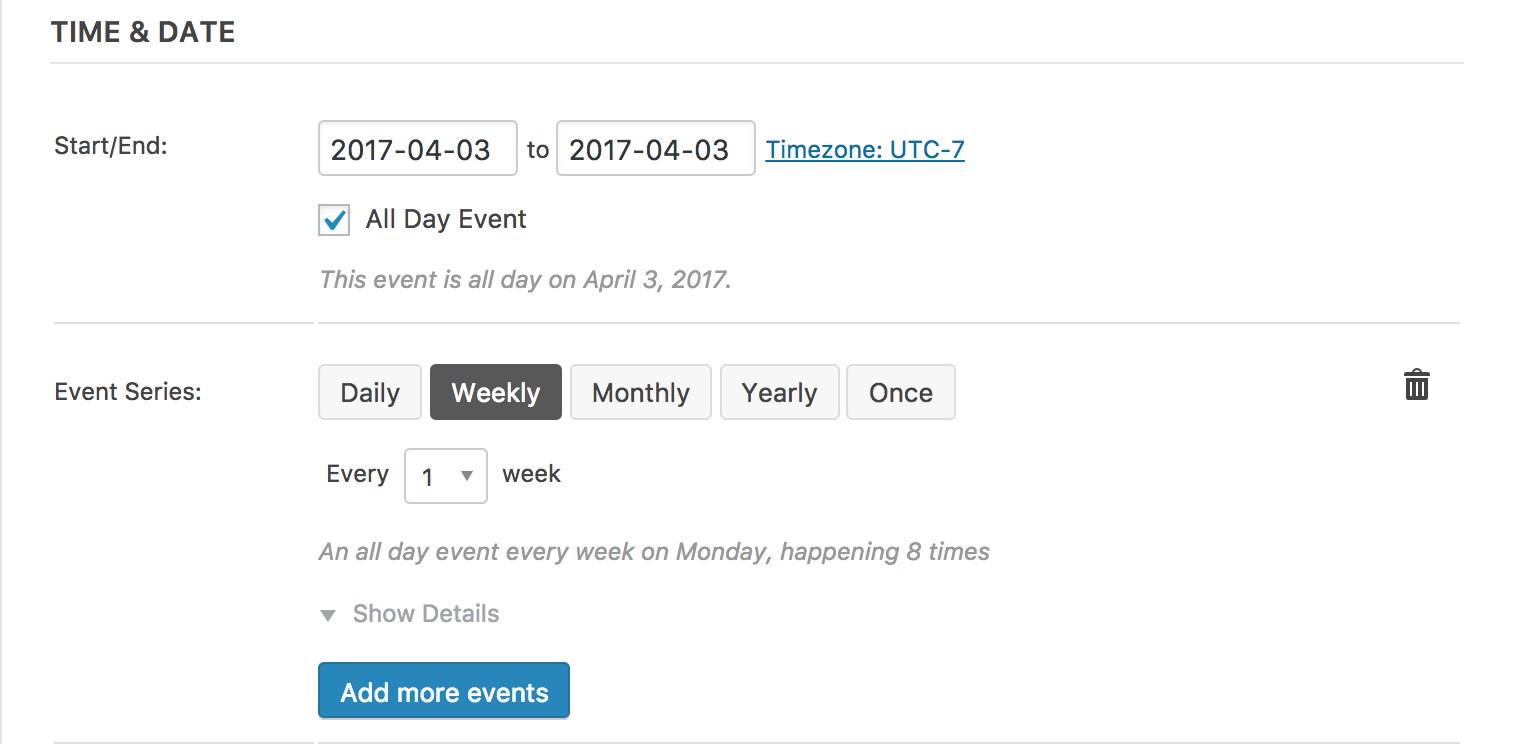
As you can see, my events are set for Mondays rather than Tuesdays as is the case on your site:
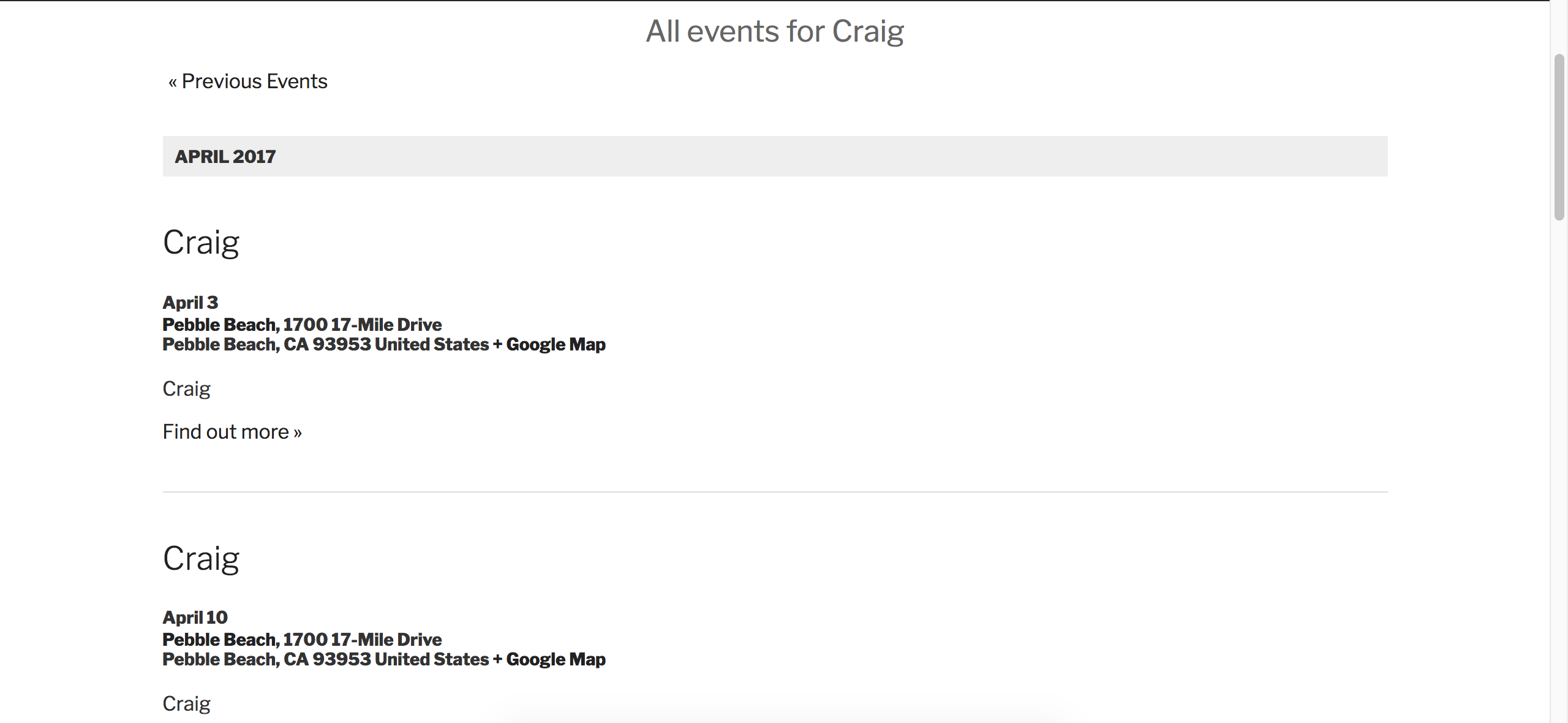
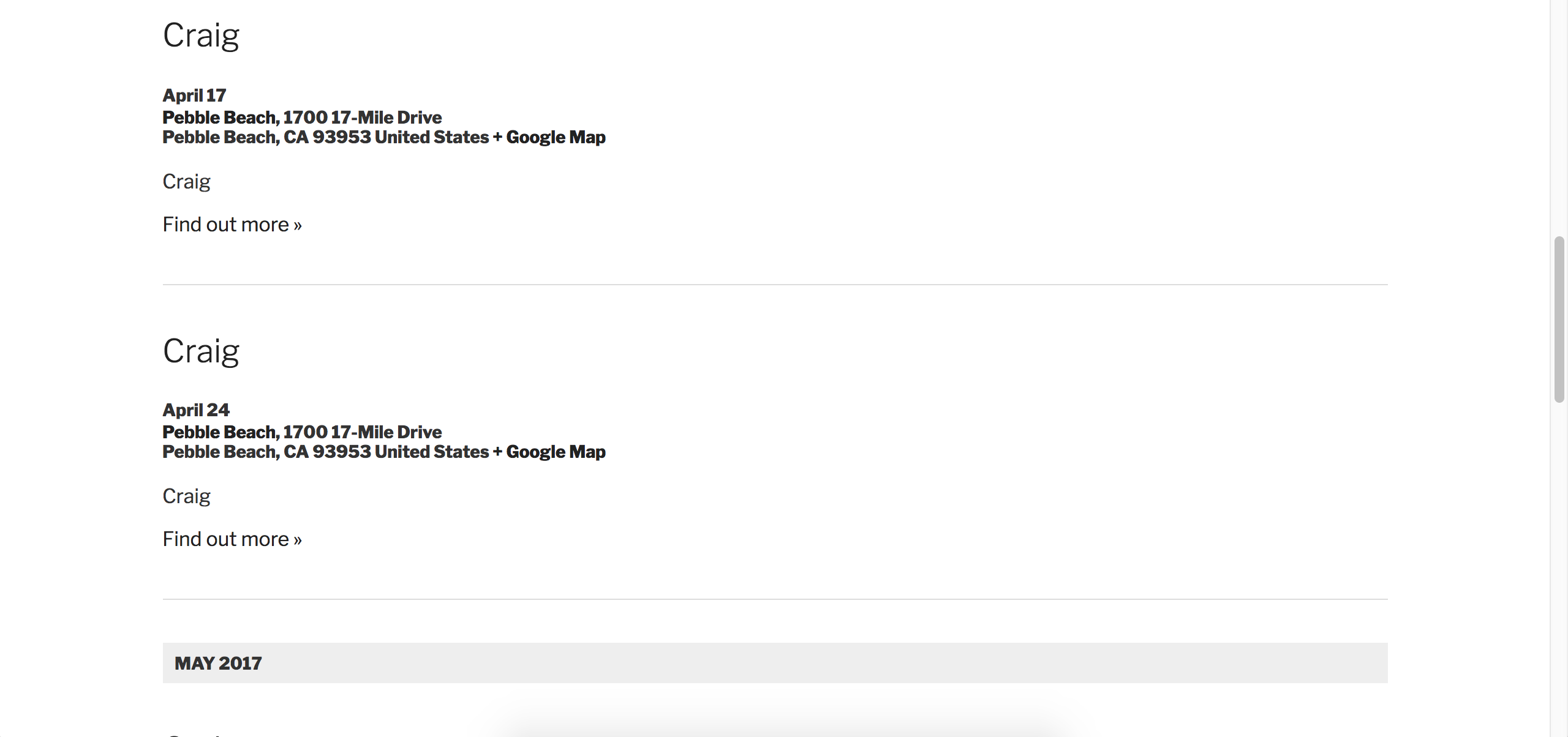
April 3rd, 10th, 17th, and 24th are all Mondays. Can you send screenshots of your WordPress Settings > General > Timezone settings screen (capture all the time/date related settings on that screen if you can) and also send a screenshot of your Events > Settings > Display > Date Format Settings screen.
• What do you have set for the End of day cutoff option in Events > Settings > General? Can you adjust that to 12:00am?
• What is your Events > Settings > Display > Datepicker Date Format setting set to? Can you set it to what I have in the screenshot below, then review our Testing for conflicts guide?

While you have the default WP theme active and all plugins TEC and PRO deactivated, try creating another event with the same ‘Time & Date‘ rules as seen in the screenshot and let me know what the results are.
Lastly, since you’re using recurring events, it might be best to familiarize yourself and bookmark our PRO Recurring Events Knowledgebase article.
Please send over your System Information as a private reply. Thanks again for your purchase and rest assured we’ll get things squared away ASAP. Cheers!
March 29, 2017 at 10:44 pm in reply to: Only previews display correctly; existing event is missing RSVP fields #1261862ModeratorHi and welcome,
Sorry to see you here under the circumstances. I notice in your System Information you’re using fairly old versions of many of our plugins. Are you able to update to the latest versions and review the Testing for conflicts guide to see if the problem persists?
If the issue remains, please retest once more and make sure WP_DEBUG and WP_DEBUG_LOG are enabled on your site’s wp-config.php file. Any errors will display at the top of your page and in your error log as you try to reproduce the conflict. I also recommend right-clicking your mouse and opening the ‘Inspect’ tool to see if any errors display in the console. Note what you find and please include it in your reply.
Do you for any reason have JavaScript disabled on any part of or your entire site? Please keep me posted and have a pleasant rest of your day. Cheers!
-
AuthorPosts