

Forum Replies Created
-
AuthorPosts
-
October 24, 2016 at 11:06 pm in reply to: Attendees popup window no scroll whith more than 2 tickets #1182305
Geoff B.
MemberGood evening Fernando and welcome back!
Thank you for reaching out to us.
We are sorry to hear about the windows not scrolling down as expected.
I would love to help you with this topic.As a first troubleshooting step, could you please provide us with your complete system information in a private reply using the instructions found in the following link?
https://theeventscalendar.com/knowledgebase/sharing-sys-info/
Could you also please send me a copy of your WordPress theme / child theme in a .zip file link (via Dropbox or Google Drive) so that I can run some tests on my end ?
Please ensure you are using the latest files as found on your actual website.
This way I will get access to any updates you might have made.Best regards,
Geoff B.
October 24, 2016 at 11:02 pm in reply to: Woocommerce integration not allowing inventory updates #1182304MemberThis reply is private.
MemberGood evening Tom and welcome to the Events Calendar Support forum!
Thank you for reaching out to us.
I would love to help you with this topic.Actually, Event Tickets Plus is built on top of Wootickets. There were no feature loss in the process (only new features).
When you are ready to migrate, you can simply follow this guide: https://theeventscalendar.com/knowledgebase/moving-to-event-tickets-plus/
You are right about the Wootickets key not being compatible. However, not having the key will not prevent the plugin from working properly. The only thing it prevents is updating (which should not be a problem).
So in short, you can totally go without the license key.
If you don’t have the files, then that could be arranged too.
Let me know if that helps.
Have a great day!
Geoff B.
October 24, 2016 at 10:43 pm in reply to: Calandar \"View All Events\" overlapping onto the next calendar day #1182301MemberGood evening Jonathan and welcome to the Events Calendar forum!
Thank you for your interest in our products. It’s truly appreciated.
We are sorry to hear about the display issue you are experiencing with your theme.
However, please note that we do not offer support for our free plugin in this premium add-ons forum.
But, the good news is that you are still welcome to consult this forum to your liking and browse it for solutions, snippets and tutorials.
If you don’t mind, in the future could you please post your support questions here: https://wordpress.org/support/plugin/the-events-calendar ?
Best regards,
Geoff B.
MemberGood evening Joanna and welcome back!
Thank you for reaching out to us.
We are sorry to hear about the 404 error messages.
I would love to help you with this topic.This might sound obvious, but would you mind also temporarily shutting down and emptying all caches for W3TC ?
Exceptionally, I would also recommend deactivating all 3 of our plugins, deleting them and reinstalling them manually.
If that does not work, the next step would be to go through our testing for conflicts procedure (preferably in a staging/dev environment or local install of your WordPress website) and let us know what you find out.
Basically the goal here is to revert back to a bare WordPress installation to see if the problem persists. It also allows us to pinpoint what the cause of the issue is.
But, before you do that, there are 2 things I would advise:
- Make a backup of your database
- Consider activating a “Maintenance Page” plugin if you are doing this on your live site (to minimize impact on your visitors)
Let me know how that goes.
Best regards,
Geoff B.MemberGood evening Damian and welcome back!
Thank you for reaching out to us.
I would love to help you with this topic.We have not tested wpglobus with our plugins at this point.
So I cannot confirm that it is compatible with any of our plugins.Officially the only supported multi-lingual (while limited, as you know) is WPML.
That being said, some of our customers have had success with Polylang.
We do not officially support it (at least not yet), but according to our users’ reports, it works at about 95% (including tickets).Some other customers have also managed to get things working with QtranslateX (but only until version 4.2.6).
Let me know if that helps.
Have a great day!
Geoff B.
MemberThis reply is private.
MemberGood evening Michael,
Thank you for running those tests
Dang! That’s not cool at all.
Everybody loves Ninja Forms. If you don’t mind could you please send me a copy of your the version you are using in a .zip file link (via Dropbox or Google Drive) so that I can run it past dev and open a proper bug ticket for this?
That is the very least we could do!
Best regards,
Geoff B.
MemberGood evening Alex,
Thank you for writing back.
I installed a copy of your theme on my website.As I thought, the word “Archive” disappears if you have the correct setting for “Events Template” under Events -> Settings -> Display. Make sure you select the “Default Events template” option.
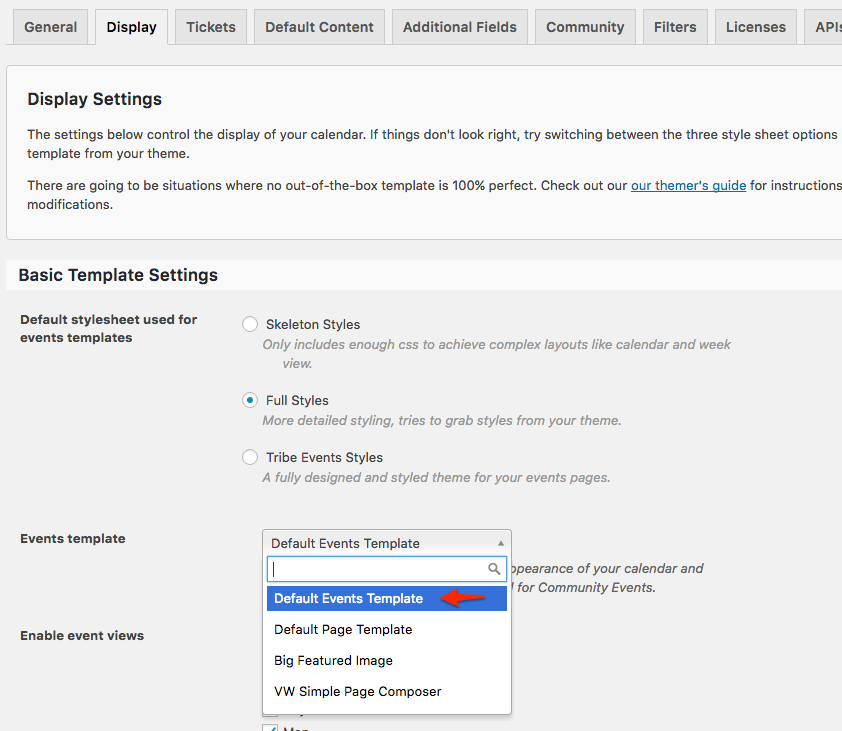
Let me know how that goes.
Best regards,
Geoff B.MemberGood evening Damian,
Thank you for pitching in.
I totally understand where you are coming from.
Since the tickets are not shown while WPML is active, this might be perceived as a bug.However, you need to keep in mind that Event Tickets or Event Tickets Plus were never supported with WPML to begin with.
To fix this requires a full code change. We do not have a quick fix or hard code available at the moment.
In any case, filing this as a bug will not expedite the process since we are already working on this as we speak with the intention of releasing it very shortly (as soon as the testing and everything is done).
As I mentioned earlier, I wish I had a better answer for you, but for now it’s the best one I have.
Hang in there as we work on this as fast as possible.
Best regards,
Geoff B.
MemberGood evening Benjamin,
I actually answered this thread last Friday, but somehow, the answer seems to have vanished.
My apologies for that.I ran your log (thank you for sharing that) by our Dev team and here is what they had to say:
PHP Fatal error: require_once(): Failed opening required ‘/nas/content/live/legendsoh/wp-content/plugins/event-tickets/src/Tribe/Main.php’
There are lots of entries like the one above. It is possible that when you last updated one or more files didn’t make it across. Deleting and re-installing at least event tickets (but ideally all of our suite)could be worth a try.
PHP Fatal error: Unknown: Cannot use output buffering in output buffering display handlers in Unknown on line 0
Since you are with WP Engine, if the previously suggested reinstall still triggers the PHP messages, could you set up a copy of your site in their Staging environment ?
The next step would then be to go through our testing for conflicts procedure and let us know what you find out.
Basically the goal here is to revert back to a bare WordPress installation to see if the problem persists. It also allows us to pinpoint what the cause of the issue is.
But, before you do that, there are 2 things I would advise:
- Make a backup of your database
- Consider activating a “Maintenance Page” plugin if you are doing this on your live site (to minimize impact on your visitors)
I wish I had a better answer for you, but for now it’s the best one I have.
Let me know how that goes.
Best regards,
Geoff B.MemberHey Gabriel,
Thank you for writing back.
I am sorry and surprised the recurring rules did not work out for you (as I had tested them first).
When you say that it didn’t work on your site, could you tell me what happens exactly ?I am totally interested in seeing your solution and helping you with the CSS.
The simplest way would be through screenshots or URLs.
Best regards,
Geoff B.
MemberGood evening Michael,
Thank you for writing back.
I am super stoked that everything works great for you once again.
Kudos!You are welcome back on our support forums any time 🙂
For now, I am going to close this thread.
Have a great week!
Geoff B.
MemberGood evening Gary and thank you for writing back.
Thank you for the extra information.
Actually the checkbox for system information will only kick-in the next time you contact us.But it’s no biggie, I have found the cause of the issue.
What is going on is that you are using The Events Calendar: Community Events v 3.12
This is an un-matching version with the Events Calendar 4.3.1.1, which causes the crash.
You can simply manually update that plugin by downloading it here: https://theeventscalendar.com/my-account/downloads/
That should fix everything.
Let me know how that goes.
Best regards,
Geoff B.MemberGood evening Preben.
Thank you for writing back and providing additional details.
I believe the issue is that you might not be using the latest version of our language files OR that you might have some template customization in your theme.
With a default WordPress theme such as twenty-fifteen, here is what that widget looks like in Danish
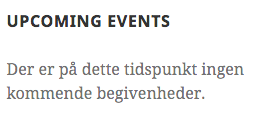
I am not sure which version of the Events Calendar you are using. But I would advise:
- Making sure you are using the Events Calendar 4.3.1.1
- Temporarily reverting back to a default WordPress theme OR simply send me a copy of your WordPress theme in a .zip file link (via Dropbox or Google Drive) so that I can run some tests on my end ?
Best regards,
Geoff B.
-
AuthorPosts