

Forum Replies Created
-
AuthorPosts
-
Geoff B.
MemberGood evening Sue and welcome back!
Thank you for reaching out to us.
I would love to help you with this topic.Unfortunately, it looks like the issue you are referring to has not been carried over in this thread.
Would you mind telling me what challenge you are facing.This will allow me to help you out.
Best regards,
Geoff B.
MemberGood afternoon Catherine,
Thank you for reaching out to us.
We are sorry about this error message creeping up on you.
I would love to help you with this topic.You have stumbled upon a glitch impacting all WordPress users that are using a version of PHP that is older than 5.6 (which is WordPress recommended minimum PHP version).
Fortunately, we have a temporary fix:
- You can head to line 97 of events-calendar-pro/src/functions/template-tags/venue.php from this: return ! empty( tribe_get_events( $args ) ); to this $tribe_events = tribe_get_events( $args );
return ! empty( $tribe_events );
And even better, you can simply upgrade Pro to 4.3.1.1 since we have released a fix for this.
Let me know how that goes.
Best regards,
Geoff B.MemberGood evening Thomas and welcome back!
Thank you for reaching out to us.
We are sorry to hear about the default calendar view not working properly when set to photo.
I would love to help you with this topic.Could you tell me which version of the total theme you are using ?
I just ran a test with version 3.5.3 of that theme and the photo view displayed correctly.Secondly, would you mind changing the default view to month, saving the settings and then change it back to photo view to see if that helps.
Let me know how that goes.
Best regards,
Geoff B.October 25, 2016 at 9:36 pm in reply to: I purchased events calendar pro and downloaded 4 zip files now what? #1182978MemberGood evening George and welcome back!
Thank you for reaching out to us.
We are sorry to hear about the issues you are dealing with while trying to install your purchases.
I would love to help you with this topic.The first thing is thing that you should know is that we have replaced the facebook importer plugin by our new Event Aggregator service (which is an all-in-one importing solution).
The second thing is that to work together, plugins from the the Events Calendar family need to have matching versions. Otherwise, issues and error messages are bound to happen.
So to make a long story short, the facebook importer plugin will not be compatible with any version of the Events Calendar beyond 4.2.7. Since you are using version 4.10 of the facebook importer plugin, it means that you have 3 options available for you:
- Get a license for our Event Aggregator service and uninstall the facebook importer plugin.
- Downgrade all of your the Events Calendar plugins back to version 4.10 (https://theeventscalendar.com/knowledgebase/downgrading-plugin-past-version/)
- Simply deactivate the facebook importer plugin for now
That being said, your license for the Events Calendar Pro should still work and be valid.
If the message is still there after one of the solutions above, could you please provide us with your complete system information in a private reply using the instructions found in the following link?https://theeventscalendar.com/knowledgebase/sharing-sys-info/
Let me know how that goes.
Best regards,
Geoff B.MemberGood evening Mats and welcome back!
Thank you for reaching out to us and for your great words.
We are sorry to hear about the calendar not displaying to your liking.
I would love to help you with this topic.I cannot see what the photo view looks like on your website while using the shortcode (perhaps if you had a screenshot, that would be great).
But, what I can say, based on your message is that you might not be using straight quotation marks. This will break the shortcode and switch to the default view.
The correct shortcode would be [tribe_events view=”photo” tribe-bar=”false”]
You can read about the quotation marks at the bottom of this page: https://theeventscalendar.com/knowledgebase/embedding-calendar-views-tribe_events-shortcode/
Let me know if that helps.
Have a great day!
Geoff B.
October 25, 2016 at 9:13 pm in reply to: You entered a license key for The Filter Bar but the key is out of installs #1182966MemberGood evening OngKar and welcome back!
Thank you for reaching out to us.
We are sorry to hear about the issue you have encountered while you entered your license key.
I would love to help you with this topic.What is going on is that your license is currently tied to your staging website beta.sikhdharma.org
The good news is that you are free to move this license around: https://theeventscalendar.com/knowledgebase/moving-your-license-keys/
Let me know if that helps.
Have a great day!
Geoff B.
MemberGood evening Jonathan and welcome back!
Thank you for reaching out to us.
I would love to help you with this topic.As it turns out, you no longer need the snippet.
Since 4.3, we offer a built-in feature for this:
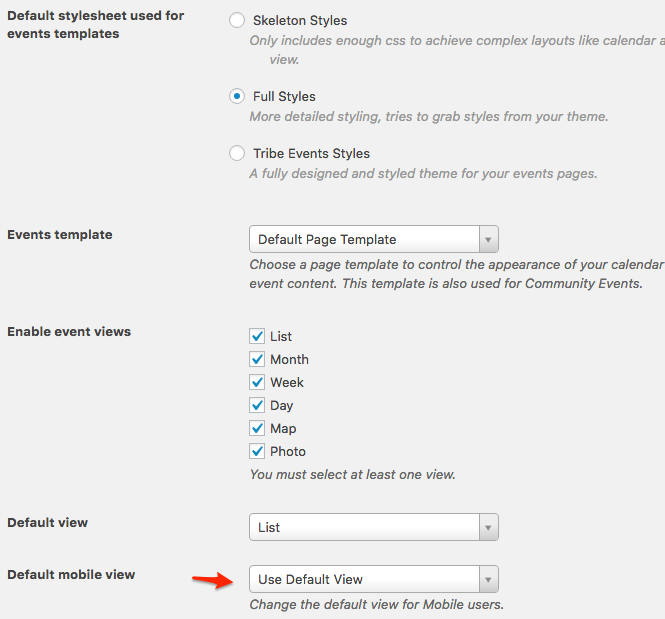
So in short, I would recommend removing the snippet and using that feature instead.
Let me know how that goes.
Best regards,
Geoff B.MemberGood evening Michael and welcome to the Events Calendar Support forum!
Thank you for reaching out to us.
We are sorry to hear about the challenges you are facing with ticket emails.
I would love to help you with this topic.Typically, tickets are only sent when the order is set to “complete”. Never before.
If they are being sent regardless of the payment status, it means that something is automatically changing the order statuses to “complete” (perhaps the checkbox or a snippet in your WordPress theme).
Can you try unchecking the box and see what happens ?
As a first troubleshooting step, could you please provide us with your complete system information in a private reply using the instructions found in the following link?
https://theeventscalendar.com/knowledgebase/sharing-sys-info/
Best regards,
Geoff B.
October 25, 2016 at 8:54 pm in reply to: Vertical in the Filters Layout no longer works since latest update #1182956MemberGood evening Tania and welcome back!
Thank you for reaching out to us.
You are absolutely right. Our apologies.
A fix is on its way.Unfortunately, I cannot commit to a release date at this point. But stay tuned, you will be contacted when the fix is released.
In the meantime, you can simply add the following CSS rule to your theme’s style.css or custom CSS section.
.tribe-events-filters-vertical {

float: left;

width: 25%;

}
Best regards,
Geoff B.
October 25, 2016 at 8:42 pm in reply to: Can't install latest version of Events Calendar and filter bar doesn't work #1182953MemberGood evening Sofia and welcome back!
Thank you for reaching out to us.
We are sorry to hear about the issues you have dealt with while trying to install our plugins.
I would love to help you with this topic.Basically, the original message is saying that matching versions of the Events Calendar plugins is required for things to work properly.
The simplest solution is to deactivate all of our plugins and then delete them.
If you want to be on the safer side of things, you might want to do a database backup first, but it should not be necessary.
Once that is down, you can simply install them from scratch with the latest version and everything should be smooth sailing.
Let me know how that goes.
Best regards,
Geoff B.MemberGood evening Hans,
Thank you for pitching in with valuable insight. It is super appreciated.
Full disclosure, the 4.3 release has kept us fully busy and I have not been able to drive this one home like I wanted to last week. But I should be able to do that this week.
So stay tuned!
Best regards,
Geoff B.
MemberGood evening Sean and Edward,
I believe I answered this thread last Friday, but for some reason, my answer vanished.
I am sorry about that.As I was saying back then, Ed has the perfect solution.
However, this will get overwritten as soon as you update the plugin.You can simply take your edited file and do the following:
- Create a /tribe-events/ folder in your theme (or even better, in your child theme)
- upload them to the appropriate folder. In your case, that would be /tribe-events/wootickets/tickets.php
This way, the edit will stay even when the plugin updates.
Let me know how that goes.
Best regards,
Geoff B.MemberGood evening Hans Gerd,
I just noticed that my answer from last Friday seems to have vanished completely.
I am sorry about that.
As I was saying, this unfortunately did not make it in the last maintenance release cycle.
But, I am following up so that it does ASAP (since it is such an easy fix).Best regards,
Geoff B.
MemberGood evening Corinna and welcome to the Events Calendar Support forum!
Thank you for reaching out to us.
We are sorry to hear about events spanning over several days not repeating properly while using the “all day event” option. I would love to help you with this topic.
You are correct in your assessment of what is going on. The End of Day is the issue in this case.
The good news is that we are about to rework this section of our code specifically. So timing could not be better.
Let me see if it is possible to get some kind of snippet solution as a workaround. I will ask Dev tomorrow.
I wish I had a better answer for you, but for now it’s the best one I have.
Best regards,
Geoff B.
October 24, 2016 at 11:11 pm in reply to: Getting YOUR CART IS CURRENTLY EMPTY after adding ticket to cart with WooCommerc #1182306MemberGood evening Yuval and welcome back!
Thank you for reaching out to us.
We are sorry to hear about the issue you are facing while adding tickets to your cart.
I would love to help you with this topic.Could you tell me which version of the Jupiter theme you are using ?
The reason I am asking is because there has been a few glitches lately between the Jupiter theme and our plugins. The good news is that we are working hard at ironing these out.
Secondly, could you give me an URL of an example where this happens ?
Best regards,
Geoff B.
- You can head to line 97 of events-calendar-pro/src/functions/template-tags/venue.php from this: return ! empty( tribe_get_events( $args ) ); to this $tribe_events = tribe_get_events( $args );
-
AuthorPosts