

Forum Replies Created
-
AuthorPosts
-
Geoff B.
MemberGood evening Brian,
We did do a major effort for translations in our latest release (4.3.1).
I just checked the German translation file and what is going on is that the strings that are not translated (e.g.: Purchaser) on your website are in fact not translated in the German language file.
You can see that for yourself by opening the file up in the free Poedit software.
My recommendation would be to:
- Open that language file
- Click on Catalog > Update from pot file
You will notice no changes, but Poedit will suggest “automated” translation (fuzzy) for the untranslated strings. You can manually approve these or change them to your liking.
I would offer to do that, but my German is pretty basic unfortunately.
Once that is done, upload the updated po/mo files to your /wp-content/languages/plugins folder.
This way they won’t be overwritten by a future plugin update.Let me know how that goes.
Best regards,
Geoff B.October 25, 2016 at 11:28 pm in reply to: Problems displaying upcoming events (recurrent events) #1183041MemberGood evening Victor,
First of all, I want to apologize.
I did reply to this thread on Friday, but somehow my answer seems to have vanished completely !As I was saying back then, I believe the issue is with the way your recurring events are setup.
The main issue is with the start and end dates.
The way you have defined this, you are trying to repeat one large 8 day long event (as opposed to 1 all-day event). You can see my corrected screenshot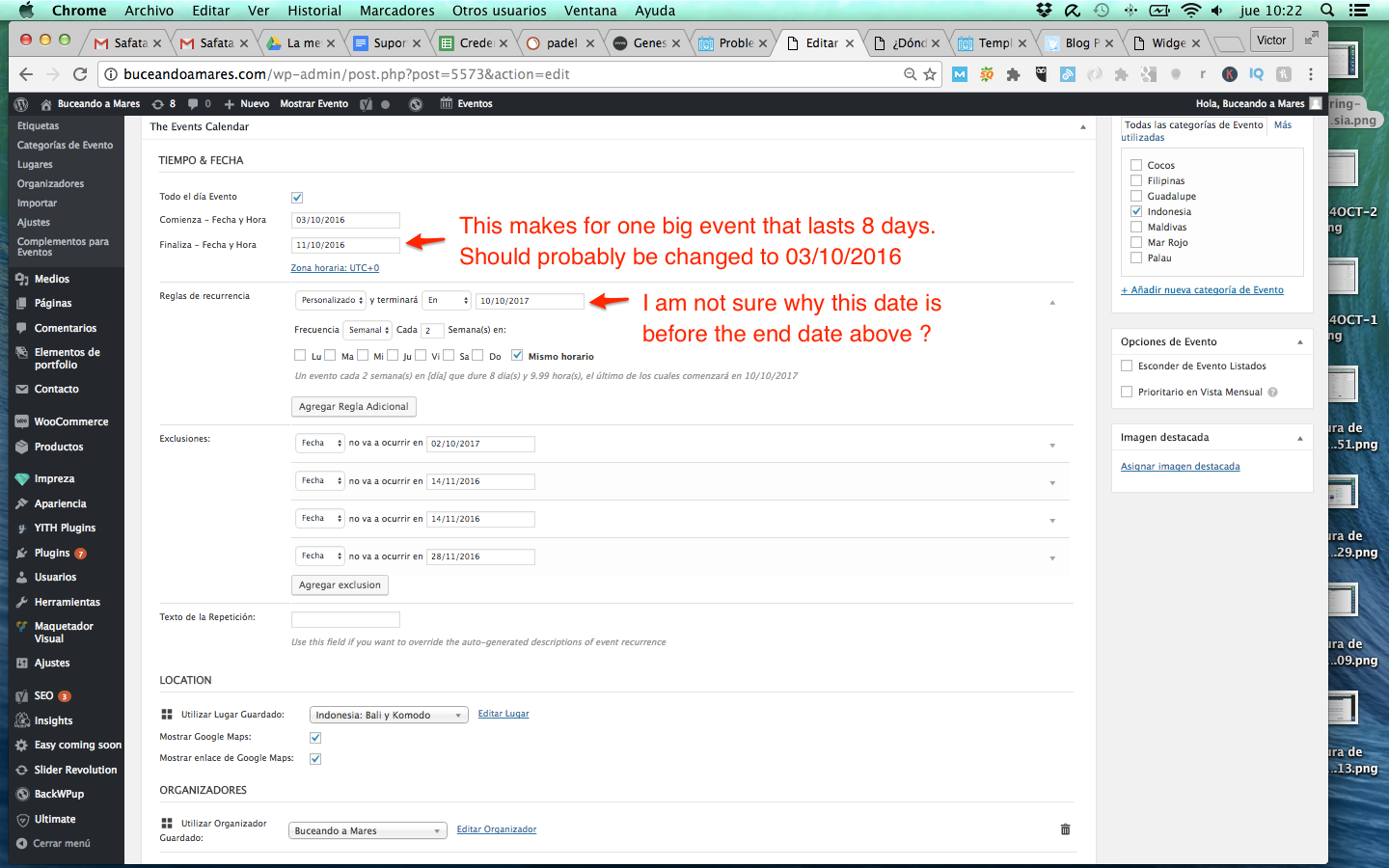
Let me know if that helps.
Have a great day!
Geoff B.
MemberGood evening Christine,
Thank you for writing back.
This is super strange (to say the least). Is it possible that you have some caching or CDN solution in place that is preventing the edits from working ?
On another note, could you please send me a copy of your WordPress theme / child theme in a .zip file link (via Dropbox or Google Drive) so that I can run some tests on my end ?
Please ensure you are using the latest files as found on your actual website.
This way I will get access to any updates you might have made.Best regards,
Geoff B.
MemberGood evening Preben,
Thank you for the theme file.
I have tested Canvas on my installation and the string translates correctly to “Der er på dette tidspunkt ingen kommende begivenheder.”Can you tell me which version of our plugin you are using ?
Best regards,
Geoff B.
MemberThis reply is private.
MemberBonsoir Grégoire,
Merci de nous réécrire.
Vous avez tout à fait raison, il y a un bogue.
Je vais immédiatement ouvrir un billet pour ça et en profiter pour voir si une rustine temporaire ne serait pas possible.Aux fins de rigueur, vous serait-il possible de me fournir une copie de vos dernières informations système, tel qu’expliqué ici (dans une réponse privée): https://theeventscalendar.com/knowledgebase/sharing-sys-info/
Salutations,
Geoff B.MemberGood evening Caleb and welcome to the Events Calendar forum!
Thank you for your interest in our products.
We’ll be glad to answer your questions.Actually, for front-end submission abilities, you simply need the Community Events add-on: https://theeventscalendar.com/product/wordpress-community-events/
The Events Calendar Pro will work great too, but it is not required (as it is a separate add-on with its own set of features).Let me know if that helps.
Have a great day!
Geoff B.
MemberGood evening John and welcome to the Events Calendar Support forum!
Thank you for reaching out to us.
We are sorry to hear about the challenges you have experienced while trying to change the form labels on the community event submission page. I would love to help you with this topic.
Could you provide me with an example of what text you are trying to change exactly ? Either a URL, a screenshot or a detailed explanation will be super helpful.
Best regards,
Geoff B.
October 25, 2016 at 10:33 pm in reply to: The translation of a word in the search bar does not work #1183012MemberBonsoir Sébastien,
Je suis navré que la situation ne se soit pas réglée suite à la mise à jour.
J’aimerais vous aider à aller jusqu’au bout de cette histoire si vous le permettez.
J’ai quelques questions pour vous:
- Est-il possible que vous ayez des fichiers de traductions pour le calendrier dans le dossier /wp-content/languages/ ou /wp-content/languages/plugins. Si tel est le cas, il faudra soit les retirer de là ou les mettre à jour.
- Vous serait-il possible de m’envoyer une copie de votre thème enfant (Divi By Ms Agence Internet) afin que je fasse quelques tests de mon côté ? (dans une réponse privée, un simple lien Dropbox ou Google drive vers un fichier .zip) fera l’affaire.
Salutations,
Geoff B.
MemberGood evening Sheila and welcome back!
Thank you for reaching out to us.
We are sorry to hear about the tickets not being sent automatically.
I would love to help you with this topic.The simplest way to solve this is to follow the instructions found here: https://docs.woocommerce.com/document/automatically-complete-orders/
Let me know how that goes.
Best regards,
Geoff B.MemberHello again Mats,
The short answer to your question is yes. You can totally change that colour.
The first thing you might want to try is to go to Display > Customize > The Events Calendar and try the colour options there.
If that does not work for you, would you mind providing me with a URL with an example of this.
That will enable me to provide you with a custom CSS rule to fix this.Have a great day!
Geoff B.
MemberGood evening Dushan and welcome back!
Thank you for reaching out to us.
We are sorry to hear about the error 500 message you have received on your site.
I would love to help you with this topic.I took a look at your website and the Community Events page displays nicely on my end.
As anything changed on your end ? Can you confirm if you are still experiencing this issue ?Other than that your license seems to be valid and attached to the correct website.
This might be related to the fact that the Events Calendar is a network plugin while Community Events is not.If you have not already done so, you might want to read the following: https://theeventscalendar.com/knowledgebase/multisite-license/
Best regards,
Geoff B.
MemberGood evening Mauricio and welcome back!
Thank you for reaching out to us.
We are sorry to hear about the images not displaying to your expectations.
I would love to help you with this topic.As a first troubleshooting step, could you please provide us with your complete system information in a private reply using the instructions found in the following link?
https://theeventscalendar.com/knowledgebase/sharing-sys-info/
Can you tell me what happens if you try to replace the featured image for http://www.electronicgroove.com/event/lolo-electronic-groove-halloween/ with a full size image ?
The main thing I am noticing is a limiting argument on that image (<span class=”webkit-html-attribute-name”>sizes</span>=”<span class=”webkit-html-attribute-value”>(max-width: 300px) 100vw, 300px</span>”) for some reason.
Let me know how that goes.
Best regards,
Geoff B.MemberGood evening HVK and welcome to the Events Calendar Support forum!
Thank you for reaching out to us.
I would love to help you with this topic.
Currently, the best built-in way to prevent RSVP spam is to use the Require users to log in before they RSVP option in Events -> Settings -> Tickets
That being said, you can still add reCaptcha to any form. To do that you will have to do a template customization.
My colleague Josh has some great insights on this: https://theeventscalendar.com/support/forums/topic/add-captcha-to-events-with-tickets/#post-1147570
Let me know if that helps.
Have a great day!
Geoff B.
October 25, 2016 at 9:55 pm in reply to: Fatal error: Can't use function return value in write context -venue.php line 97 #1182991MemberGood evening Steve,
Thank you for reaching out to us.
We are sorry about the fatal error you have received.
I would love to help you with this topic.As it turns out, you have stumbled upon a glitch impacting all WordPress users that are using a version of PHP that is older than 5.6. As a side note, you might want to consider upgrading PHP to at least 5.6 since this is the minimal recommend PHP version (by WordPress).
Fortunately, we have a temporary fix:
- You can head to line 97 of events-calendar-pro/src/functions/template-tags/venue.php from this: return ! empty( tribe_get_events( $args ) );
- And change it to this $tribe_events = tribe_get_events( $args );
return ! empty( $tribe_events );
Better yet, you can simply download the Events Calendar Pro v4.3.1.1 that includes a fix for this specific issue.
Let me know how that goes.
Best regards,
Geoff B. -
AuthorPosts