

Forum Replies Created
-
AuthorPosts
-
Geoff B.
MemberThis reply is private.
MemberHey Michael,
I am sorry to hear about that!
I apologize for the delay, as we are closed on weekends.Normally the messages should all be gone provided you have:
- the Events Calendar 4.3.1.1
- the Events Calendar Pro 4.3.1.1
- Community Event 4.3.1
So if the message is still there, with your permission, I would like to log in and look (not touch).
As a first troubleshooting step, could you please provide us with your complete system information in a private reply using the instructions found in the following link?
https://theeventscalendar.com/knowledgebase/sharing-sys-info/
Finally, in the meantime, another solution (not ideal) would be to downgrade your plugins: https://theeventscalendar.com/knowledgebase/downgrading-plugin-past-version/
Hang in there as we figure this one out!
Best regards,
Geoff B.
MemberGood evening Kirsten,
I went in and looked. But I was not able to look at your Events > Settings screen because of limited permission rights.
But I was able to catch the following error message
js?ver=4.6.1:34 Google Maps API error: MissingKeyMapError https://developers.google.com/maps/documentation/javascript/error-messages#missing-key-map-error_.kb @ js?ver=4.6.1:34
maps.google.com/maps-api-v3/api/js/26/9/util.js:208 Google Maps API warning: NoApiKeys https://developers.google.com/maps/documentation/javascript/error-messages#no-api-keysOA.j @ maps.google.com/maps-api-v3/api/js/26/9/util.js:208With certain webhosts, it is possible to get the calendar working without Specific Google Map API keys.
However, that usually means that you are using your webhost’s keys. Google recently made this more of a requirement than it was in the past and if anything it is going to become more and more necessary.
So in short, your best bet is to follow the instructions to install the API key in question.
I wish I had a better answer for you, but for now it’s the best one I have.
Let me know how that goes.
Best regards,
Geoff B.MemberThis reply is private.
October 24, 2016 at 1:34 pm in reply to: Fatal error brought down entire site after updating EC PRO to 4.3.1 #1182117MemberHey Jonathan,
I am glad you managed to get things working again.
You are absolutely right, renaming your folder’s plugin temporarily has the added perk of deactivating any plugin that might be causing troulbe.The great news is that all of our plugins are now stable, provided you install the very latest version.
Have a great day!
Geoff B.
MemberThis reply is private.
MemberHey Cole,
Thank you for chiming in.
You are correct, there is currently no “limit” parameter for our freshly released full calendar shortcode.
The display rule you can use can be seen in the screenshot below:
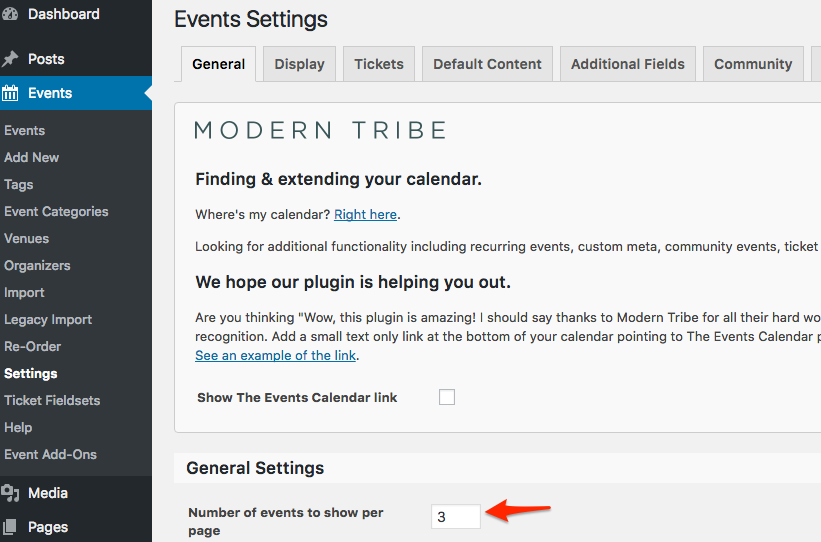
Additionally, you can control specifically the photo view by using a snippet like this one: https://gist.github.com/elimn/8fd157765d5aea751e66526183b8c8c7 in your theme’s functions.php
Let me know if that helps.
Have a great day!
Geoff B.
MemberHey Shannon,
Thank you for chiming in.
We are still working on the CSS bug reported by Nietmar (which you can temporarily work around with Custom CSS). But the error 500 messages are completely stabilized by now.
I would suggest opening a separate thread if you experience any further issue with this.
Best regards,
Geoff B.
MemberHey Ingo,
Just a quick note to let you know this has been fixed as part of our latest updates.
Have a great week!
Best regards,
Geoff B.
October 24, 2016 at 12:35 pm in reply to: Shortcode Month Calendar View Not Displaying Event Hoverover #1182069MemberHey Monique,
Thank you for your awesome contribution and kudos for finding a workaround for now!
We are absolutely working on improving our newly released full calendar shortcode.
In fact, as promised before, you will be contacted as the tooltip is back.
You are welcome back on our support forums any time 🙂
For now, I am going to close this thread.
Have a great week!
Geoff B.
MemberHey Jason,
Thank you for your understanding.
As you might know, the hotfix for this has been released.And, you are right, PHP 5.6+ is totally worth considering. PHP 7 being especially fast.
You are welcome back on our support forums any time 🙂
For now, I am going to close this thread.
Have a great week!
Geoff B.
MemberHey Patrick,
I’m stoked that this worked out for you.
You are welcome back on our support forums any time 🙂
For now, I am going to close this thread.
Have a great week!
Geoff B.
MemberHey Kate,
I’m super stoked that this helped you out!
You are welcome back on our support forums any time 🙂
For now, I am going to close this thread.
Have a great week!
Geoff B.
MemberGood evening Raymond and welcome to the Events Calendar Support forum!
Thank you for reaching out to us.
I would love to help you with this topic.That is a great question. Here is what unlimited means “Get updates & support for a year on an unlimited number of sites.”
You might also be interested in our bundles: https://theeventscalendar.com/bundles/
Let me know if that helps.
Have a great day!
Geoff B.
MemberGood evening Cyril and welcome back!
Thank you for reaching out to us.
I would recommend reading the following to get the map to display as it should: https://theeventscalendar.com/knowledgebase/setting-up-your-google-maps-api-key/
Let me know if that helps.
Have a great day!
Geoff B.
-
AuthorPosts