
Home › Forums › Ticket Products › Event Tickets Plus › The word “Archives:” appears at the top
- This topic has 5 replies, 4 voices, and was last updated 9 years, 10 months ago by
Alexandre.
-
AuthorPosts
-
October 21, 2016 at 9:45 am #1180732
Alexandre
ParticipantHi there, I see other topics related but could not find an answer for me.
The word “Archives:” appears at the top of my main events page–I would like to just say the page name, “Agenda Financier”.
Working wiht “Yoast SEO Premium”Possible to get custom code for this?
https://investissons.be/agendas/
Alex
October 21, 2016 at 12:24 pm #1180865Geoff B.
MemberGood afternoon Alex and welcome to the Events Calendar Support forum!
Thank you for reaching out to us.
We are sorry to hear about the word Archives sneaking up on your Calendar.
I would love to help you with this topic.This type of issue typically comes from the way your theme handles “archive” post types.
There are a couple of ways to fix this:
- Try different settings for “Events Template” under Events -> Settings -> Display to see if that helps
- Completely bypass our “Normal” events page and use a full calendar shortcode in a “normal” page instead: https://theeventscalendar.com/knowledgebase/embedding-calendar-views-tribe_events-shortcode/
- Edit your theme’s archive.php file to add a conditional (when archive type is tribe).
We are limited in the custom code we can provide, but I can still take a look at your theme if you want.
Could you please send me a copy of your WordPress theme / child theme in a .zip file link (via Dropbox or Google Drive) so that I can run some tests on my end ?
Best regards,
Geoff B.
October 21, 2016 at 1:50 pm #1180938ParticipantThis reply is private.
October 24, 2016 at 10:15 pm #1182294MemberGood evening Alex,
Thank you for writing back.
I installed a copy of your theme on my website.As I thought, the word “Archive” disappears if you have the correct setting for “Events Template” under Events -> Settings -> Display. Make sure you select the “Default Events template” option.
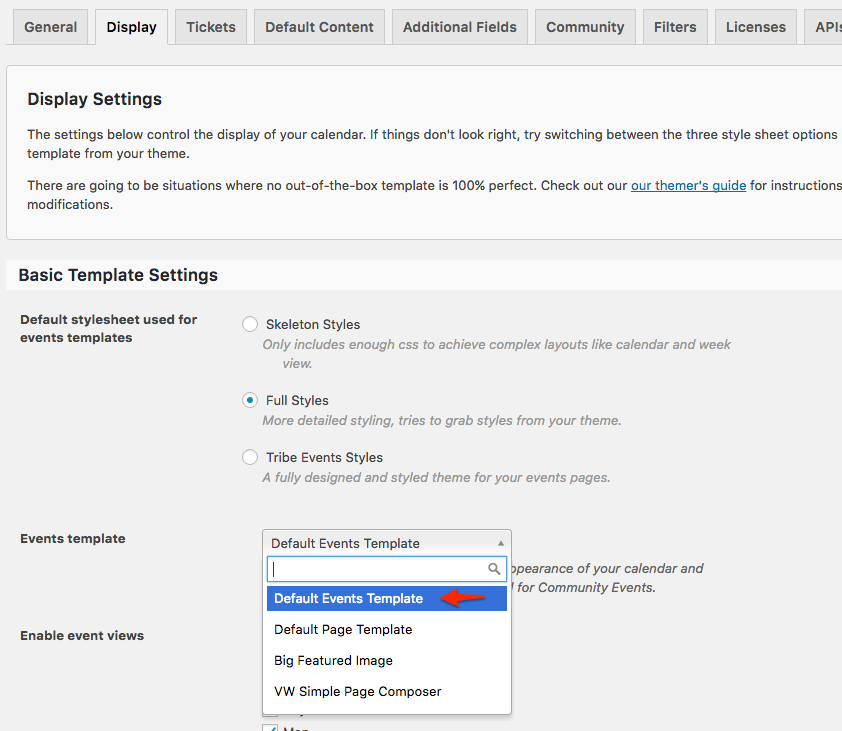
Let me know how that goes.
Best regards,
Geoff B.November 15, 2016 at 8:35 am #1192556Support Droid
KeymasterHey there! This thread has been pretty quiet for the last three weeks, so we’re going to go ahead and close it to avoid confusion with other topics. If you’re still looking for help with this, please do open a new thread, reference this one and we’d be more than happy to continue the conversation over there.
Thanks so much!
The Events Calendar Support Team -
AuthorPosts
- The topic ‘The word “Archives:” appears at the top’ is closed to new replies.