

Forum Replies Created
-
AuthorPosts
-
Geoff B.
MemberGood afternoon and welcome to the Events Calendar Support forum!
Thank you for reaching out to us.
We are sorry to hear about the issues you have bumped into while using our plugins with WPML.
I would love to help you with this topic.The first thing you should know is that we do not fully support Event Tickets Plus integration with WPML yet: https://theeventscalendar.com/knowledgebase/wpml-support/
This feature is scheduled to be release later this year. Initially we planned for spring, but there might be some pushback.
In the meantime, you could get it to partially work, but this is unsupported.
To achieve that, you will need:
- WooCommerce multilingual
- Some manual intervention
After creating the ticket AND saving the event, head over to WPML > Support > Troubleshooting page.
Once you are there, you should see several cleanup buttons. I would recommend:
- Clearing WPML cache
- Using the button that forces language assignment to items (which is what is creating the issue). This can also be accomplished by deactivating and reactivating WPML.
Your ticket will now magically appear.
The only downside is that the tickets you create in other languages are not really translations of the initial ticket. They are completely independent new tickets.
Let me know if that helps.
Have a great day!
Geoff B.
MemberGood afternoon Bayley and welcome to the Events Calendar Support forum!
Thank you for reaching out to us.
We are sorry to hear about the tickets not being sent when you would expect them too on your install. I would love to help you with this topic.
The very first thing I would recommend would be to upgrade Event Tickets Plus to version 4.4.2
We have completely redesigned our tickets sending feature under Events -> Settings -> Tickets and it is much much better.
Full disclosure, the previous version did cause several issues to some of our customers.
Give it a shot and let me know if your issues persist.
Best regards,
Geoff B.
MemberGood afternoon Jordan,
I am glad that was helpful to you.
Normally, the tooltip should appear upon hovering, even with the shortcode.
As a first troubleshooting step, could you please provide us with your complete system information in a private reply using the instructions found in the following link?
https://theeventscalendar.com/knowledgebase/sharing-sys-info/
Secondly, a quick look at the Google Chrome Developer console shows that there is a Javascript error at play.
By the sound of it, it looks like there is some type of conflict at play.
This is usually because of:- A conflict with another plugin
- A conflict with your WordPress theme
- A template customization for the Events Calendar that requires updating
A first quick test is to simply temporarily revert back to a default WordPress theme such as twenty-sixteen to see if the issue persists.
The next step would be to go through our testing for conflicts procedure (preferably in a staging/dev environment or local install of your WordPress website) and let us know what you find out.
Basically the goal here is to revert back to a bare WordPress installation to see if the problem persists. It also allows us to pinpoint what the cause of the issue is.
But, before you do that, there are 2 things I would advise:
- Make a backup of your database
- Consider activating a “Maintenance Page” plugin if you are doing this on your live site (to minimize impact on your visitors)
Let me know how that goes.
Best regards,
Geoff B.MemberGood afternoon Ken and welcome to the Events Calendar Support forum!
Thank you for reaching out to us.
We are sorry to hear about the page not displaying properly after you added tickets to it.
I would love to help you with this topic.It looks like you are using Event Tickets and Event Tickets Plus standalone (without the Events Calendar), which is great. But since you are referring to events (as opposed to tickets), can you confirm if that is true ?
In any case, I went ahead and tried to reproduce the issue on my site using twenty-seventeen.
The good news is that it worked fine for me. So I am pretty sure it is a simple matter of finding out why that is not the case for you.Would it be possible to get a screenshot of the “Edit Ticket” screen in your example ?
Additionally, is it possible that you have set the ticket start sale date somewhere in the future ?
If so, that will hide the ticket until that date is reached.Hang in there,
Geoff B.MemberGood afternoon Catherine and welcome to the Events Calendar Support forum!
Thank you for reaching out to us.
We are sorry to hear about the buttons not working properly on your site.
I would love to help you with this topic.As a first troubleshooting step, could you please provide us with your complete system information in a private reply using the instructions found in the following link?
https://theeventscalendar.com/knowledgebase/sharing-sys-info/
We already have part of that info, but it looks like some of it is missing (the plugins list for example).
Secondly, by the sound of it, I believe there might be a plugin conflict at play.
Without looking much deeper, I suspect the autoptimize one could be involved.
Perhaps you should consider completely deactivating it to see if that helps.Hang in there!
Geoff B.MemberGood afternoon Gisela and welcome to the Events Calendar Support forum!
Thank you for reaching out to us.
We are sorry to hear about the struggles you have faced while trying to get recurring events working for you.
I would love to help you with this topic.
If you have not already done so, I would highly recommend reading the following: https://theeventscalendar.com/knowledgebase/pro-recurring-events/
Based on your specific needs (with the event date changing every month), I believe you might be better off with the following approach:
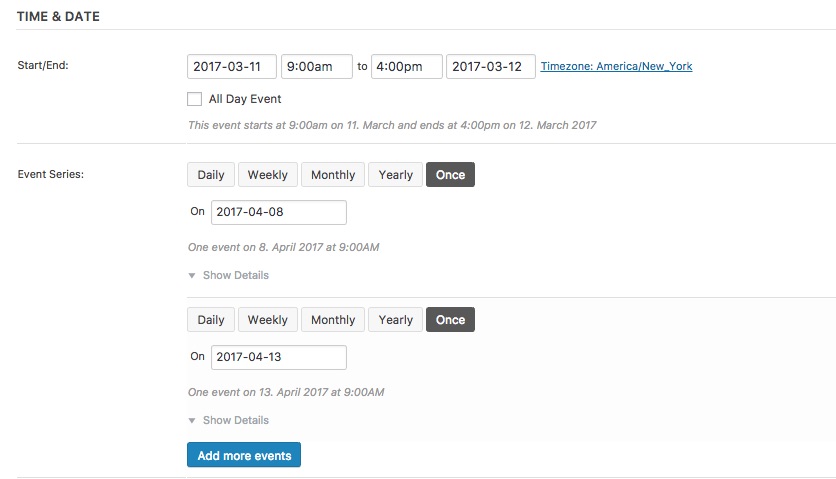
Or
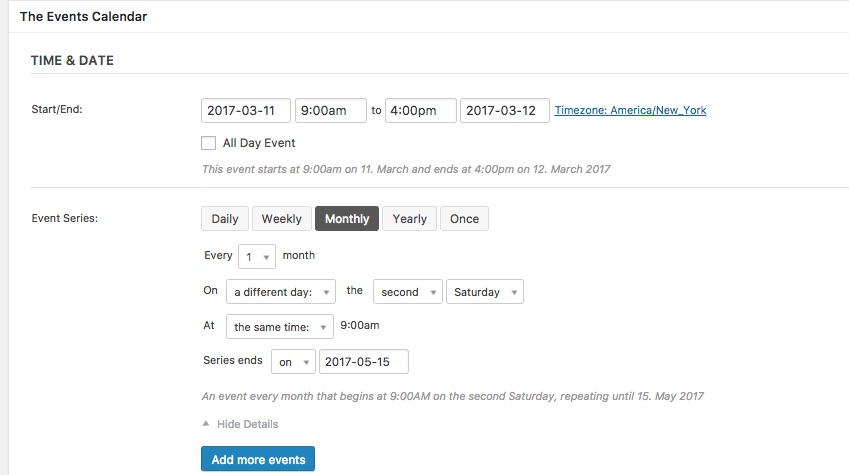
Let me know if that helps.
Have a great day!
Geoff B.
February 15, 2017 at 11:38 am in reply to: Attendee Information. Show input field if radio button true. #1236041MemberGood afternoon Matthew and welcome to the Events Calendar Support forum!
Thank you for reaching out to us.
I would love to help you with this topic.The short answer is that we do not have that feature built-in right now (conditional fields).
But, you can totally vote for that idea: https://tribe.uservoice.com/forums/195723-feature-ideas/suggestions/16633027-conditional-fields
In the meantime, possible solutions are:
- Coding some template overrides. You might want to read our Themer’s guide to get a sense of how that works.
- Hire one of our recommended customizers to do the customization for you.
- Try to integrate a form plugin (e.g. Gravity form) in the process – these offer built-in conditional forms.
I wish I had a better answer for you, but for now it’s the best one I have.
Have a great day!
Geoff B.
MemberGood afternoon Thomas,
I hear you and, in your context, it does not look like this is a fit.
To the best of my knowledge, the answer is no, there are no other options available through WooCommerce.
Even if you look at other WooCommerce similar plugins (https://woocommerce.com/products/product-vendors/ or https://srd.wordpress.org/plugins/yith-woocommerce-product-vendors/), the concept is always the same: the site owner is “in charge”.
So as you can see, this is not so much a question of wether or not our Community Calendar approach is sound or not. But rather that we are limited by the currently available technologies.
With that in mind, Paypal’s refund process is pretty straightforward.
For that reason, as much as I can understand your very valid points, I believe that with the proper disclaimers for customers and a very clear contract with your organizers, this could work.But this decision is entirely up to you.
The only other option (that still relies on trust) is that you set up an affiliate program with your organizers.
Simply put, you could use a tracking parameter in the URL to the ticket purchases on their systems and trust that they would pay you upon each sale that is completed.
I wish I had a better answer for you, but for now it’s the best one I have.
Best regards,
Geoff B.
<p class=”p1″>MemberGood afternoon Bart,
Thank you for your awesome understanding.
We will be in touch shortly!Geoff B.
February 15, 2017 at 12:32 am in reply to: Notifying Organizers when people sign up for an Event (RSVP) #1235054MemberGood evening Adrian,
Thank you for writing back.
By the looks of it, your WordPress installation’s WPmail function do appear to get in the way.
From experience with a large number of similar issue, the SMTP solution is the simplest.It can even be done using a gmail address.
At the very least, I would recommend trying it out to see if that solves the issue.
If it does and you still do not want to use such a plugin (or a similar one), it will be up to your dev or your web host to troubleshoot what is being blocked when WordPress uses WPmail.
Let me know what you decide.
Best regards,
Geoff B.
February 15, 2017 at 12:18 am in reply to: Woo Commerce Ticket Form has no add to cart field on event page #1235049MemberThis reply is private.
February 14, 2017 at 11:44 pm in reply to: Event cost filed after installing event ticket – now remove the mention "FREE" #1235038MemberGood evening Vanina,
I am sorry that none of these snippets helped.
As a first troubleshooting step, could you please provide us with your complete system information in a private reply using the instructions found in the following link?
https://theeventscalendar.com/knowledgebase/sharing-sys-info/
Could you also please send me a copy of the latest version of your WordPress theme / child theme via a link to a .zip file link (stored Dropbox or Google Drive) so that I can run some tests on my end ? I recommend a private reply for that purpose.
Please ensure you are using the latest files as found on your actual website.
This way I will get access to any updates or customizations you might have made.Hang in there!
Geoff B.MemberThis reply is private.
MemberGood evening Phil,
Thank you for writing back.
I can totally leave this thread open for you.
As a fair warning, after a few weeks of inactivity, we have a bot that tends to close these automatically.
Let me know how that goes.
Best regards,
Geoff B.MemberThis reply is private.
-
AuthorPosts