

Forum Replies Created
-
AuthorPosts
-
May 25, 2017 at 9:29 am in reply to: Recurring Events are showing the wrong times in the front-end. #1288907
Geoff B.
MemberGood afternoon Dale,
Thank you for writing back.
To clarify, take a look at
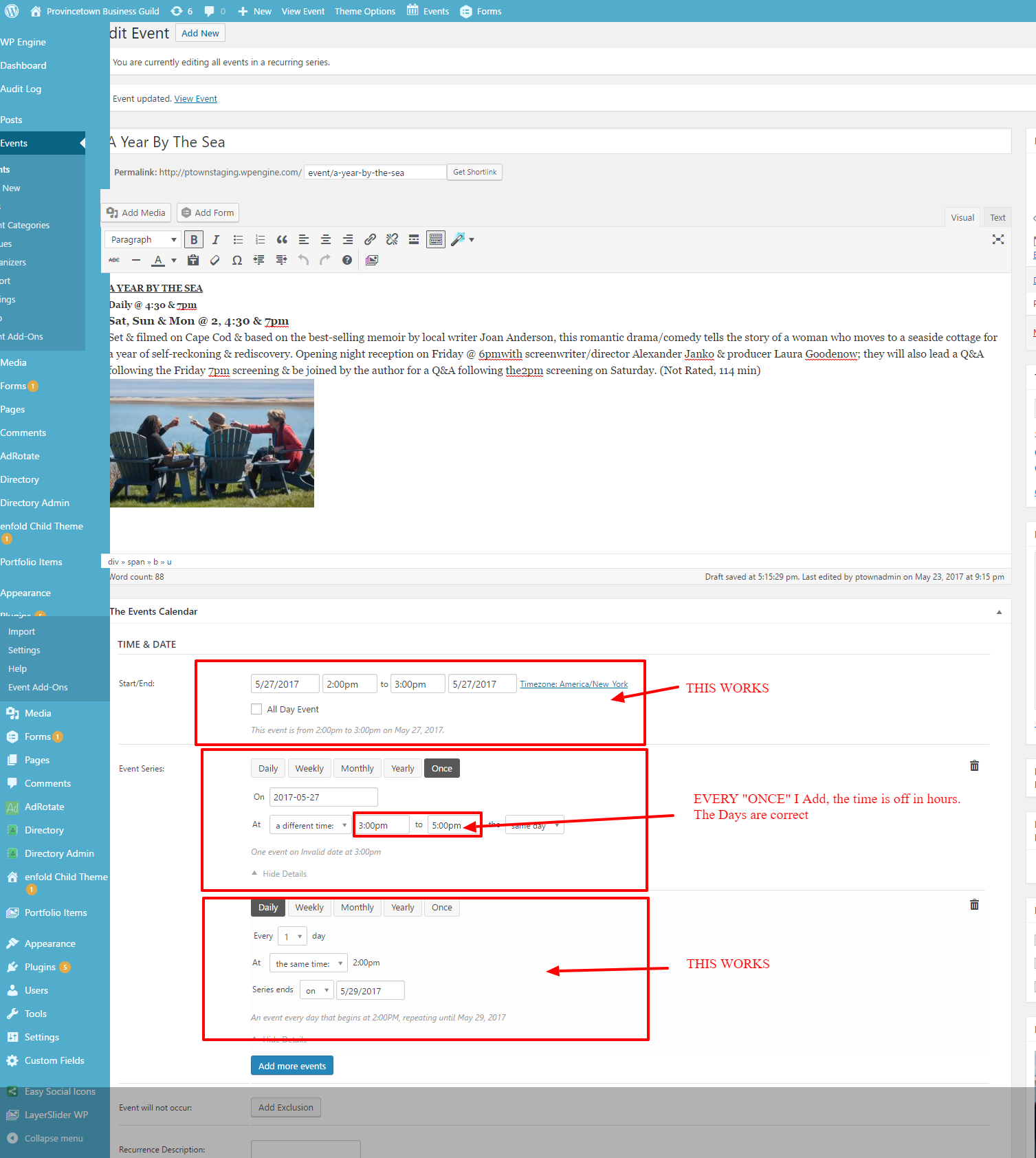
The event date on that screen is 5/27/2017. The once date is 2017-05-27.
The end date of the every day series is 5/29/2017.As you can see, only the “once” date has the yyyy-mm-dd format.
That is because there is a glitch associated to the “once” rule which forces the use of exactly that format.For now, the only solution is to make sure you adjust the date format to yyyy-mm-dd everywhere ( WordPress, Events -> Settings -> Display, the date pickers) if you are using the “once” rule.
If that still does not cut it, you might want to try to adjust the Timezone mode setting to
Use the local timezones for each eventLet me know if that helps.
Have a great day!
Geoff B.
MemberGood afternoon Juliet,
I am super stoked that this did the trick for you.
You are welcome back in our support forums any time 🙂
For now, I am going to close this thread.
Have a great week!
Geoff B.
MemberThis reply is private.
MemberThis reply is private.
MemberThis reply is private.
MemberThis reply is private.
MemberGood evening Christophe and welcome back!
Thank you for reaching out to us.
We are sorry to hear about the Monthly view not working properly on your install.
I would love to help you with this topic.From what I can gather, there seems to be an error 500 generated when visitors click on the “Next month” link.
There are a couple of things worth exploring:
- You could try enabling the monthly view cache under Events -> Settings -> Display
- It looks like there is some type of conflict at play.
This is usually because of:- A conflict with another plugin
- A conflict with your WordPress theme
- A template customization for the Events Calendar that requires updating
When it comes to that type of issue, it is preferable to troubleshoot in a staging environment if you have one.
A first quick test is to simply temporarily revert back to a default WordPress theme such as twenty-sixteen to see if the issue persists.
The next step would be to go through our testing for conflicts procedure and let us know what you find out.
Basically the goal here is to revert back to a bare WordPress installation to see if the problem persists. It also allows us to pinpoint what the cause of the issue is.
But, before you do that, there are 2 things I would advise:
- Make a backup of your database
- Consider activating a “Maintenance Page” plugin if you are doing this on your live site (to minimize impact on your visitors)
- Head over to WPML > Support > Troubleshooting page.
Once you are there, you should see several cleanup buttons. I would recommend:
- Clearing WPML cache
- Using ALL the cleanup buttons on that page
- Re-saving your permalinks
Let me know how that goes.
Best regards,
Geoff B.May 24, 2017 at 11:15 am in reply to: Recurring Events are showing the wrong times in the front-end. #1288490MemberGood afternoon Dale and welcome to the Events Calendar Support forum!
Thank you for reaching out to us.
We are sorry to hear about the issue impacting your site when the
I would love to help you with this topic.As a first troubleshooting step, could you please provide us with your complete system information in a private reply using the instructions found in the following link?
https://theeventscalendar.com/knowledgebase/sharing-sys-info/
With that in mind, from what I can gather, this might be caused by a date format discrepancy.
We apologize for the inconvenience.More specifically, as you can see from your screenshot, this date follows the yyyy-mm-dd format (as opposed to m/dd/yyyy like what is set under Events -> Settings -> Display).
For now, the best solution would be to use the default yyyy-mm-dd format everywhere or at least under Events -> Settings -> Display.
I realize this is far from perfect, but it will buy you some time until the fix is released.
Let me know how that goes.
Best regards,
Geoff B.MemberGood afternoon Michelle and welcome back!
Thank you for reaching out to us.
We are sorry to hear about the Add Events Community Calendar page not working properly for you. I would love to help you with this topic.
The first thing I would recommend is actually to upgrade Community Events to 4.4.6 (as it appears you are still using 4.1.1 for some reason).
Could you also please send me a copy of the latest version of your WordPress theme / child theme via a link to a .zip file link (stored Dropbox or Google Drive) so that I can run some tests on my end ? I recommend a private reply for that purpose.
Please ensure you are using the latest files as found on your actual website.
This way I will get access to any updates or customizations you might have made.Let me know how that goes.
Best regards,
Geoff B.MemberGood afternoon Scott and welcome to the Events Calendar forum!
Thank you for your interest in our products.
We’ll be glad to answer your questions.I totally understand where you are coming from and please know that we are really looking forward to being able to release this features ourselves.
However, contrary to what one might think, making this a reality is far more complex than following that other customer’s otherwise great advice.
In fact, I believe that this is best explained here: https://tribe.uservoice.com/forums/195723-feature-ideas/suggestions/3685663-recurring-event-support-for-tickets
To make a long story short, we have completely re-architectured the way our recurring events work with that feature in mind.
That part of the work is nearing completion which means that we will be able to tackle the tickets part of things very soon.
Thank you for your patience and understanding and stay tuned!
Best regards,
Geoff B.
MemberGood afternoon Taha and welcome to the Events Calendar Support forum!
Thank you for reaching out to us.
We are sorry to hear about the translation not being fully complete in Dutch.
I would love to help you with this topic.When translation file strings are not kicking in, it is usually caused by one of the following things:
- Your translation files are not up to date
- You are using some customized translation files that have been placed in the /wp-content/languages/ or /wp-content/languages/plugins/ folder. These might not be updated and will override any other file.
- The strings are translated, but are considered “fuzzy”
In the first 2 cases, the solution is to update your translation files using the pot file. You can do this by using the Poedit software and heading to Catalog > Update from pot file.
In the last case, you will need to make them “unfuzzy” using Poedit.
Based on a quick test, I am pretty sure option 2 is the culprit.
In other words, updating or removing the file should fix the issue.Let me know how that goes.
Best regards,
Geoff B.MemberGood afternoon Juliet and welcome back!
Thank you for reaching out to us.
We are sorry to hear about the photo view not displaying as expected.
I would love to help you with this topic.I believe this is a simple matter of CSS missing.
Try adding the following CSS rule to your style.css file or in your Custom CSS metabox:
.post-type-archive-tribe_events #content {

    width: 100%;

}
Let me know if that helps.Have a great day!
Geoff B.
MemberGood afternoon Mark,
You are welcome back in our support forums any time 🙂
Have a great week!
Geoff B.
MemberGood afternoon David,
That is a good question.
While logged as an admin to your site, head over to Settings > Permalinks in your WordPress’ site wp-admin (backend).
Once there, simply click on the “Save Changes” button and pay attention to the confirmation message you get (it should say “Permalinks structure updated”).
Let me know how that goes.
Best regards,
Geoff B.MemberGood afternoon Heinz,
That is great to hear.
I hope it all goes according to plan.Please reach out to us if there is anything else.
Have a great day!
Geoff B.
-
AuthorPosts