

Forum Replies Created
-
AuthorPosts
-
Geoff B.
MemberThis reply is private.
MemberThis reply is private.
MemberGood evening Mary,
Thank you for writing back.
If coding is not really your cup of tea, you could always hire one of our recommended customizers to do the customization for you.
But before resorting to that, have you tried editing the ticket in WooCommerce directly (see screenshot).
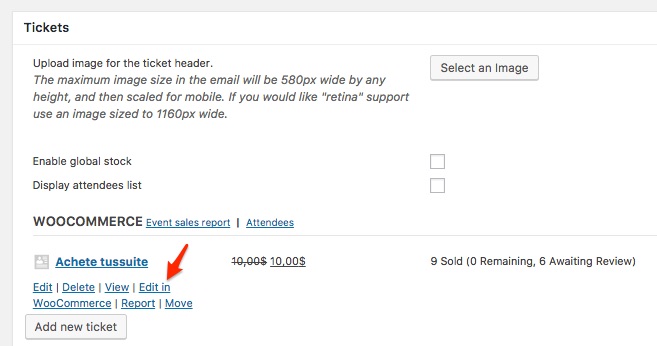
That should allow you to set whatever tax class you want (https://docs.woocommerce.com/document/setting-up-taxes-in-woocommerce/)
Let me know if that helps.
Have a great day!
Geoff B.
MemberGood evening Alyson,
Thank you for writing back.
all of the events in the series are using the same ticket pool.
That means that:
- Each event displays the exact same tickets
- You cannot tell for which of the events a person has bought a ticket for
This typically works great for situations such as a class that is held over several weeks, but where you pay a one time fee for all the series.
I believe you will learn how to create a recurring events series and break events from that series by reading the following: https://theeventscalendar.com/knowledgebase/pro-recurring-events/
add tickets to the events individually
If you add a ticket to the event right after creating the events series, this ticket will apply as a shared ticket (between all the events in the series – as described above).
If you first break the events from the series, and then add the tickets, each event will get its own unique ticket.
To add tickets, I would recommend reading the following: https://theeventscalendar.com/knowledgebase/making-tickets/
With the woo box office it will only work with individual events like above?
We have not tested Woo box office integration, so this hard to say.
What I can tell you is that this product was not specifically intended to integrate with ours. But, as with all things, depending on what you are trying to accomplish specifically, it might work for you.
Also importantly which plugin Tickets Plus or Box office will integrate with facebook so people can book directly from facebook?
Regardless of the plugin you will use, you will need an extra step to link your WooCommerce store to Facebook.
There are a couple of ways to do this.
Here are a couple of links to get you started.
You preferred solution will probably depend on what your needs are:- https://woocommerce.com/products/facebook/
- https://wordpress.org/plugins/facebook-shop-by-storeyacom/
- https://www.facebook.com/business/help/community/question/?id=10156496772825291
n.b.: you might have to set the catalog visibility of your tickets to “visible” for this to work.
Let me know if that helps.
Have a great day!
Geoff B.
MemberGood evening Arthur,
We apologize for the inconvenience caused by this glitch.
We are actively working on a solution for this.Alas, I cannot guarantee when it will be fixed, as it’s in the development team’s hands now.
They need to assign it, code it, test it, and schedule it for release.The good news is that you will be contacted as soon as a fix is available.
The other good news is that it looks like this is a display bug.
Although this is annoying, that means that the functionality still works correctly (thankfully).Thank you for your patience as we see this through.
Best regards,
Geoff B.MemberGood evening Mark,
Thank you for writing back.
As you know, every single maintenance bugfix is processed as fast as we possibly can.
After all, we want nothing more than rock-solid integration.With that in mind, unfortunately I do not have a release date for you.
For the time being, the only workaround would be to take the downgrade route.
That means downgrading our plugins (and possibly WPML) to a previous version that offered multi-language vs month view integration.I recommend reading the following article on that topic: https://theeventscalendar.com/knowledgebase/downgrading-plugin-past-version/
Based on my research, that seems to be the Events Calendar version 4.3.5 and the Events Calendar Pro version 4.3.4. It might also mean WPML version 3.6.2 (more or less).
Let me know if that helps.
Geoff B.
MemberGood evening Yosua,
As promised, I checked if it was possible to use the additional attendee information functionality standalone with WooCommerce products.
As I thought, this is currently not possible without some major customization.
For the time being, it is only possible to have access to that functionality when tickets are used with event or posts.I wish I had a better answer for you, but for now it’s the best one I have unfortunately.
Best regards,
Geoff B.
MemberGood evening Aeky,
Thank you for writing back.
I am super stoked that this is now all good for you!You are welcome back in our support forums any time 🙂
For now, I am going to close this thread.
Have a great week!
Geoff B.
MemberThis reply is private.
MemberGood evening Nicolas,
Thank you for your awesome understanding.
You are welcome back in our support forums any time 🙂
For now, I am going to close this thread.
Have a great summer!
Geoff B.
MemberGood evening Kerry,
Thank you for the files.
I have found where to fix the issue.More specifically, you will need to take a look at /wp-content/themes/spacious-pro/header.php around line 158.
Just to set expectations, the scope of our support is mostly to get our customers started on the right track and to help them in case of issues. We unfortunately do not provide complete support for customization.
With that in mind, if you add a conditional for post-type-archive-tribe_events pages, you will be able to return a H1 like “events” instead of archives.
Let me know how that goes.
Best regards,
Geoff B.MemberGood evening Ryan,
Thank you for writing back.
I am glad you are making progress on this.Regarding your other issue, I would recommend trying the following:
- Go over to Events -> Settings -> General and change the single event slug to something different (e.g.: events instead of event)
- Re-save your permalinks.
If that does not work, try temporarily reverting back to a default WordPress theme such as twenty-sixteen to see if that helps.
Let me know how that goes.
Best regards,
Geoff B.MemberThis reply is private.
July 19, 2017 at 10:50 pm in reply to: Just purchased license and entered license, but import options don't show #1323691MemberGood evening Derek and Sharon-Lee,
This is pretty awesome to see our customers help each other out like that!
Major props your way.You are welcome back in our support forums any time 🙂
For now, I am going to close this thread.
Have a great week!
Geoff B.
MemberGood evening guys!
This is pretty awesome team work!
Kudos to all.You are welcome back in our support forums any time 🙂
For now, I am going to close this thread.
Have a great week!
Geoff B.
-
AuthorPosts