

Forum Replies Created
-
AuthorPosts
-
Barry
MemberHi Robert,
I attempted to add the additional event time using the “once” button but it would not allow me to add the additional days that I need to specify.
You would need to repeat this process, once for every additional event date/time that you wish to add.
Looking at the last screenshot you shared, it seems like you’ve already added two extra dates/times though it looks like they are taking place at exactly the same date and time as the original event.
In case it helps to clarify the process: once you have clicked on the Once button, you should see a blank field labelled On – click in this field and a datepicker will appear letting you select the actual date you want the show to repeat on:
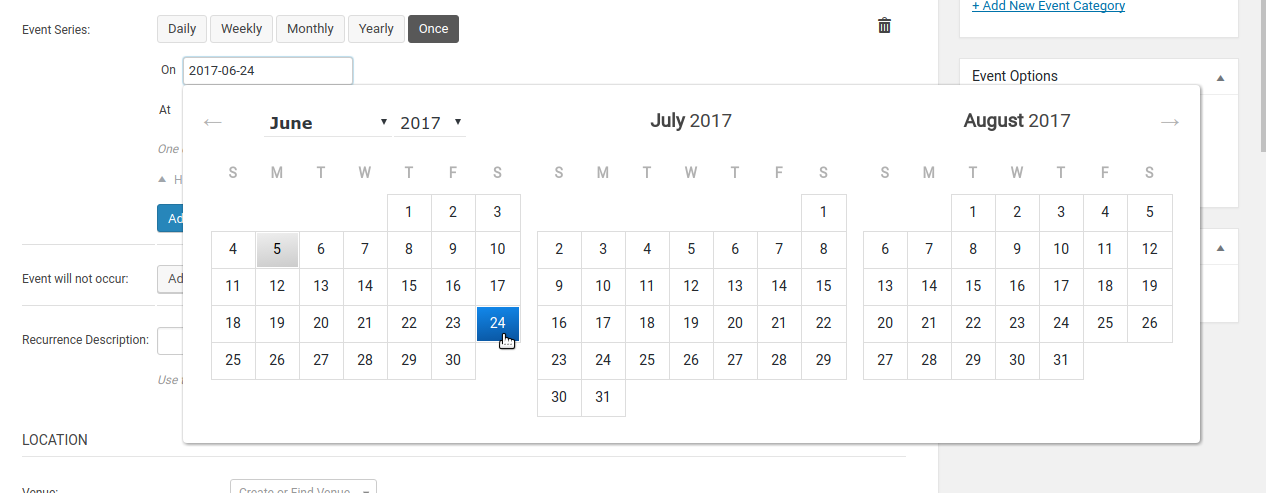
Does that help at all?
June 5, 2017 at 7:52 am in reply to: Just paid for a license renewal for Aggregator but the renewal date is wrong #1293148MemberHi @tribedude,
To clarify the situation: when we rolled out our Event Aggregator service this replaced a number of legacy products, including Facebook Events (which you had purchased), and so as a courtesy we issued license keys to users like you so you could transition from legacy plugin to Event Aggregator.
In your case, that courtesy license key is the one set to expire in November this year. It wasn’t something you actually purchased, so we can’t refund it – but if you wish to use it up until November then you can do so and you could certainly apply for a refund of the Event Aggregator key that you purchased recently.
To do this, please follow the instructions and complete the form found here.
Thanks!
MemberHi 🙂
If you had added a fix in relation to this problem, then yes: I would recommend you now try removing it.
Thanks!
MemberHi Christophe!
Geoff is currently unavailable but if I understand correctly, this issue is now resolved and so I will go ahead and close the thread.
Of course, should we be able to help with anything else please do create a new forum topic and one of the team will be only too happy to assist 🙂
MemberExcellent, glad to hear that issue is resolved and one of the team will be only too happy to help further in the new forum topic you created 🙂
MemberThis reply is private.
MemberHi Jamjam,
Our ticketing solutions currently are not designed to work with recurring events, that’s true and it says as much on the Event Tickets Plus product page (besides there being many instances in the forums where we’ve made the same thing pretty clear).
As you note, lots of users do indeed ask for this – but I think we’ve been as clear as we can possibly be that it is not currently something our products officially support (though we’re making changes that, hopefully, should lead to the introduction of this much requested functionality in a future release).
I’m sorry to hear you were unable to workaround this via a custom development strategy, of course, and appreciate you highlighting this limitation in case it helps others reading this post 🙂
Since it’s been a while since the original author, Heinz, reached out to us, though, I’ll go ahead and close this topic.
Should we be able to help with anything else, please do create a new support topic so the team can assist further.
Thanks!
June 5, 2017 at 7:12 am in reply to: Some issues with Events Cal : FR translation – Calendar colors – Widget #1293130MemberHi Nathalie,
I’m sorry to say Geoff is not available right now, however I understand Cliff has given you some guidance on replacing pieces of text generally, which should complement the instructions Geoff already provided a little earlier.
Il reste le problème de l’affichage de “Voir tous les Evénements” dans le widget.
Je ne parviens pas à remplacer cette string.In fact, you can! It is possible to override the template and change the string directly. You could also change the string itself (“View All %s”) using any of the techniques Geoff outlined in his previous reply or via a plugin such as Say What.
Last but not least, though I appreciate you wish to resolve these problems prior to purchasing Events Calendar PRO, we can’t really provide ongoing technical assistance here in the pre-sales forum.
Instead, for any further technical guidance that you might need, please do post in our translations forum or the community forum over at wordpress.org (once you purchase a license, of course, the team will be delighted to help via our premium forums).
Thanks!
MemberHi Ron!
Generally it is best to create new topics for each individual problem or question: it helps us to serve all our customers fairly and also makes it much easier to manage and address individual topics. That said, let me try and answer a few of your questions up front — I would ask though that you post any follow ups in fresh topics and in the relevant forums 🙂
Regarding the login requirement for frontend submissions, yes exactly: if you do not wish to force users to login before submitting events, please enable anonymous submissions.
With regards to CAPTCHA, I can’t really supply any insights into whether you previously used CAPTCHA or not, but the capability is certainly there if you want to take advantage of it. In fact, if you allow anonymous submissions, I’d highly recommend its use.
Last but not least, the options in the Events → Settings → Community → Access Control area are there to let you block certain levels of users from the admin environment if you want to: some site administrators feel more comfortable with this in place.
WordPress is built with security in mind, however, and so long as you are judicious in the sort of user accounts you set up for people there is no particular need to use these (and, in fact, if your users generally will not even be asked to login you may need it at all).
A safe starting point you or your admin can start with and tweak if needed, though, would be something like:
- Block access to WordPress dashboard [check]
- Roles to block [subscriber]
- Redirect URL [default – ie, leave blank]
I hope that helps and – last but not least – I’ll leave you with a few links that might be useful references for you 🙂
- New User Primer for Community Events
- Guide to Community Events settings
- Managing Community Events submissions
Good luck and – if you need more help – we’re here to help (though, creating new topics is appreciated) – thanks!
MemberThanks for sharing that information 🙂
This is not something that we can see ourselves and most users don’t seem to have any issue, which tends to point to a local conflict of some kind on your site.
I wonder if you could do some more troubleshooting. Once again, please switch to a default theme (making a backup first as Geoff suggested last time, just in case). Next, deactivate all plugins except for:
- The Events Calendar
- Event Tickets
- Event Tickets Plus
- WooCommerce
Again, please deactivate all other plugins if you can including the various other WooCommerce plugins that you are using. With that done, do you still see the same problem?
Let’s assume for the moment you do not and the problem is resolved. Begin reactivating everything and keep checking the product editor until you discover which plugin exactly is causing the conflict: if we can identify this, there is a higher chance we can do something about it (though of course I can offer no absolute guarantees here).
I do of course realize that – particularly for an ecommerce website like yours – running through the above steps may not be ideal. However, you can certainly approach this a different way. Here’s an alternative:
- Create a test site, which can be as simple as a sub-directory install of WordPress (ie, example.com/test-wp)
- Install only the plugins listed above and use only the default theme
- See if things behave as expected
- Assuming they do, incrementally add the other plugins (and ultimately the same theme) as on your live site until you discover what if anything triggers the breakage
Setting up an extra test site if you haven’t done it before may sound daunting, but if you have a good web host with CPanel it’s usually pretty much a “one click” operation and they can guide you through it.
Let me know if you can perform some of this testing and how you get on 🙂
June 2, 2017 at 7:43 pm in reply to: Tickets get sent immediately, even if the customer pays via cheque / on-hold #1292708MemberExcellent!
MemberSounds good – please do let us know how you get on with the other proposed solution 🙂
MemberHi Brian,
Perhaps a snippet like this that you could add to a custom plugin would help, however I warn you that it is not safe in its current form:
add_action( 'tribe_events_update_meta', function( $event_id, $data ) {
	if (
		! isset( $_POST['EventCost'] )
		|| ! isset( $data['EventCost'] )
		|| $_POST['EventCost'] === $data['EventCost']
	) {
		return;
	}

	// Warning! This means there is zero sanitization: you should carefully consider
	// what you do and do not wish to accept here and take the time to implement
	// suitable safeguards
	$true_cost = $_POST['EventCost'];
	update_post_meta( $event_id, '_EventCost', $true_cost );
}, 10, 2 );
Please take the time to read the comments and implement proper sanitization (or seek the advice of a dev who can help you with this if you are unsure).
I hope it helps!
June 2, 2017 at 4:56 pm in reply to: Purchased Event Tickets Plus, but the purchase is not visible in my account #1292661MemberThis reply is private.
MemberHi Kiki,
We did have an unfortunate blip which triggered an error similar to what you described and that was since corrected. I would simply recommend making a backup and trying again: I’m sure you’ll have more luck this time 🙂
Our apologies for the inconvenience first time round.
-
AuthorPosts