

Forum Replies Created
-
AuthorPosts
-
Barry
MemberGlad it worked!
I’ll go ahead and close out this topic, but of course if we can assist with anything else please don’t hesitate to create new forum topics as needed and one of the team will be only too happy to help 🙂
MemberThanks Tony.
I can see the problem on your site – but on trying to replicate locally with just The Events Calendar, Events Calendar PRO and Gravity Forms enabled (to mimic your site, I embedded a form in the footer sidebar so this was also present on map view, just as on your staging site) and I was unable to reproduce.
I’m unable to access your system information, so perhaps you can share manually, but it would be interesting to know if all plugin versions are up-to-date.
I also wonder if you could repeat the basic troubleshooting steps you performed earlier but take your (staging) site back to a point where only The Events Calendar, Events Calendar PRO and Gravity Forms are activated alongside a default theme such as Twenty Seventeen. Does the problem still happen then, or does it work as expected?
I’m keen to discover if the conflict may be compound in nature (perhaps some theme code integrates with Gravity Forms and is inadvertently triggering this, for instance), as other users aren’t generally reporting this – despite Gravity Forms being a very popular plugin – and I am unable to replicate myself.
Thanks!
MemberYou’re welcome.
As this has been marked ‘resolved’ I’ll go ahead and close the topic, but of course please feel free to post new support topics as needed should anything else arise that we might be able to help with.
Thanks again!
MemberHappy to help 🙂
MemberHi Fran,
WordPress’s RSS feeds include the author field by default – it’s not something we add or generate on our side.
I’m afraid to say, it’s easier to add new elements that to strip out certain hardcoded existing elements – making removal of the author field a fairly advanced customization.
Also, can I add the event description (if there is one)?
This is included as standard 🙂
When I visit your site I don’t see any events with descriptions, though, which is probably why they are currently absent from the feed.
I hope that helps!
June 5, 2017 at 1:07 pm in reply to: India Time Zone : Would it be possible to have IST GMT +5:30 #1293335MemberHi Guarav,
Selecting India for your venues is indeed supported 🙂
If you’re finding you can’t locate it, though, could I ask you to post a question in our community support forums? I’m afraid here in the pre-sales forums we don’t generally provide technical support.
Of course, if you have purchased a license key please do login and post on our Events Calendar PRO forum.
Thanks!
MemberApologies for the delay in responding, Jeff.
I’m not aware of any current conflicts with Gravity Forms on the frontend of the site and would be interested to learn more about this one.
In what way is map view impacted? I visited the site linked to your license key and – currently – it seems to be deactivated. Would it be possible to temporarily reactivate map view so we can see the issue first hand?
Thanks!
MemberThat is odd.
In the first instance, can you visit Events → Settings → Display and try changing the default events template (if it is currently set to Default Page Template, as an example, try switching it to Default Events Template or vice versa).
If that doesn’t work, can you try testing for conflicts in case your theme or another plugin is causing this issue? Steps can be found by following the link provided below.
theeventscalendar.com/knowledgebase/testing-for-conflicts
Thanks!
MemberHi Robert,
Is there any way to speak with someone over the phone?
I’m afraid not: we deliver all support here on the forums.
Can I please cancel our subscription since the feature likely doesn’t work the way I need it to.
I hope we can resolve your problem and so hopefully we won’t have to do this, but at any time within the first 30 days you are welcome to apply for a refund by following the steps and completing the form found here:
theeventscalendar.com/knowledgebase/refund-policy
I am not getting the option to edit the “once” additional dates it only replicates the original date and time from the post that is why you are seeing that.
Interesting …
So if you edit a recurring event that you already created, do you find you can locate and click on a link like the one in the following screenshot (“Show Details”) or is this completely missing?
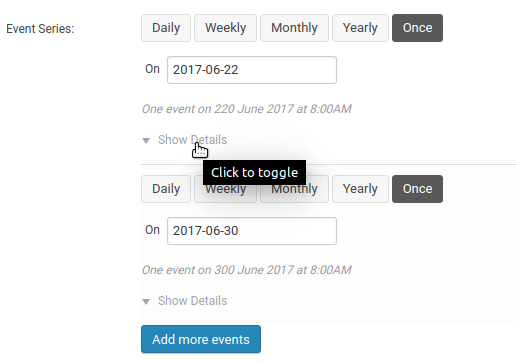
Is the date itself always missing as per this earlier screenshot you shared?
If so, I wonder if there is a conflict of some kind going on … can you share the system information for the site you are experiencing the problem on?
/theeventscalendar.com/knowledgebase/sharing-sys-info
Thanks!
June 5, 2017 at 12:14 pm in reply to: Purchased Event Tickets Plus, but the purchase is not visible in my account #1293298MemberExcellent – happy to help 🙂
June 5, 2017 at 12:13 pm in reply to: Some issues with Events Cal : FR translation – Calendar colors – Widget #1293295MemberFantastic, happy to hear it 🙂
MemberHi Steve,
Filter Bar does indeed an out-of-the-box means of filtering down the list of events and it includes support for filtering by organizer.
And also, if so, why wasn’t it suggested initially in this support request thread?
I guess because the initial request was couched in terms of completing some customization work that was already in progress.
It’s not infrequent for users to prefer customizing what they already have over purchasing a separate plugin and indeed for this sort of thing in particular some site owners have a strong desire to modify or add extra controls to the existing search bar, versus adding a 2nd bar (which is how Filter Bar works).
On review, though, we certainly could have flagged the possibility of you adopting Filter Bar and I apologize for not doing so.
MemberThis reply is private.
MemberHi Steve,
At this point in time I’m afraid to say you cannot create a ticket for a recurring event and have users select a single date from the series.
The only ways to workaround this are to follow the approach outlined by Geoff but create an individual ticket for each possible date (and you might build on this with some customization work to only show the correct ticket for the date being viewed), or else you could create individual (non-recurring) events and add the required ticket(s) for each.
However, as full support for recurring events is not yet available for Event Tickets or Event Tickets plus, I’m afraid there simply isn’t an easy solution.
MemberHi John,
Sorry to hear that. It could again be the case that some theme CSS is triggering this. I appreciate you removed the widget, though, which makes it difficult for us to see the problem (since with most themes, this doesn’t happen).
Any chance you could set it up – perhaps using a plugin like Widget Logic to make it only appear on a specific page? We can then take a look at it in the context of your theme?
Alternatively, if you simply want to remove the featured event image, you could add some custom code like this to a custom plugin or to your theme’s functions.php file:
function hide_event_list_remove_featured_imgs_filter() {
	return '';
}

function hide_event_list_remove_featured_imgs_setup() {
	add_filter( 'post_thumbnail_html', 'hide_event_list_remove_featured_imgs_filter' );
}

function hide_event_list_remove_featured_imgs_teardown() {
	remove_filter( 'post_thumbnail_html', 'hide_event_list_remove_featured_imgs_filter' );
}

add_action( 'tribe_events_list_widget_before_the_event_image', 'hide_event_list_remove_featured_imgs_setup' );
add_action( 'tribe_events_list_widget_after_the_event_image', 'hide_event_list_remove_featured_imgs_teardown' );
I hope that helps!
-
AuthorPosts