
Home › Forums › Calendar Products › Events Calendar PRO › Event Calendar Recurrence
- This topic has 14 replies, 3 voices, and was last updated 9 years, 3 months ago by
Robert.
-
AuthorPosts
-
May 31, 2017 at 7:15 am #1291255
Robert
ParticipantI purchased the pro edition to be able to set up recurring events. I am not able to customize and randomly choose the dates I need to except through the predefined settings of daily, weekly, monthly, etc…
I have this calendar set up on my website to list a television show schedule but it varies week to week even with some airings multiple times daily.
I wished to post the episode one time but continuously add additional dates to the original post each time I get the airing schedule of that particular episode. Is this possible? If it is not possible can I get a refund for the purchase of the pro addition if we determine we made the purchase before understanding if it would work the way we need it to.
May 31, 2017 at 8:59 pm #1291591Geoff B.
MemberGood evening Robert,
Thank you for reaching out to us.
I would love to help you with this topic.I wished to post the episode one time but continuously add additional dates to the original post each time I get the airing schedule of that particular episode. Is this possible?
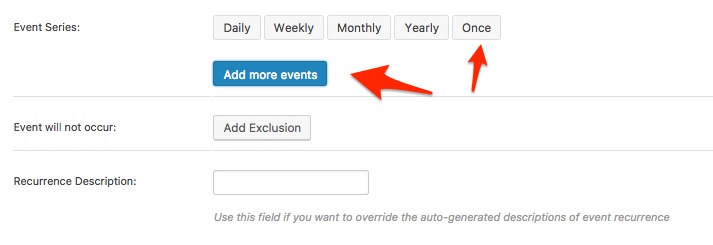
Yes, this is absolutely possible.
You simply need to use the “Once” option (see screenshot)
If you have not already, I would also recommend reading the following: https://theeventscalendar.com/knowledgebase/pro-recurring-events/
Let me know if that helps.
Have a great day!
Geoff B.
June 2, 2017 at 8:06 am #1292364ParticipantI attempted to add the additional event time using the “once” button but it would not allow me to add the additional days that I need to specify.
June 2, 2017 at 8:06 am #1292366ParticipantI need to add multiple date to this event
June 5, 2017 at 7:59 am #1293152Barry
MemberHi Robert,
I attempted to add the additional event time using the “once” button but it would not allow me to add the additional days that I need to specify.
You would need to repeat this process, once for every additional event date/time that you wish to add.
Looking at the last screenshot you shared, it seems like you’ve already added two extra dates/times though it looks like they are taking place at exactly the same date and time as the original event.
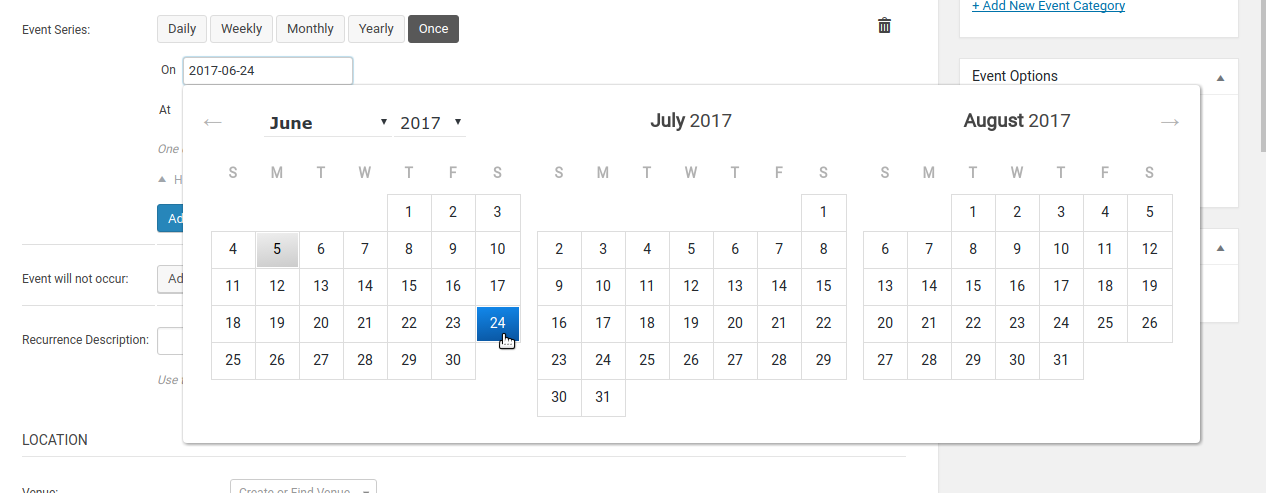
In case it helps to clarify the process: once you have clicked on the Once button, you should see a blank field labelled On – click in this field and a datepicker will appear letting you select the actual date you want the show to repeat on:
Does that help at all?
June 5, 2017 at 9:53 am #1293225ParticipantI don’t believe I am explaining my problem properly or what I am asking is possible, is there any way to speak with someone over the phone? If I am not able to get this feature to work can I please cancel our subscription since the feature likely doesn’t work the way I need it to.
June 5, 2017 at 10:09 am #1293235ParticipantI see the difference now from your screen shot after a 2nd look. I am not getting the option to edit the “once” additional dates it only replicates the original date and time from the post that is why you are seeing that. I am not sure why I am not able to this is what would help make this software work for us.
June 5, 2017 at 12:24 pm #1293304MemberHi Robert,
Is there any way to speak with someone over the phone?
I’m afraid not: we deliver all support here on the forums.
Can I please cancel our subscription since the feature likely doesn’t work the way I need it to.
I hope we can resolve your problem and so hopefully we won’t have to do this, but at any time within the first 30 days you are welcome to apply for a refund by following the steps and completing the form found here:
theeventscalendar.com/knowledgebase/refund-policy
I am not getting the option to edit the “once” additional dates it only replicates the original date and time from the post that is why you are seeing that.
Interesting …
So if you edit a recurring event that you already created, do you find you can locate and click on a link like the one in the following screenshot (“Show Details”) or is this completely missing?
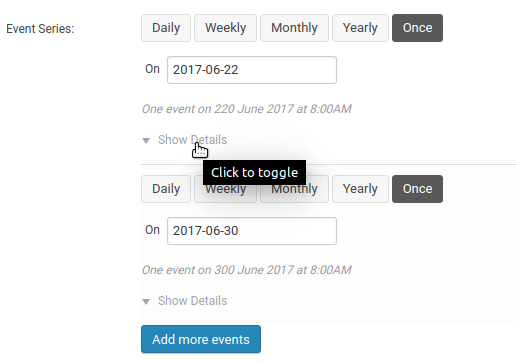
Is the date itself always missing as per this earlier screenshot you shared?
If so, I wonder if there is a conflict of some kind going on … can you share the system information for the site you are experiencing the problem on?
/theeventscalendar.com/knowledgebase/sharing-sys-info
Thanks!
June 7, 2017 at 5:58 am #1294341ParticipantI will do my best to get this to work it will be a time saver. I have upload the steps I take, the difference I see if that I can not specify the date like I see you can on your screen shots.
June 7, 2017 at 7:13 am #1294383MemberSo it certainly seems like things aren’t working in your case, I’m not sure why but it could be a conflict of some kind.
- Can you share your system information via a private reply? theeventscalendar.com/knowledgebase/sharing-sys-info
- Can you try running through our recommending conflict testing steps? theeventscalendar.com/knowledgebase/testing-for-conflicts
Simply because this isn’t a problem we can replicate (nor so far as I’m aware is it something many other users are experiencing or reporting on the forums) it does seem that the above troubleshooting steps would be worthwhile.
Can you give them a shot?
June 7, 2017 at 7:18 am #1294388ParticipantThis reply is private.
June 7, 2017 at 7:19 am #1294391ParticipantThis reply is private.
June 7, 2017 at 3:04 pm #1294892MemberThanks for sharing. That’s certainly a lot of plugins and many I’m unfamiliar with. So, while nothing jumps out as being an obvious source of a conflict I think testing that angle next of all is worthwhile. Again, here are the steps to follow:
theeventscalendar.com/knowledgebase/testing-for-conflicts
If you are unable to do this on your live site, please consider creating a test site — this can be as simple as a fresh installation of WordPress in a subdirectory (ie, example.com/testsite). Start by only adding The Events Calendar and Events Calendar PRO and add nothing else – stick to a default theme.
Can you replicate the same issue, or does the user interface for recurrence work as expected? If it does, this is a strong indication that your live site is subject to a conflict.
You can then begin adding the very same plugins as you have on your live site (and, ultimately, the same theme) until you uncover which if any component is causing the problem.
Let me know how you get on!
June 29, 2017 at 9:35 am #1312144Support Droid
KeymasterHey there! This thread has been pretty quiet for the last three weeks, so we’re going to go ahead and close it to avoid confusion with other topics. If you’re still looking for help with this, please do open a new thread, reference this one and we’d be more than happy to continue the conversation over there.
Thanks so much!
The Events Calendar Support Team -
AuthorPosts
- The topic ‘Event Calendar Recurrence’ is closed to new replies.