

Forum Replies Created
-
AuthorPosts
-
Andras
KeymasterHi Mike,
I checked with the dev team and while it will not make it into the next maintenance release (in 1-2 weeks) but most probably it will be in the one coming after that. We will know more after the next MR.
Cheers,
AndrasKeymasterHi Lisa,
Apologies for the delayed reply. I was out due to a small accident.
Sorry to hear about the staging site. Would have been great to be able to test this as it looks like a unique issue, so far nobody reported anything similar.
The problem could lie in a lot of places, any of the other plugins, the theme, the server, the payment gateway or even our plugin. A test for conflicts would help us narrow that down.
You could still run a test on your live site in a less busy period. Fire up a maintenance mode plugin (like this) and run a conflict test with some fake purchases.
First do a full backup of your site and database just in case, then do some test purchases (with Payment on Delivery gateway for example) to see if you can recreate the issue. Then run the conflict test and check when the issues stop appearing.
There is nothing in your system information that would really stand out. Keeping the plugins and WP up-to-date is always a good idea.
There are different cases where the payment gateway is causing an issue of some sort, but that is close to a wild guess at the moment. One other thing you can check is marking the purchase completed automatically, but I believe how that is handled has been changed in the recent 4.4.3 version.
Although this is not much I still hope it helps. Let me know if there’s anything I can help you with or if you manage to spin up a staging site (a copy on a sub-domain is sufficient) or run a conflict test.
Cheers,
AndrasMarch 1, 2017 at 3:02 pm in reply to: Incorrect sort order when viewing all recurring events #1248021KeymasterHi Jim,
I’m sorry to hear that.
I recreated the recurring event based on your screenshot with the most recent versions of our plugins and all seemed to work fine.
What happens if you create a new recurring event? Does it get jumbled up?
If you just hit Update for “Homework Zone” event, does it get fixed after that update?
Thanks for letting me know.
Cheers,
AndrasMarch 1, 2017 at 2:42 pm in reply to: Same Day Events stop displaying prior to starting on a category page #1248006KeymasterHi Teresa,
I’m really sorry I kept you waiting for so many days without an answer. I had a small accident at home (my lovely daughter poked me in the eye) and I was away from the screen recuperating.
You mentioned:
I discovered that my colleague wrote a custom query function for the grid view of the calendar page.
I checked the code you shared and there are some parts which look like they are modifying the query of events in some way. It would be great if you could disable all custom codes and check what happens then with the disappearing events.
If disabling the custom codes doesn’t help, then the next step would be running a test for conflicts based on our guide to see if any plugin or the theme you are using is influencing that somehow.
Let me know what you find, I’ll be waiting.
Cheers,
AndrasKeymasterThis reply is private.
KeymasterHello Robert & Arzan,
I’m really sorry for the wait for an answer. I had a little accident – my daughter poked me in the eye, so I had to take some time off from the screen.
I checked our records and I see 2 similar issues on file. Both of them are currently being worked on (one is already ready for testing) and if all goes according to plan, the fix should come with the next maintenance release in 1-2 weeks. Please hang in there.
I am going to set the status of this ticket to “pending fix” and we will update it once the fix is released. If you have any new questions or issues please create a new ticket and reference this one.
Thanks and cheers,
AndrasKeymasterHey,
Sorry for the long break, I had a little accident and had to be off screen.
Thanks for all the details you shared! That will help our devs get a proper fix for this, they are already working on it. If all goes well, the fix for the attendee meta will come with the next MR in a week or two.
As for the payment gateway issue, I’ll need to do some investigation.
Cheers,
AndrasKeymasterHello again Saif,
Thanks for using our plugins and for reaching out to us! I’m really sorry you are experiencing issues with Events aggregator.
Event Aggregator does use cronjobs for importing events on a schedule. If you have a lot of import jobs set up and scheduled to run at the same time – which I believe can happen when you switch from the old importers to Event Aggregator – then the cronjobs might produce some heat.
This is what I would do:
- solve the license key issue
- check if a new manual import works
- check if one old import works when moved to Event Aggregator
- check if all the rest of old imports work when moved to Event Aggregator
So, for the license key: when you go to Events > Settings > Licenses and please check if you see the “Valid Key!” response for Event Aggregator.
Also, please go to the bottom of the Events > Help page and send me a screenshot of the Event Aggregator System Status, which should look like this:
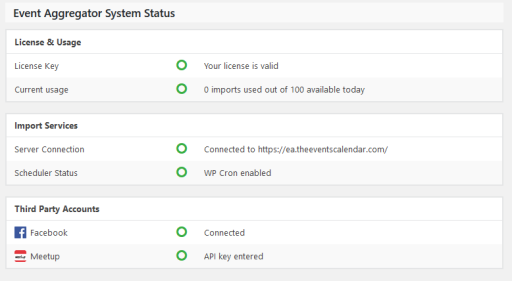
If you have a “Valid key!” see all greens like above, then go to Events > Import and check if the dropdown now allows you to choose any of the options.
Once this works well we can move on to the next steps.
Looking forward to solving this with you.
Cheers,
AndrasFebruary 22, 2017 at 3:52 pm in reply to: Custom field values for attendees not saved to cart #1244170KeymasterSzia András! 😉
Thanks for using our plugins and welcome to the forums!
I’m really sorry about this issue you are experiencing with the attendee meta fields.
We have seen reports of a similar issue and we are investigating it. The details you sent are amazing and will help us hunt down the source of this issue so we can eliminate it. Thank you for this, much appreciated!
As an extra I would kindly like to ask you to share with me your system information as well. Here’s a nice guide on how you can do that.
Kösz és üdv,
AndrasUi: Magyarul is kommunikálhatnánk, de mivel úgy néz ki, hogy egy hibáról van szó, és a csapatban csak én beszélek magyarul, ezért inkább maradjunk az angolnál, hogy a többiek is megértsék, ha belenéznek a topicba az információk miatt. 🙂 Köszi!
KeymasterHello Arzan, thanks for getting in touch and I’m really sorry you are facing this as well.
Azran, it would be great if you could share your system information with me as well and also which hosting provider you are using. Thanks!
Robert, Arzan, thanks for the screenshots. Based on those it does look like the bug we encountered at specific providers and hosting packages. We are currently investigating this issue, please hang in there.
Also note, we just have released a new Maintenance Release, version 4.4.3 today. While this MR most probably will not solve your issue, it is still recommended to update.
Thanks for your patience!
Cheers,
AndrasKeymasterHi pgleleux,
Again, I’m really sorry this is happening, and I understand how nerving that can be. Let me assure you that I will do my best in order to find and fix this issue with your cooperation.
I know this might seem like a waste of time, still I would like to ask you to go through our conflict testing guide, to rule out the possibility of any plugins, theme or custom code interfering with the calendar. If we manage to find which plugin is causing it, then we can start looking deeper on how we can fix that.
Also what you can try, even before conflict testing is to increase the memory on your server. I see you have 256M, so try 512M. Usually this helps with fatal memory issues.
Let me know the results and we’ll go further from there. Looking forward to solving this with you so you can have a properly working calendar and site, as you would expect.
Cheers,
AndrasFebruary 22, 2017 at 1:18 pm in reply to: Same Day Events stop displaying prior to starting on a category page #1244019KeymasterThis reply is private.
KeymasterHi Miroslav,
That is actually possible as of version 4.4.2 I believe. Check this video:
https://1drv.ms/u/s!Aqh6lbOjUW1ToUCC4C3rNSQEg5JE
We have just released 4.4.3 today, so I suggest that after you do a full site backup (just in case, always recommended before updates), update the plugins and check that out how it works. And let me know please. 🙂
Cheers,
AndrasFebruary 22, 2017 at 12:53 pm in reply to: Event series settings not available after 4.4 update #1244010KeymasterHi Chris,
Thanks for the further information.
I was asking about “the recurrence rules were replaced by exception rules” because I saw a very similar case recently where that has happened.
Also I checked in our system and there is a bugticket filed for an issue like this when updating to 4.4.x
Our developers are already working on this on high priority and if all goes well it will come out with the next maintenance release. For that unfortunately I don’t have a date yet.
I added this thread to the ticket to give it a bit more push.
Until then the workaround would be restoring a backup from before the update. Maybe you can try downgrading back to 4.2.3 instead of the backup, might work as well. And do a backup before doing anything, just in case. 🙂
I’m really sorry about this issue, rest assured we are working on a fix. We ask for your kind patience.
I am going to set the status of this ticket to “pending fix” and we will update it once the fix is released. If you have any new questions or issues please create a new ticket and reference this one.
Thanks and cheers,
AndrasFebruary 22, 2017 at 12:36 pm in reply to: "View all" recurring events don’t list the events #1244003KeymasterHi,
This is quite difficult to pinpoint, as at the moment I don’t even know what to look for.
At first the timepickers load, then their format is changed to what you need, then when the whole page is almost completely loaded, they are changed back to the am/pm format. So there might be a script running at the end of the page, or a script is called when pageload is done, that reverts this setting.
To find what is causing this the right course of action here would be:
- check if this happens with a default theme like twentyfifteen. (On my test install it works without issues with that.) If twentyfifteen is fine, then there is something in the theme that causes this.
- If you have the same issue with twentyfifteen, then a conflict test might reveal which other plugin is influencing this.
At the moment this is the smartest idea I have.
By the way, we released version 4.4.3 today which should solve the “Recurring events ‘show all’ URL is broken when translated” issue. Please update when you have some time, and let me know if it solves your related issue. You can read more about this release here.
Cheers,
Andras -
AuthorPosts