

Forum Replies Created
-
AuthorPosts
-
Andras
KeymasterOk, I’ll check what can be done about that. Most likely the $1 as the minimum will be the way to go. I’ll get back to you soon.
Andras
KeymasterAlright Mark, thanks for getting back to me on this!
I’ll close this as suggested and if anything else pops up later with our plugins, then just open a new ticket and we’ll be happy to help.
Cheers man,
Andras
February 21, 2017 at 2:52 pm in reply to: Event series settings not available after 4.4 update #1243346KeymasterHello Chris,
Thanks for reaching out and I’m sorry about this recurring event issue.
Yes, there are changes in how the recurring events are handled, it was introduced in version 4.4.
I have seen one other report of the exact thing happening. If I understand correctly, then the recurrence rules were replaced by exception rules in your case?
Do you still need any help with this issue? (I’m sorry, it is not clear from the above.) If yes, please let me know what the issue is and I’ll do my best.
Thanks a lot!
Cheers,
AndrasKeymasterHello again Chris,
WOW!!! Kudos to you, man! Amazing testing.
I tried to recreate the issue with the summer time change but couldn’t. Here is what I did:
- General Settings Time Zone > Sydney, Australia.
- The Event Calendar Settings > use the Local Timezone
- Create an event for March 31, from 8am to 9am, with daily recurrence that stops after 5 days.
- On the front-end all recurrences show start time as 8am and end time as 9am as expected.
I even tried this with General Settings Timezone as UTC, same result.
Changed event timezone from locality to utc and back, no changes.
So I’m a bit clueless at the moment. Are you / were you doing anything different when setting up the recurring event? Maybe different type of recurrence rule? That is the only thing I can think about at the moment.
Let me know, please. I’m just about as eager to get to the bottom of this as you are. I do hope we find something and we will be able to fix it.
Cheers,
AndrasKeymasterWelcome back Mike,
Yeah, it looks like a theme issue. I checked the code of 2 pages to compare.
This is your events page:
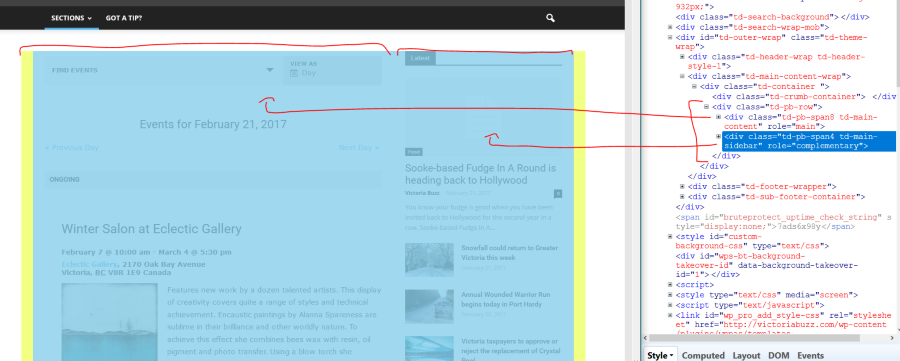
You can see that you have a row, and in the row the 2 columns are nicely there.
This is your event submit page, where the sidebar column somehow falls outside of the row.
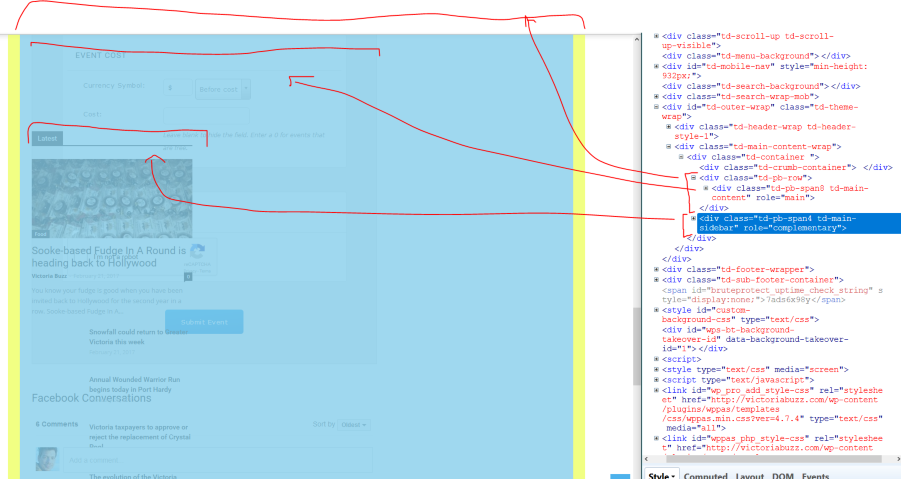
(Sorry for the rough sketches.)
So you can try to check around in how those pages are set up, if it’s possible.
This css snippet does help a bit, but it’s still not perfect:
.tribe_community_edit .td-main-sidebar { float: right; }Does this help get you started? Let me know.
Cheers,
AndrasFebruary 21, 2017 at 12:40 pm in reply to: 1 Hour Issue during/after Meetup.com Import with Event Aggregator / Calendar Pro #1243267KeymasterGrüss dich Hanns,
I’m Andras and I’ll be handling your case. Thanks for using our plugins and for the kind words!
There are some bugs with imports changing the time, but it is difficult to say if your case falls into one of those or if it is a new one.
In case you can dig out and share with me the URLs to the topics you referred to, that would be very helpful.
Also, if possible, please share with me the URL that you are trying to import events from, so I can run some tests on it.
Thanks and I’m looking forward to solving this with you.
Mit freundlichen Grüssen
Andras
KeymasterHello pgleleux,
Thanks for getting in touch with us and I’m sorry you are hit by a memory issue.
Memory issues can be caused by – among some other things – the number of records in your database and the number of plugins used. This differs by the plugins, but there are some which require more resources than others, and if you have too many of those, then you simply run out of memory.
In order to find the root cause of this I would like to ask two things:
- When are you getting the error message, what are you doing, which page are you visiting when that happens? Is it random or is it only with a couple of pages? Back-end or front-end or both? etc. The more details you can give me the better.
- It would be great if you could run a test for conflicts based on this guide.
Let me know and we’ll dig further to solve this.
Thanks and cheers,
AndrasKeymasterHi Mark,
I checked the html code of that URL and there are still quite some markup errors. I don’t know where they come from, but I suspect it’s either coming from the theme or some customization.
Here is an example:
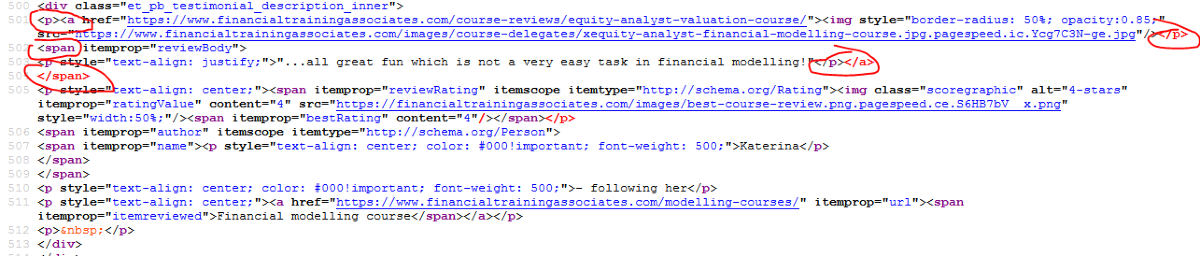
The nesting of the elements is jumbled.
I quickly scanned through the code of the page. There was nothing else that jumped out, so I would take a look at this section and fix it.
Once that is fixed we can take a look again what the issue can be, if it still exists.
This article might help you with some ideas on finding issues:
Cheers,
AndrasFebruary 21, 2017 at 2:13 am in reply to: Having trouble with calendar export / subscribe (?) #1242831Keymaster🙂 Sure thing! Thanks for hanging in there!
A.
KeymasterThanks, I take it it’s this section here:

Could you please send me some screenshots of how that page and the widget is set up?
Also, it would be great if you could check the following:
- Put the widget with the same settings in to a regular widget area and check if it works fine there. It might be that since the widget is placed in the main content area, there are some things affecting it.
- Switch to a default theme like twentysixteen and check if the widget works fine there. This can help us find out if there is something in your theme or some customization that is influencing how the widget behaves.
Thanks and cheers,
AndrasKeymasterAh, Leipzig ist schön. 🙂
I’ll check with the team if anybody has a quick solution for this.
Please note that we don’t support customizations, as our priority is solving issues and fixing bugs, so this might take some time.
Also, just to know, would it be OK, if the minimum value for the filter was set to $1 instead of $0?
Thanks and cheers,
AndrasFebruary 21, 2017 at 1:58 am in reply to: Event Tickets Plus Extension: Enhance Woo Order Templates – error #1242826KeymasterThanks Scott! I’ll be waiting for your zipped version so I can test exactly the same.
A.
February 21, 2017 at 1:56 am in reply to: Same Day Events stop displaying prior to starting on a category page #1242823KeymasterHello again,
There is no separate timezone setting for the different event categories. All of them use the same as per your settings in Dashboard > Settings > General and Events > Settings > General tab > Timezone settings.
So it anything makes a change to the timezone, then it could be Essential Grid.
I recommend doing the following 2 tests:
1. You tested what happens if you prolong the end time of the event, and that helped. It would be great to see what happens if you make it end earlier. Does it disappear earlier from the calendar? This would help us understand if it is really the end time and possibly a timezone setting causing the issue.
2. Enable List view (under Events > Settings > Display tab) and check when the event disappears from there.I did a test now on my local install, the event disappeared when the end time was passed.
Let me know the results of this.
Cheers,
AndrasFebruary 21, 2017 at 1:20 am in reply to: WordPress database errors, Slow performance and Slow Errors #1242807KeymasterHello again Greg,
Thanks for the answers and I’m really sorry about the crashes. This is definitely not how our plugins are supposed to work.
If you have other sites running fine with Flywheel, then it is some local issue. That can be a lot of things, like a plugin or WordPress update going south, some events having corrupted data, or corrupted / mixed up data in the database, or something we might not even think of.
Our calendar plugins don’t use separate tables for storing the information. They are stored in wp_posts, wp_postmeta and the taxonomy/terms tables.
What you can try is bulk deleting events 50-100 at a time and see if the performance improves after a while. This could help eliminate a corrupted event.
Or yes, you can set up a new site and export / import the venues, organizers and events. Though I think I would also do this in batches and check regularly if everything is still ok. (Or you done a full import, and if the performance issues come up, then re-start and do it in batches.)
Here’s a guide that can help you with exporting / importing.
https://theeventscalendar.com/knowledgebase/using-wordpress-export-tools-to-migrate-events-content/
Let me know what you decide to do and if I can support you further with anything regarding this issue.
Cheers,
AndrasFebruary 21, 2017 at 1:05 am in reply to: "View all" recurring events don’t list the events #1242800KeymasterThis reply is private.
-
AuthorPosts