Forum Replies Created
-
AuthorPosts
-
Andras
KeymasterHappy to hear that Gary! Awesome!
Since this seems resolved I am going to close this ticket, but if you need anything else related to this topic or another please create a new ticket and we’ll be happy to help.
Cheers,
AndrasPS: We’d be grateful if you would give us feedback on your satisfaction with support. Just click on one of the classy looking emojis below. 🙂 If you can spare a few words, that’s even better. Thanks!
PS2: If you like our plugins, and you didn’t yet do so 🙂 we would also be happy to receive a review in the wordpress.org repository. Much appreciated!
https://wordpress.org/support/view/plugin-reviews/the-events-calendar/
https://wordpress.org/support/view/plugin-reviews/event-tickets/KeymasterYou are very welcome!
I believe it is enough to deactivate Events Calendar PRO, but yes, that should solve the issue.
As you phrased it, TEC should play nice with Gutenberg. At this time, just like with the Gutenberg plugin itself, since both that and our Extension are still in development, it is not recommend to use them on a production environment. But of course it’s up to you. 😉 Make sure you have backups. 🙂
A.
KeymasterThanks for the feedback Natalie, much appreciated!
I will definitely run this by the docs team to see if we can polish things a bit.
I am going to close this ticket, but if you need anything else related to this topic or another please create a new ticket and we’ll be happy to help.
Cheers,
AndrasKeymasterThanks José, I will get one of our Spanish-speaking guys to get back to you on this.
Cheers,
AndrasSeptember 10, 2018 at 2:42 am in reply to: problem when editing existing product, only with the products that have Tickets? #1617337KeymasterHi thlink,
Thanks for your answer.
I’m still missing some crucial information to be able to further help you.
Please, share your system information with me in a private reply, based on this guide.
Do I understand correctly that you are adding tickets to products, and not to events? Or the issue is somewhere else?
Can you explain me step by step what you are doing so I understand and check? Something like:
- Create an event
- add a ticket to the event
- open the WooCommerce ticket product page
- …
If you can share some screenshots or even a screen recording, that would be best.
Thanks,
AndrasKeymasterSzia Ágota!
Thanks for reaching out to us!
Could you send me a full screen screenshot of the issue? Thanks!
Please also try to go through our conflict testing guide and check if maybe one of the plugins you are using is interfering with it.
Let me know what you find.
Üdv,
AndrásKeymasterHi triviumchina,
Thanks for reaching out!
To be able to help you better, could you share your system information with me? Thanks!
Also please share with me a URL to your week view so I can take a look what’s happening there. By default the event titles should not be truncated.
Here’s our demo site where you can check this.
Cheers,
AndrasKeymasterHi Ammon,
Thanks for reaching out to us!
Great questions there. Let me help you out.
If someone purchases multiple tickets, can they be required to give unique contact information for each ticket?
Yes, that is absolutely possible with Event Tickets Plus. This article will give you a rundown on the functionality:
does the attendee list include all contact information with all tickets, or just the PURCHASERS of the tickets
Actually contains both. If you look at this screenshot from the above post, the ‘Primary Information’ column will contain the info of the purchaser.
If you open the ‘details’ section which will show up as shown in the red rectangle, that’s where you’ll have the unique contact infos.
Also, the attendee list can be exported as csv or xls, in case you find it easier to manage in a different software application.
Can tickets be purchased that apply to any event within an event TYPE…
This is not possible with our plugins, at least not out of the box.
You could possibly create something like this with WooCommerce and a couple add-ons.
Ultimately, we are looking for event management that can integrate with Infusionsoftt via WP Fusion.
Unfortunately I’m not familiar with Infusionsoft and WP Fusion so I cannot give you any answer on this.
We do have a 30-day no-questions-asked refund policy, so you can test drive our plugins and check if it suits your needs.
Let me know if you have any further questions.
Cheers,
AndrasKeymasterHey Natalie,
Thanks for getting in touch with us!
No worries about the multiple posts here. The more information we have the better we can help you out.
And congratulations of finding a fix for the issue, good job there!
Is there anything I can help you with related to this? Or can we close this as resolved?
Thanks and have a great weekend,
AndrasSeptember 7, 2018 at 8:55 am in reply to: _tribe_rsvp_status Database query killing database server. #1616287KeymasterHi provbusnews,
Thanks for getting in touch!
Sorry to hear about this issue. Not quite sure what could be happening there but I’d be happy to help you figure out.
That query def. doesn’t look good. I ran it on my test site database and got 997 rows, and a lot of the rows appear more times.
I haven’t been able to reproduce that query on my site though, so we would need to find it what triggers that. Would you be able to do a conflict test to determine that.
You can also try installing the Query Monitor plugin and send me a screenshot of the query in question and its details.
Thanks,
Andras
September 7, 2018 at 8:03 am in reply to: Please verify your API key is correctly entered on the settings page #1616230KeymasterThis reply is private.
KeymasterThanks, that looks OK! I will get back to you soon.
A.
KeymasterHey Rob,
Thanks for clarifying the question.
We do not have a feature quite like this built in.
If you go to Events > Settings > General tab > General Settings section, there you will find a “Move to trash events older than…” option. You can set that to the required value. However that only removes the events if I know correctly. (Just checking this with the developer.)
As for users and rsvps and tickets, that will need to be a manual work.
The following query will give you the IDs of all the events the user with ID=1 has RSVP’d to:
SELECT post_id FROM wp_postmeta WHERE (meta_key = '_tribe_tickets_attendee_user_id' AND meta_value = '1')If you are using WooCommerce, then the order id of those can help too.
When a ticket is purchased through Event Tickets (and WooCommerce), then the WooCommerce order id gets registered with the ticket. In the wp_postmeta table you will have an entry where the meta key = ‘_tribe_wooticket_order’ and the meta_value is the WooCommerce order id.
In the same row you also have the post_id, which gives you which ticket / rsvp it’s connected to. That post_id is the ID in the wp_posts table.
If you can tell me what other data you would like to look up / delete, I can try come up with further info / advice on what you can do in the database.
And of course, before doing anything in the database, it is highly recommended to create a backup.
Cheers,
AndrasKeymasterOkay, thanks for clarifying.
Not quite sure what’s happening, but I’m happy to assist you in finding out.
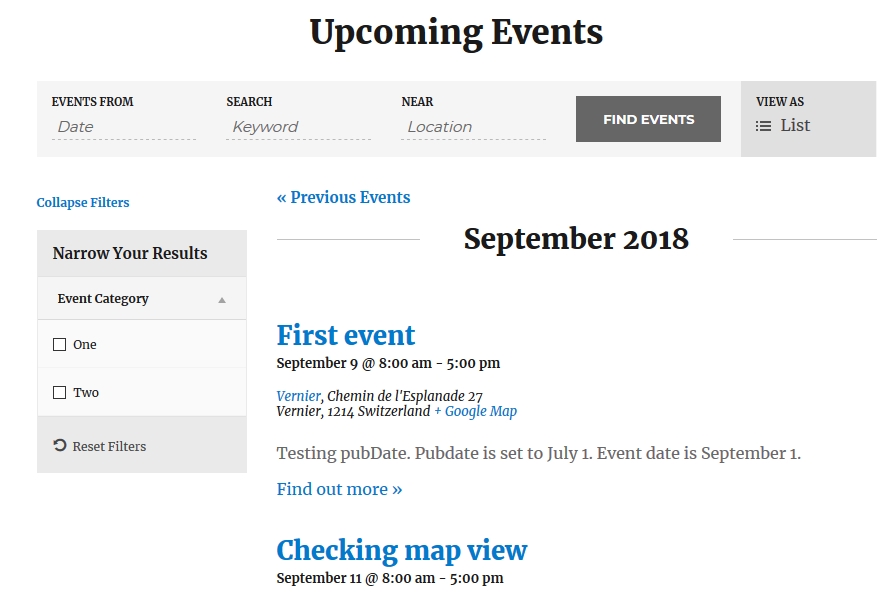
If I understand correctly, then this is the view you would like to achieve on pageload:
Might be month view as well, the focus is now on the categories being open.
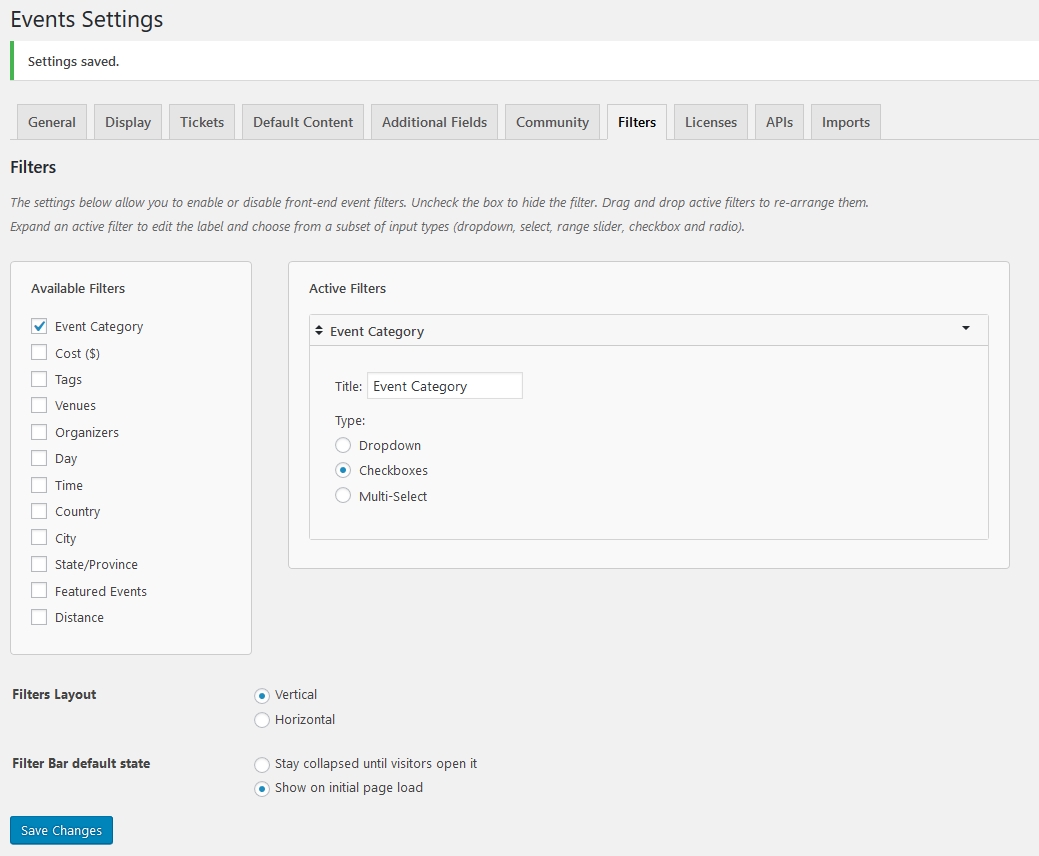
To achieve this I have the following setting under Events > Settings > Filters tab
What I also realized that no matter what the setting is, once you have toggled it open or close, on the next pageload it will have the same status. So if you closed it before, it will be closed on the next pageload, even if you change your settings meanwhile.
I was trying to check where this is stored, but couldn’t find it. It is not in transients and not in a cookie or cache.
If you open the page in a different browser or in a private tab / window, then they will show or not show based on your setting.
If you want to make sure that they always show, no matter what, then you can add this snippet to your (child) theme’s style.css file:
[code language=”css”].tribe-events-filter-group.tribe-events-filter-checkboxes {
display: none !important;
}[/code]Also note that with this the user will not be able to close the filters at all.
Does this help?
If you need further help, please share your system information with me in a private reply.
Thanks and cheers,
AndrasKeymasterHi Laura,
I’m so happy to hear that helped! Awesome!
Since this is resolved I am going to close this ticket, but if you need anything else related to this topic or another please create a new ticket and we’ll be happy to help.
Cheers,
AndrasPS: We’d be grateful if you would give us feedback on your satisfaction with support. Just click on one of the classy looking emojis below. 🙂 If you can spare a few words, that’s even better. Thanks!
PS2: If you like our plugins, and you didn’t yet do so 🙂 we would also be happy to receive a review in the wordpress.org repository. Much appreciated!
https://wordpress.org/support/view/plugin-reviews/the-events-calendar/
https://wordpress.org/support/view/plugin-reviews/event-tickets/ -
AuthorPosts