

Forum Replies Created
-
AuthorPosts
-
Victor
MemberHi There!
I’m sorry to hear you are having that issue. Let me help you with the troubleshooting.
Does re-sending the ticket email works? You can try this by navigating to the WooCommerce order for the tickets and in the Order Actions metabox choose “Resend tickets email”.
There could be an error somewhere. Could you please enable WP_DEBUG and WP_DEBUG_LOG ? This will create a debug.log file inside the /wp-content directory.
After that, try reproducing the issue a few times (by resending the tickets email), so that in case there is an error, it will be saved into the debug.log file. Please share that log file with us so we can see if any problem from there.
Thanks,
VictorMemberHi Bill!
Thanks for getting in touch with us! I’d be happy to help you with this topic.
Tribe Commerce uses PayPal IPN (Instant Payment Notification) system to generate the orders in your site. Bear in mind, IPN can’t be tested on a local environment as the site needs to be online for the notification from PayPal to reach your site.
Also, do make sure you have gone though all the settings in the following article to configure Tribe Commerce > https://theeventscalendar.com/knowledgebase/tribe-commerce-paypal/
I hope that helps. Let me know if any follow up questions.
Best,
VictorMemberHi there,
Thanks for sending over the screenshot as a reference.
The “Status” column in the attendees list shows the order status. Orders are all managed by WooCommerce, so you can go through their documentation to know more about it > https://docs.woocommerce.com/document/managing-orders/
I believe that partial refunds in WooCommerce do not change the order status. Only full refunds set the orders as “Refunded”.
Is there anything else I can help you with?
Best,
VictorAugust 6, 2018 at 1:06 pm in reply to: Ticket 'Buy Now' button redirects to website homepage instead of PayPal checkout #1591378MemberHi Travis,
Thanks for following up with this.
I ran some tests on my end but I’m not able to reproduce it.
Could you please try creating a new event and ticket while still under default conditions (using a default theme and only our plugins active) and see if any difference?
Also, please enable WP_DEBUG and WP_DEBUG_LOG. This will create a debug.log file inside the /wp-content directory.
After that, try reproducing the issue a few times, so that in case there is an error, it will be saved into the debug.log file. Please share that log file with us so we can see if any problem from there.
Thanks,
VictorAugust 6, 2018 at 11:52 am in reply to: Ticket 'Buy Now' button redirects to website homepage instead of PayPal checkout #1591306MemberHi Travis!
Thanks for getting in touch with us. I’m sorry to hear you are having that issue. Let me help you with the troubleshooting.
I’ve just had a look at your site and tested the Buy Now button. It looks like there could be a conflict with your theme, another plugin or even some custom code. To make sure we are not dealing with a conflict, please go through the steps outlined in our Testing for Conflicts guide and see if you can reproduce the same issue under default conditions.
Let me know how it goes.
Thanks,
VictorAugust 5, 2018 at 8:52 am in reply to: [tribe_events] shortcode month view broken in Version 4.4.27 #1590626MemberHi @peterphanoutlook.com
Thanks for chiming in here.
I’m sorry to hear you are hitting the same issue. However, those error logs seem to be due to something different.
Could you please open a new separate topic for your issue? When you do, please share with us your system information by following this guide > https://theeventscalendar.com/knowledgebase/sharing-sys-info/.
This will allow us to to keep things more organized and make sure we give the proper attention to each of you.
Thanks,
VictorMemberHi,
i can’t able to create my event as a product.
Just to clarify, only the creation of a ticket will create a WooCommerce product, not events.
Once a WooCommerce ticket is created, you can navigate to edit the WooCommerce product and set a sale price for it as you can see in the following screenshot:
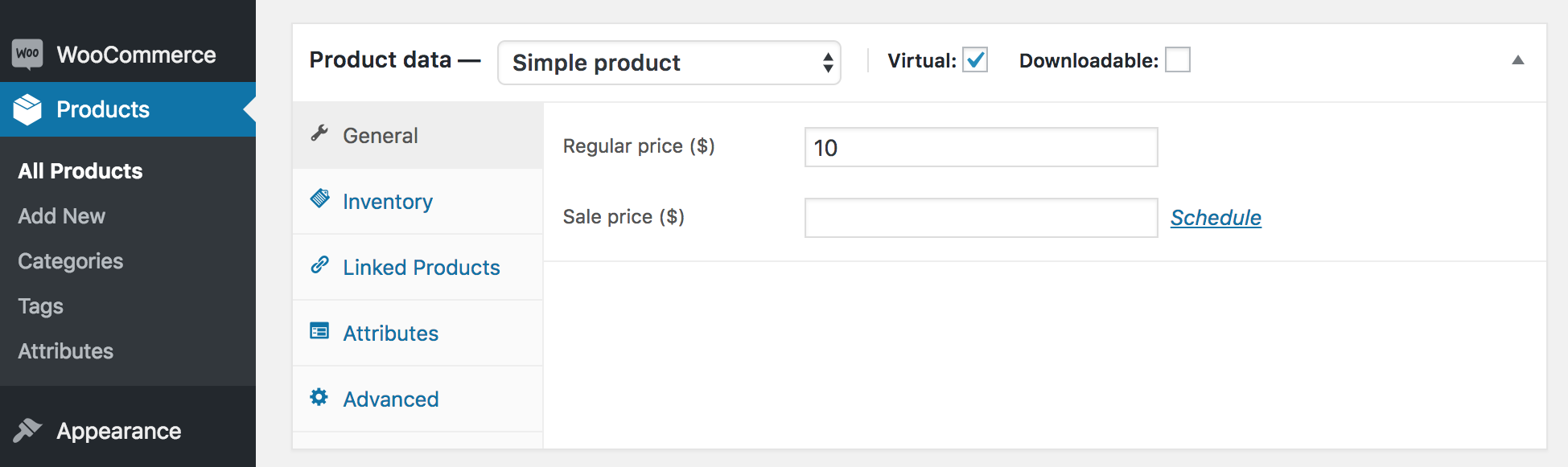
As a reference, let me share the following article that gives a good overview of how to create tickets using our plugins > https://theeventscalendar.com/knowledgebase/making-tickets/
In addition, George recently wrote a very interesting blog post that lists some great WooCommerce extensions that can boost your ticket sales > https://theeventscalendar.com/awesome-woocommerce-extensions-for-event-ticket-sales/
Best,
VictorMemberHi,
Let me help you with that.
When you delete an attendee, you will no longer be able to access the attendee data.
If you want maintain a record of the deleted attendees, you will first need to export the attendee information before you delete it.
You can learn more about managing your orders and attendees in the following article > https://theeventscalendar.com/knowledgebase/managing-your-orders-and-attendees/
Additionally, if you want to sell tickets using WooCommerce, I’d recommend you take a look at the WooCommerce Specific Settings > https://theeventscalendar.com/knowledgebase/woocommerce-specific-ticket-settings/ that allows you to control when the attendee records are generated, depending on the order status.
I hope that helps.
Best,
VictorMemberHi James,
Unfortunately, there is no easy workaround for this as it would be a new functionality. However, you could certainly achieve that with some custom coding.
We do have a feature request with many votes already in our user voice > https://tribe.uservoice.com/forums/195723-feature-ideas/suggestions/8391186-reminder-emails-for-x-days-before-event so I recommend you add yours too.
Best,
VictorAugust 3, 2018 at 5:30 pm in reply to: Does a cancelled event send out notificiations at all to attendees? #1590083MemberHi James,
Thanks for following up with this.
I think that for that situation, you might want to check out the move tickets functionality that enables you to move the tickets from one event to another including its attendees. This will trigger an email to the ticket holders notifying them about the change.
You can learn more about this in the following article > https://theeventscalendar.com/knowledgebase/moving-tickets/
I hope that helps 🙂
Best,
VictorMemberGreat to hear that Steven! Thanks for your confirmation 🙂
I’ll close this now, but as always, feel free to open a new topic if anything comes up.
Have a good weekend!
Cheers,
VictorAugust 3, 2018 at 8:47 am in reply to: [tribe_events] shortcode month view broken in Version 4.4.27 #1589598MemberHi Glen,
Thanks for getting back to us about this issue.
I’ve just made a few tests on my end and the shortcode works for me.
Do you have a link you can share with us where this is happening? We’d like to have a closer inspection and see what we can find.
When testing the shortcode, did you make sure you updated both The Events Calendar and Events Calendar PRO to the latest versions?
Please let us know about that.
Thanks,
VictorMemberHi Ashley!
Thanks for getting in touch with us! I’d be happy to assist with this topic.
As you say, there is no built-in functionality to have a wait list when tickets are out of stock for an event.
Creating a second ticket type for that purpose sounds like a possible workaround. However, you should bear in mind that those tickets will also be considered valid tickets, so the ticket emails will also be generated for them and it could be a cause of confusion at the time of checking-in your attendees at the event.
If you consider to try that out, I’d suggest you perform some tests and see if it would apply for your specific real life scenario.
I hope that helps. Let me know if any follow up questions.
Best,
VictorMemberHi There!
I’m sorry for a bit of delay in our response. We are dealing with a high volume of threads at the moment and we are slowly getting back to normal response times.
My intention is : i need to create a price rule for quantity. Means i need to set a ticket price based on quantity.
Unfortunately, this is not a built-in functionality of our plugins. However, if you sell tickets using WooCommerce, you can set a sale price or create discount coupons.
Quantity based discounts is not a default functionality of WooCommerce either, but I found the following extension that you might want to have a look at > https://woocommerce.com/products/dynamic-pricing/
I hope that helps.
Best,
VictorMemberHi Lee!
Thanks for getting in touch with us!
With Event Aggregator you can import from any iCalendar format feed. The link you shared seems to be an actual iCalendar feed and I have just tested on a local installation and it is possible to import from it using Event Aggregator.
Could you explain how I can do this and do I need PRO to be able to provide an iCal sync option
You don’t need Events Calendar PRO to import events from that source, but instead an Event Aggregator license. Bear in mind, that there is no sync functionality really, It provides an import functionality as Event Aggregator does not push events to another source.
You can learn more about importing events from a feed or other URL in the following article > https://theeventscalendar.com/knowledgebase/import-from-feed-or-url/
I hope that helps. Let me know if any follow up questions 🙂
Best,
Victor -
AuthorPosts