
Home › Forums › Ticket Products › Event Tickets Plus › Ticket Price
- This topic has 4 replies, 2 voices, and was last updated 8 years, 1 month ago by
scalingup.
-
AuthorPosts
-
August 1, 2018 at 11:07 am #1587891
scalingup
ParticipantHi
How to change the ticket price dynamically ?
My intention is : i need to create a price rule for quantity. Means i need to set a ticket price based on quantity.
For example : one tickets cost is $10. if customer buy a more than 3 tickets , set a one ticket price value is $8.
How to do this one.
Thanks
August 2, 2018 at 5:18 am #1588390ParticipantConcern : I am getting slow response. But my client is asking update on every hour.
Please give me reply
Thanks
August 3, 2018 at 8:14 am #1589576Victor
MemberHi There!
I’m sorry for a bit of delay in our response. We are dealing with a high volume of threads at the moment and we are slowly getting back to normal response times.
My intention is : i need to create a price rule for quantity. Means i need to set a ticket price based on quantity.
Unfortunately, this is not a built-in functionality of our plugins. However, if you sell tickets using WooCommerce, you can set a sale price or create discount coupons.
Quantity based discounts is not a default functionality of WooCommerce either, but I found the following extension that you might want to have a look at > https://woocommerce.com/products/dynamic-pricing/
I hope that helps.
Best,
VictorAugust 3, 2018 at 10:45 am #1589819ParticipantThank you.
Here(Using this plugin) i can’t able to create my event as a product. How to i set a sale price ?
August 5, 2018 at 8:48 am #1590625MemberHi,
i can’t able to create my event as a product.
Just to clarify, only the creation of a ticket will create a WooCommerce product, not events.
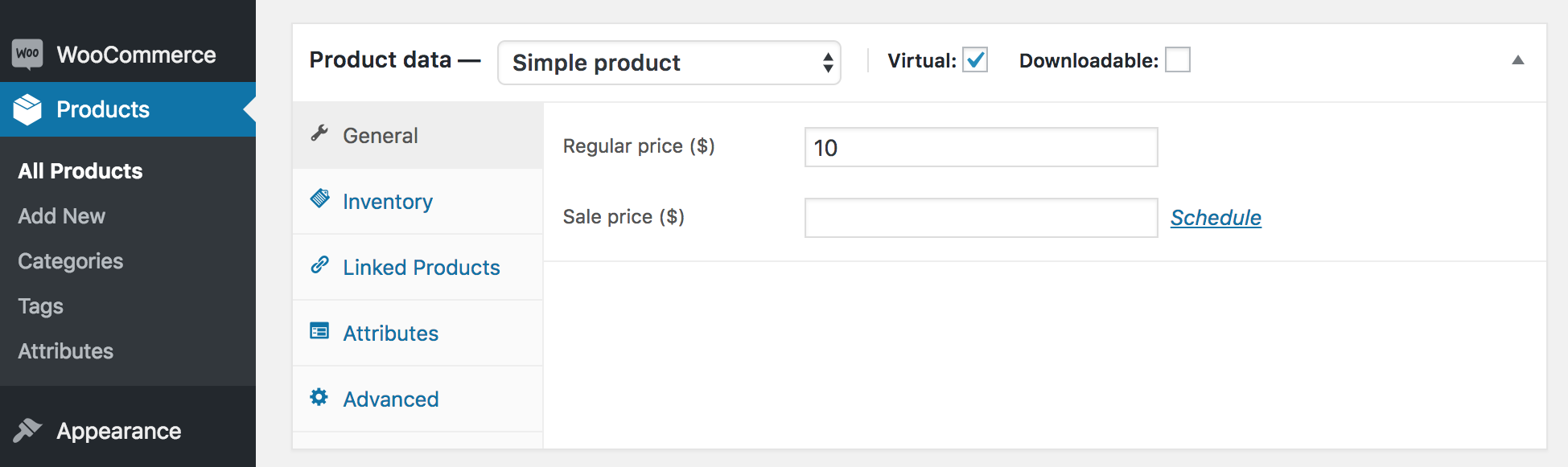
Once a WooCommerce ticket is created, you can navigate to edit the WooCommerce product and set a sale price for it as you can see in the following screenshot:
As a reference, let me share the following article that gives a good overview of how to create tickets using our plugins > https://theeventscalendar.com/knowledgebase/making-tickets/
In addition, George recently wrote a very interesting blog post that lists some great WooCommerce extensions that can boost your ticket sales > https://theeventscalendar.com/awesome-woocommerce-extensions-for-event-ticket-sales/
Best,
VictorAugust 27, 2018 at 9:35 am #1606722Support Droid
KeymasterHey there! This thread has been pretty quiet for the last three weeks, so we’re going to go ahead and close it to avoid confusion with other topics. If you’re still looking for help with this, please do open a new thread, reference this one and we’d be more than happy to continue the conversation over there.
Thanks so much!
The Events Calendar Support Team -
AuthorPosts
- The topic ‘Ticket Price’ is closed to new replies.