

Forum Replies Created
-
AuthorPosts
-
Victor
MemberHi There!
Thanks for getting in touch with us!
We have the following extension that will add the Event and Attendee information to the WooCommerce order details > https://theeventscalendar.com/extensions/add-event-and-attendee-information-to-woocommerce-order-details/
By installing and activating the extension, the event and attendee info will show up on all WooCommerce orders.
Does it help? Let me know if any follow up questions 🙂
Best,
VictorAugust 3, 2018 at 7:21 am in reply to: Does a cancelled event send out notificiations at all to attendees? #1589543MemberHey there James!
Unfortunately, cancelling an event is not a built-in functionality of our plugins.
For cancelled events, you could edit the event and add a cancel message to it and remove or hide the tickets by modifying the end sale dates.
However, you will need to manually send a notification to the attendees already registered for the event.
Hope that helps. Let me know if any follow up questions.
Best,
VictorMemberHi James!
Thanks for getting in touch!
Event Tickets nor Events Calendar PRO has a feature that sends reminder notifications for events. The only email that is sent to the users for an even is when they RSVP or purchase a ticket for an event they receive a confirmation/ticket.
Perhaps you have a custom functionality that sends users a reminder email notification?
Let me know if I’m missing something.
Best,
VictorMemberHi Laura!
Thanks for getting in touch with us! I’d be happy to help you with this topic.
First, please make sure you are using the latest versions of our plugins. Remember you can always download our plugins from your downloads page > https://theeventscalendar.com/my-account/downloads/
my existing tickets are not showing under my woocommerce product list
If those tickets were previously created using Tribe Commerce, they will not show up as a product in WooCommerce. If you have multiple commerce platforms enabled to sell tickets, you will need to select one from the tickets settings when editing an event. In the following screenshot you can see where to select that:
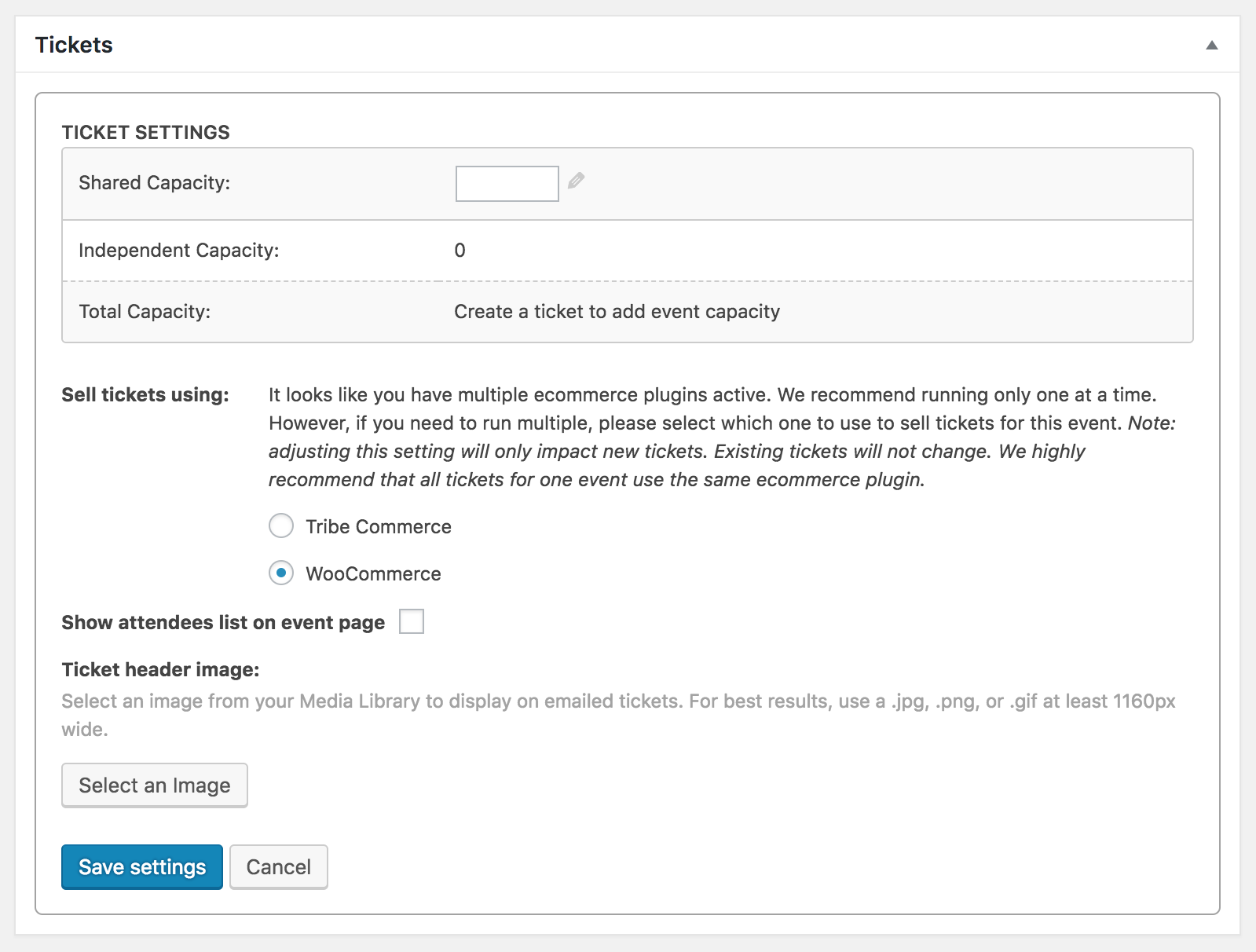
Even though you can create WooCommerce and Tribe Commerce tickets for the same event by switching from one another, this is not recommended.
Additionally, let me share with you the following article that explains in further details the tickets creation process > https://theeventscalendar.com/knowledgebase/making-tickets/
I hope that helps. Let me know if any follow up questions 🙂
Best,
VictorMemberHi There!
I just wanted to follow up with this to let you know that a new release of our plugins is out, in which we are no longer able to reproduce the issue described here. This means that it may have been fixed before while working on other fixes/improvements.
You can find out more about this release → https://theeventscalendar.com/maintenance-release-for-the-week-29-july-2018/
Please update the plugins and let us know if it works for you.
Best,
VictorAugust 2, 2018 at 8:51 pm in reply to: 'Hide Attendees List' entry now 'Display attendees list' #1589274MemberHi Anthony!
I just wanted to follow up with this to let you know that a new release of our plugins is out, in which we are no longer able to reproduce the issue described here. This means that it may have been fixed before while working on other fixes/improvements.
You can find out more about this release → https://theeventscalendar.com/maintenance-release-for-the-week-29-july-2018/
Please update the plugins and let us know if it works for you.
Best,
VictorAugust 2, 2018 at 8:50 pm in reply to: Hide Attendees List check box changed to Display Attendees List #1589273MemberHi There!
I just wanted to follow up with this to let you know that a new release of our plugins is out, in which we are no longer able to reproduce the issue described here. This means that it may have been fixed before while working on other fixes/improvements.
You can find out more about this release → https://theeventscalendar.com/maintenance-release-for-the-week-29-july-2018/
Please update the plugins and let us know if it works for you.
Best,
VictorMemberHi There!
I just wanted to follow up with this to let you know that a new release of our plugins is out, in which we are no longer able to reproduce the issue described here. This means that it may have been fixed before while working on other fixes/improvements.
You can find out more about this release → https://theeventscalendar.com/maintenance-release-for-the-week-29-july-2018/
Please update the plugins and let us know if it works for you.
Best,
VictorMemberHi Heather!
Just wanted to share with you that a new release of out plugins is out, including a fix for this issue 🙂
Find out more about this release → https://theeventscalendar.com/maintenance-release-for-the-week-29-july-2018/
We apologize for the delay and appreciate your patience while we worked on this.
As always, we suggest to setup a dev/staging site so you can make all plugin updates without disrupting the live site.
Please update the plugins and let us know if the fix works for your site.
Best,
VictorMemberHi Dan!
Just wanted to share with you that a new release of our plugins is out, in which we are no longer able to reproduce the issue described here. This means that it may have been fixed before while working on other fixes/improvements.
You can find out more about this release → https://theeventscalendar.com/maintenance-release-for-the-week-29-july-2018/
Please update the plugins and let us know if it works for you.
Best,
VictorMemberHi Steven!
Just wanted to share with you that a new release of our plugins is out, in which we are no longer able to reproduce the issues described here. This means that they may have been fixed before while working on other fixes/improvements.
You can find out more about this release → https://theeventscalendar.com/maintenance-release-for-the-week-29-july-2018/
Please update the plugins and let us know if it works for you.
Thanks,
VictorMemberHi Bryan!
Just wanted to share with you that a new release of out plugins is out, including a fix for the Month View shortcode loosing the filter once advancing to the next month.
Find out more about this release → https://theeventscalendar.com/maintenance-release-for-the-week-29-july-2018/
We apologize for the delay and appreciate your patience while we worked on this.
As always, we suggest to setup a dev/staging site so you can make all plugin updates without disrupting the live site.
Please update the plugins and let us know if the fix works for your site.
Best,
VictorAugust 2, 2018 at 8:14 pm in reply to: Single Category Display not maintained when toggling through months #1589249MemberHi Brian!
Just wanted to share with you that a new release of out plugins is out, including a fix for this issue 🙂
Find out more about this release → https://theeventscalendar.com/maintenance-release-for-the-week-29-july-2018/
We apologize for the delay and appreciate your patience while we worked on this.
As always, we suggest to setup a dev/staging site so you can make all plugin updates without disrupting the live site.
Please update the plugins and let us know if the fix works for your site.
Best,
VictorMemberHi David!
Just wanted to share with you that a new release of out plugins is out, including a fix for this issue 🙂
Find out more about this release → https://theeventscalendar.com/maintenance-release-for-the-week-29-july-2018/
We apologize for the delay and appreciate your patience while we worked on this.
As always, we suggest to setup a dev/staging site so you can make all plugin updates without disrupting the live site.
Please update the plugins and let us know if the fix works for your site.
Best,
VictorMemberHi Thomas!
Just wanted to share with you that a new release of out plugins is out, including a fix for this issue 🙂
Find out more about this release → https://theeventscalendar.com/maintenance-release-for-the-week-29-july-2018/
We apologize for the delay and appreciate your patience while we worked on this.
As always, we suggest to setup a dev/staging site so you can make all plugin updates without disrupting the live site.
Please update the plugins and let us know if the fix works for your site.
Best,
Victor -
AuthorPosts