

Forum Replies Created
-
AuthorPosts
-
Hunter
ModeratorHey Shaun,
Welcome back! I hope you had a great holiday season and your New Year is off to a great start. Sorry to see you’re having issues with the Filter Bar. Before we proceed, can you please review our Testing for conflicts guide and reply back with your findings? Please include your System Information as a private reply.
Please note we are fairly limited when it comes to conflicts with custom themes and plugins by other authors. For more info, please review our What support is provided for license holders? Knowledgebase article.
Let me know what you find out and take care 🙂
ModeratorWelcome back!
I hope you had a great holiday season 🙂
We’ve changed our hosting to Siteground in the past month, and since, we’ve gotten multiple warnings that we’re over our daily & monthly CPU limit – with the site being deactivated by the host 3 times in the last week. We’ve located the issue – being the Events Calendar PRO making excessive CPU calls.
We don’t have any logged bugs of users reporting similar behaviors, but I’ll provide all the resources I have relating to speed and performance below:
- https://codex.wordpress.org/High_Traffic_Tips_For_WordPress
- https://codex.wordpress.org/WordPress_Optimization
- https://theeventscalendar.com/knowledgebase/caching-basics/
- https://theeventscalendar.com/knowledgebase/caching-month-view-transients/
- https://theeventscalendar.com/knowledgebase/caching-basics/
- https://theeventscalendar.com/the-events-calendar-performance-considerations/
- https://theeventscalendar.com/favorite-developer-plugins/
- https://theeventscalendar.com/knowledgebase/problems-with-minification/
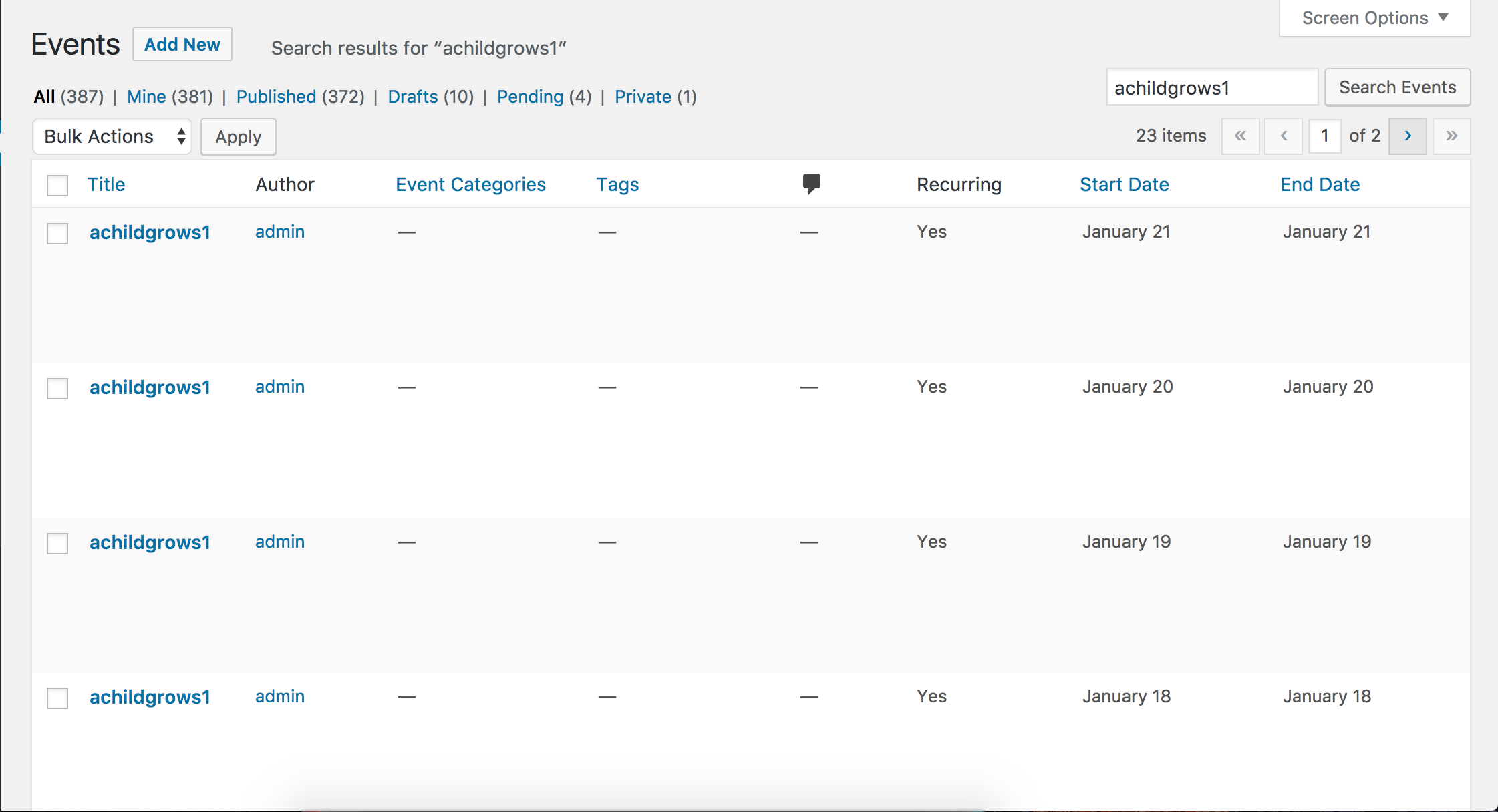
Does the recurring event issue occur every time you attempt to create a new event? If not, is there any sort of pattern you’ve noticed? I set up a test event using the same date/time and recurrence rules, but everything worked correctly. (see screenshot below)
Lastly, I see you checked ‘Yes’ to reverting back to the default WordPress theme and deactivating all plugins other than ours as instructed in the Testing for conflicts guide, but can you please confirm this?
Please keep me updated and take care!
January 2, 2017 at 9:17 pm in reply to: How do I prevent my events from showing up in a Google search? #1212418ModeratorHey Mike,
Welcome back! I hope you had a great holiday season. The best route in this scenario is to install a plugin such as Yoast SEO. Doing so will allow you to restrict specific content from displaying in Google’s search results.
Let me know how it goes and take care!
January 2, 2017 at 9:14 pm in reply to: license key not displaying for input for events ticket plus #1212417ModeratorHello 🙂
I hope you had a great New Year and welcome to our premium plugin support forums! The reason you’re seeing the option to input a license for Event Aggregator is because Event Aggregator is essentially “baked in” to The Events Calendar (free version).
To start troubleshooting your issue, please review our Finding and inputting your license key Knowledgebase article and send over your System Information as a private reply.
Lastly, I see you checked ‘Yes’ to reverting back to the default WordPress theme and deactivating all plugins other than ours as instructed in the Testing for conflicts guide, but can you please confirm this?
Please keep me updated and have a great evening. Cheers!
ModeratorHey Thomas,
Welcome back 🙂
I hope your New Year has started off in the right direction. The only other cost I can think of is if you plan on processing payments using PayPal. You can learn more about their fees here. Other than that, you should be good to go.
Let me know if you have any more questions and take care!
January 2, 2017 at 9:04 pm in reply to: Unable to import public group events or apply a Facebook app ID #1212412ModeratorHi Neesha,
Welcome back and I hope your New Year is off to a great start! To make sure your WordPress site is connected to Facebook, visit Events > Settings > APIs and make sure the screen looks identical to the screenshot below:

If you see the screen below rather than the one above, go ahead and hit the ‘Connect to Facebook‘ button to ensure you can properly import events from Facebook. If you have any issues connecting, please review the Testing for conflicts guide and attempt to connect to Facebook after reading the guide.

You should see the following screen if your site successfully connects to Facebook:

If you get the site connected to Facebook, the next step is to review the Testing for conflicts guide to make sure there aren’t any theme and/or plugin conflicts occurring while you’re attempting to import events from Facebook. Our New User Primer: Event Aggregator is another helpful article.
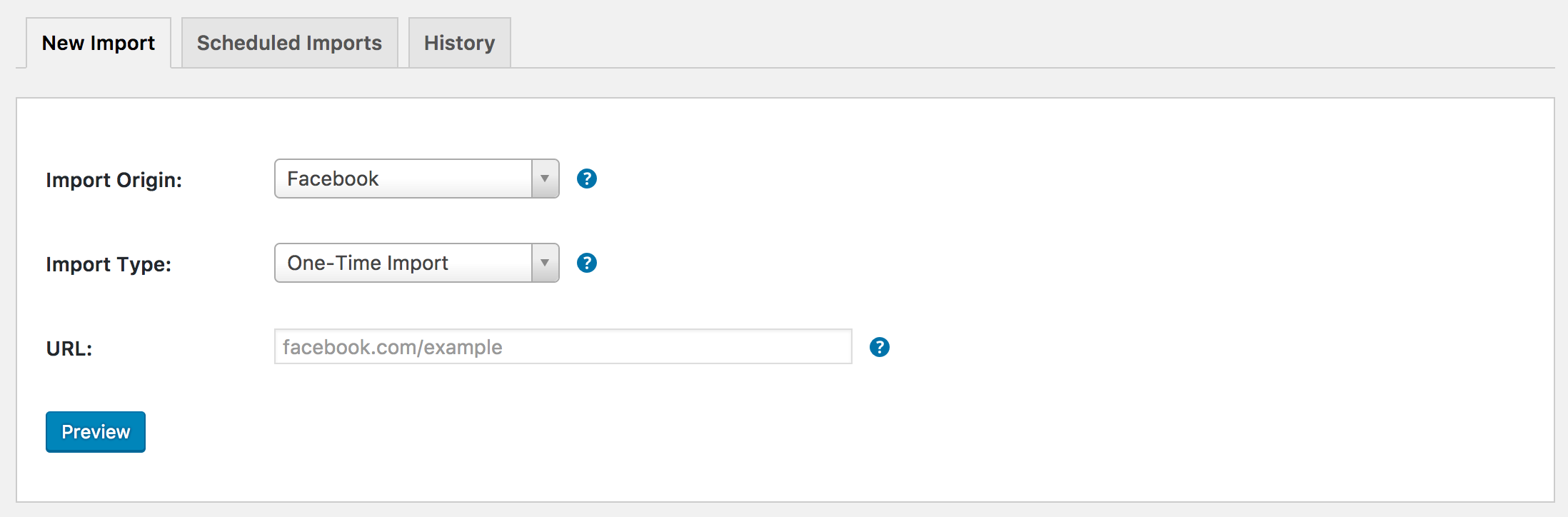
If you’re still seeing the message you shared with me, then unfortunately the events you’re attempting to import are not going to import due to the Facebook API restrictions. You might be able to import events individually by copying the URL from Facebook and entering it into the URL field when import an event via Events > Import > Facebook. (see screenshot below)
I hope this helps clarify how the plugin connects to Facebook and how to use Event Aggregator properly. Let me know if you have any more questions and take care!
January 2, 2017 at 8:05 pm in reply to: Theme conflict – Perth Pro vs Events Calendar Pro's latest update #1212402ModeratorHello 🙂
Welcome to our premium plugin support forums and sorry to see you’re having troubles. I hope your New Year is off to a great start! We typically don’t provide support for theme conflicts, but the issue you’re currently experiencing is also occurring even when the default WordPress themes are active. For what we are able to support in the forums, please review our What support is provided for license holders? Knowledgebase article.
As a temporary workaround, you can either use the following CSS (not guaranteed to work) or revert back to version 4.3.4.2:
.tribe-events-event-image {

    float: none;

}
If you’d like to use CSS, please review this Customizing WordPress #2 – Using Chrome Developers Tools YouTube video on using your browser’s ‘Inspect‘ tool.
We have a bug logged resembling what you’ve described, so I’ve gone ahead and added this forum thread to the ticket which helps expedite the process of getting a fix included in an upcoming release. I don’t have a precise date when it will be available, but please stay tuned to our Release Notes and the plugin changelogs for more information. Thanks again and let me know if you’ve got any additional questions or comments. Cheers!
January 2, 2017 at 7:59 pm in reply to: Can I specify a specific User Role when a user registers to submit an event? #1212401ModeratorHi Math,
I hope your New Year is off to a great start! What you’ve described is definitely possible though it might require the use of additional plugins to bridge the gap. I’d check out plugins like User Role Editor and Theme My Login, though I’m not 100% certain the best ones to use for your situation.
I’ve personally set up a site similar to what you’ve described using Gravity Forms and a few of it’s Add-Ons. Lastly, try searching the forums to see if you can find any specific examples of users doing the same thing you’re looking to accomplish.
Best of luck and let me know if you have any more questions. Cheers!
January 2, 2017 at 7:52 pm in reply to: Facebook events are importing but not under Upcoming Events widget #1212400ModeratorHi and welcome back 🙂
I hope your New Year is off to a great start! Sorry to hear you’re experiencing troubles. Before I test to reproduce the issue myself and compare it to our list of logged bugs, can you please review our Testing for conflicts guide and reply back with your findings?
I notice in your System Information you have the Facebook Events plugin installed on your site. If you’re not aware, we are in the process of retiring the Facebook Events plugin and replacing it with our newest plugin, Event Aggregator.
You have been granted a license for Event Aggregator and it is set to expire on the same date your Facebook Events license expires. For information, please review our Moving to Event Aggregator Knowledgebase article and if you run into any issues along the way, please create a separate thread.
Thanks and take care!
ModeratorHi Jenna,
Thank you for sending over the screenshots. I am still a bit unsure on how to proceed due to the fact I set up a test installation from scratch with only the default Twenty Seventeen theme and The Events Calendar installed/activated and don’t see the ‘Edit’ option in my Widgets dashboard, with or without The Events Calendar being activated.
The next step in this instance is to set up a fresh WordPress test installation with the default Twenty Seventeen theme and The Events Calendar to see if you can reproduce the behavior. I understand this is not an ideal situation, but without the ability to reproduce the behavior myself and no logged bugs resembling your issue, it’s hard to provide much support.
Let me know what you find and have a great afternoon. Cheers!
ModeratorWelcome back,
I hope you had a great New Year! The procedure you’ve followed should work just fine. I also recommend heeding the advice from the article you linked to:
If you want to, you can set an email to receive the output of your cronjob. We recommend you doing that, to make sure that the task is executing properly. Once you get an email with the wp-cron.php output, you can remove your email address from the field to stop getting those mails.
So to recap, the method you’ve gone (manually adding cron jobs via the cPanel dashboard) running every 5 minutes should suffice for our plugins. Let me know if you’ve got any more questions and have a great week ahead.
ModeratorHi Julien,
Thank you for your purchase and welcome back to the premium plugin support forums! If you have the ‘Allow anonymous submissions‘ option unchecked in Events > Settings > Community (see screenshot below), users will be required to log in prior to submitting events.

If you would like users to log in before allowing them to add events, my recommendation would be to add a registration form somewhere on your site, then add a link to your Submit Event form on their account page or wherever you feel is best.
You might also want to add a link from your Submit Event form to your site’s registration page. It might also be a good idea to include a note on the Submit Event form along the lines of, “You must log in/register before adding events.” Check out Theme My Login to gain more power over your site’s login/register forms.
I hope this helps clarify how the plugin works and let me know if you have any more questions. Thanks again and take care!
January 2, 2017 at 10:59 am in reply to: MAJOR issues with auto-complete feature Event Tickets Plus/WooCommerce #1212313ModeratorHi and welcome back 🙂
I hope you had a great weekend! I truly appreciate you breaking up the issues you’re having in a separate manner and being so descriptive. It helps cut down the amount of responses and saves a lot of time in the long run.
I would be more than happy to test the issues myself in addition to comparing them to the list of our logged bugs, but before doing so, can you please review our Testing for conflicts guide and reply back with your findings? I’ll also need your System Information as a private reply.
Thanks for understanding and I look forward to your response. Have a great afternoon!
ModeratorHello,
Thank you for the update and I’m glad to hear you’ve got the export buttons hidden. We have a bug logged resembling what you’ve described, so I’ve gone ahead and added this forum thread to the ticket which helps expedite the process of getting a fix included in an upcoming release. I don’t have a precise date when it will be available, but please stay tuned to our Release Notes and the plugin changelogs for more information.
I did some testing and backdating to version 4.3.2 of TEC is the easiest workaround I can think of: https://downloads.wordpress.org/plugin/the-events-calendar.4.3.4.2.zip
To center your featured images might require a custom template and CSS. Please review our Themer’s Guide for more information.
Thanks again and let me know if you’ve got any additional questions or comments. Cheers!
ModeratorHi Stefaan,
Thank you for sharing your findings with us. If you’re still experiencing the issue, please create a separate thread as it’s a requirement and will help expedite the entire process. Thanks for understanding and I’ll keep my eye on the queue for your thread. I hope you had a great New Year and enjoy the rest of your week. Cheers!
-
AuthorPosts