

Forum Replies Created
-
AuthorPosts
-
January 3, 2017 at 3:39 pm in reply to: Add thumbnails to upcoming events List Widget not working in Google Chrome #1212873
Hunter
ModeratorHello,
We are unfortunately unable to provide support through our Pre-Sales forum channel, but you can head over to The Events Calendar WordPress.org support forums for assistance and answers.
If you have a PRO license, you can log into your account and get assistance through the PRO forums.
Thanks for understanding and good luck resolving your issue. Have a good day!
January 3, 2017 at 3:39 pm in reply to: Slow Transition From Month to Month & Lagging Backside of Events Calendar #1212872ModeratorHey James,
Welcome back from the holiday break and I hope you are having a great New Year! We don’t have any reports about a widespread number of users experiencing the issues you’ve shared with me. I’ll share below all the resources I have relating to speed and performance. Please review them and let me know if you have any questions.
If you are on shared hosting, it’s going to be a constant uphill battle. I would look into the idea of switching to a provider such as DigitalOcean which allows for much more control over your servers.
Please let me know if any of this information helps and have a great rest of your day. Cheers!
- https://codex.wordpress.org/High_Traffic_Tips_For_WordPress
- https://codex.wordpress.org/WordPress_Optimization
- https://theeventscalendar.com/knowledgebase/caching-basics/
- https://theeventscalendar.com/knowledgebase/caching-month-view-transients/
- https://theeventscalendar.com/knowledgebase/caching-basics/
- https://theeventscalendar.com/the-events-calendar-performance-considerations/
- https://theeventscalendar.com/favorite-developer-plugins/
- https://theeventscalendar.com/knowledgebase/problems-with-minification/
ModeratorHey Matthew,
Welcome back from the holiday break and I hope your New Year is off to a great start! I am not having the same issues as you’ve described. I see you checked ‘Yes’ to reverting back to the default WordPress theme and deactivating all plugins other than ours as instructed in the Testing for conflicts guide, but can you please confirm this?
It might be best you set up a fresh WordPress installation where you can fully troubleshoot the issue. Please review our Using One License for Live and Dev Sites for more information.
Please make sure WP_DEBUG and WP_DEBUG_LOG are enabled on your site’s wp-config.php file. Any errors will display at the top of your page as you try to reproduce the conflict. Note what you find and please include it in your reply. Any screenshots you can provide would be helpful as well.
Please keep me updated and have a great evening. Cheers!
ModeratorHi and welcome 🙂
Thank you for your purchase and I hope your New Year is off to a great start!
we are trying to add custom fields but when we change the number of tickets to more than 1 (e.g. 2) custom fields appears 2 times.
This is the default behavior. When users attempt to purchase two tickets, two ticket fieldsets should appear. If you wish the plugin to behave otherwise, the best routes are to build the customization yourself, visit our UserVoice Feature Ideas and submit the desired behavior as a feature request, or hire outside help. We have a list of customizers that can provide further assistance.
How can I add the fields after the default ones. Also I would like them to look like the rest of the fields (Full name, E-mail) separated in two columns in the table.
I haven’t personally done this myself, so I don’t know the correct files you’ll need to edit to achieve what you’ve described off the top of my head, but refer to our Themer’s Guide for more info on how to create and save customizations.
Sorry I can’t do much more in both instances. For what is covered on the support forums, please refer to our What support is provided for license holders? Knowledgebase article.
Thanks again and let me know if you’ve got any more questions or comments. Cheers!
ModeratorHi Sandrine 🙂
I hope you had a great holiday break and your New Year is off to a pleasant start. I tried out the snippet Andras provided when you initially requested to remove the option of “Not Going” from the RSVP form and it appears to work correctly.
If you’d like to completely remove the “Going/Not Going” dropdown, try creating a template override as explained in our Themer’s Guide. You can remove/comment out lines 120-127 from /event-tickets/src/views/tickets/rsvp.php and that should take care of it.
In response to your last question about choosing how and where to display the fields, the Themer’s Guide I linked to above is the best resource I can provide. This is a great YouTube video for a visual example on how to create overwrites: https://www.youtube.com/watch?v=cbU12Tw7Q4U
Best of luck with the customizations and let me know if you’re able to successfully remove the “Going/Not Going” option from the RSVP form. Cheers!
January 3, 2017 at 2:57 pm in reply to: Google Cal export not correctly exporting event on Event View #1212844ModeratorHey Curtis,
Thank you for posting to our premium plugin support forums and I hope your New Year is off to a great start! I attempted to reproduce the behavior you’ve described, but everything worked fine when I exported a single event using the ‘+ Google Calendar‘ export option.
I see you checked ‘Yes’ to reverting back to the default WordPress theme and deactivating all plugins other than ours as instructed in the Testing for conflicts guide, but can you please confirm this?
It might be best you set up a fresh WordPress installation where you can fully troubleshoot the issue. Please review our Using One License for Live and Dev Sites for more information. Please make sure the only themes/plugins installed include the default WordPress theme and The Events Calendar/Events Calendar PRO. I’d test to see if the issue still occurs both with TEC and PRO active, then with just TEC active.
Make sure WP_DEBUG and WP_DEBUG_LOG are enabled on your site’s wp-config.php file. Any errors will display at the top of your page as you try to reproduce the conflict. Note what you find and please include it in your reply.
Please keep me updated and have a wonderful evening. Cheers!
ModeratorHey Ben,
Greetings from the U.S. and I hope you had a great holiday season! I set up a test event and venue and the Google Map displays correctly with the venue map marker in the correct location. (see screenshot below)
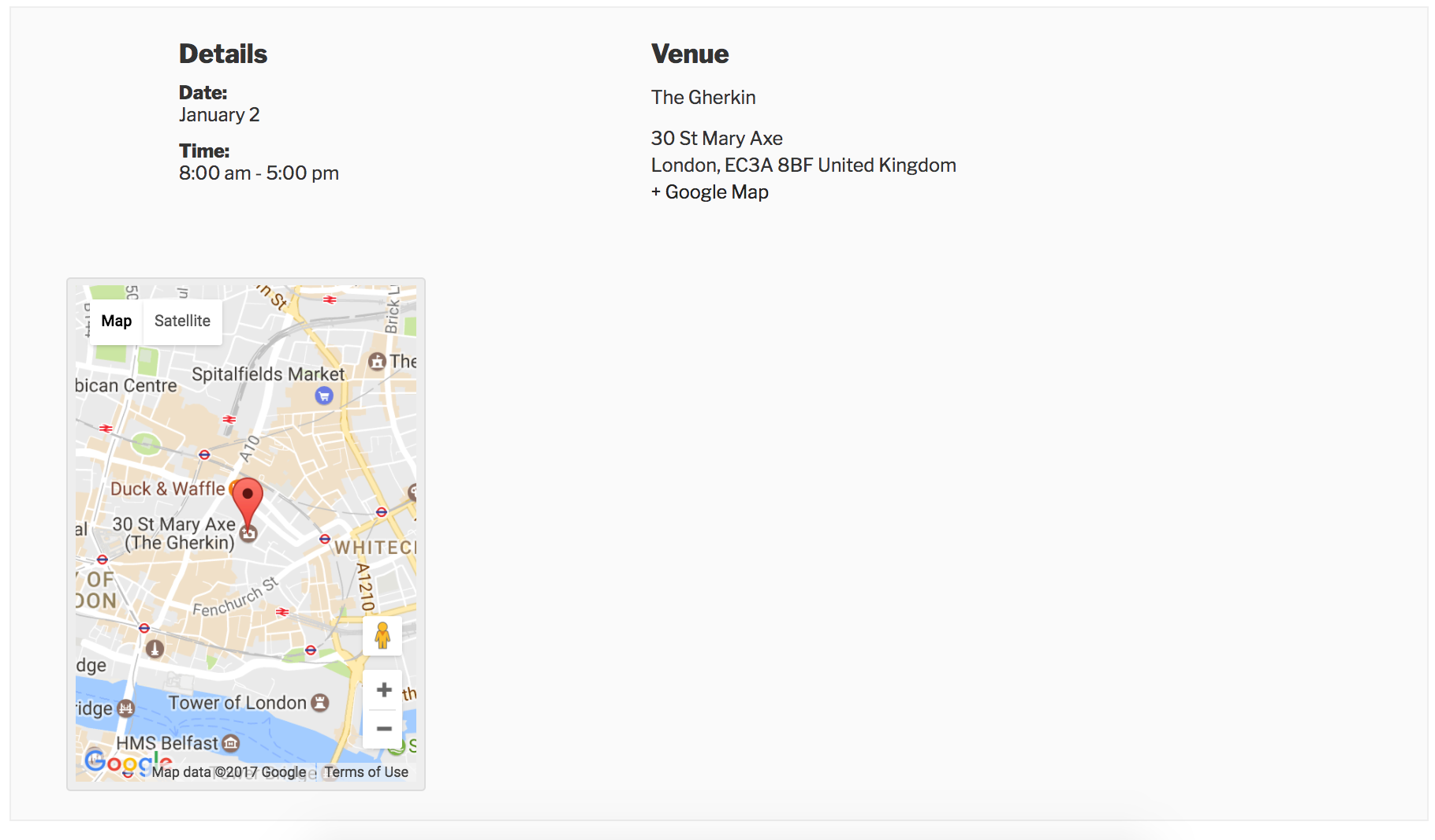
You can see in the screenshot below how I entered the address when creating a new venue for The Gherkin on my test website:
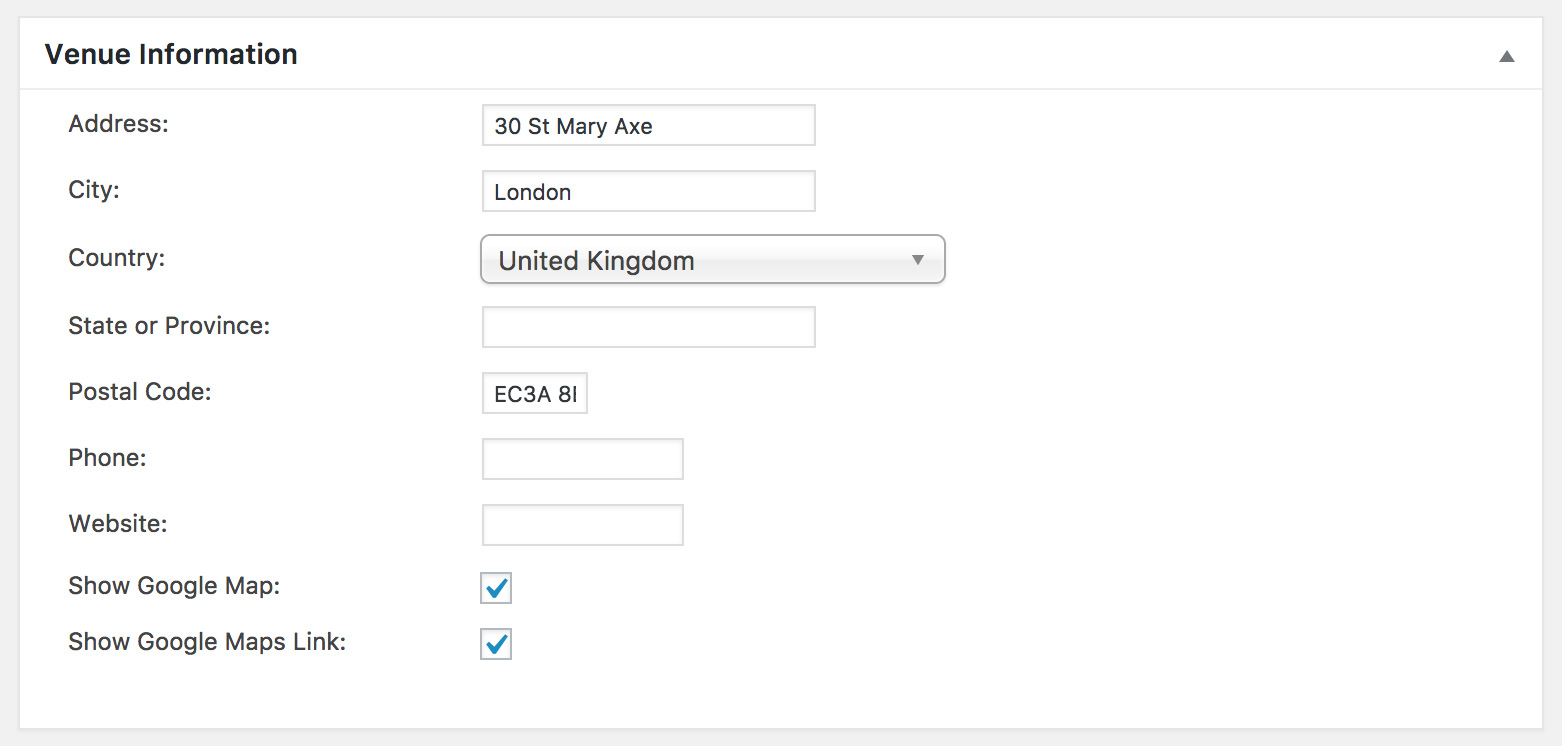
The only difference I notice when moving ‘London‘ from the ‘City‘ to the ‘State/Province‘ field is how it displays on the front end.
Before we proceed, can you please review our Testing for conflicts guide and reply back with your findings? Include a link to the event you’re attempting to import from Eventbrite and I’d be happy to see if I can reproduce the behavior.
Keep me updated and have a great evening. Cheers!
ModeratorHey James,
Thank you for taking the time to troubleshoot the issue so thoroughly. I’m just now finding a bug which might be related to the issue you’re having. Luckily, it’s marked at Priority Level 1, so a fix should be available any day now. I’ve also added this forum thread to the report for the developers to review while making improvements.
There appear to be some differences between the screenshot you shared with me highlighting the issue and the screenshots relating to the screenshots included in the bug report. I’m also unsure you are being affected by the bug due to the fact you’ve reverted back to previous versions and there doesn’t appear to be a difference in behavior.
I’m still unable to reproduce the behavior as you can see by watching the short screencast of my testing.
Please stay tuned to our Release Notes and the plugin changelogs for more information. Thanks again and let me know if you’ve got any additional questions or comments. Cheers!
ModeratorNo worries at all! Thank you for letting me know the issue has been resolved and please feel free to create a new thread if you have any more questions or comments. Take care!
January 3, 2017 at 1:28 pm in reply to: Difficulty getting recurring events in 2017 to appear #1212792ModeratorHey Nick,
I hope you had a great holiday season! The import did not include events past January 31, 2017, so therefore no events after January 31, 2017 were imported into my test site. Let me know if you have any more questions. Cheers 🙂
January 3, 2017 at 1:17 pm in reply to: Auto-import from Facebook is not working for all events #1212787ModeratorWelcome back,
Thank you for the update. You can learn about Using One License for Live and Dev Sites for these instances. We are unfortunately unable to log into customer sites, so please refrain from sending credentials over.
Are you able to successfully import events doing a one-time import from any of the six Facebook pages you are having the issues with scheduled imports? Feel free to reply back with a few of the Facebook URLs you’re attempting to import from and I’d be happy to investigate.
Thanks again and take care 🙂
ModeratorHey Thomas,
Thank you for the response. Our Configuring Community Tickets Knowledgebase article does a great job explaining the process and should provide answers to all the questions you’ve asked. Please take a moment to review it and if you still have questions, feel free to reply and I’ll do my best to accommodate.
Thanks again and have a great afternoon 🙂
January 3, 2017 at 12:43 pm in reply to: license key not displaying for input for events ticket plus #1212771ModeratorHi and welcome back,
Thank you for the response. I notice in your System Information you have the Facebook Events plugin installed on your site. If you’re not aware, we are in the process of retiring the Facebook Events plugin and replacing it with our newest plugin, Event Aggregator.
You have been granted a license for Event Aggregator and it is set to expire on the same date your Facebook Events license expires. For information, please review our Moving to Event Aggregator Knowledgebase article and if you run into any issues along the way, please create a separate thread.
I also notice you do not have Event Tickets installed on your site. In order for Event Tickets Plus to work properly, you’ll need to install Event Tickets. More information can be found in our New User Primer: Event Tickets and Event Tickets Plus Knowledgebase article.
Lastly, it might be best you set up a fresh WordPress installation where you can fully troubleshoot the issue. Please review our Using One License for Live and Dev Sites for more information. Please let me know if you are able to get the Event Tickets Plus license field showing properly and have a great evening. Cheers 🙂
January 3, 2017 at 12:34 pm in reply to: How to add woocommerce coupon information in sales report? #1212769ModeratorHi and welcome back 🙂
I hope you’re having a great New Year so far! My apologies for the delayed response, I had responded but apparently it didn’t go through for some reason. I tested the issue myself on a fresh WordPress installation and can confirm I experienced the same behavior.
I’ve created a bug report for the developers to review and have included this forum thread to the ticket which helps expedite the process of getting a fix included in an upcoming release. I don’t have a precise date when it will be available, but please stay tuned to our Release Notes and the plugin changelogs for more information. Thanks again and let me know if you’ve got any additional questions or comments. Cheers!
ModeratorHey Cody,
Welcome back to the premium plugin forums and I hope your New Year is off to a great start! Sorry to see you’re experiencing troubles. We don’t have any logged bugs of users reporting similar behaviors and I haven’t had any issues with scheduled imports from Facebook as of late.
What I would do is install a plugin like WP Crontrol so you can get a better idea of what’s going on with the failed scheduled imports. I would also set up a fresh test WordPress website with just the default WordPress theme and The Events Calendar installed and activated. This Knowledgebase article on Using One License for Live and Dev Sites might come in handy.
Once you’ve done that, set up your scheduled imports from Facebook and reply back with what you learn. If you experience the same behavior on your test site, please include the System Information of your testing site as a private reply.
Keep me updated and have a great evening. Cheers!
-
AuthorPosts