

Forum Replies Created
-
AuthorPosts
-
Hunter
ModeratorWelcome back, Mary.
If you instruct the user to visit the event page where they initially purchased their tickets, they should see a block of text that reads, “You have 4 tickets for this event. View your tickets”. This links to a page where they can edit the attendee information.
More information can be found under the ‘Letting Attendees Edit Their Information‘ section on our Tickets: Managing your orders and attendees Knowledgebase article. Let me know if the user is able to successfully edit their attendee information and take care.
ModeratorHey Ben,
We are unfortunately unable to log into customer sites, so please refrain from sending me credentials. I spent some time doing some testing and learned things are definitely finicky in regards to this particular address.
So long as all the venue fields are filled in for The Gherkin on your WordPress website, there shouldn’t be any issues getting an event imported to Eventbrite. Unfortunately, it may take some manual editing once the event gets imported to Eventbrite.
I imported a few events taking place at The Gherkin from Eventbrite into my test WordPress website and got a few different results, one including a blank State/Province field once it was imported into my WP site. So again, it’s hard to really nail down where the breakdown is occurring.
With that said, I’m not exactly sure a bug is present in this case. Sorry I don’t have a workaround for you at this time and let me know if you have any more questions or comments on the matter. Thanks and take care.
January 4, 2017 at 5:55 pm in reply to: How to add woocommerce coupon information in sales report? #1213542ModeratorHello,
Thank you for the response and kind words. I completely agree this information should be integrated into the event sales report information, so it was my pleasure to get that logged. Hopefully it comes out sooner rather than later. To help expedite the process even more, take a moment and submit the request to our UserVoice Feature Ideas page. Doing so will only get more eyes on the matter.
Thanks again and I’ll mark this thread ‘Pending Fix’ for the time being. Feel free to create a new thread if you have any more questions or concerns. Have a good evening!
January 4, 2017 at 5:51 pm in reply to: How do I prevent my events from showing up in a Google search? #1213540ModeratorHey Mike,
As far as I know, that should work. Have you resubmitted an updated sitemap via Google Webmaster? If not, this is an important step. Please note it may take some time for Google to update what it displays. What has your research showed you so far about hiding/removing specific post types from appearing in Google’s search results?
Please keep me updated and have a good evening. Cheers!
January 4, 2017 at 5:44 pm in reply to: Facebook events are importing but not under Upcoming Events widget #1213536ModeratorHello,
Thank you for the response. I attempted to reproduce the behavior on my test website, but the widget is displaying upcoming events as expected. I also checked the logged bug reports, but there does not appear to be anything resembling your issue at this time.
The next steps in this situation are to retest the issue with strictly the default WordPress theme and The Events Calendar activated, but this time please make sure WP_DEBUG and WP_DEBUG_LOG are enabled on your site’s wp-config.php file. Any errors will display at the top of your page as you try to reproduce the conflict. Note what you find and please include it in your reply.
If you right-click your mouse and open the ‘Inspect’ tool, additional error information will be displayed in the console. Again, note what you learn. Screenshots are always helpful.
Thanks again and have a good evening.
January 4, 2017 at 5:29 pm in reply to: Attendee info not saving or showing in Attendee Lists again. #1213530ModeratorWelcome back,
I hope your New Year is off to a great start! I’m not able to reproduce the behavior (see screenshot below). We ask since this is a different topic from your original issue that you create a new thread. Thanks for understanding and take care.
 Moderator
This reply is private.
ModeratorWelcome back,
Thank you for the response. Are you noticing any effects from the error? Do you notice any reason what action causes the error to display? As previously requested, can you please clarify where the error/notice is showing? E.g. your server’s error log or in the backend of your WordPress website when logged in as an administrator. I’m not able to find any bug reports or threads of users experiencing the same error. I’m also unable to reproduce the behavior on my test installation.
I see you have a plugin to help with debugging. I recommend reviewing Our Favorite Developer Plugins Knowledgebase article for some other helpful plugin ideas.
Please make sure each question gets answered to the best of your knowledge. The more information you can provide, the better idea we’ll have on how to proceed. Thanks again and have a good evening.
ModeratorHello 🙂
Thank you for your purchase and welcome to the premium plugin support forums. I hope your New Year is off to a pleasant start! Please review our Using One License for Live and Dev Sites for more information on working with multiple environments.
Let me know if this helps and have a great evening. Cheers!
ModeratorHey Mike,
Welcome and I hope your New Year is off to a great start. Can you install WP Crontrol to see if you can get a better idea on what’s going on with the failed scheduled imports? I’m not having any issues with schedule imports as of late, though there is always the possibility something is going on here.
If you haven’t already reviewed our Testing for conflicts guide, that’s a great place to start. If you have already ruled out the potential of a theme and/or plugin conflict on your live site, I would probably set up a whole new fresh test WordPress website with strictly the default WordPress theme, WP Crontrol, and The Events Calendar installed/activated. Please review our Using One License for Live and Dev Sites for more information.
Once that’s done, set up your scheduled imports to see if everything works correctly. Please make sure WP_DEBUG and WP_DEBUG_LOG are enabled on your site’s wp-config.php file. Any errors will display at the top of your page as you try to reproduce the conflict. Note what you find and please include it in your reply.
Have a great evening and please keep me updated. Cheers!
ModeratorHey Erin,
Welcome to our premium plugin support forums. Do you get the same result when you export the calendar from Google as an .ics file and import the .ics file using Event Aggregator? (see screenshot below)
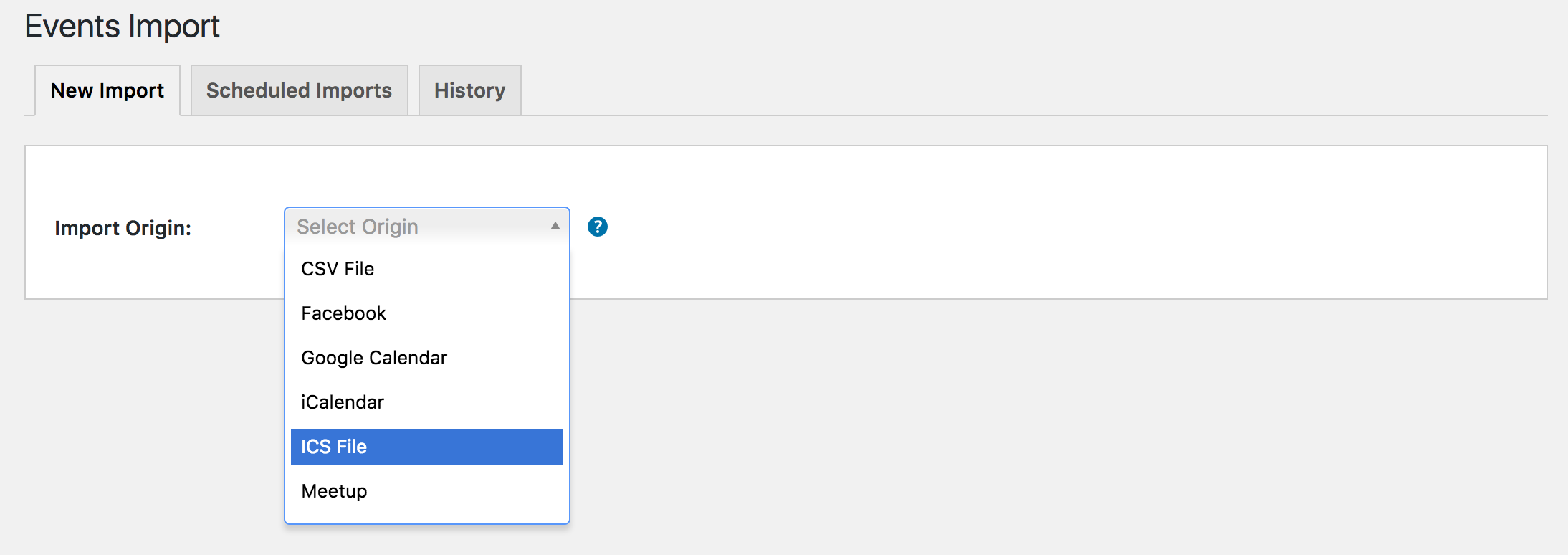
Before I’m permitted to test the behavior myself, you’ll need to review our Testing for conflicts guide and reply back with what you find out. If you still experience the error, include the Google Calendar link and I’ll test to see if I get the same issue.
Thanks and have a good evening.
ModeratorHey Mary 🙂
Happy New Year! I hope you had a great holiday season and thank you for your purchase. If the user who purchased the tickets visits the event page, they should see a link where they can view and update their ticket information. (see screenshot below)

There is no time for admins to easily change this information, but it’s a feature we have on our radar. Please let me know if this helps answer your question and have a good evening. Cheers!
ModeratorHey Chris,
Welcome to our Pre-Sales Questions forum and Happy New Year! Whoever originally purchase the license for Events Calendar PRO should have received emails leading up to their license expiration date prompting them to renew at a discounted price.
If you need to purchase a new license, you can do so by visiting the Events Calendar PRO product page and going through the checkout process. Once you’ve done that, you should receive an email providing instructions on how to access and set up your new license key.
Please let me know if this helps answer your questions and have a great evening. Cheers!
ModeratorHi Pieter,
Welcome to our Pre-Sales Questions channel and thank you for reaching out. I hope you had a great holiday season and your New Year is off to a great start. As far as I know, we don’t have any plans to release a lifetime subscription for any of our plugins. Your best option in this situation is to submit this request to our UserVoice Feature Ideas page.
I hope this helps answer your question and have a great rest of your week. Cheers!
ModeratorHello,
Welcome back and sorry to hear you’ve run into a conflict with your theme. Unfortunately, we don’t provide technical support in these instances. For what we are able to cover, please refer to our What support is provided for license holders? Knowledgebase article.
We have a bug logged aimed to update the version of Select2, which could be the reason you’re having issues, but I don’t have any temporary workaround for you at this time. I’ve added this forum thread to the ticket which helps expedite the process of getting a fix included in an upcoming release.
I don’t have a precise date when it will be available, but please stay tuned to our Release Notes and the plugin changelogs for more information. Thanks again and let me know if you’ve got any additional questions or comments. Cheers!
-
AuthorPosts