

Forum Replies Created
-
AuthorPosts
-
Hunter
ModeratorHello,
Welcome to our premium plugin forums. Does the behavior still occur when you revert back to the default WP theme and deactivate every plugin other The Events Calendar? Try it once with TEC/PRO active, then just TEC to see if you can further isolate the source of conflict. Please review our Testing for conflicts guide for complete details.
Include your System Information in a private reply and we’ll continue investigating. Thanks and have a good evening.
ModeratorHello,
Sorry to hear your events navigation isn’t working properly. Before we proceed, can you please review our Testing for conflicts guide and reply back with your findings?
Doing so will help identify the source of conflict and give us a better idea on how to proceed. Thanks and take care!
ModeratorHi Ziv 🙂
Thank you for your purchase and welcome to our premium plugin support forums! To adjust where the calendar displays events would take custom code, which we’re unfortunately unable to provide. A good starting point is to review our Themer’s Guide as it provides details on how to create and save customizations. This Customizing WordPress #1 – How To Create A Child Theme by LevelUpTuts YouTube video is a helpful visual aid which goes over the concept of template overrides.
Sorry I can’t do more in this instance and good luck with the customization. Cheers!
ModeratorHello again,
Thank you for taking the time to post in our premium plugin forums. Oddly enough, I logged a feature report about this exact feature, or lack of. I’ve added this forum thread to the ticket which helps expedite the process of getting a fix included in an upcoming release. I don’t have a precise date when it will be available, but please stay tuned to our Release Notes and the plugin changelogs for more information. Thanks again and let me know if you’ve got any additional questions or comments. Cheers!
ModeratorHi and welcome 🙂
I would be happy to help further investigate. How exactly are you limiting the time the stock holds products in the cart? E.g. a plugin or code snippet added to your theme’s functions.php file.
I think the best way to answer your question would be to set up a fresh WordPress installation where you can try replicating what you believe to have happened. Make sure you have only the default WordPress theme and The Events Calendar installed and activated on the test site. Please review our Using One License for Live and Dev Sites for more information.
I noticed you selected ‘No’ to reverting back to the default WordPress theme and deactivating all plugins other than ours to see if you can reproduce the behavior. This is a required step to continue receiving troubleshooting. Please review our Testing for conflicts guide for more information.
Let me know what you learn and we’ll continue investigating. Thanks and take care!
ModeratorHi and welcome back 🙂
The only way at this time to “re-synchronize” events at this time is to set up a scheduled import to run daily. If you visit Events > Import > New Import and select Facebook from the dropdown. From there, you can set up your daily scheduled import. (see screenshot below for example)
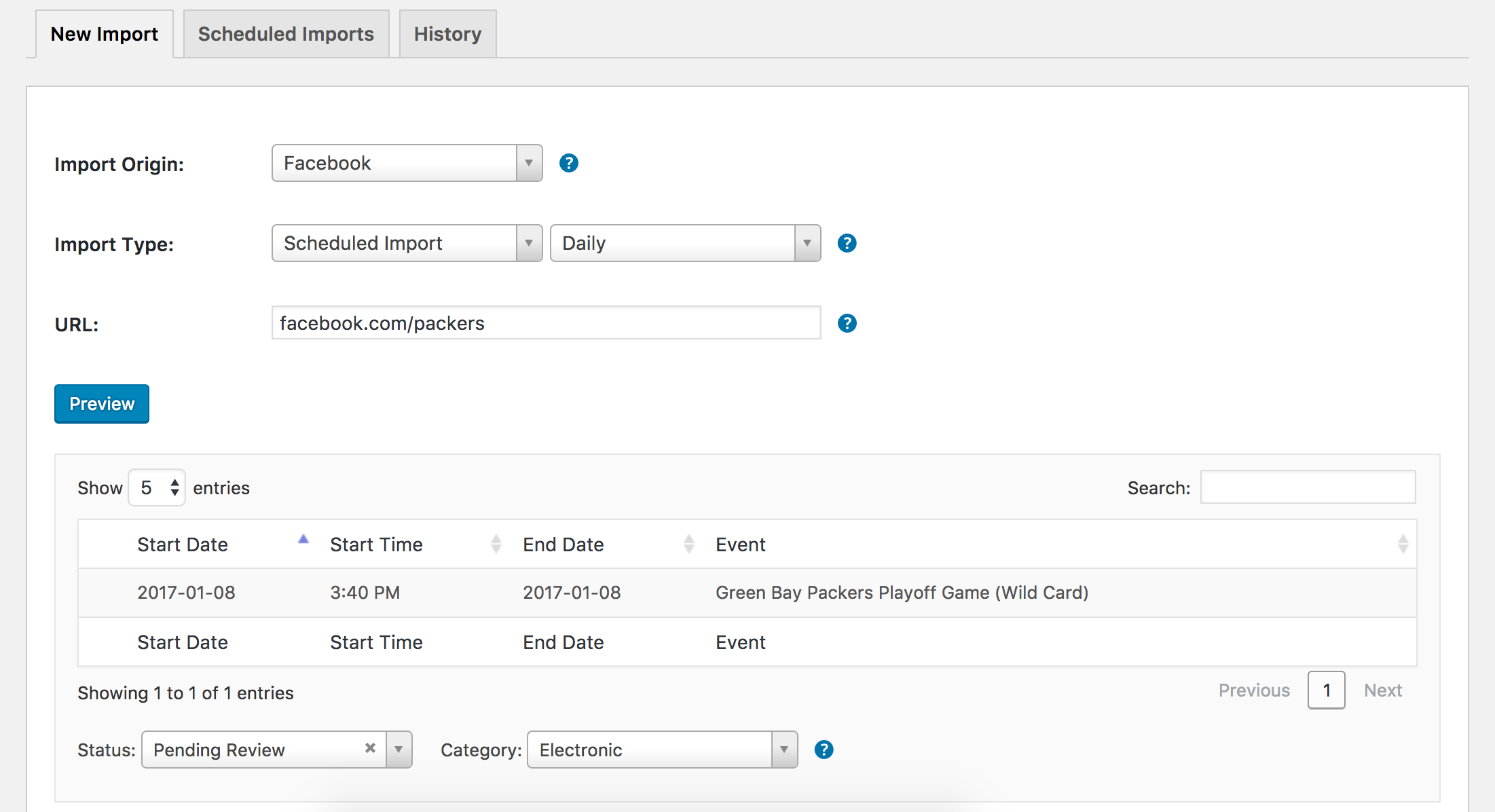
You’ll need to visit Events > Settings > Imports and make sure things are set to your liking. If you’d like to request additional features, you can do so by visiting our UserVoice Feature Ideas page.
I hope this helps answer your question and please let me know if you have any additional questions or comments. Cheers!
ModeratorHello 🙂
Sorry to see you’ve run into troubles. Before I test the issue myself, can you send over your System Information as a private reply?
It might also be best you set up a fresh WordPress installation where you can fully troubleshoot the issue. Make sure you have only the default WordPress theme and The Events Calendar installed and activated on the test site. Please review our Using One License for Live and Dev Sites for more information.
Please make sure WP_DEBUG and WP_DEBUG_LOG are enabled on your site’s wp-config.php file. Any errors will display at the top of your page as you try to reproduce the conflict. Note what you find and please include it in your reply.
Between your extensive testing and testing on my end, we’ll be able to identify the conflict quickly and take the necessary steps to resolving it. Thanks and take care!
ModeratorHi and welcome 🙂
Sorry to hear you’ve run into a conflict with the Post Types Order plugin. We are unfortunately unable to much in this instance. Reason being is if we were to solve every conflict with every theme and plugin, we’d look like a much different company.
I know it’s not ideal, but might I recommend looking into other plugins that might achieve what Post Types Order does, but doesn’t conflict with the order of events? Based on some quick research, I found another user ran into a similar issue and Intuitive Custom Post Type Order seemed to work out for them.
Sorry I can’t do more in this situation. For what we are able to cover, please review our What support is provided for license holders? Knowledgebase article.
Thanks for understanding and best of luck resolving the conflict. Cheers!
ModeratorHey John,
Thank you for posting to our premium plugin forums. It sounds like you might need to do a little customization to get the footer widgets displaying properly. Our Themer’s Guide does a great job of explaining the process of creating and saving custom templates.
Another helpful source includes this Customizing WordPress #1 – How To Create A Child Theme by LevelUpTuts as it gives a great visual and verbal breakdown similar to what you’ll need to do.
You might also want to look into hiring a freelancer to help further assist. It shouldn’t take a professional more than 15-30 minutes to get the job done. Sorry I can’t be more help in this instance and best of luck getting your theme and the plugin to play nicely. Cheers!
January 4, 2017 at 8:29 pm in reply to: Event Aggregator: Overwriting previuosly imported items #1213588ModeratorWelcome back 🙂
At this time, the only way to delete events from your WordPress site is to do so manually. I thought we had that feature on the radar, but I’m not able to find anything. I’ll go ahead and log a feature report for the developers to review. To request additional features in the future, I recommend visiting our UserVoice Feature Ideas. It might be best you submit a request, too. The more eyes you can get on the matter, the better. Sorry I don’t have a better answer for you at this time.
In regards to the duplicate events: I believe the first and last sets of duplicate events highlighted in the screenshot you shared with me got imported multiple times because there was a change in the event title. For the “Kyle Wareham” event, I’m not exactly sure what the deal is.
It might be best you set up a fresh WordPress installation where you can fully troubleshoot the issue. Please review our Using One License for Live and Dev Sites for more information. It’s recommended the test site has only the WordPress default theme and The Events Calendar installed. WP Crontrol is also permissible in this situation and might be useful to help gain more information on the failed imports.
It would also be helpful if you could send over your System Information as a private reply. Include a link to the Google Calendar and a screenshot of the scheduled import rules you have set. Lastly, include a screenshot of your Events > Imports screen and I’ll see if I can reproduce the issue.
Thank you and have a good evening 🙂
January 4, 2017 at 7:03 pm in reply to: Google Cal export not correctly exporting event on Event View #1213573ModeratorHey Curtis,
Awesome! I appreciate the update and you sharing what you found out as it may be useful for other users in the same situation. I attempted to reproduce the behavior and was able to do so. This obviously is not how the plugin should behave, so I logged a bug report for the developers to review.
I don’t have a precise date when a fix will be available, but please stay tuned to our Release Notes and the plugin changelogs for more information. Thanks again and let me know if you’ve got any additional questions or comments. Cheers!
ModeratorThank you for letting me know the issue has been resolved and please feel free to create a new thread if you have any more questions or comments. Take care!
ModeratorThomas,
Thank you for the feedback. I understand your frustration on the matter and hopefully we can get Stripe included as an option for the Community Tickets split payments feature.
Thanks again and feel free to create a new thread if you have any more questions or comments. Cheers!
ModeratorHello,
Thank you for the update. Yes, the errors you’re experiencing are most likely due to the fact the calendars you’re attempting to import from are blank. Try adding an event, then test to see if it gets imported correctly.
Please let me know what you find out. Cheers!
ModeratorThis reply is private.
-
AuthorPosts