
Home › Forums › Calendar Products › Events Calendar PRO › Events Calendar Plugin not allowing EDIT widget
- This topic has 10 replies, 4 voices, and was last updated 9 years, 8 months ago by
ctaintsobad.
-
AuthorPosts
-
December 8, 2016 at 8:17 am #1203126
ctaintsobad
ParticipantOn our wordpress widgets admin page we are unable to see the EDIT link next to each widget (usually found to the right of the widget). We turned off all plugins except for the base Events Calendar plugin (not pro). It was the Events Calendar plugin that seems to be an issue. Any thoughts on resolving this?
December 8, 2016 at 3:22 pm #1203580Hunter
ModeratorHi and welcome 🙂
Before we proceed, I’ll need you to temporarily revert back to the default WP theme and deactivate all plugins other than ours. Please review our Testing for conflicts guide. This will rule out the potential for both theme and plugin conflicts and give us a better idea on how to proceed.
Thanks and have a great evening. Cheers!
December 16, 2016 at 4:21 pm #1207223ParticipantWe ran tests with and without our hosting providers technical support and still having the same issue. When arriving on the Admin Dashboard > Widgets page, we see the ‘add’ and ‘edit’ links temporarily for 1 second and then they disappear upon a full page load.
December 16, 2016 at 9:16 pm #1207256ModeratorWelcome back,
I’m unable to reproduce the issue you’re experiencing and there don’t appear to be any logged bugs of users reporting similar behaviors. Can you please send over your System Information as a private reply?
I’ll also need you to confirm you reviewed the Testing for conflicts guide in it’s entirety. This is a required step to continue receiving support. Please let me know what you find any have a great weekend. Cheers!
December 17, 2016 at 11:18 am #1207374ParticipantThank you. We’ve tested everything and the only possible culprits left being an Events Calendar plugin – Database Issue OR an Events Calendar plugin – BlueHost Service provider conflict.
We did everything including
1. We deactivated all plugins except for the Events Calendar plugin, issue still persists.
2. We switched to the TwentyFifteen theme and kept only Events Calendar plugin on, issue still persists.Thank you and look forward to resolving this issue.
Show original messageDecember 19, 2016 at 9:44 am #1207755ParticipantHunter,
Is there any way you can help us resolve this now.
Having lots of issues and have tech guy with me here.
Are you able to call?December 19, 2016 at 10:30 am #1207793ModeratorWelcome back,
We are unfortunately unable to provide support via telephone. I am admittedly a little confused on the issue you’re having. I spun up a brand new WordPress test site on my local machine and don’t see the ‘Edit‘ text you claim is missing. (see screenshot below)
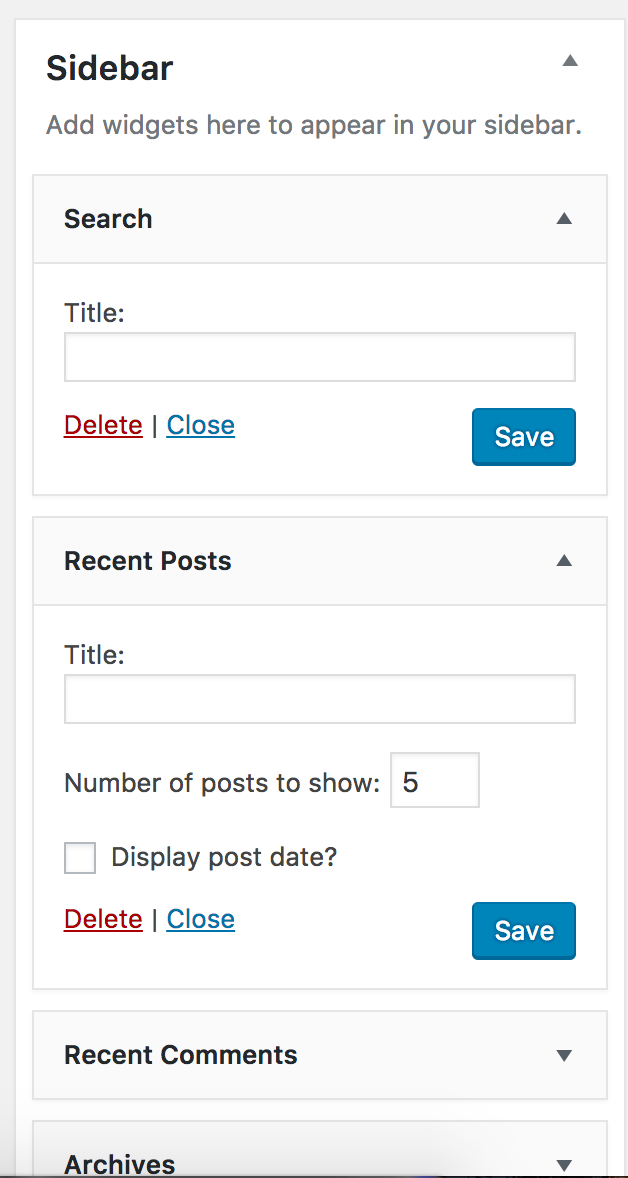
Can you please elaborate on the issue and possibly send screenshots with the ‘Edit‘ text so I can better understand your issue? Thanks and have a great afternoon. Cheers!
January 2, 2017 at 11:11 am #1212320ParticipantHunter,
Below are 2 screenshots…look at the right side of them…in one you see the “EDIT” option and in the other you don’t so we can’t click to EDIT the widget.
In order for me to capture the screenshot that had EDIT I had to do it in a split second when it flashed on the screen but then it went away…
Thanks,
JennaJanuary 2, 2017 at 12:42 pm #1212337ModeratorHi Jenna,
Thank you for sending over the screenshots. I am still a bit unsure on how to proceed due to the fact I set up a test installation from scratch with only the default Twenty Seventeen theme and The Events Calendar installed/activated and don’t see the ‘Edit’ option in my Widgets dashboard, with or without The Events Calendar being activated.
The next step in this instance is to set up a fresh WordPress test installation with the default Twenty Seventeen theme and The Events Calendar to see if you can reproduce the behavior. I understand this is not an ideal situation, but without the ability to reproduce the behavior myself and no logged bugs resembling your issue, it’s hard to provide much support.
Let me know what you find and have a great afternoon. Cheers!
January 24, 2017 at 8:35 am #1222994Support Droid
KeymasterHey there! This thread has been pretty quiet for the last three weeks, so we’re going to go ahead and close it to avoid confusion with other topics. If you’re still looking for help with this, please do open a new thread, reference this one and we’d be more than happy to continue the conversation over there.
Thanks so much!
The Events Calendar Support Team -
AuthorPosts
- The topic ‘Events Calendar Plugin not allowing EDIT widget’ is closed to new replies.