

Forum Replies Created
-
AuthorPosts
-
Hunter
ModeratorHey John,
I’m not seeing anything in our feature reports, but that does not mean it hasn’t been discussed, though I haven’t heard anything personally. We truly appreciate you taking the time to submit the feature request as we’re always pulling the most popular ideas to include in upcoming releases.
If it’s something you just have to have, we have a list of customizers that can help assist.
Thanks again and please let me know if you have any additional questions or comments. Take care and enjoy your evening. CHeers!
ModeratorHey Monica,
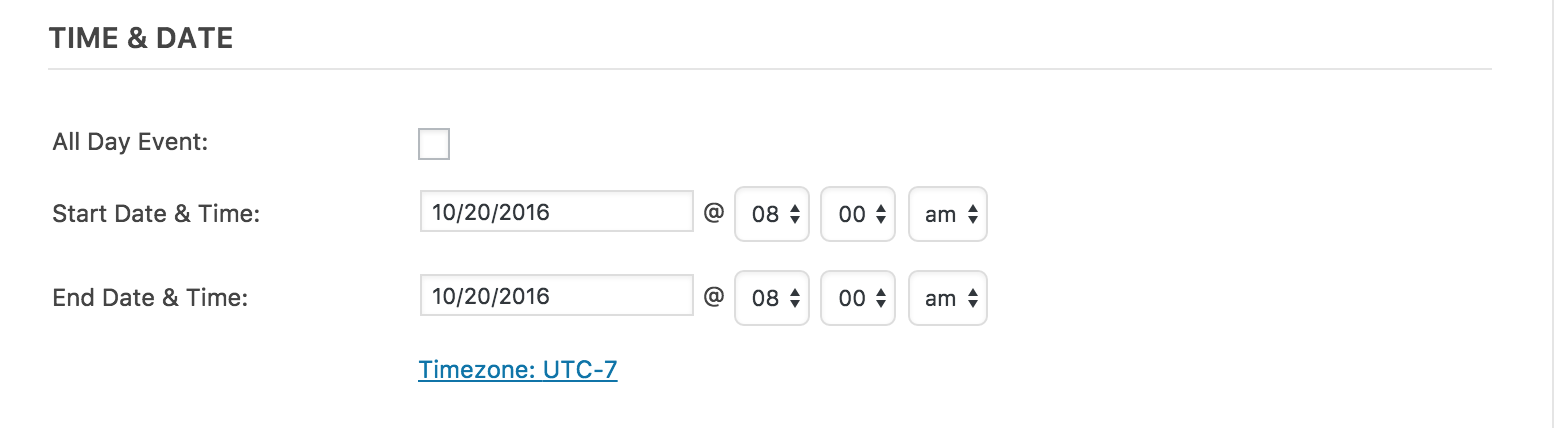
Happy Tuesday! If you set the start and end time to the same time (see screenshot below), the plugin should display the ‘All Day Event’ text you’re seeking in the title, and display the event start time under the event ‘Details’ section. Can you try this and let me know if that achieves what you’re looking for? Please keep me informed and have a great evening. Cheers!
 Moderator
Hi Greg,
Thank you for reaching out! Our plugin can accomplish either displaying start/end time by local timezone or sitewide timezone. A full Knowledgebase article covering the matter can be found here.
Please let me know if this helps address your concerns and let me know if you have any additional questions. Cheers!
ModeratorThis reply is private.
ModeratorHello,
Thank you for your patience while we worked our way to your thread. We have a logged bug for issue #1, so I’ve attached this thread to the bug report for the developers to review while making improvements. Please stay tuned to our Release Notes for maintenance release info.
Can you elaborate on issue #2? Providing screenshots of your permalink settings might be helpful. Before I test the issue myself, I’ll need you to review our Testing for conflicts guide and reply back with what you find out.
Thanks again and have a great evening. Cheers!
ModeratorHey there!
Look who it is! Sorry to see you back here under the circumstances, but it’s always nice working with a lovely user like yourself! Now down to business!
Have you deactivated the Facebook Events plugin and entered your Events Aggregator license key under Events > Settings > Licenses? Once that’s done, did/can you try importing through the new importer by visiting Events > Import then select Facebook from the dropdown and proceed as usual? Let me know if how that works. Additionally, can you provide specific plugin versions for this statement you made:
it looks like you pushed two versions of the update out. The legacy import worked perfectly after the first update but begin failing after the second.
Sorry again you’re dealing with these issues and thanks for your patience for my delayed response. Take care and keep me posted. Cheers!
ModeratorCharles,
Sorry to hear nothing changed when deactivating The Events Calendar. I too am experiencing some strange import issues as you describe, so I’ve created a bug for the developers to address in an upcoming maintenance release. I unfortunately don’t have a concrete date for you, but please keep an eye on the Release Notes for more info. I’ve also linked this thread to the logged ticket for the developers to review.
If you need, I’d recommend reverting back to the version that works for you. Please review our Manual Updates KB article and let me know if you have any questions.
Apologies you’re having to deal with this nasty bug and let me know if you have any more questions or concerns. Cheers!
October 18, 2016 at 1:46 pm in reply to: Where do we create the events tickets plus templates under our child theme? #1178634ModeratorMohamed,
I apologize if I led you down the wrong path… I’m too experiencing the plugin template taking precedent over the override inside my tribe-events folder. I must’ve confused myself during testing, so again, my apologies! I’ve gone ahead and logged a bug documenting the issue and we’ll get a fix for it in an upcoming maintenance release.
For the time being, go ahead and “hack” the core plugin file and be sure to keep an eye on our Release Notes for maintenance release info. Be sure to make a backup of the select.php file prior to updating when a new version comes out to avoid losing customizations.
Thank you again for your patience while we investigated the issue and identified the bug. Please let me know if you have any additional questions and have a good evening. Cheers!
ModeratorHello,
If you review the Themer’s Guide, it will guide you through the process of creating overwrites to display images according to your preferences. More info can also be found by reviewing how the WordPress featured images work. You’ll essentially need to replace the default size called in and replace it with a larger image, whether it be one of the sizes automatically created by WordPress or a custom thumbnail size created in your theme code.
The ‘Set Featured Image‘ option should display when you’re adding/editing a post/event. If you’re not seeing that, refer to our Testing for conflicts guide. Please note: featured images are a functionality of WordPress.
2) I’m sorry, but I’m not really sure I understand the question. I took another look at your site and the ‘Upcoming Events’ text no longer displays at the top of the events list. Please let me know if you need further assistance and provide screenshots if possible.
3) Have you reviewed the Testing for conflicts guide to see if there is a potential theme and/or plugin conflict? We don’t have any logged bugs related to this issue and I’m unable to reproduce it on my test install.
Thanks for the update and have a great afternoon. Cheers 🙂
ModeratorHello,
I can assure you the information you’re looking for is located inside the wp_posts and wp_postmeta tables. Try selecting the ‘Browse’ tab inside the wp_posts and wp_postmeta tables rather than the ‘Insert’ tab you have selected in the screenshot you shared with me.
More info on our post meta info can be found here.
Let me know if you’re able to locate it and if this exceeds your level of expertise, we have a list of customizers that can help provide further assistance.
Have a great evening. Cheers!
ModeratorSounds great! Thank you for the update and please feel free to open a new thread if you have any more questions or concerns. Take care and have a great week. Cheers!
ModeratorThis reply is private.
ModeratorHello,
You are correct; Event Tickets Plus and Community Tickets would allow users to submit events to your website and allow you to collect fees for tickets sold. The Eventbrite plugin pushes and pulls events to and from your WordPress website and Eventbrite. More information can be found on the Eventbrite product page. You might also want to check out our Bundles page to save some money when purchasing multiple products.
Let me know if this helps and take care. Cheers!
ModeratorHello,
Welcome to the both of you 🙂
I spoke with the developers are you are correct, we updated things just a bit in efforts to remove unneeded code from the plugin. Try adding the following snippet to your theme’s functions.php file and let me know if things work properly until Avada can update their code. Cheers!
function tribe_get_venue_details_back_compat( $details ) {

    if ( is_array( $details ) && isset( $details['linked_name'] ) ) {

        $details['name'] = $details['linked_name'];

    }
return $details;
}add_filter( 'tribe_get_venue_details', 'tribe_get_venue_details_back_compat' );
October 18, 2016 at 11:46 am in reply to: ticket form not showing up on event page, and no meta box on posts or pages #1178578ModeratorStrange how things are working, but we’ll take it! I’ll close this thread out but please feel free to create a new thread if you have any more questions. Cheers!
-
AuthorPosts