

Forum Replies Created
-
AuthorPosts
-
Hunter
ModeratorAwesome! Thank you for the update and please feel free to create a new thread if you have any more questions or comments. Take care and have a good week 🙂
ModeratorHello,
There are many factors that can hinder the delivery of your emails. I wish I had an answer for you, but this type of conflict unfortunately extends beyond what we’re able to cover seeing no bugs are logged resembling your issue.
If things get out of hand, I recommend reaching out to one of the devs on our list of customizers and I’m sure you can find someone to help resolve the email delivery issue.
I truly apologize I can’t be of more help here and you also might want to try running through our Testing for conflicts guide to see if you can narrow down the source of conflict, if in fact it is coming from your WordPress site rather than your hosting provider.
Best of luck and please let me know if you have any more questions. Cheers!
October 24, 2016 at 12:46 pm in reply to: Pressing tab key in Start Date & Time skips fields #1182077ModeratorGreg,
Sorry you’re not able to get the video to play. I even double-checked it worked with a few support team members before replying. Regardless, I am experiencing the same behavior as you when I start with the cursor on the Start Date & Time field. I’m not exactly sure whether this is a bug or not, but I’ll go ahead and log it as such for the developers to review and make the appropriate decision.
I don’t have a workaround for you in the mean time and hopefully it’s not something causing too many problems for you. I’ll also include the note about the compound adjective. I’m particular about those things as well.
Thank you for working with me on the matter and please keep your eyes on your WordPress admin dashboard and our Release Notes for maintenance release info. Cheers!
October 24, 2016 at 12:28 pm in reply to: Taxonomy filter will not register with Event List Widget #1182066ModeratorBryan,
We’re on the same page and rest assure we’re already hard at work on a solution. Thanks for the patience and our apologies you’ve having to deal with this nasty bug! Have a good week and take care.
ModeratorLisa,
Without knowing exactly how to reproduce the issue, it’s hard confirm whether there is a bug in play. We don’t have any logged bugs of users reporting similar behaviors, so once you have more info on exactly where the problem is coming from, we’ll be able to further investigate.
I wish I had a better answer for you as I can imagine this is a stressful situation you’re having to deal with. I’ll keep this thread open for the time being and feel free to respond with any updates you get. If things get out of hand, we have a list of customizers that can help.
Thank you and have a good rest of the day. Cheers 🙂
ModeratorMonica,
Try creating a template override for /the-events-calendar/src/views/single-event.php as explained in our Testing for conflicts guide and use the entire code found here.
You will need to take the reigns from here. Let me know how it works out and best of luck. Cheers!
ModeratorHello,
Thank you for the response. I am unable to reproduce the issue on my test environment. Can you please verbally confirm you’ve ran through the Testing for conflicts guide? The view you have appears to be custom, so I don’t really have a way to mimic your exact behavior. I’m also not seeing any logged bug reports resembling your issue.
Sorry I don’t have any answers for you at the moment and please let me know the results from the Testing for conflicts guide and we’ll proceed troubleshooting. Thanks and have a good afternoon.
ModeratorHello,
My apologies if I misunderstood you. The search function is working properly on my local test environment. Have you reviewed our Testing for conflicts guide to see if there is a theme/plugin conflict in play? Can you elaborate on how it’s not working? Also, can you send over your System Information as a private reply?
We don’t have any logged bugs resembling what you’ve described, so I’m not entire sure there is a bug. Please review the Testing for conflicts guide and let me know if you’re able to reproduce the issue. Thank you and I look forward to your response. Cheers 🙂
ModeratorHello,
You can import multiple events from Facebook pages you don’t own. The Facebook pages you’re attempting to import from (Personal Facebook pages rather than Business Facebook pages) are limited at this time. For example, if I attempt to import events from https://www.facebook.com/insomniacevents, everything works as designed. (see screenshot below)
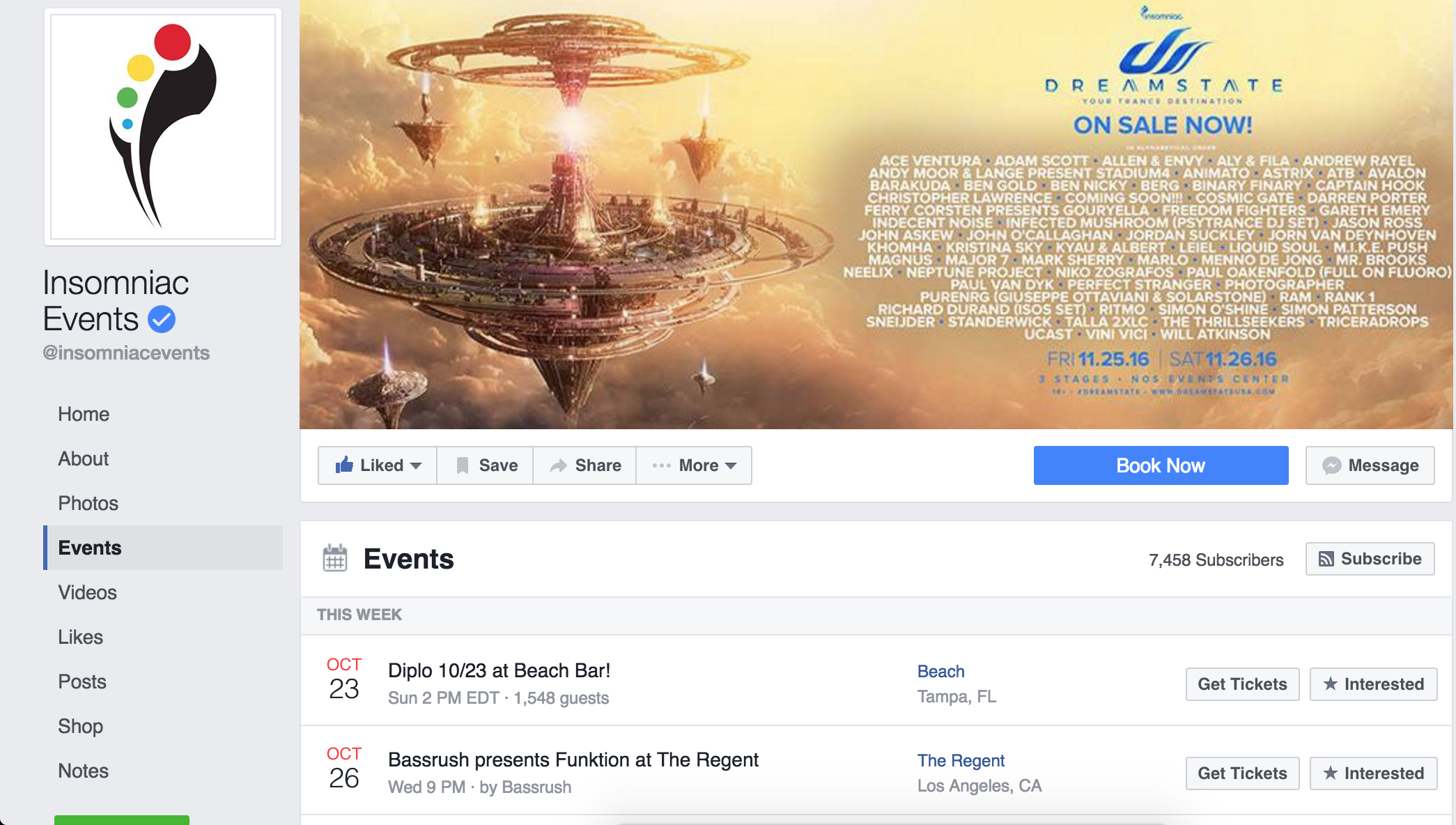
I wish I had a better answer for you and let me know if it all makes sense. Cheers!
ModeratorHello,
Without being able to test the code below myself, I can’t guarantee either will work, but try them out and let me know how things go. Adjust the -50px to whatever value you’d like. Cheers!
.single-tribe_events #tribe-events-footer {

display: none;

}
.single-tribe_events #tribe-events-content {
margin-bottom: -50px;
}October 24, 2016 at 11:35 am in reply to: Update link not available for Events Calendar Pro #1182027ModeratorBecca,
My apologies if I confused you! Yes, the bug is relating to your initial issue, so we’ll be addressing it in an upcoming maintenance release. Let me know if this clears up any confusion and have a great Monday!
ModeratorWelcome,
Thank you for sharing the screenshot with me. We have chosen these methods based on a variety of reasons, including in-depth discussions within our organization, feedback from our users, and performance. If you feel things could be in a more efficient manner, we welcome your feedback with open arms over at our UserVoice Feature Ideas.
Our newly released [tribe_events] shortcode might help ease your concerns due to nearly limitless abilities for displaying your events throughout your website. I hope this answer helps clarify how and why we’ve done things the way we have and please let me know if you have any more questions or concerns. Thanks again and have a wonderful week ahead. Cheers!
ModeratorHey Terry,
Welcome back to our support forums! What you’ve described sounds like a fairly simple task. The besty way to go about this would be a custom template override as we have explained in our Themer’s Guide. The template you’ll be focusing on is /the-events-calendar/src/views/single-event.php.
Please let me know if this information is helpful and have a great Monday. Thanks again!
ModeratorHey Denon,
Thanks for reaching out and being so thorough in your post. The design and placement of information is a customization built into the Avada theme. I encourage reviewing Avada’s How To Use The Events Calendar With Avada Knowledgebase article.
Our Themer’s Guide is the basic process Avada used when making the custom templates, so that’s another resource worth familiarizing yourself with. One of my favorite YouTube videos on the subject is Customizing WordPress #1 – How To Create A Child Theme by LevelUpTuts. Please review both articles.
The template you’ll need to focus on is /the-events-calendar/src/views/single-event.php. I’d also like to note that theme customizations are outside the scope we can support (see What support is provided for license holders?), but feel free to respond back with any questions and I’ll do my best to accommodate.
Thanks again and have a great Monday. Cheers!
ModeratorHi Marianne,
Welcome 🙂
Unfortunately there is a bug report logged describing the issue you’re experiencing. I don’t have any temporary workarounds until we can get this addressed in an upcoming maintenance release, so keep your eye on your WordPress admin dashboard and our Release Notes for release info.
Sorry about the bug and rest assured we’re hard at work on a fix. Take care and enjoy the week. Cheers!
-
AuthorPosts