

Forum Replies Created
-
AuthorPosts
-
October 23, 2016 at 9:49 pm in reply to: Taxonomy filter will not register with Event List Widget #1181759
Hunter
ModeratorHey Bryan,
Thanks for sending over this info. I attempted to recreate the behavior and can confirm there is a bug. I’ve logged a bug report for the developers to review and we’ll get this addressed in an upcoming maintenance release. I can’t give you a concrete date, but the Events List widget is a popular feature, so I imagine a lot of users will be impacted.
For future reference, we typically ask that you review our Testing for conflicts guide to ensure a theme and/or plugin conflict is not in play prior to creating threads as it saves a necessary step and cuts down on the time to resolve most issues.
Thanks again and keep your eye on your WordPress admin dashboard and our Release Notes for maintenance release info. Have a great upcoming week!
ModeratorHey Bryan,
Sorry to hear you’re experiencing troubles integrating our plugins with your theme. Unfortunately, theme conflicts extend beyond what we’re able to cover here on the support forums (see What support is provided for license holders?).
I’d be happy to try and help where I can, so send over a list of specific issues and include screenshots where possible. Again, I’m limited to how much support I can provide but I’ll do my best to accommodate. We always have our list of customizers that can help out.
Thank you for your purchase and have a great Monday. Cheers!
ModeratorHello,
Thank you for reaching out 🙂
You can go ahead and send over a screenshot of the orders page in a private reply. Before I test to try and reproduce the issue myself, can you please review our Testing for conflicts guide and reply back with your findings?
Thanks again and have a great Monday. Cheers!
October 23, 2016 at 9:08 pm in reply to: Day Filter only show 5 days instead of 7 days a week #1181753ModeratorHello to the both of you 🙂
Hans is correct! Please let me know how it works out and thank you big time to Hans for jumping in here and helping out. As they say, “it takes a village.”
Have a great Monday and take care. Cheers!
October 23, 2016 at 4:28 pm in reply to: showing deleted tickets – show tickets as woo products #1181728ModeratorDamian,
Thank you for reaching out 🙂
I want to show tickets as woo products. I read https://theeventscalendar.com/knowledgebase/selling-tickets-from-the-woocommerce-products-page/, I include the code in functions.php inside my theme folder but still not showing my “success summit 2017” ticket here: http://otg.global/ticketsstore/shop/
Can you please confirm you’ve reviewed our Testing for conflicts guide to see you’re not experiencing a theme and/or plugin conflict and reply back with your findings?
I do not have 2014 template installed.
If you have the Twenty Fifteen or Twenty Sixteen themes, either would suffice in place of the Twenty Fourteen theme when reviewing the Testing for conflicts guide.
I can confirm the event page still links to ‘View your Tickets‘ even after deleting the ticket and all associated records. I’m honestly not sure whether that was done by design or is in fact a bug. I’ll bring this thread to the attention of other support team members to see if anyone has an answer for certain and respond once I hear back from you.
Thank you for purchasing our plugins and we look forward to getting these issues resolved so you can turn your attention elsewhere. Cheers!
ModeratorHey Geoff,
Welcome and thank you for reaching out.
Also, when trying to import an event into WordPress, the drop down menu shows nothing (just continues to say “searching” for an undetermined amount of time).
I’m having trouble reproducing the behavior when attempting to import an event from Eventbrite into my WordPress site. (see screenshot below)
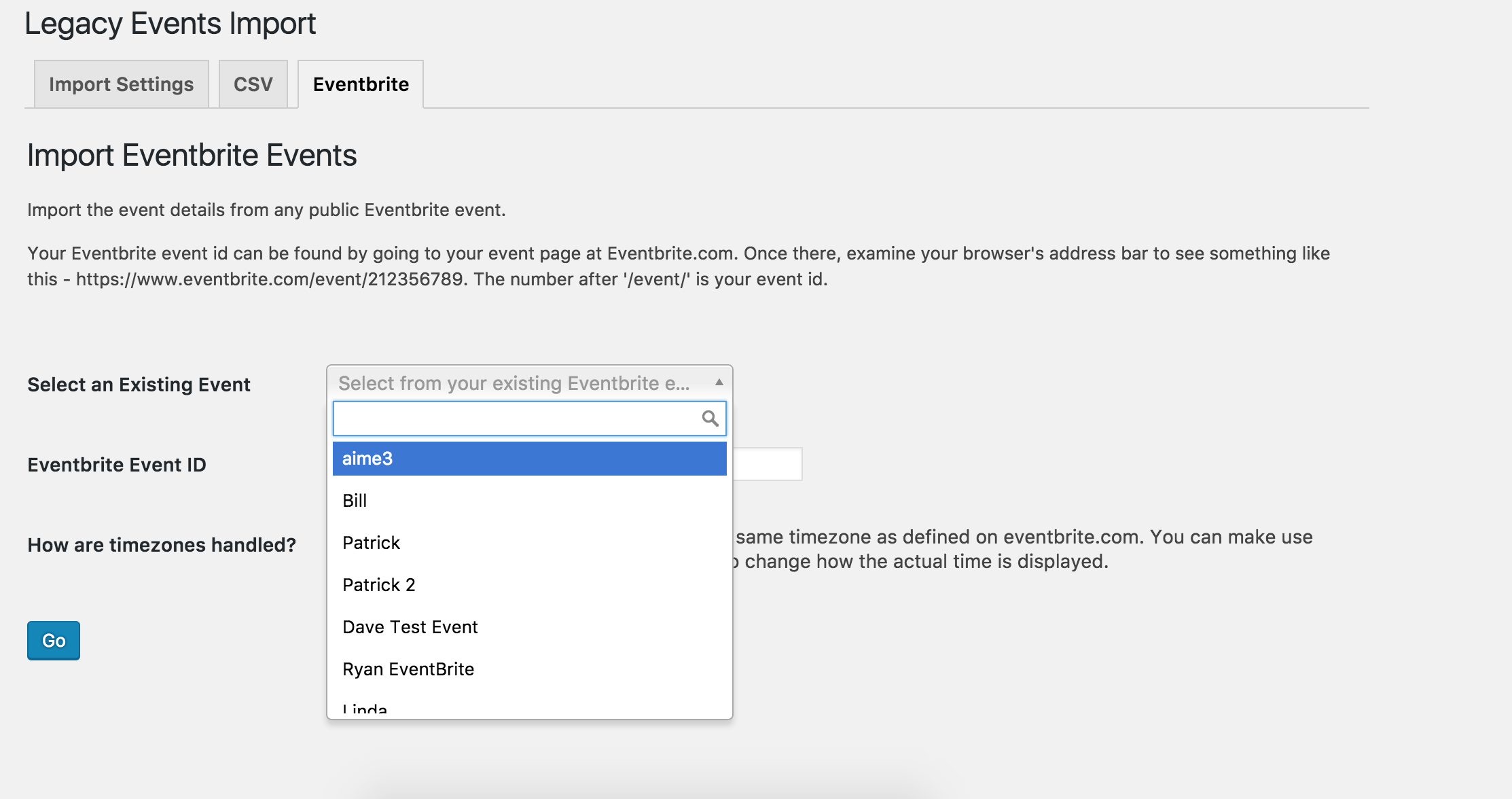
When I try to re-import an event it gives me an error and tells me the event already exists.
Can you try completely deleting the event from your website, then reattempt to import it from Evenbrite? I see you checked ‘Yes’ to reverting to the default WP theme and deactivating all plugins other than ours as outlined in our Testing for conflicts guide, but can you please confirm this?
Once I hear back with more info, I’ll have a better idea on how to proceed. Thanks again and have a great week ahead. Cheers!
ModeratorHello,
I visited your site and attempted to reproduce the behavior described, but everything worked correctly. Can you please confirm the issue is still occurring? If so, is there any way you can create a screencast of your experience and provide a link to make sure I understand the issue correctly?
If you haven’t already, please review our Testing for conflicts guide to see if a theme/plugin conflict is in play.
Thank you for your patience and have a wonderful week ahead. Cheers!
ModeratorHello,
I hope you weekend is going well. We are unfortunately unable to provide support through our Pre-Sales channel, but you can head over to The Events Calendar WordPress.org support forums for assistance and answers.
If you have a PRO license, you can log into your account and get assistance through the PRO forums.
Thanks for understanding and I’ll keep an eye out for your issue. Have a good day!
ModeratorHello,
After some sleuthing myself, I’ve found if you remove the first comma in the following line of code found on /the-events-calendar/src/views/list/single-event.php, you should get the desired results.
<?php echo implode( ', ', $venue_details ); ?>Be sure review our Themer’s Guide for more info on saving customizations to avoid losing changes when updating our plugins in the future.
Please let me know if this helps and take care. Cheers!
ModeratorHello,
Sorry about the delay! I’ve kept an eye on the logged bug reports and there is still nothing relating to the issue you’ve described. Additionally, I have not experienced similar behavior during my own tests. This leads me to believe there was some kind of issue when you transitioned from WooTickets to Event Tickets/Event Tickets Plus.
I wish I was able to help in this instance :-/ We don’t have any major known issues when making the switch, so I’m not sure where I’d start other than reattempting the process from when things were working to see where things are breaking down. If you’re still hoping to use Event Tickets Plus, we have a list of customizers that can assist in finding out what’s going on with your site.
Again, my apologies for the delayed response and please let me know if you have any questions. I’ll gladly bring this thread to the attention of my other support team members when they’re back “in the office” tomorrow. I can try and update you if/when I learn more, but I recommend reaching out again Monday or Tuesday to see if I have any new info.
Thanks for working with me on the matter and have a great rest of your Sunday. Cheers 🙂
ModeratorHello,
I personally have not used that plugin, so I cannot vouch for the quality. I always read the reviews and do my due diligence while testing new plugins and do so on a local environment before deploying to a live site.
Good luck and feel free to open a new thread if you have any more questions. Cheers!
ModeratorHello,
I had typed up another response, but had a few moments of clarity after replying. The Events Aggregator is unable to import events from pages you’re attempting to import from. The pages you’ve shared with me are personal Facebook accounts. The plugin can only import events from Business Facebook pages at this time.
I hope this makes sense and please let me know if you have any more questions. Cheers!
ModeratorRebecca,
It looked like we both sent a reply at the same time. Please review my last response and let me know if you have any questions. Thanks again and take care 🙂
ModeratorHello,
Thank you for the response. You have been granted a license for Events Aggregator. The license date is set to the same expiration date as your Facebook Events license, so no need to purchase another license. I’d like to point out it appears you need to renew your license for Events Aggregator within the next week to maintain your status on the support forums and to receive plugin updates. The Facebook Events plugin has been discontinued and replaced with Events Aggregator. Please view the links above for more info on retiring the Facebook Events plugin and features included in the Events Aggregator.
If you visit to your License Keys page, you should see a license for Events Aggregator. You can then copy it and paste into the Events Aggregator license key field under Events > Settings > Licenses. From there, you can deactivate and delete the Facebook Events plugin.
Please let me know if this clarifies any confusion and if you have any additional questions or need help with anything. Thanks again and have a great rest of your weekend.
ModeratorThank you for the update and I’ll keep this thread open until I hear back. Have a great rest of your weekend 🙂
-
AuthorPosts