

Forum Replies Created
-
AuthorPosts
-
Hunter
ModeratorHello,
Thank you for your patience. Try removing the first 2 lines of code from the snippet, so only lines 3-80 are pasted to the bottom of your theme’s functions.php file. Let me know if it gets the site back up and have a great rest of the weekend. Cheers!
ModeratorHello,
Thank you for sending over the screenshots. You can use either CSS or a custom template override as explained in our Themer’s Guide. Please try the following CSS and let me know if it works. If you need assistance with the template override, let me know and I’d be happy to help where possible.
Thanks again and have a great rest of the weekend. Cheers!
#tribe-events-footer .tribe-events-sub-nav {

    display:none;

}ModeratorHans,
Thank you for the input. If you wouldn’t mind, please create a separate topic on the matter and we’d be happy to assist. It’s the procedure we’ve found to be most efficient. Feel free to copy/paste what you typed here and even link to this forum thread.
With that said, I am also experiencing the same issue as of late, so I’m going to log a bug describing the incorrect behavior and we’ll gladly be addressing it an upcoming maintenance release. Keep an eye on your WordPress admin dashboard and our Release Notes for more info.
Thanks again to the both of you and have a wonderful rest of your weekend. Cheers!
October 22, 2016 at 11:21 am in reply to: WP API V2 – tribe_venue – no matching route found #1181343ModeratorHello,
There shouldn’t be any reason the free and PRO version aren’t behaving the same way as they use the same tribe_venue for venue post types. Did you try also temporarily deactivating your custom theme to see if that could be the cause of conflict?
Let me know and we’ll continue investigating. Thank you for the response and have a great Saturday. Cheers!
ModeratorHello,
I took another look at your site but I’m not really sure how much padding you want, so as previously mentioned, try and use the ‘Inspect‘ tool to identify the classes/IDs you need and makes changes accordingly.
If you can send over a screenshot highlighting what you’re referring to and what you’d like, I’ll do my best to accommodate. Take care and thanks for the update. Cheers 🙂
ModeratorHey Cory,
I am also experiencing the same behavior on my test environment, so I’ve logged a bug and attached this forum thread to it for the developers to review while making improvements. I don’t have a fix for you at this time, but stay tuned to your WordPress admin dashboard and our Release Notes for more info.
Thank you for your patience while we come up with a solution and have a great weekend. Cheers!
October 21, 2016 at 10:38 pm in reply to: Pressing tab key in Start Date & Time skips fields #1181183ModeratorHello again, Greg 🙂
I’m not entirely sure I understand your issue, but I did my best to try and replicate the behavior but was unable to do so. I took a quick screencap of me navigating down The Events Calendar settings when adding a new event which can be seen here.
Please let me know if I understood you correctly. I’d also recommend reviewing the Testing for conflicts guide to see if you can reproduce the issue using the Twenty Sixteen theme and only our plugins active. Thanks and take care.
ModeratorHello 🙂
I attempted to recreate the issue and was able to do so. My best guess is the Facebook API is not allowing events to import due to restrictions out of our control. About halfway down our Facebook Events: API errors article, it reads:
You maybe dealing with an Age, Profanity, Alcohol, Country, or another type of restriction. Pages or Events that are associated with bars, breweries, adult entertainment, or similar things may be marked as age restricted by Facebook. Unfortunately, that means the Facebook API cannot import those events unless you or the Page owner is able to change the age restriction.
In some instances, it may be possible for you or the Facebook Page owner to change the age restriction on an event. However, this is not possible with Pages that Facebook has specifically deemed to be alcohol related or have adult content.
Please refer to the linked above article for more information and potential solutions. Sorry I can’t do more here and let me know if you have any more questions. Have a great evening.
ModeratorHi and welcome back!
The most efficient way to identify CSS classes and IDs is to use the ‘Inspect‘ tool. This YouTube Video does a good job of explaining how it works. Our Themer’s Guide is also a great resource for learning how to make custom templates. I recommended taking some time to learn that process as it will make this type of work much easier down the road. This is another YouTube video I like to recommend on creating child themes.
Try adding the following CSS snippet to your theme’s CSS panel or style.css file:
#tribe-events-footer {

    margin-bottom: 0;

}
Let me know if any of this helps and best of luck. Cheers 🙂
Moderator@Zé, I can now confirm I’m experiencing the same behavior on my test environment. I’ve gone ahead and logged a bug detailing the issue and attached this thread for the developers to review while making improvements. Stay tuned to our Release Notes and your WordPress admin dashboard for changelog info.
Sorry I don’t have a workaround for you in the mean time, but once I have some time to discuss this issue with other support team members, we might be able to come up with a solution.
Thank you for your patience and have a good evening.
ModeratorHey Andrew,
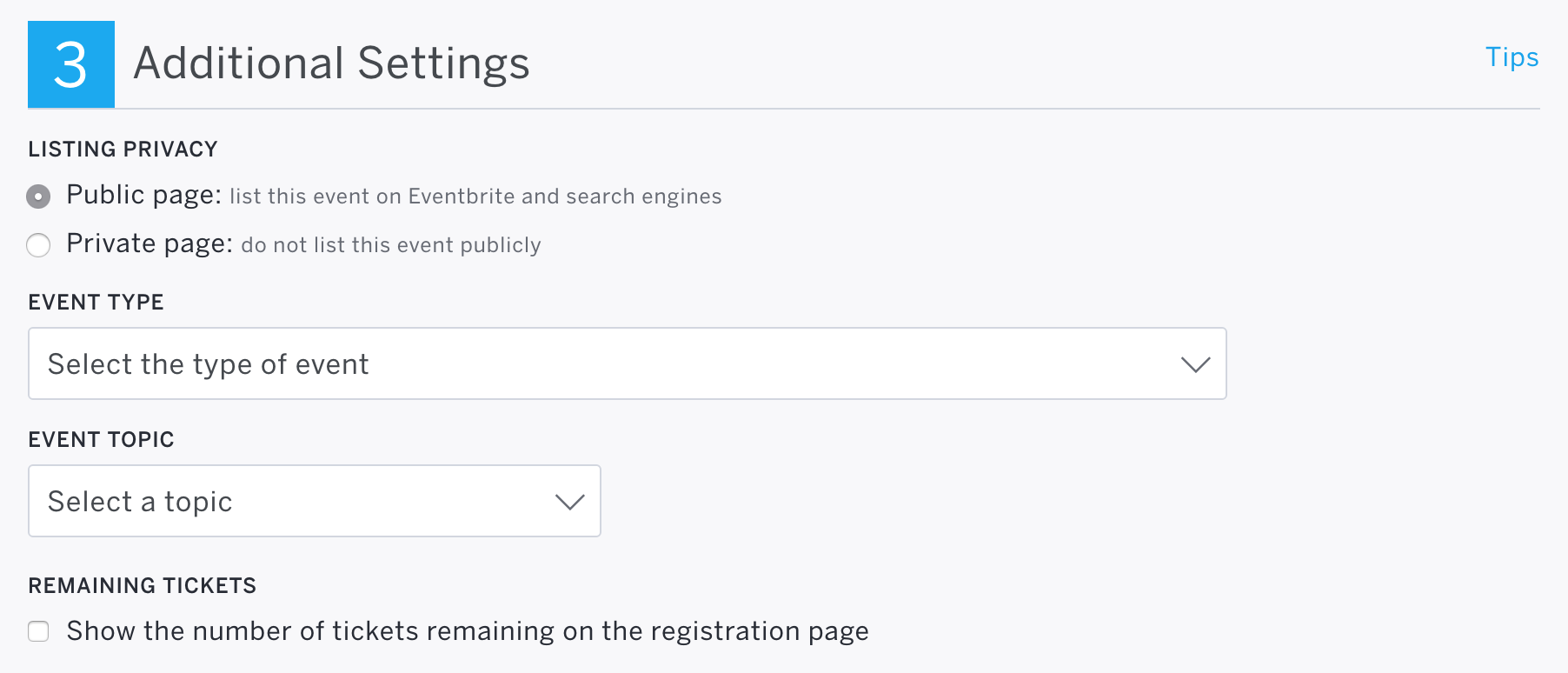
Thank you for picking up the Eventbrite Tickets plugin! I’d be happy to help investigate. First, you’ll need to make sure the event status on Eventbrite is ‘Public page‘. The ticket box will not display if the event status is set to ‘Private page‘ on Eventbrite.com. (see screenshot below)
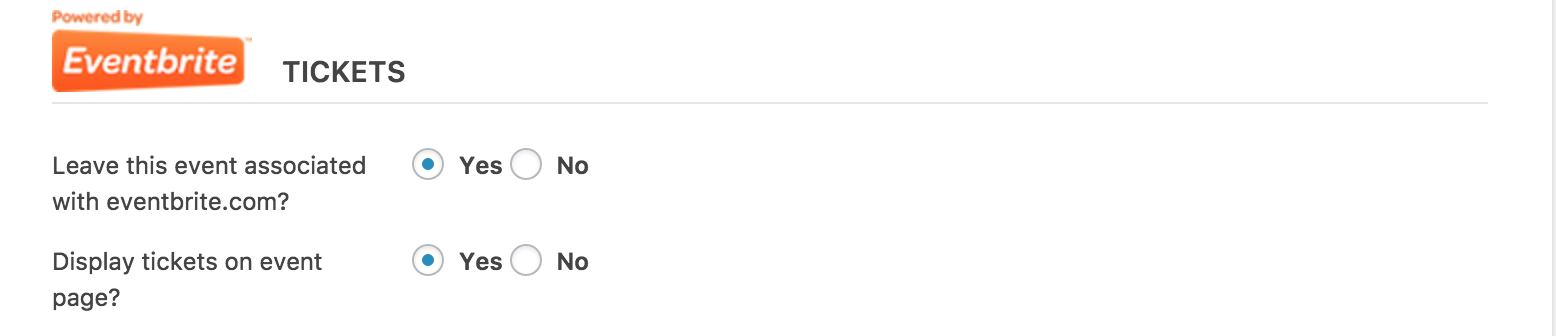
You’ll also need to ensure the ‘Display tickets on event page?‘ option is set to ‘Yes‘ on the add/edit event page. (see screenshot below)
Please let me know if my response helps and if you’re still experiencing troubles, be sure to review the Testing for conflicts guide to make sure there is not a theme and/or plugin conflict in play.
Thanks again and have a great weekend. Cheers!
ModeratorWelcome back, Gregg 🙂
With the new shortcodes, displaying past events should be a breeze. We are currently working on this functionality, but it should be available any day now. We do have a current workaround which I’ll provide below. Please let me know if you have any questions. I’ll link this thread to the feature report for the developers to review while making improvements. Keep an eye on our Release Notes and your WP admin dashboard for update info.
Add the following code to the bottom of your theme’s functions.php file. The shortcode to display past events is [tribe_past_events view=”list”]. Let me know how it goes!
function tribe_past_events_shortcode( $atts ) {

    if ( ! class_exists( 'Tribe__Events__Pro__Shortcodes__Tribe_Events' ) ) return '';

    add_action( 'parse_query', 'tribe_past_events_shortcode_modify_query' );

    $shortcode = new Tribe__Events__Pro__Shortcodes__Tribe_Events( $atts );

    return $shortcode->output();

}
function tribe_past_events_shortcode_modify_query( $query ) {
$query->set( 'tribe_is_past', true );
remove_action( 'parse_query', 'tribe_past_events_shortcode_modify_query' );
}add_shortcode( 'tribe_past_events', 'tribe_past_events_shortcode' );
ModeratorHey Dean,
Thank you for reaching out. We typically keep these questions geared toward their appropriate forums rather than the Pre-Sales Channel, so please head on over to the Filter Bar forums and we’d be happy to assist.
Thanks for understanding and I’ll keep my eye on the queue for your thread. Have a great evening. Cheers!
ModeratorHello,
Welcome to our premium plugin support forums! Before we go any further, I’ll need you to please review our Testing for conflicts guide and reply back with your findings. Please include your System Information as a private reply.
Once I have that information, we’ll be able to proceed the troubleshooting process. Thanks for choosing us for your events calendar needs and have a great evening. Cheers!
ModeratorHi and thanks for reaching out 🙂
Sorry you’re having to deal with manual updates… I imagine that’s frustrating! Does the issue occur on every site you’re managing that is running TEC and PRO? Has it ever given you the option to upgrade, or did this start recently? Is this issue strictly related to PRO, or do you notice TEC not giving you the option to update as well? Any additional details you can provide will help me identify if there is a bug in play and possible solutions.
The only bug I’m seeing related to available updates not displaying seem to only affect Multisite users. I see in your System Information your site is not part of a Multisite network, but can you confirm this?
We appreciate your patience on the matter and I look forward to your response. Have a great Friday!
-
AuthorPosts