

Forum Replies Created
-
AuthorPosts
-
Hunter
ModeratorHello,
@Jay and Pierre, as redundant as it might seem, would you mind opening separate topics for your issues? It helps expedite and keep things organized. Thank you and I’ll keep an eye on the queue for your threads.
@Zé, I’m sorry but I’m unable to reproduce the issue on my test environment. I was also unable to locate any bug reports resembling your situation. Can you please review our Testing for conflicts guide and reply back with your findings?It would also be helpful if you could provide screenshots of the Events > Settings > Filters section of your WordPress admin dashboard.
Thanks to the both of you and have a great weekend. Cheers 🙂
ModeratorHello,
Thank you for reaching out. The behavior described is by default. If you wanted to change where the ‘Login to Register’ link goes to, I recommend exploring a plugin such as Theme My Login. Another option would be to visit our UserVoice Feature Ideas and submit a request.
I hope this helps answer your question and enjoy the rest of your weekend. Cheers!
ModeratorGreg,
Thank you for providing that code – I’ve added it to the bug report, so that should hopefully expedite things. Rest assured things will get better with the next release. Thanks again and please feel free to create a new thread if you have any more questions or concerns.
Try and enjoy your Friday night and I’ll do the same! Cheers:-)
ModeratorI tested the code you provided and it seemed to work for me only when navigating to a future month (/?tribe-bar-date=2016-12), but didn’t seem to work for past months (/?tribe-bar-date=2016-07). Did you write that yourself or did another support team member provide it to you? If the latter, please send a link to the thread.
Thanks again and take care.
ModeratorHey Greg,
Welcome back and thank you for reaching out! Sorry to hear you’re experiencing some issues. I can confirm there is a bug related to the the [tribe_events] shortcode when navigating directly to a past or future month.
I was, however, unable to reproduce this behavior:
It gets worse. If I click Find Events in the bar with “Events In: 2016-07”, the title changes to “October 2016”, provides a link to September, and shows events for July.
Our apologies you’re having to deal with these bugs and rest assured we’re already hard at work on solutions. I’ve linked this thread to the bug report for the developers to review while making improvements. Please stay tuned to our Release Notes and your wp-admin for maintenance release info.
For the time being, you could add the following snippet to the bottom of your theme’s functions.php file. You can use the following shortcode to implement the code: [tribe_past_events view=”list”]. Please note it only works on list view.
function tribe_past_events_shortcode( $atts ) {

    if ( ! class_exists( 'Tribe__Events__Pro__Shortcodes__Tribe_Events' ) ) return '';

    add_action( 'parse_query', 'tribe_past_events_shortcode_modify_query' );

    $shortcode = new Tribe__Events__Pro__Shortcodes__Tribe_Events( $atts );

    return $shortcode->output();

}
function tribe_past_events_shortcode_modify_query( $query ) {
$query->set( 'tribe_is_past', true );
remove_action( 'parse_query', 'tribe_past_events_shortcode_modify_query' );
}add_shortcode( 'tribe_past_events', 'tribe_past_events_shortcode' );
Thanks again and please let me know if you have any more questions or concerns. Cheers!
ModeratorHi and welcome 🙂
I took a look at the link provided but don’t see the ‘Related Events’ section on your site. Is that what you’re referring to? (see screenshot below)

Please let me know if I understand your issue correctly and if you still need assistance. Screenshots are always helpful in these situations. Thank you for reaching out and have a wonderful rest of your Friday. Cheers!
ModeratorHello and welcome 🙂
We recently rolled out our newest plugin, Events Aggregator, which is actually built into the free version of The Events Calendar, though you need to activate the Events Aggregator functionality by entering your Events Aggregator license key in your Events settings.
I attempted to import the event you shared with me and everything went as expected. (see screenshots below)
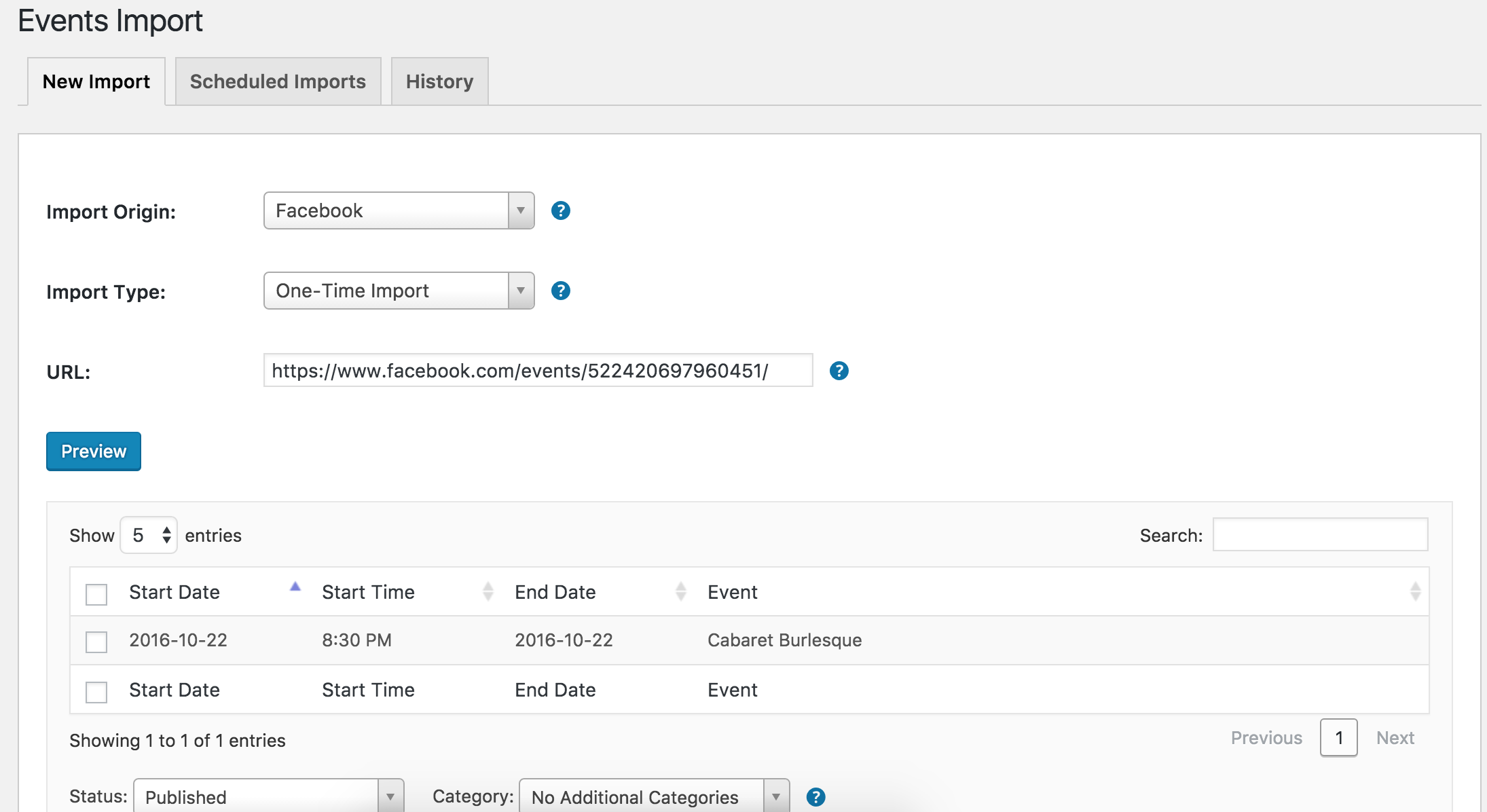

Can you please review the following articles to see what has been updated lately?
- Things to Be Aware of in Version 4.3 of The Events Calendar, Event Tickets, and Premium Add-ons
- Release: The Events Calendar 4.3, Event Aggregator, and Premium Add-ons
Once you’ve entered your Events Aggregator license, you can deactivate and delete both the iCal Importer and Facebook Events plugins. After that’s all finished, please try and reproduce the issue you originally posted about and report back with your findings. If you do run into any issues, please make sure to review the Testing for conflicts guide again to ensure no theme and/or plugin conflicts are in play.
Thank you for dealing with this wall of text and please let me know if anything I’ve said needs further clarification or if you have any questions. Have a great Friday and thanks for choosing PRO. Cheers!
ModeratorHey Matthew,
Looks like we’re neighbors! I’m located in Chandler, AZ – just a few hours south of the beautiful red rocks of Sedona! Sorry to see you here under the circumstances. While we are fairly limited on the amount of support we can provide regarding theme conflicts (see What support is provided for license holders?), I’ll do my best to help out.
I did a quick check of our logged bug reports to see if anything resembles what you’ve described, but I’m not seeing anything. Have you tried setting wp_debug to ‘true‘ on your wp-config.php file, then tried to reproduce the issue to see if any notices appear at the top of your site? If so, feel free to share the results with me and I’ll do my best to assist.
Thank you for reaching out and enjoy the upcoming week. Cheers!
ModeratorHey Vicky,
Welcome! Sorry to hear about the issues you’re experiencing. The text looks like it’s actually coming through from your theme rather than our plugin. Can you confirm this by reviewing and reporting back your findings from our Testing for conflicts guide?
Keep me posted and have a wonderful Friday. Cheers!
ModeratorHey Jackson,
Welcome to our support forums 🙂
You bring up a great point! If you wouldn’t mind, can you elaborate on the following sentence?
I see this about once every 3 months and it’s always a big problem.
Are you having an unnecessary amount of recurring events randomly generated for no reason every so often? We have a few bug/feature reports aimed at improving many aspects of the recurring events functionality and user experience, but it would be helpful if you could visit our UserVoice Feature Ideas and provide a detailed explanation of your concerns so we can hopefully get them addressed in an upcoming release.
Thank you for the constructive criticism and please keep me posted. Cheers!
ModeratorHello,
If you’re having issues with Events Aggregator, please create a support ticket and we’d be happy to help troubleshoot for solutions. The Facebook Importer plugin is no longer available as it’s been replaced with Events Aggregator.
In response to the QR question, please review Tickets: Managing your orders and attendees as it contains detailed information on how to set up and check in tickets using a QR scanning app. If you need specific instruction, please create a support thread as we are unable to provide support through the Pre-Sales Channel.
You can also hide/add images to your tickets, emails, etc. using the instructions outlined in our Themer’s Guide. Again, this is a topic you’ll need to create within the necessary support forums.
I hope this helps and have a great Friday. Cheers!
ModeratorHey Jack,
Welcome to the forums and thank you for purchasing PRO 🙂
If you visit Altering or removing titles on calendar views and copy/paste the snippet to the bottom of your theme’s functions.php file with lines 74-75 deleted or commented out, it should achieve exactly what you’re after.
Please let me know how it works out and have a great Friday. Cheers!
ModeratorHi Scott,
Thank you for your purchase and sorry to hear things aren’t going according to plan… yet! I know we have a logged bug reporting an issue with incorrect dates/times when importing events using Events Aggregator which is currently being worked on. Before I confirm your issues are related to the bug, can you please review our Testing for conflicts guide and reply back with your findings? Once I have that information, I’ll have a better answer for you. Please also include an .ics link you’re having issues with so I can test to see if I can reproduce the behavior.
In regards to the request to parse out iCal data, that might be an idea worth mentioning over at our UserVoice Feature Ideas page. One workaround I can think of would be to do an SQL query or download the .ics file first, open with a text editor, and remove the ‘GROUP NAME’ text using the find/replace tool.
I look forward to your response and getting the issues resolved so you can focus on gathering and promoting events. Thanks again and have a wonderful evening. Cheers!
ModeratorHey Robert,
Welcome back and thanks for reaching out. I took a look at your site and the lines for the day boxes appear to be there. (see screenshot below)
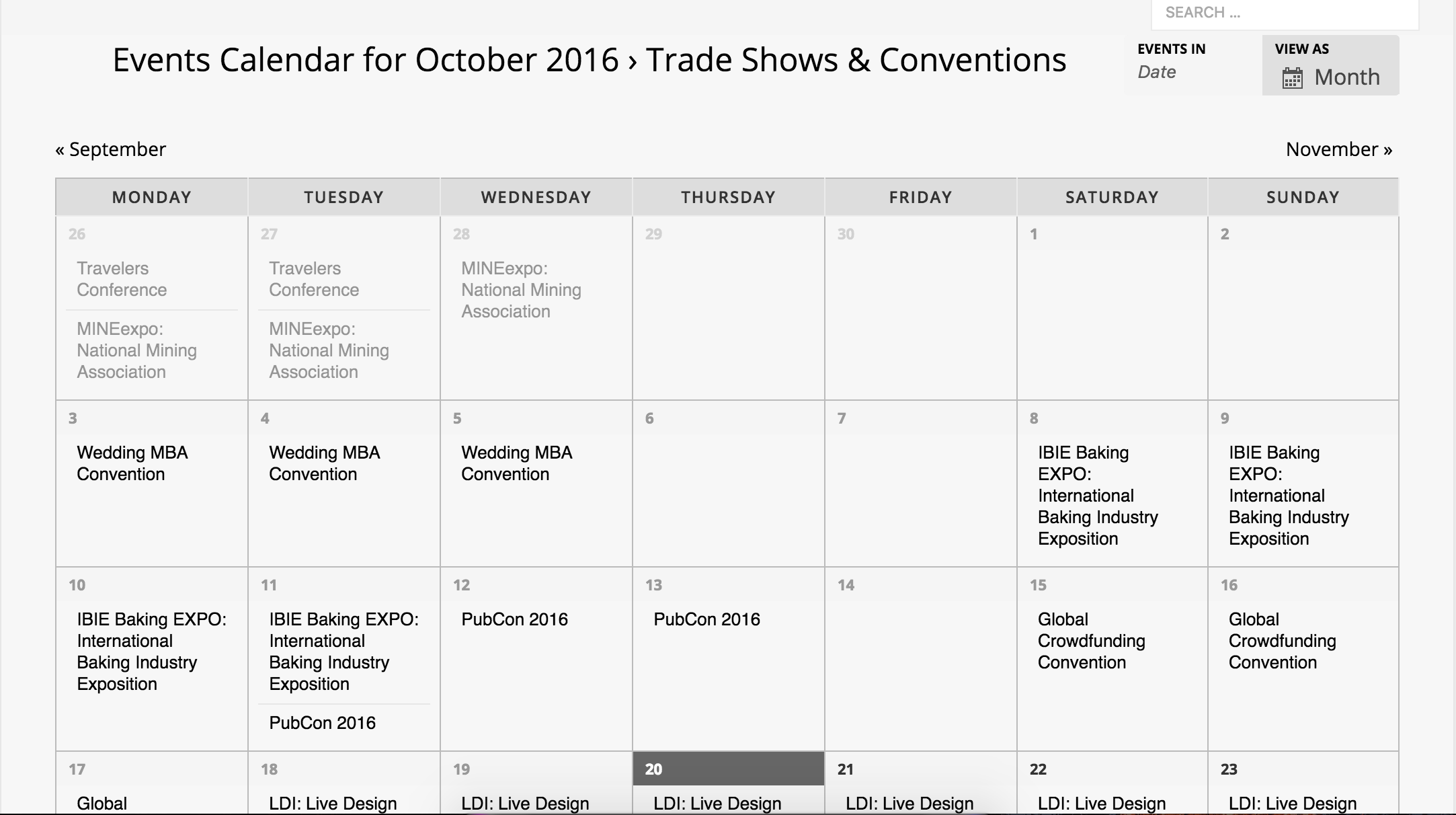
If you’re ever having styling issues, I recommend watching this YouTube Video on using the ‘Inspect’ tool to identify CSS classes and IDs so you can make changes by adding code to your theme options CSS panel or directly into your theme’s style.css file.
I hope this helps and please let me know if you’re still having troubles. Take care and have a good evening. Cheers 🙂
ModeratorHello,
I truly appreciate your patience while I’ve been hard at work on your issue. I can confirm at this time after talking with other support team members there is a bug related to the problems you’re experiencing. We have a report logged and I’ve attached this forum thread for the developers to review while working on improvements.
I don’t have a concrete date when we’ll be shipping a fix in a maintenance release, but rest assured we’re already hard at work. Watch our Release Notes and your wp-admin for info about what’s been fixed/added in the next release.
Thank you again for your patience and please let me know if you have any questions. I’ll mark this thread as ‘Pending Fix’ for the time being. Have a great Friday. Cheers!
-
AuthorPosts