

Forum Replies Created
-
AuthorPosts
-
Hunter
ModeratorWelcome back,
Sorry to hear you’re experiencing issues. Can you please clarify where the organizer is not displaying, whether it be the back end of your site, front end, or both? I’ll also need you to please review our Testing for conflicts guide and reply back with your findings. I see your note about not having the Twenty Fourteen theme, so if you have either the Twenty Fifteen or Twenty Sixteen, either will suffice. If you don’t have any of the default WordPress themes, please download Twenty Sixteen so you can test as required. Lastly, your System Information will be required. Please send it over as a private reply.
Once I get a response, I’ll have a clearer idea on what direction to look and have the steps necessary to try and reproduce the issue. Thank you so much for choosing PRO and have a great evening. Cheers!
ModeratorHello again 🙂
You’ll need to remove lines from 38-40 (see code below) from /the-events-calendar/src/views/single-event.php. Save the file as [your-theme]/tribe-events/single-event.php to avoid losing customizations. Please see our Themer’s Guide for more info.
To add “Per Person” before the “Cost:” text, edit line 123 of /the-events-calendar/src/views/modules/meta/details.php and save as [your-theme]/tribe-events/modules/meta/details.php.
Please let me know if this helps. We strive to provide customizations when possible, but it is strongly recommended you familiarize yourself with the ins-and-outs of the Themer’s Guide as it’s an essential for learning how to create and save custom templates.
Take care and keep me posted on your progress. Cheers!
ModeratorHello,
You should have the option to add event categories directly into the menu when visiting Appearance > Menus. (see screenshot below) Full details on Event Categories can be found here.
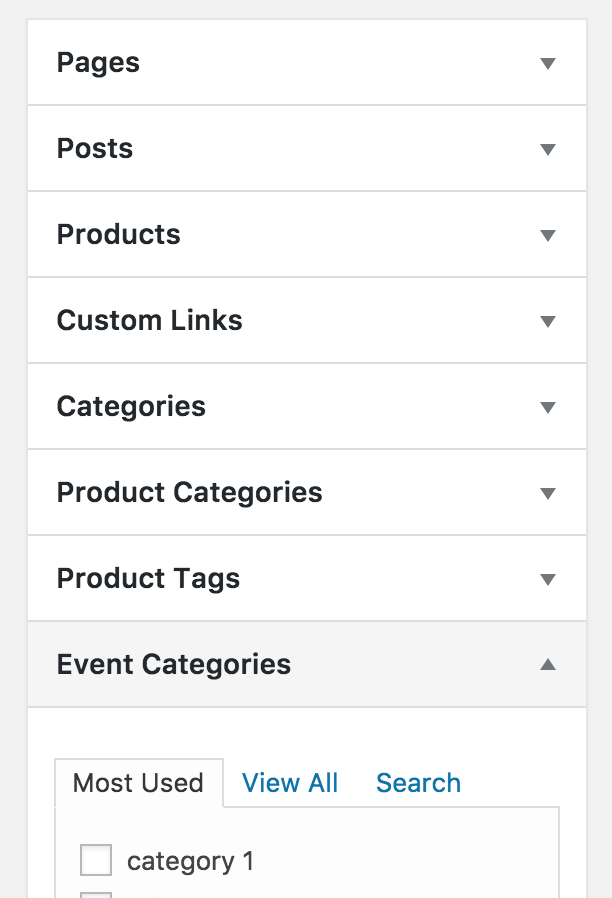
Does your WordPress website show that option? Let me know and if not, we’ll investigate other options. Thanks for reaching out and have a great evening. Cheers!
ModeratorHello!
Sorry to hear about the issues. Rest assured, I’m here to help 🙂
Have you tried activating the default WordPress theme (Twenty Fourteen-Twenty Sixteen) and only our plugins? In other words, can you please try deactivating your custom theme and all plugins other than ours to see if you can reproduce the behavior?
It would also be helpful if you could include your System Information as a private reply.
Once I hear back, we’ll continue investigating. Thank you so much for purchasing our products and have a wonderful evening. Cheers!
ModeratorAwesome 🙂
Thank you for kindly letting me know everything is good to go! I’ll close this thread out, but go ahead and create a new one if you come across any more questions or concerns. Cheers!
ModeratorThank you for letting me know the status of your issue and I’ll go ahead and close the thread out. Feel free to open a new one if you have any more questions or concerns. Thanks again 🙂
ModeratorHey Lisa,
According to your order records, you are unfortunately outside the 30-day money back return window :-/
Do you see any errors in your server’s error log? Have you tried extensively troubleshooting the issue with ‘wp_debug’ set to ‘TRUE’ on your wp-config.php file? This might be a question worth reaching out to WooCommerce over, though I believe they maintain the same set of rules of not supporting third-party conflicts.
I truly do apologize I can’t be of more assistance here and if things get to a breaking point, we have a list of customizers that can always help assist.
Thank you for understanding our position on the matter and please let me know if you have any more questions. Take care!
ModeratorHello,
Welcome back 🙂
I’m assuming that existing orders placed under the old plugin would still exist in the system. Is that right?
You are correct. Orders should still exist in the system unless something went awfully wrong. We wouldn’t delete any records of such importance for any reason. I wish I could be of more help, but as previously stated, I think the best way to troubleshoot would be to make another attempt at the transition from WooTickets to Event Tickets Plus, but make sure you have the default WP theme and only our plugins active until you know everything worked out.
I truly do apologize I can’t do more here as I can imagine the amount of stress you’re dealing with, but please don’t forget about the option to hire a customizer to help get you over this hump.
Let me know if this response is of any help and enjoy your evening.
ModeratorLennart,
I don’t have any new info for you since my last response, so as previously mentioned, keep an eye on you WordPress dashboard and our Release Notes for more info.
Thank you for your patience and take care.
October 24, 2016 at 5:30 pm in reply to: Deleted tickets still visible to person who bought them on event page #1182206ModeratorHey Ben,
Thank you for being so thorough in your post. We truly appreciate these kinds of details as they help us when making improvements. I’m aware of the issues you’ve mentioned and have brought them up with my fellow support team members. I can confirm the behaviors you’ve described, so we’re on the same page. Obviously there are some improvements that need to be made, so once we get all the details, we’ll get a bug report logged and get fixes out as quickly as possible.
It would also be helpful if you please send over your System Information as a private reply.
Once I hear back from you, I should have more information on the matter and rest assured we’ll get things squared away. Thanks again for your patience while we iron our the kinks from our recent feature release and have a good afternoon.
ModeratorRoger,
We have a logged bug aimed to address this shortcoming in an upcoming maintenance release. Stay tuned to your WordPress dashboard and our Release Notes for more info. Thank you for you patience while we iron out the kinks from the new feature release and let me know if you have any more questions or comments.
Cheers!
October 24, 2016 at 3:50 pm in reply to: "Events cannot be imported because Facebook has returned an error" #1182163ModeratorHey Thomas,
Thank you for reaching out. I am able to import events from a Facebook Group I manage, even when the group is set to ‘Private’ setting on Facebook.
Can you please review our Testing for conflicts guide and report back with your findings? If you’ve already done that, are you able to create a test environment using only our plugins and the default theme to see if you can reproduce the issue?
Let me know and we’ll proceed from there. Thanks and have a good evening. Cheers 🙂
ModeratorHello,
Thank you for taking the time to respond! We love hearing this type of feedback, so what I’ve done is added your input as a feature request and hopefully we will incorporate into an upcoming release.
I’ll close this thread out for now but feel free to open a new thread if you have any new questions or concerns. Take care!
ModeratorWelcome back!
Glad to hear things are starting to work as designed. I am able to view upcoming events, both Public and Private in the dropdown import menu, so I’m not sure why yours is only displaying past events.
Regarding the event on your WordPress site not reflecting the changes made on your Eventbrite account, it is something we’re aware of and currently have a ticket logged which will allow us to investigate the matter. I don’t have a date on if/when this functionality will be implemented, but keep an eye on your WordPress dashboard and our Release Notes for info.
Please let me know if this helps clarify everything and if you have any unresolved questions, feel free to respond and I’ll be happy to answer the best I can. Thanks for the update and have a good rest of the day.
ModeratorThank you for your patience,
After some discussion, it appears PRO does modify the Register Post Type for Venues, so your filter might be getting called too early and wiped out by that. You didn’t provide the hook you’re working with, but maybe changing the priority will help with it.
While I’m not 100% sure, it could be the following causing the issue:
add_action( 'wp_loaded', array( $this, 'allow_cpt_search' ) );

        /**

         * Re-registers the custom post types for venues so they allow search from the frontend.

         *

         * @return void

         */

        public function allow_cpt_search() {

            $tec = Tribe__Events__Main::instance();

            $venue_args = $tec->getVenuePostTypeArgs();

            $venue_args['exclude_from_search'] = false;

            register_post_type( Tribe__Events__Main::VENUE_POST_TYPE, apply_filters( 'tribe_events_register_venue_type_args', $venue_args ) );

        }
Additionally, it is possible to modify the venue post type without touching the code files, here’s a sample of how to do that: https://git.io/vPxGK
I hope this info helps and please let me know how it goes. Have a good rest of the day. Cheers!
-
AuthorPosts