

Forum Replies Created
-
AuthorPosts
-
Geoff B.
MemberGood morning Henry,
I am glad this is helping. I agree with you, there is nothing quite like testing things out to find out if a solution works for you.
With that in mind, we have built our reputation on that refund policy. So it is totally safe 🙂
In fact, reach out to me if you need assistance with the refund (in case things don’t work for you).Have a good weekend,
Geoff B.
MemberHey David,
I am sorry to hear that. It sounds like my suggestion might be the way to go.
If you are able to, setting up a staging site (clone) of your site would be awesome for that purpose.Hang in there!
Geoff B.
MemberGood morning Akari,
Thank you for writing back. I am sorry this did not fix the issue.
By the sound of it, it looks like there is some type of conflict at play.
This is usually because of:- A conflict with another plugin
- A conflict with your WordPress theme (this is why I requested a copy)
- A template customization for the Events Calendar that requires updating
When it comes to that type of issue, it is preferable to troubleshoot in a staging environment if you have one.
A first quick test is to simply temporarily revert back to a default WordPress theme such as twenty-sixteen to see if the issue persists.
The next step would be to go through our testing for conflicts procedure and let us know what you find out.
Basically the goal here is to revert back to a bare WordPress installation to see if the problem persists. It also allows us to pinpoint what the cause of the issue is.
But, before you do that, there are 2 things I would advise:
- Make a backup of your database
- Consider activating a “Maintenance Page” plugin if you are doing this on your live site (to minimize impact on your visitors)
Let me know how that goes.
Geoff B.
MemberGood afternoon,
Thank you for chiming in.
I would highly recommend opening a separate thread so that we can provide you with personalized support.Was this a problem on the plugin?
No, this is literally a limitation of the Google Maps API.
You might want to review the following documentation in detail: https://theeventscalendar.com/knowledgebase/setting-up-your-google-maps-api-key/Since you have a multisite install, you might have to consider using a dedicated IP for your sites (if setting up separate APIs does not cut it).
Best regards,
Geoff B.
January 5, 2018 at 7:47 am in reply to: Is it possible to change the author of the event for community events? #1418832MemberGood morning Dan and welcome back!
Thank you for reaching out to us.
I would love to help you with this topic.Can we transfer ‘ownership’ of the event so that the organiser can edit aspects of the event that’s been created?
Absolutely.
Simply change the author of the event using the dropdown in wp-admin. Once that is done, the event now “belongs” to the organizer.
Let me know if that helps.
Have a great day!
Geoff B.
MemberGood morning William and welcome to the Events Calendar forum!
Thank you for your interest in our products.
We’ll be glad to answer your question.The short answer is yes.
In fact, you can tweak any view to your exact requirements (removing or adding things).
We have made this simple for our users.You might want to read our Themer’s guide to get a sense of how that works.
Based on your screenshot, I would recommend tweaking the list view.
Let me know if that helps.
Have a great day!
Geoff B.
January 5, 2018 at 7:37 am in reply to: Dashboard view is warped and un-readable. How can I fix it? #1418819MemberGood morning Karen,
I am super stoked that this did the trick for you.
You are welcome back in our support forums any time 🙂
For now, I am going to close this thread.
Have a great week!
Geoff B.
January 5, 2018 at 7:36 am in reply to: Change Name of Calendar Page from " Upcoming Courses" to " Course Schedule" #1418813MemberGood morning Deb and welcome back!
Thank you for reaching out to us.
I would love to help you with this topic.There are a couple of ways to go about that:
- Using the approach from the following article: https://theeventscalendar.com/knowledgebase/altering-or-removing-titles-on-calendar-views/
- By tweaking your view files accordingly (perhaps with some conditions in the code). You might want to read our Themer’s guide to get a sense of how that works.
- By using the Events Calendar Pro’s shortcodes while hiding the view title and replacing it with your own: https://theeventscalendar.com/knowledgebase/embedding-calendar-views-tribe_events-shortcode/
Let me know if that helps.
Have a great day!
Geoff B.
MemberGood morning Kristine and welcome to the Events Calendar forum!
Thank you for your interest in our products.
We’ll be glad to answer your questions.1. recurring events
For this feature, you will need to grab a copy of our the Events Calendar Pro premium add-on: https://theeventscalendar.com/product/wordpress-events-calendar-pro/
2. let others add their own events to my calendar
To achieve this goal, Community Events is the add-on you will need to install: https://theeventscalendar.com/product/wordpress-community-events/
3. automatically pull in events from Facebook
That can be achieved by a subscription to our Event Aggregator service: https://theeventscalendar.com/product/event-aggregator/
4. default to list view (not month or week)
Nothing special here, you simply need to adjust your the Events Calendar settings accordingly under Events -> Settings -> Display
Also, is it possible to not show an event’s time, and show date only
Absolutely, you can do that one of 2 ways:
- By customizing your views. We have made that simple for our users. You might want to read our Themer’s guide to get a sense of how that works.
- By adding a bit of code to your WordPress theme’s functions.php OR using a plugin
You could apply the following snippet in the functions.php file of your theme (without the PHP tag at the top): https://gist.github.com/elimn/ee4f74fe1b561148dc7cd7563c16d815#file-tribe_remove_time_list_view-php
But first to be extra safe, before making any changes to your functions.php file, you should make a backup of that file.
And here is an example of the plugin approach: tribe_remove_time_single_view
Let me know how that goes.
Best regards,
Geoff B.MemberGood morning Stuart and welcome back!
Thank you for reaching out to us.
I would love to help you with this topic.The best way to achieve this would be to use a third-party plugin that lets you export WordPress data in a CSV file (including custom post types – aka events). The most popular one is probably: https://wordpress.org/plugins/wp-all-export/
Let me know how that goes.
Best regards,
Geoff B.MemberThis reply is private.
MemberThis reply is private.
MemberGood afternoon Daniel and happy new year!
Thank you for the files.
I was able to reproduce your issue on my end.Try adding the following CSS rule to your style.css file or in your Custom CSS metabox (with the color of your choice):
#tribe-events-content table.tribe-events-calendar .type-tribe_events.tribe-event-featured {

    background-color: #dd3333 !important;

}
Let me know how that goes.
Best regards,
Geoff B.January 4, 2018 at 8:33 am in reply to: Dashboard view is warped and un-readable. How can I fix it? #1417944MemberGood morning Karen and welcome back!
Thank you for reaching out to us.
I would love to help you with this topic.What is going on is that, based on your screen size, there are too many columns activated under the Events list menu in wp-admin. As such, these columns are fighting for space.
The solution is to deactivate unnecessary columns by clicking on Screen Options in the top right corner of your screen (see screenshot). Once that is done, simply remove the checkbox of undesired columns until the problem disappears).
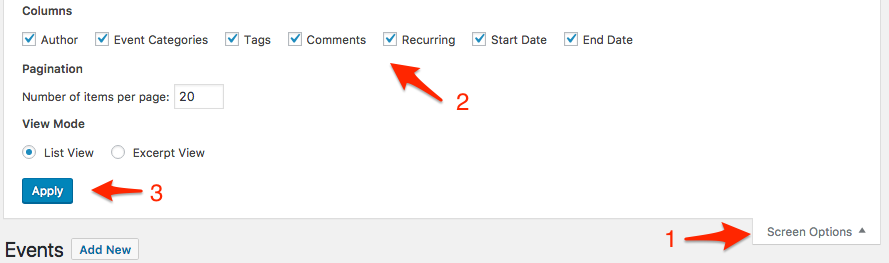
Let me know how that goes.
Best regards,
Geoff B.January 4, 2018 at 8:25 am in reply to: Not able to install Events Calendar PRO and Filter Bar through license keys #1417936MemberGood morning Maria and welcome to the Events Calendar Support forum!
Thank you for reaching out to us.
I would love to help you with this topic.Simply put, to install those 2 premium add-ons, you actually need to download their respective plugins first.
Once the plugins are installed and activated, the license key tabs will appear. Here are the primers to get you started:
- http://theeventscalendar.com/knowledgebase/new-user-primer-the-events-calendar-and-events-calendar-pro/
- http://theeventscalendar.com/knowledgebase/new-user-primer-filter-bar/
Let me know how that goes.
Best regards,
Geoff B. -
AuthorPosts