

Forum Replies Created
-
AuthorPosts
-
Geoff B.
MemberGood morning Heather,
Thank you for taking the time to write back.
I can totally see how this could be a cool feature to have.
I recommend you suggest it in our User Voice forum. That way other customers can vote for it!
You are welcome back in our support forums any time 🙂
For now, I am going to close this thread.
Have a great week!
Geoff B.
MemberGood morning Akari and welcome back!
Thank you for reaching out to us.
We are sorry to hear about the shortcode not working on that specific site.
I would love to help you with this topic.One of the things I am noticing is that the site is displaying [tribe_events view=»month»] and not [tribe_events view=”month”]
As you can tell from the following page, the quote mark format is very important: https://theeventscalendar.com/knowledgebase/embedding-calendar-views-tribe_events-shortcode/
Here are a couple of things to try:
- Fix the quotation marks
- Remove the quotation marks completely
- Make sure enter the shortcode AND save the page while in Visual mode in the text editor (as opposed to the “text” tab).
If none of this works, could you please send me a copy of the latest version of your WordPress theme / child theme via a link to a .zip file link (stored Dropbox or Google Drive) so that I can run some tests on my end ? I recommend a private reply for that purpose.
Please ensure you are using the latest files as found on your actual website.
This way I will get access to any updates or customizations you might have made.Hang in there!
Geoff B.
MemberGood afternoon Pascal and welcome back!
Thank you for reaching out to us.
We are sorry to hear about the issues you have been facing while using WPML alongside our plugins. I would love to help you with this topic.
As a first troubleshooting step, could you please provide us with your complete system information in a private reply using the instructions found in the following link?
https://theeventscalendar.com/knowledgebase/sharing-sys-info/
If you have not already done so, I would recommend reading and using the following guides:
- https://theeventscalendar.com/knowledgebase/setting-up-the-events-calendar-with-wpml/
- https://theeventscalendar.com/knowledgebase/creating-translations-for-events-using-wpml/
In your specific situation, there are 4 things to look at that can really help:
- Head over to Events -> Settings -> Display and make sure you disable the month cache there
- Head over to WPML > Support > Troubleshooting page and disable the language switcher cache
- Head over to WPML > Languages and experiment with different settings for Language filtering for AJAX operations
- Deactivate all caching options and empty the cache if you have a caching plugin in place
Let me know how that goes.
Best regards,
Geoff B.MemberBonjour Nicolas,
Merci de nous écrire.
Il y a 2 façons d’atteindre cet objectif:
- En créant une vue personnalisée. Je vous invite à lire notre Themer’s guide (en anglais) pour voir comment cela fonctionne.
- En utilisant un peu de CSS.
Veuillez ajouter la règle CSS suivante à votre site:
#tribe-events-bar {

    display: none !important;

}
Salutations,
Geoff B.MemberGood evening Craig and welcome to the Events Calendar Support forum!
Thank you for reaching out to us.
We are sorry to hear about the 404 error messages you are receiving while using recurring events.
I would love to help you with this topic.As a first troubleshooting step, could you please provide us with your complete system information in a private reply using the instructions found in the following link?
https://theeventscalendar.com/knowledgebase/sharing-sys-info/
Can you try re-saving your permalinks to see if that helps (as well as emptying any caching plugin you might be using).
Hang in there!
Geoff B.
MemberGood evening David and welcome back!
Thank you for reaching out to us.
We are sorry to hear about the tickets not being an option and the maps not displaying.
I would love to help you with this topic.As a first troubleshooting step, could you please provide us with your complete system information in a private reply using the instructions found in the following link?
https://theeventscalendar.com/knowledgebase/sharing-sys-info/
In the meantime, please make sure that:
- Both the Event Tickets and Event Tickets Plus plugins are installed and activated
- That WooCommerce is installed, configured and activated
As for the Google Maps issue, I would recommend:
- Making sure you follow precisely the following guidelines: https://theeventscalendar.com/knowledgebase/setting-up-your-google-maps-api-key/
- Checking if you can deactivate the Google Map API call from your theme for the event pages (right now you are doing multiple Google Map APIs calls on event pages). Or try using the key only with your theme only with our plugin
- Try to use the latitude+longitude checkboxes under the Edit Venue screen
Let me know how that goes.
Best regards,
Geoff B.MemberGood evening Richard and welcome to the Events Calendar forum!
Thank you for your interest in our products.
We’ll be glad to answer your questions.It looks like on of the CSS rules in your theme is causing this.
You could either:
- Try playing around with the different settings for styling under Events -> Settings -> Display to see if that helps OR
- Write a CSS rule to counter the effect of your theme’s rule
Try adding the following CSS rule to your style.css file or in your Custom CSS metabox:
.tribe-events-calendar .col-lg-3 {width: 100% !important;}Let me know how that goes.
Best regards,
Geoff B.MemberGood evening Rhonda and welcome back!
Thank you for reaching out to us.
We are sorry to hear about that message being generated on your site.
I would love to help you with this topic.This typically means that a site is hosted on a shared hosting plan (and thus a shared IP address).
Google enforces a limit on the daily number of queries allowed per IP address.The simplest solution would be to use either a VPS type of hosting or upgrade your shared hosting plan to include a dedicated IP address.
Let me know if that helps.
Have a great day!
Geoff B.
MemberThis reply is private.
MemberGood evening Ryan and welcome back!
Thank you for reaching out to us.
I would love to help you with this topic.As it turns out, this feature is planned, as you can see here: https://tribe.uservoice.com/forums/195723-feature-ideas/suggestions/8391186-reminder-emails-for-x-days-before-event
Please feel free to cast your vote and add your comments too.
For the moment, I can tell you that some of our users have managed to get this to work with third-party plugins such as https://woocommerce.com/products/follow-up-emails/
The other solution would be to export the CSV list of attendees and program a campaign in an external platform such as MailChimp.
I realize this is not ideal, but it could be used as a workaround until we release that feature.
Best regards,
Geoff B.
MemberGood evening Henry and welcome back!
Alas, the original Geoff now holds a different position in our company.
However, since with name is also Geoff and I also do have a beard (although not nearly as awesome as Geoff’s), I thought that would be the second best thing Modern Tribe can offer you.
Import recurring events from wp all import
As it turns out, provided you have the proper rules set in place and some way to specify the recurrence rules from your import, that should work (see screenshot)
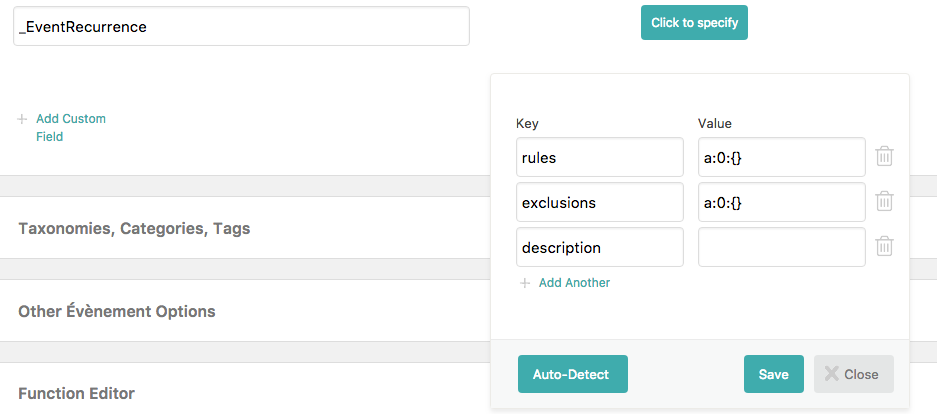
The only thing missing is that you might have to manually hit ”Update” in all of them to trigger the recurrence creation (or find some way to automate that).
I need the final pro version for testing purposes. If it works, my customer is more than happy to pay a license.
We do not offer free versions for trial unfortunately.
But, we offer the next best thing: a 30 day money-back guarantee.This should give you plenty of time to try things out.
Let me know how that goes.
Best regards,
Geoff B.MemberGood evening Heather and welcome back!
Thank you for reaching out to us.
I would love to help you with this topic.Is it possible to display the same ticket on more than one page/post, with the orders/attendees from both pages showing up on the same ticket product?
Technically tickets are tied to a single event or post/page as they are created.
As this is happening, a WooCommerce product for that ticket is also created at the same time ( a simple virtual product that is hidden from the catalog by default).
That means that you can display that product elsewhere with a WooCommerce simple product shortcode.
However, the downside is that such shortcodes will not offer some of the Event Tickets Plus features. For example, attendee info, global stock and “view my tickets” will work in that context.
But if you have “basic tickets” where all you care about is the purchase process, that will work well.
Take a look at your WooCommerce products to see which product to use in the WooCommerce single product shortcode.
Let me know how that goes.
Best regards,
Geoff B.MemberGood evening Jasmin and happy new year!
I am super stoked to hear that you managed to make things work.
Major kudos for hanging in there and seeing this through.
You are welcome back in our support forums any time 🙂
For now, I am going to close this thread.
Have a great week!
Geoff B.
January 2, 2018 at 11:41 pm in reply to: Same error message … unable to download latest version #1416735MemberHappy new year Kerrin!
I am sorry for the belated reply. I was away for the holiday season.
Thank you for the awesome wishes.I am super stoked that this helped you sort it out. I am also glad to know that helped Blake as well.
Thank you Blake for the heads up. We work hard at minimizing the occurence of such bumps in the road. Thankfully, as you saw, we have a simple and effective workaround in place 🙂
You are both welcome back in our support forums any time 🙂
For now, I am going to close this thread.
Have a great week!
Geoff B.
MemberGood evening Gil and happy new year!
I am sorry for the belated answer. I was out for the holiday season.
I had was how do you display the past and following months at the top of the calendar.Currently it only displays at the bottom.
The simplest way to do this is to create a template (view) override.
You might want to read our Themer’s guide to get a sense of how that works.Simply put:
- Find the single view file that (single.php)
- Look for the tribe-events-sub-nav element and make a clone of it above the content
- Save the file
- Upload it in your theme’s folder according to the path specified in the header comment description of that file
Let me know how that goes.
Best regards,
Geoff B. -
AuthorPosts