Dashboard view is warped and un-readable. How can I fix it?

Home Forums Calendar Products Events Calendar PRO Dashboard view is warped and un-readable. How can I fix it?

Viewing 4 posts - 1 through 4 (of 4 total)
  • Author
    Posts
  • #1417871
    Karen
    Participant

    How can I adjust the width of the columns in the WP dashboard? It’s currently a terrible mess and not manageable. See photo.
    Title column is squished to about 50 pixels wide, and others are super big.
    Please help
    thanks.

    #1417944
    Geoff B.
    Member

    Good morning Karen and welcome back!

    Thank you for reaching out to us.
    I would love to help you with this topic.

    What is going on is that, based on your screen size, there are too many columns activated under the Events list menu in wp-admin. As such, these columns are fighting for space.

    The solution is to deactivate unnecessary columns by clicking on Screen Options in the top right corner of your screen (see screenshot). Once that is done, simply remove the checkbox of undesired columns until the problem disappears).
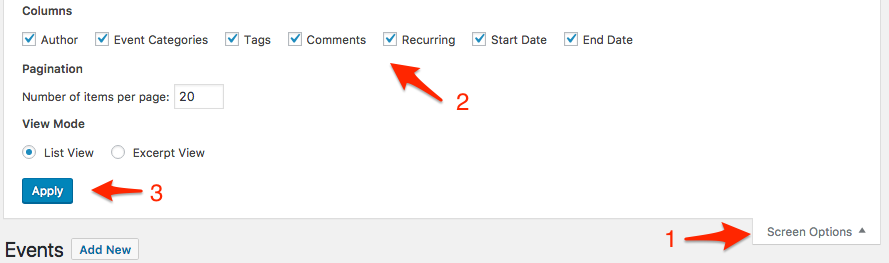
    Let me know how that goes.

    Best regards,
    Geoff B.

    #1418088
    Karen
    Participant

    oh, thank goodness. That’s MUCH better!
    All fixed. thanks so much.
    (ok to close)

    #1418819
    Geoff B.
    Member

    Good morning Karen,

    I am super stoked that this did the trick for you.

    You are welcome back in our support forums any time 🙂

    For now, I am going to close this thread.

    Have a great week!

    Geoff B.

Viewing 4 posts - 1 through 4 (of 4 total)
  • The topic ‘Dashboard view is warped and un-readable. How can I fix it?’ is closed to new replies.