

Forum Replies Created
-
AuthorPosts
-
Geoff B.
MemberGood evening Jon and welcome back!
Thank you for reaching out to us.
I would love to help you with this topic.2 CSS rules will enable you to control the hovering appearance:
#tribe-bar-views .tribe-bar-views-list .tribe-bar-views-option a:hover {

color: #000;

}
#tribe-bar-views .tribe-bar-views-list .tribe-bar-views-option.tribe-bar-active a:hover {

background: #f1f1f1;

}
Let me know if that helps.
Have a great day!
Geoff B.
October 19, 2016 at 8:59 pm in reply to: Free tickets for members, paid tickets for everyone else #1179653MemberGood evening Adam and welcome to the Events Calendar forum!
Thank you for your interest in our products.
We’ll be glad to answer your questions.Is there any way, using a combination of The Events Calendar and Event Tickets (or Event Tickets Plus) that would enable me to display an event that is free for members but has a price for non-members?
The short answer is yes. To do that you will need:
- A normal Event Tickets Plus driven installation ( the Events Calendar, Event Tickets Plus and Event Tickets)
- A WooCommerce plugin that provides discounts on user role / group
In other words, the best way to do this is at the WooCommerce level.
You simply need to research for a third-party plugin that you like. Here are a few options:- https://wordpress.org/plugins/woocommerce-role-pricing/
- https://wordpress.org/plugins/woocommerce-role-based-price/
- https://codecanyon.net/item/woocommerce-prices-by-user-role/8562616
- https://codecanyon.net/item/woocommerce-dynamic-pricing-discounts/7119279
Let me know if that helps.
Have a great day!
Geoff B.
MemberGood evening David and welcome back!
Thank you for reaching out to us.
We are sorry to hear about the issues you have experienced while trying our calendar with WP Touch.
Unfortunately, this specific plugin has long been on the very short incompatibility list for us.
In simple terms, our plugins do not play well together.The good news however is that our plugin is fully responsive and will work great with a responsive WordPress theme (as opposed to a plugin such as WP Touch).
I wish I had a better answer for you, but for now it’s the best one I have.
Best regards,
Geoff B.
MemberGood evening Patrick and welcome back!
Thank you for reaching out to us.
We are sorry to hear about the cart not appearing.
I would love to help you with this topic.There could be a couple of reasons for this:
- Your tickets have not reached their start sale date (which is normal behaviour)
- There is some theme customization preventing the cart from displaying.
The fastest way to test this is to see what happens if you temporarily switch back to a default WordPress theme such as twenty-fifteen. Does the cart appear then ?
If so, I would look for a /tribe-events/ folder in your theme’s files.
There is a chance that there is a customization/file that would need updating to display the cart properly.Finally, if in your functions.php file or in your WooCommerce templates there is an override for Cart behaviours, you might need to disable them for the cart to appear.
Let me know what you find out.
Best regards,
Geoff B.MemberGood evening Mikko,
Thank you for writing back.
Just to avoid confusion, as stated before, the day themselves come from WordPress’s language packs, not from the Events Calendar language files or from Eventica’s theme.
I just ran a quick test on my end switching to Russian and it works (see screenshot)
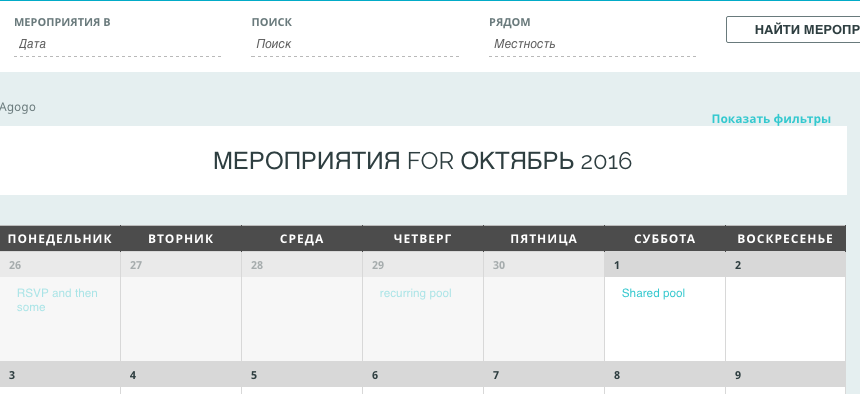
This does confirm your findings, so let me know when you have finally tackled that beast.
As per the tattoo, it’s a great idea, but you might not find Comic Sans funny when you get older 😉
Let me know how that goes.
Best regards,
Geoff B.October 19, 2016 at 8:31 pm in reply to: Tickets Disappear From Website a few hours before event begins #1179640MemberThis reply is private.
MemberThis reply is private.
MemberGood evening Tom,
Thank you for writing back.
Unfortunately, in order to help you out further, we would need your complete system information.
Without it, I am unable to replicate the issue and thus unable to help you resolve it.
You can do this (using a private reply) by following the instructions found in the following linkhttps://theeventscalendar.com/knowledgebase/sharing-sys-info/
If not, could you please answer my previous question ?
Is the featured image option is available if you temporarily revert back to a default WordPress theme such as twenty-fifteen ?
I realize this is not the most fun test to run, but in my experience, issues like the one you are dealing with tend to come from the WordPress theme or a plugin conflict.
Thank your patience as we are continuing this collaborative effort to solve your issue.
Best regards,
Geoff B.
MemberHey @S.Douglas,
Thank you for chiming in.
I am glad that my answer to vandi helped you out.
Thank you for your great suggestion.
We are absolutely planning on adding that feature as well.We decided to not wait and release the shortcode as soon as possible.
Unfortunately, I cannot commit to a release date at this point. But stay tuned as we work on this!
Best regards,
Geoff B.
MemberGood evening Nick,
Thank you for writing back and for the system information.
I believe the issue is that you have not updated the Events Calendar Pro plugin (it is still at version 4.2.4).
Unfortunately, un-matching versions tend to create these types of issues.
My next recommended step would be to upgrade the Pro plugin.
If you have entered your Pro license key under Events -> Settings > Licence , you should be able to get the update from the WordPress plugins screen.
If not, you can always download a copy here and manually install it.
Let me know how that goes.
Best regards,
Geoff B.MemberThis reply is private.
October 19, 2016 at 5:25 pm in reply to: Problems displaying upcoming events (recurrent events) #1179561MemberGood evening Victor and welcome back!
Thank you for reaching out to us.
We are sorry to hear about the challenges you have experienced with recurring events.
I would love to help you with this topic.Would it possible for you to send me screenshots of the following (in a private reply) ? :
- The “Edit Event” screen of one of these events
- The details of each widget under Appearance > Widget
This will allow me to run some tests for you.
Hang in there as we solve this together.
Best regards,
Geoff B.
MemberGood evening Stephane,
I just wanted to follow-up on this one.
Unfortunately, there is no easy way to provide a snippet for this bug.
It will have to wait until the official bug fix.Unfortunately, I cannot commit to a release date at this point. But stay tuned, you will be contacted when the fix is released.
Thank you for your understanding and we apologize for the inconvenience.
Best regards,
Geoff B.
October 19, 2016 at 4:31 pm in reply to: Responsive Breakpoint – Hitting a max issue displaying tribe-mobile-container #1179538MemberGood evening Natasha,
I just wanted to follow-up on this one.
A formal ticket has been opened for integrating the ability to bypass the filter properly.
Unfortunately, I cannot commit to a release date at this point. But stay tuned, you will be contacted when the fix is released.
Best regards,
Geoff B.
MemberGood evening Oliver,
I followed up on this one, as promised.
As it turns out, there was an important glitch in the last release of our language files during the last release. We do take this seriously and I am personally doing the QA for the upcoming 4.3.1 release to make sure all of our language files are up to date.
The good news is that 4.3.1 is just about to be released so the problem should be fixed.
Moving forward, we want to increase the QA level of language files so that our international customers of all languages have a nicer experience.
I spoke with Leah and she says that if you bring the EA translation to 100% for German, the license is yours 🙂
Best regards,
Geoff B.
-
AuthorPosts