

Forum Replies Created
-
AuthorPosts
-
November 15, 2016 at 9:40 pm in reply to: Event Ticket Plus Not working with WPML, Conflict, do not save tickets. #1192978
Geoff B.
MemberGood evening Lorena and welcome to the Events Calendar Support forum!
Thank you for reaching out to us.
We are sorry to hear that you had to experience an incompatibility between WPML and Event Tickets Plus. I would love to help you with this topic.
Unfortunately, these 2 plugins are not compatible as you can see here:
- https://theeventscalendar.com/knowledgebase/wpml-support/
- https://theeventscalendar.com/knowledgebase/setting-up-the-events-calendar-with-wpml/
But there is hope! We are currently working with the WPML team to make these plugins compatible.
Unfortunately, I cannot commit to a release date at this point. But stay tuned!
Sadly, in the meantime, there is no known workaround to this incompatibility.
The good news is you are fully entitled to a refund if you want one since you are within 30 days of your purchase. To obtain the refund, you just need to follow the procedure described here.
Best regards,
Geoff B.
MemberGood evening Jane,
Thank you for your understanding.
You are welcome back in our support forums any time 🙂
For now, I am going to close this thread.
Have a great week!
Geoff B.
MemberGood evening Nora and welcome back!
Thank you for reaching out to us.
I would love to help you with this topic.The simplest solution would be to use the following snippet: https://theeventscalendar.com/knowledgebase/change-the-wording-of-any-bit-of-text-or-string/
Let me know how that goes.
Best regards,
Geoff B.MemberGood evening Chris and welcome to the Events Calendar Support forum!
Thank you for reaching out to us.
I would love to help you with this topic.We still have this feature as planned. Unfortunately, I cannot commit to a release date at this point. But stay tuned!
In the meantime, if your client is using WooCommerce, it might be possible to achieve this via a third-party plugin such as:
- https://woocommerce.com/products/follow-up-emails/
- https://wpovernight.com/downloads/woocommerce-reminder-emails-payment-reminders/
I wish I had a better answer for you, but for now it’s the best one I have.
Finally, you could always hire one of our recommended customizers to do the customization for you if the above plugins do not work for you.
I wish I had a better answer for you, but for now it’s the best one I have.
Best regards,
Geoff B.
MemberGood evening Kevin and welcome to the Events Calendar Support forum!
Thank you for reaching out to us.
We are sorry to hear about the notifications not working properly for RSVP tickets on your installation. I would love to help you with this topic.
I totally agree with you, more options for notifications would be a nice addition to our plugins.
The good news is that you still have a couple of options available to you:
- Using the WordPress better notifications plugin: https://theeventscalendar.com/support/forums/topic/events-tickets-rsvp-email-alerts/#post-1080222
- Use the following extension: https://theeventscalendar.com/support/forums/topic/event-ticket-email-notification/#post-1162357
As a side note, we are working on releasing a nice extension library to allow our users to easily have access to several awesome tweaks.
The good news is you are fully entitled to a refund if you want one since you are within 30 days of your purchase. To obtain the refund, you just need to follow the procedure described here.
Have a great day!
Geoff B.
November 15, 2016 at 4:32 pm in reply to: Remove end time, details section, single event page #1192852MemberGood evening Sally,
I am glad that works for you.
You can hide the “all” link with a simple CSS rule on the List view
.tribe-events-list .event-is-recurring a {display:none !important;}Let me know how that goes.
Best regards,
Geoff B.MemberGood evening Douglas and welcome back!
Thank you for reaching out to us.
We are sorry to hear about the calendar no longer working on your site.
I would love to help you with this topic.The first thing I would recommend (if you can and after a backup) is to consider updating both your WordPress version and your PHP version (at least to 5.4+, in fact WordPress recommends 4.6+). Certain things can behave unpredictably with older versions.
Secondly, you might want to:
- Re-save your permalinks
- Try a different setting for Events Template under Events -> Settings -> Display
Let me know how that goes.
Best regards,
Geoff B.MemberGood evening Steven,
I followed up with my colleague Geoff as promised.
As it turns out, the extension library post you pointed to should have been in draft mode (as it is not ready yet. But, stay tuned as it will be soon enough. And when it is, there will be more goodies to look at in there!
In the meantime, you can still totally use the snippet I have provided you with.
I wish I had a better answer for you, but for now it’s the best one I have.
Have a great day!
Geoff B.
MemberHey Greg,
I’m super stoked that worked for you.
I hear you. At first, template overrides seem a bit overkill, but they offer tons of flexibility.
They are also easy to update if necessary in a future release. We’ll gladly help out if necessary.I would totally recommend using a child-theme (if you are not already).
This way these customizations will not be overwritten by theme updates.As a side note, we are currently working on an extension library for our customers.
The goal being to offer simple and user friendly solutions to specific needs such as this one.You are welcome back in our support forums any time 🙂
For now, I am going to close this thread.
Have a great week!
Geoff B.
MemberThis reply is private.
MemberHey Cassy,
I am sorry to hear this did not help.
By the sound of it, it looks like there is some type of conflict at play.
This is usually because of:- A conflict with another plugin
- A conflict with your WordPress theme
- A template customization for the Events Calendar that requires updating
A first quick test is to simply temporarily revert back to a default WordPress theme such as twenty-sixteen to see if the issue persists.
The next step would be to go through our testing for conflicts procedure (preferably in a staging/dev environment or local install of your WordPress website) and let us know what you find out.
Basically the goal here is to revert back to a bare WordPress installation to see if the problem persists. It also allows us to pinpoint what the cause of the issue is.
But, before you do that, there are 2 things I would advise:
- Make a backup of your database
- Consider activating a “Maintenance Page” plugin if you are doing this on your live site (to minimize impact on your visitors)
Secondly, you might want to consider increasing your PHP max_execution_time = 30 to PHP max_execution_time = 300
Finally, I did run the events page on https://gtmetrix.com/ and the results are pretty good (you can even apply some of their recommendations if you want.
Let me know how that goes.
Best regards,
Geoff B.MemberHey KS,
I am glad the previous answer helped you out.
Regarding the look of the calendar on your website, could you give an URL so that I can take a peek ?
In the meantime, you might want to experiment with the first 2 settings found at Events -> Settings -> Display.
Also, would there be any good workflow for downloading events from another online calendar, and them import them into this calendar, without having to enter each one manually? (I don’t know if there’s a way to download events in bulk – never tried to do that before).
Yes there is. There are 2 ways you could do this:
- Using our built-in CSV importer: https://theeventscalendar.com/knowledgebase/csv-files-options-and-examples/ and https://theeventscalendar.com/knowledgebase/importing-data-from-a-csv-file/
- Using our Event Aggregator online service: https://theeventscalendar.com/product/event-aggregator/
Let me know if that helps.
Have a great day!
Geoff B.
MemberGood evening Malgorzata,
I am sorry that the above CSS created additional issues.
It surely was not the intention.You have a couple of options available:
- You can control the excerpt that gets displayed in the photo view by manually entering the Excerpt in the appropriate meta box
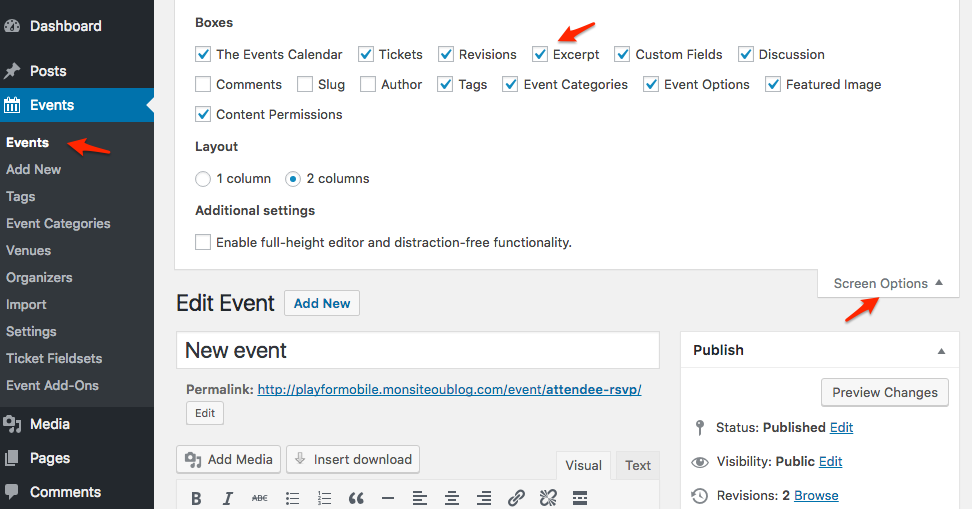
- You can add some CSS rules to control the height automatically
.type-tribe_events.tribe-events-photo-event .tribe-events-photo-event-wrap {

height: 425px;

overflow: hidden;

}

.tribe-events-list .tribe-events-photo-event .tribe-events-event-details {

max-height: 248px;

overflow: hidden;

}
As per the span tag, I believe this might be coming from a customized view.
You might want to read our Themer’s guide to get a sense of how that works.Basically, look for a /tribe-events/ folder in your WordPress Theme files and search for the photo/nav.php file.
Let me know how that goes.
Best regards,
Geoff B.MemberHey Erik,
First of all, I want to apologize.
I did reply to this, but somehow it looks like a system glitch got in the way and made my reply vanish 🙁
The simplest way to do this is to head over to https://theeventscalendar.com/my-account/license-keys/
You will be able to disconnect all your licenses from there and reconnect them manually.
Let me know how that goes.
Best regards,
Geoff B.November 15, 2016 at 10:32 am in reply to: Display days with 3 letters in mini calendar shortcode #1192628MemberHey Fadi,
I am super stoked that this worked out for you!
You are welcome back in our support forums any time 🙂
For now, I am going to close this thread.
Have a great week!
Geoff B.
-
AuthorPosts