

Forum Replies Created
-
AuthorPosts
-
Geoff B.
MemberGood morning Gary,
I’m sorry to hear this did not work.
Could you add the same rule again, but with the !important argument ?
.type-tribe_events {

border-bottom: none !important;

}
Also, if the rule does not work, could you please leave it in place nevertheless ?
Best regards,
Geoff B.
December 21, 2016 at 10:58 pm in reply to: Can't update past version 4.2.7 without getting an INTERNAL SERVER ERROR #1209350MemberThis reply is private.
December 21, 2016 at 10:55 pm in reply to: Avada Theme: Page Titles disappeared on views, but appear on single event page #1209349MemberGood evening Jonathan,
Thank you for writing back.
I see what you mean. In fact, here is my screenshot. If I get this correctly, you would be expecting the title to say “Events” or “Calendar”.
This is probably caused by how Avada handles it’s archive.php templates. It sounds like it needs a conditional for post-type-archive-tribe_events types.
Unfortunately, since this is theme specific (you will notice that the issue goes away with a default WordPress theme such as twenty-sixteen), I think you are on the money.
I know the good folks from the Avada do a really nice job at customizing their theme to work with ours, so that should not be too much of a biggie for them to tweak.
In turn that will benefit all of their users 🙂
Let me know how that goes.
Best regards,
Geoff B.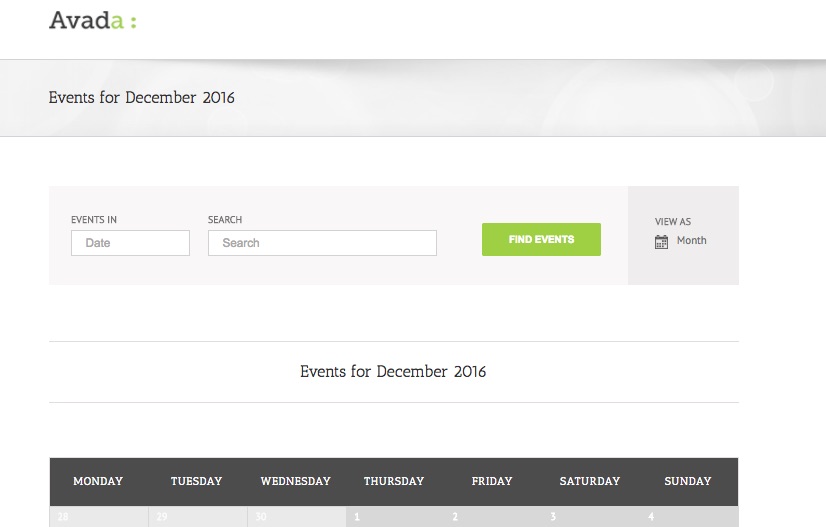 Member
Good evening Cindy,
Thank you for writing back and kudos for finding the cause of the issue.
If you have not already, I would recommend reading the following about CSV imports:
- https://theeventscalendar.com/knowledgebase/importing-data-from-a-csv-file/
- https://theeventscalendar.com/knowledgebase/csv-files-options-and-examples/
As you can see, the CSV imports should work (even with large numbers), but there are a couple of caveats.
- You need to follow exactly the format required
- You need to import venues first (before events) for the mass import to work properly.
In doubt, could you share a sample CSV file or two ?
Hang in there,
Best regards,
Geoff B.
MemberGood evening Steve and welcome to the Events Calendar forum!
Thank you for your interest in our products.
We’ll be glad to answer your questions.We have a certain number of seats, and we want to have site visitors book and pay for slots in these classes. What do we need to purchase and configure?
To get started, you need 2 free plugins and a premium add-on:
- Our Free the Events Calendar plugin: https://theeventscalendar.com/product/wordpress-events-calendar/
- Our Free Event Tickets plugin: https://theeventscalendar.com/product/wordpress-event-tickets/
- Our premium Event Tickets Plus add-on: https://theeventscalendar.com/product/wordpress-event-tickets-plus/ . This will let you sell tickets through WooCommerce (which is free).
If you are interested in other calendar views, you could also take a look at the Events Calendar Pro premium add-on, but that’s not mandatory.
Let me know if that helps.
Have a great day!
Geoff B.
MemberGood evening Corey,
Thank you for writing back.
Based on the fact that you do not have a “Help” tab under “Events” probably means 2 things:
- You are using an older version of the Events Calendar or the Events Calendar Pro. Your “Help” tab will probably be located under Events -> Settings -> Help
- You need to make sure you have the latest versions of both the Events Calendar and the Events Calendar Pro installed and activated.
- You can grab a copy here: https://theeventscalendar.com/my-account/downloads/ and here: https://wordpress.org/plugins/the-events-calendar/
One thing I am also noticing is that your have an actual page called “Events” (with the http://thefamilyinstitute.com/dev2/events/ slug).
Event though our calendar is not a “real page”, it needs exclusivity of the URL slug defined in Events -> Settings -> General (by default, that slug would be http://thefamilyinstitute.com/dev2/events/).
In other words, unless you change the slug of your page or the one found under Events -> Settings -> General, the calendar will probably not display properly.
Hang in there as we figure this one out together.
Best regards,
Geoff B.
MemberThis reply is private.
December 21, 2016 at 9:56 pm in reply to: Transfer License – not working with web developer anymore #1209324MemberGood evening Sarah,
I am glad to be of assistance.
Once we get that I will have our team to work to get the license under us. Is there anything special I need to do with the plugin to make sure it works?
You will simply need to enter your new license number under Events -> Settings -> Licenses.
While you are at it, you might want to give our new user primer a read, just to get you up to speed: https://theeventscalendar.com/knowledgebase/new-user-primer-the-events-calendar-and-events-calendar-pro/
Let me know how that goes.
Best regards,
Geoff B.December 21, 2016 at 9:49 pm in reply to: Remove RVSP checkbox from tickets section on the event submission form #1209319MemberGood evening Emil,
I have some pretty good news.
You are the first to get a copy of this pretty neat extension: https://theeventscalendar.com/content/uploads/2016/12/tribe-ext-select-ticket-providers.zip
It installs just like a plugin and gives you the following options:
[caption id="attachment_1209146" align="alignnone" width="627"]
 Example of the option area this extension adds[/caption]
Let me know if that helps.
Have a great day!
Geoff B.
MemberGood evening Alessandro,
This is awesome news.
I am glad everything works again for you.
For now, I am going to close this thread.
Have a great week!
Geoff B.
MemberThis reply is private.
MemberGood afternoon Nate and welcome to the Events Calendar forum!
Thank you for your interest in our products.
We’ll be glad to answer your questions.I wanted to know if the subsites running the event calendar can sell tickets through the main site woocommerce install?
Technically, that would probably be possible.
However, for this to work, it would most likely mean that the all of the events are actually created on the main site (even if they don’t display there).
The reason for this is because to create a ticket, you absolutely need WooCommerce installed (which is not the case on your subsites).
So there are a couple of approaches to this:
- Create all of the events and tickets on the main site, each assigned an event category that matches the subsites names (for filtering).
- Embed the calendar on the subsite filtering by category using an iFrame OR
- Create a copy of all these events on the subsites (without the tickets) and add a link to the ticket URL on the main site
If coding is not really your thing, you can hire one of our recommended customizers to do the customization for you.
Let me know if that helps.
Have a great day!
Geoff B.
MemberGood afternoon Jesse and welcome back!
Thank you for reaching out to us.
We are sorry to hear about the attendee order screen going blank on you. Yikes!
I would love to help you with this topic.I do run into issues when I sell a lot of tickets for an event. I try to view the Attendee and Order information on the event and get a white screen. So I was wondering if this was a common issue and if there was a way to resolve it.
To the best of my knowledge, this is not a common issue.
However, you do make a valid point, with high volumes, the need for a properly tuned sever is absolutely necessary.
With that in mind, from your system info, it looks like your PHP max execution time is set to 0.
The first thing I would recommend is to setting this up to at least 300 (if not more).Let me know how that goes.
Best regards,
Geoff B.MemberGood afternoon Paul,
Absolutely, this would work.
Have a great day!
Geoff B.
December 21, 2016 at 11:08 am in reply to: JS 404 loading error when shifting from http to https #1209062MemberGood afternoon Stuart and welcome to the Events Calendar Support forum!
Thank you for reaching out to us.
We are sorry to hear that you are getting 404 messages for all the Javascript files loaded by our plugin. Yikes!
I would love to help you with this topic.
As a first troubleshooting step, could you please provide us with your complete system information in a private reply using the instructions found in the following link?
https://theeventscalendar.com/knowledgebase/sharing-sys-info/
With that in mind, it looks like you might be dealing with a mixed content issue (some of the resources are trying to load over https while others are doing so over http).
Could you tell me if changing the 2 URLs found in Settings > General (in wp-admin) to http or to https solves the issue ?
Finally, before and after this, could you try re-saving your permalinks to see if that helps ?
Best regards,
Geoff B.
-
AuthorPosts