
Home › Forums › Calendar Products › Events Calendar PRO › Avada Theme: Page Titles disappeared on views, but appear on single event page
- This topic has 8 replies, 3 voices, and was last updated 9 years, 9 months ago by
Jonathan Vogel-Borne.
-
AuthorPosts
-
December 20, 2016 at 3:14 pm #1208551
Jonathan Vogel-Borne
ParticipantUp until the Avada 5.0.5 the title did appear in the Avada page title location. I have done a temporary fix by making visible by comment out the following in my custom CSS:
==================
/**
.tribe-events-page-title {
visibility: hidden;
}
.fusion-events-before-title {
display: none !important;
}*/
===================But that looks awkward with a blank page title band across the top. Up until some recent change, by either Avada (I have a ticket with theme-fusion too) or The Events Calendar, the page titles used to appear in the correct font and within the Avada page title band (I’ve attached the Calendar view and a custom “Worship Services” category view for you to see what I’m talking about)
By comparison and what is interesting is that the page titles and bread crumbs appear perfectly on single event pages, but not on the calendar view (see attached file). I would like to have that back on the Month, Week, List, and Photo views.
Thanks for your great plugin and thanks for your help.
Jonathan Vogel-Borne
December 20, 2016 at 8:28 pm #1208701Geoff B.
MemberGood evening Jonathan and welcome back!
Thank you for reaching out to us.
We are sorry to hear about the titles not displaying as they used to with the latest updates.
I would love to help you with this topic.Speaking of updates, I would encourage you to upgrade to the latest version of our plugins (we just issued a maintenance release earlier today).
But back to your issue.
As you know Avada has quite a few built-in customizations for our plugins (which is awesome). But that also means, that we sometimes might have to undo some of these changes to get the desired result.
I just tested things out with the latest vanilla version of Avada and the good news is that the titles display perfectly.
As a quick test, I would recommend temporarily reverting back to the basic Avada theme (and not your child theme) to see what happens.
Additionally, also while using the basic theme could you experiment with different settings for Events template under Events -> Settings -> Display and see if that changes the display ?
Let me know how that goes.
Best regards,
Geoff B.December 21, 2016 at 11:57 am #1209088ParticipantGreetings Geoff,
Thanks for your reply. I am totally up to date with everything. I have tested the site with the Avada parent, but I only get the dynamic “.tribe-events-page-title” in the “.fusion-events-before-title” area. I do not get the page title in the Avada page-title band just below the header (bread crumbs on the right). In my earlier solution, I hid the “.fusion-events-before-title” area because The Events Calendar was putting the same dynamic title in the Avada page-title bar.
Here is my message to the Avada support team:
=========
To be clear, on the default calendar page you can see the Avada page title band below the header, with the breadcrumbs on the right hand side. Up until the last updates (Avada and The Events Calendar), the dynamic Events Calendar titles were appearing in the Avada page title Band. Just like every other page and post on the site. I have set the page title band to be the default on all pages via theme options in order to have the page title (and consistent site look and feel) on the Events Calendar pages. Prior to this update I had hidden the Events Calendar dynamic title, because it DID appear in the Avada page-title band.
The attached screen shot of the single event post shows what I used to see in the Avada page-title on month, week, list, categories, photo views. On those views, the Events Calendar includes the category in the title i.e., “Calendar for December 2016 > Worship Services”.
===========
The same screen shot mentioned above is in my original The Events Calendar post.I hope that is clear. You say that it worked in the plain vanilla version of Avada. Please send me screenshots of your success to see if we are saying the same thing or not.
Thank you again,
Jonathan
December 21, 2016 at 10:55 pm #1209349MemberGood evening Jonathan,
Thank you for writing back.
I see what you mean. In fact, here is my screenshot. If I get this correctly, you would be expecting the title to say “Events” or “Calendar”.
This is probably caused by how Avada handles it’s archive.php templates. It sounds like it needs a conditional for post-type-archive-tribe_events types.
Unfortunately, since this is theme specific (you will notice that the issue goes away with a default WordPress theme such as twenty-sixteen), I think you are on the money.
I know the good folks from the Avada do a really nice job at customizing their theme to work with ours, so that should not be too much of a biggie for them to tweak.
In turn that will benefit all of their users 🙂
Let me know how that goes.
Best regards,
Geoff B.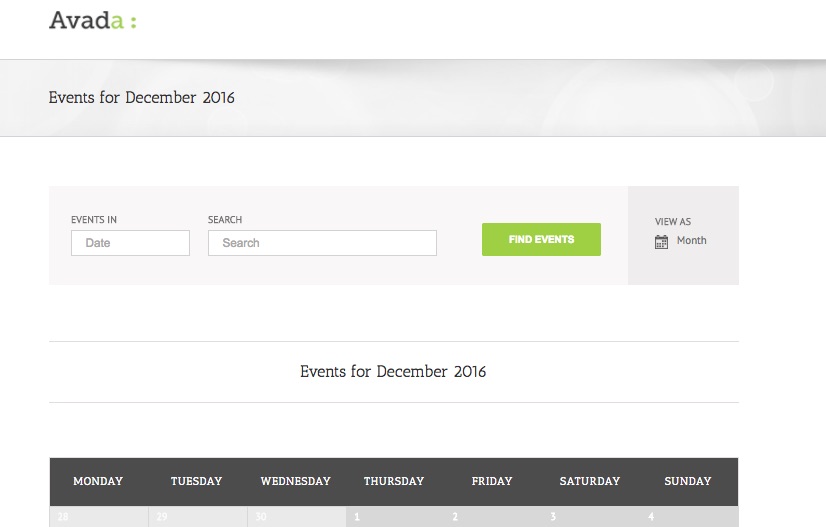 December 22, 2016 at 7:49 am #1209455Participant
Thank you Geoff. Again, clarity is sometimes difficult in these written interactions. I do have a functions.php that I found on The Events Calendar themeing guide where I can edit what appears in the title. I have modified the month view to be “Calendar for <given month>” rather than the default “Events for…” as shown in your screenshot.
Theme-fusion folks say they have understood my problem and that the developers are looking to fix it with an upcoming patch. I await their solution.
BUT, what exact version of the theme were you using to create the screenshot you included in your last post? The current Avada theme us at 5.0.6 with patches to #415118.
December 22, 2016 at 11:57 pm #1209930MemberHey Jonathan,
I am glad Theme fusion is on it.
On my end, I am using Avada 5.0.1, perhaps downgrading to that version could serve as a workaround until the patch is issued ?
If you don’t mind, please let me know when you have an update on that fix.
Have a good weekend,
Geoff B.
January 10, 2017 at 10:27 am #1216007ParticipantGreetings again Geoff,
The Avada Support Team came through with a fix in the class-avada-helper.php located in /wp-content/themes/Avada/includes directory. I’ve attached a screen shot of the changed code for your reference. At this point, without specifically addressing the issue in the next major Avada update (they do patches several times a week, but not a major update), I have backed up the file and will need to reload it if it gets overwritten by the new Avada theme version.
Otherwise, I think we can close this thread and thank you for your help here.
Jonathan
January 10, 2017 at 12:33 pm #1216066MemberGood afternoon Jonathan,
Thank you for sharing the code tweak. I am sure it will benefit many other Avada users.
I am super stoked that you managed to find a workaround.
You are welcome back in our support forums any time 🙂
For now, I am going to close this thread.
Have a great week!
Geoff B.
-
AuthorPosts
- The topic ‘Avada Theme: Page Titles disappeared on views, but appear on single event page’ is closed to new replies.